SUGR Cube Manual de usuario

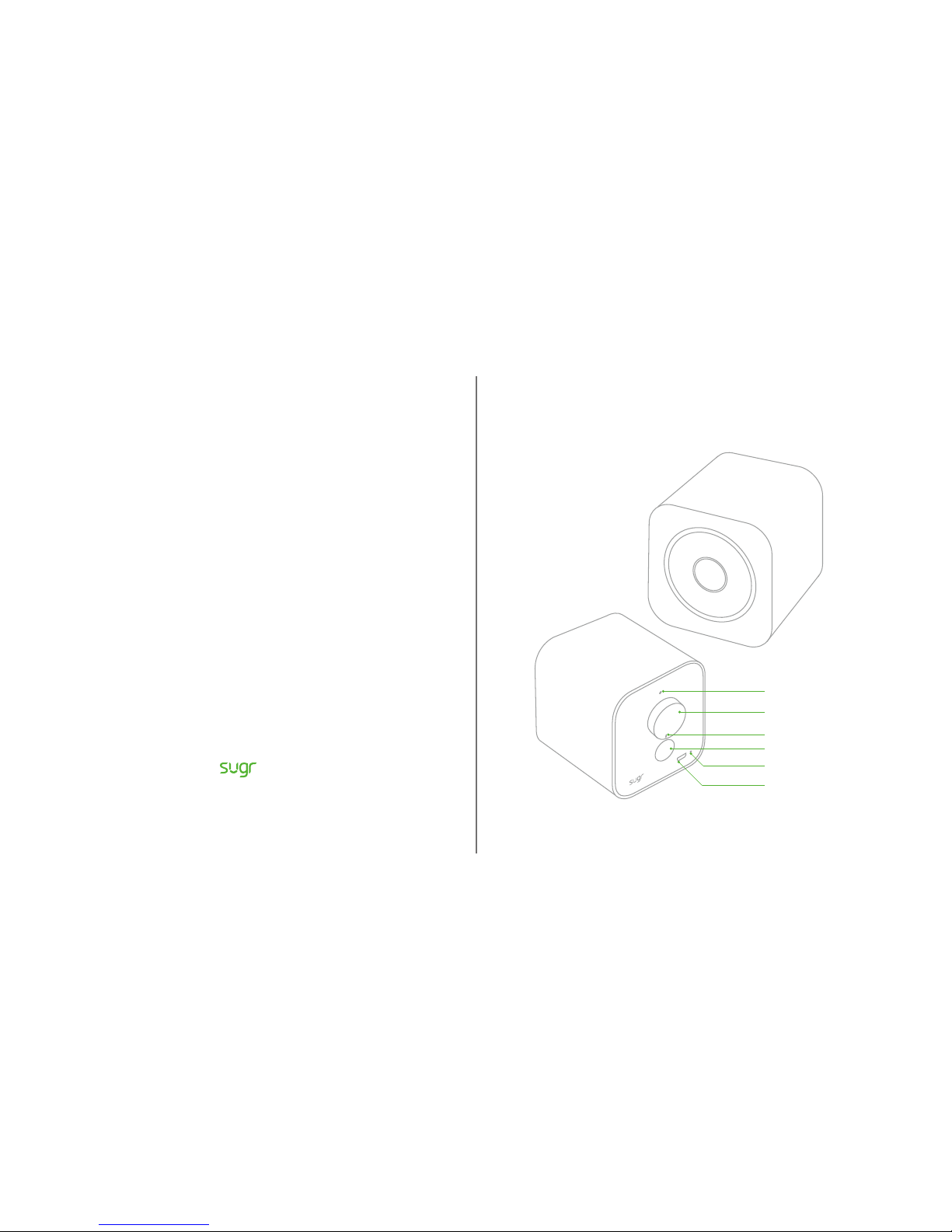
SUGR Cube Exterior
MIC
Switch/Volume Control Knob
Indicator LED
Vent Tube Hole
Reset Button
Micro-USB Power Supply Port
SUGR Cube
www.sugrsugr.com

Download SUGR Cube App
Please search 'sugr cube' in Apple App Store or Google Play.
sugr cube
sugr cube
sugr
14:20
GET
sugr cube
sugr cube
sugr
14:20
Installation
2: Make sure your cell phone is connected to Wi-Fi.
Wi-Fi
Wi-Fi
Your Wi-Fi
14:20
1: Turn the knob of Cube, so the indicator points to the 10 o'clock position.
* Please charge Cube if the LED on knob is off.
Setup Cube Wi-Fi
iOS Android
*Please get latest Android app at
https://fir.im/xux5

Wi-Fi Configuration Success
Once Cube voices 'Connected', bingo, Wi-Fi configuration success.
3: Open SUGR Cube App, tap 'I have Cube' button.
Find Out
I have Cube
4: Enter your Wi-Fi password, then tap 'NEXT' button.
Your Wi-Fi
Wi-Fi Password
14:20
5:Tap 'Connect' button, chirp sound will come from your cell phone. Face the
speaker of cell phone to the MIC of Cube.

A: It means Wi-Fi configuration failed if Cube voices 'Connect fail'.
You may re-enter Wi-Fi password and redo 'chirp' procedure.
B: You may follow below steps if Cube has no response in 'chirp' procedure.
1: Make sure Cube is powered on
* Check whether the LED on knob is on, please charge Cube if not.
2: Check whether the speaker of cell phone is facing to the MIC of Cube while doing 'chirp'.
3: Try to restart Cube then redo 'chirp' procedure.
4: Please refer to FAQ on www.sugrsugr.com for more answers.
Also you can mail support@sugrsugr.com to get engineers' professional support.
Wi-Fi Configuration Fail
SUGR Cube Operating Guidance
* More motion controllings will be available in future, please check website: www.sugrsugr.com
Tap the top surface of Cube for PLAY / PAUSE.
Tilt Cube left 45°~60° for PREVIOUS.
Tilt Cube right 45°~60° for NEXT.

This equipment has been tested and found to comply with the limits for a Class B digital device, pursuant to
Part 15 of the FCC Rules. These limits are designed to provide reasonable protection against harmful
interference in a residential installation. This equipment generates uses and can radiate radio frequency
energy and, if not installed and used in accordance with the instructions, may cause harmful interference to
radio communications. However, there is no guarantee that interference will not occur in a particular
installation. If this equipment does cause harmful interference to radio or television reception, which can be
determined by turning the equipment off and on, the user is encouraged to try to correct the interference by
one or more of the following measures:
-- Reorient or relocate the receiving antenna.
-- Increase the separation between the equipment and receiver.
-- Connect the equipment into an outlet on a circuit different from that to which the receiver is connected.
-- Consult the dealer or an experienced radio/TV technician for help.
Changes or modifications not expressly approved by the party responsible for compliance could void the
user's authority to operate the equipment.
This device complies with part 15 of the FCC Rules. Operation is subject to the following two conditions: (1)
This device may not cause harmful interference, and (2) this device must accept any interference received,
including interference that may cause undesired operation
Sugr Cube User Guide
Go to www.sugrsugr.com/support.
Safety and Handling
See “Safety, Handling, & Support” in the Sugr Cube User Guide.
Battery
The lithium-ion battery in Sugr Cube should NOT be replaced and must be recycled or
disposed of separately from household waste.
Avoiding Hearing Damage
To prevent possible hearing damage, do not listen at high volume levels for long periods.
Sugr warrants the included hardware product and accessories against defects in
materials and workmanship for one year from the date of original retail purchase.
Sugr does not warrant against normal wear and tear, nor damage caused by
accident or abuse. To obtain service, contact Sugr. International shipping charges
may apply.
Sugr Cube Info
Sugr One-Year Limited Warranty Summary FCC Compliance Statement

方糖音箱使用手册
www.sugr.fm
This equipment is in compliance with the essential requirements and other relevant provisions of
Directive 1999/5/EC.
Use the Digital Signage in the environment with the temperature between 0°C and 40°C.
CAUTION: RISK OF EXPLOSION IF BATTERY IS REPLACED BY AN INCORRECT TYPE. DISPOSE OF
USED BATTERIES ACCORDING TO THE INSTRUCTIONS.
Adapter shall be installed near the equipment and shall be easily accessible.
Important
Changes or modifications to this product not authorized by
Sugr could void the electromagnetic compatibility (EMC) and wireless
compliance and negate your authority to operate the product. This product
has demonstrated EMC compliance under conditions that included the
use of compliant peripheral devices and shielded cables between system
components. It is important that you use compliant peripheral devices and
shielded cables between system components to reduce the possibility of
causing interference to radios, televisions, and other electronic devices.
© 2015 Sugr Electronics Corp. All rights reserved.
Sugr, the logo are trademarks of Sugr Electronics Corp. registered in the U.S. and China.
R&TTE NB Compliance Statement

方糖音箱部件
麦克风
开关/音量调节旋钮
LED指示灯
倒相管
复位按钮
Micro-USB 充电接口
下载 SUGR Cube App
方糖音箱Wi-Fi配置指南
iOS Android
扫码下载 APP 扫码下载 APP

准备工作: 请确保手机已经接入家中 Wi-Fi
Wi-Fi
Wi-Fi
Your Wi-Fi
14:20
准备工作: 拧开方糖音箱背部旋钮开机
* 如果发现旋钮上的 LED 灯没有亮,请先充电
准备工作:打开 Sugr Cube的App,选择“我有 Cube”
了解
我有Cube
开始设置: 输入你的 Wi-Fi 密码,然后点击“下一步”
Your Wi-Fi
Wi-Fi 密码
14:20

Wi-Fi 连接成功
当听到 “Connected” 提示音,表示联网成功,祝贺你!
声波通信传密码:按“连接”按钮 ,听到“滴滴滴”的声音
此时将 iPhone 喇叭靠近方糖旋钮上部的麦克风孔。
A: 如果听到 “Connect fail'”提示音,表示连接失败,请重试上面的步骤
B: 或者采用下面的操作排除问题
Wi-Fi 连接失败
1: 确保方糖已经开机
2: 请确保手机喇叭靠近方糖背板旋钮上方的麦克风孔(如图示)
3: 请尝试用旋钮重启方糖音箱,再进行配置
4: 欢迎联系 support@sugrsugr.com 获取技术支持

方糖音箱操作指南
*更多的触控操作将会陆续发布,请关注我们的官网 www.sugr.fm 以获得最新消息
轻拍顶部 播放/暂停音乐
向左倾斜音箱45°~60° 播放前一曲
向右倾斜音箱45°~60° 播放后一曲
Sugr (深圳米唐科技有限公司)对本产品的硬件提供一年保修:
为期壹(一)年的保证,由原来零售采购日期算起。
此项保证不适用于:
(1)因意外、滥用、不当使用、误用或非米唐产品所导致的损坏。
(2)因非米唐授权服务提供商的任何人士进行的服务(包括提升与扩充工作)所导致的损坏。
(3)任何在未获得米唐书面许可的情况下被修改的产品或零件。
(4)消耗性或耗用性的产品或零件。
(5)您不是从米唐授权转售商处采购的产品或零件。
(6)自然灾害及人力、战争等不可抗力因素所造成的损坏。
另:国际用户需承担因维修所产生的运费。
方糖音箱保修服务
Tabla de contenidos


