STUDIO LINEA SLWK60BK Manual de usuario


2
TABLE OF CONTENTS
1) Package contents
2) Safety instructions
3) Installing and using the device
4) Cleaning and maintenance
5) Product specifications
6) Storage & transportation
1) PACKAGE CONTENTS
•Instant hot water dispenser
• User manual
• Reset key
• Water Filter, Filter Box(optional)

3
2) SAFETY INSTRUCTIONS
The following precautions must always be taken in consideration before using the Instant hot water
dispenser, hereinafter referred as the “device”.
WARNING !
General information
•Keep the instructions safe and read carefully before use. Please also pass this manual to other body if you give this
device to him
• Only use this device in accordance with the instructions in this user manual.
• This device can be used by children aged 8 and over and people with restricted physical, sensory or mental
capabilities, or lack of experience and knowledge, unless they have been given supervision or instructions concerning
the use of the appliance by a person responsible for their safety.
Children must not play with the device. Cleaning and maintenance must not be done by children unless they are over
the age of 8 and must be under supervision.
• This device is intended for domestic or similar use, not for professional use.
•WARNING! The packaging material is not a toy and do not leave packaging lying around carelessly. This
may become dangerous playing material for children. Risk of suffocation!
Electricity and heat
•Before use, check that the mains voltage is the same as the mains voltage stated on the rating plate of the device.
• Make sure your hands are dry before touching the device, power cord or plug.
• Plug the power plug into an electrical outlet with earthing that is easily accessible at all times.
• WARNING! Never cover the power plug or cable with cloths, curtains or any other material to prevent
overheating and potential fire hazards.
•Check the power cord regularly for damage.
• Never use the device if the power cord shows signs of damage, if the device has fallen on the ground or shows any
other signs of damage.
• Switch OFF the device and remove the power plug if you discover any faults during use, find any signs of damage,
are not using the device or are cleaning it.
•Make sure that the power cord cannot be trodden on or pinched.
•Do not allow the power cord to hang over sharp edges and keep it away from hot objects and naked flames.
• When plugging in the power cord, make sure people cannot accidentally pull it out or trip over it.
• Remove the power plug from the power socket during lightning storms or if unused for long periods of time.
• Use a 10amp cable if an extension cable is required. Cables with a lower amp rating may burn out.
• When using an extension cable, make sure it is completely extended.
• WARNING! To reduce the risk of fire or electric shock, protect the device from dripping or splashing water
and keep away from objects filled with liquids, such as vases. These objects should not be placed on or near the
device.

4
Use
• Do not use the device in the vicinity of flammable materials.
• Do not leave the device unattended when it is in use.
•Do not touch the waterspout or the water being dispensed when operating the device.
•When operating, do not touch or block the steam outlet by hand or any other means.
•Do not open the water tank lid in a rush, in order to avoid burns resulting from hot steam or any possible
malfunctions.
• Do not use hands or any other body parts to feel the temperature or the steam of the device while it is
being operated.
•Do not use the device to heat anything other than water.
• Do not fill the water tank of the device above the “MAX” indicator.
•Do not operate the device if the water level is below “MIN”
• Do not operate the device without water, or when the water is below the minimum water level, to avoid damaging the
heating element.
•Place the device on a flat and stable surface, in a place where it cannot fall over or suddenly be knocked over,
resulting in burns.
• Do not lean on the device.
• Do not operate the device upside down.
• Do not use the device into a working disinfection cabinet.
• Do not use the device in the refrigerator or freezer.
•Never move the device when it is switched ON or still warm. First switch OFF the device and only move it when it
has cooled down.
• Clean the device thoroughly after use (see “cleaning and maintenance”).
• Avoid locations subject to vibrations, cold or humidity.
• Do not expose the device to direct sunlight, heat sources, excessive humidity or corrosive environments.
• Do not place the device under any mechanical stress.
• Improper use of the device could damage the product.
• Please handle the device carefully. Impacts or falls, even from a low height, can damage the device.
•Do not open the casing as this may result in electric shock.
• Do not attempt to disassemble or repair the device or modify it in any manner.
• The device must be serviced if it has been damaged in any way, i.e., if the power supply cord/plug is damaged;
objects have fallen into it; it has been exposed to rain or moisture; it has been dropped or does not operate properly.
• Do not use abrasive cleaning solvents to clean the device.
• Do not use foreign objects to clean the device.
Important information, follow these instructions
• This device can be used by children aged 8 and over and people with restricted physical, sensory or mental capacity
or a lack of experience and expertise, provided they are under supervision or have been given instructions about
safely using the device and are aware of the potential hazards. Children must not play with the device. Cleaning
and maintenance must not be done by children unless they are over the age of 8 and under supervision.
• Only use the device indoors, in dry areas and not in the vicinity of water, other liquids or humidity.
• Do not use the device if it, the cable or power plug has fallen into water or any kind of fluid.

5
• Never immerse the device, cable and power plug in water or any kind of fluid.
• Do not pick up the device if it has fallen into water or any kind of fluid. Remove the plug from the power socket

immediately. Do not sue the device again.
• Place the device on a flat and stable surface, in a place where it cannot fall over.
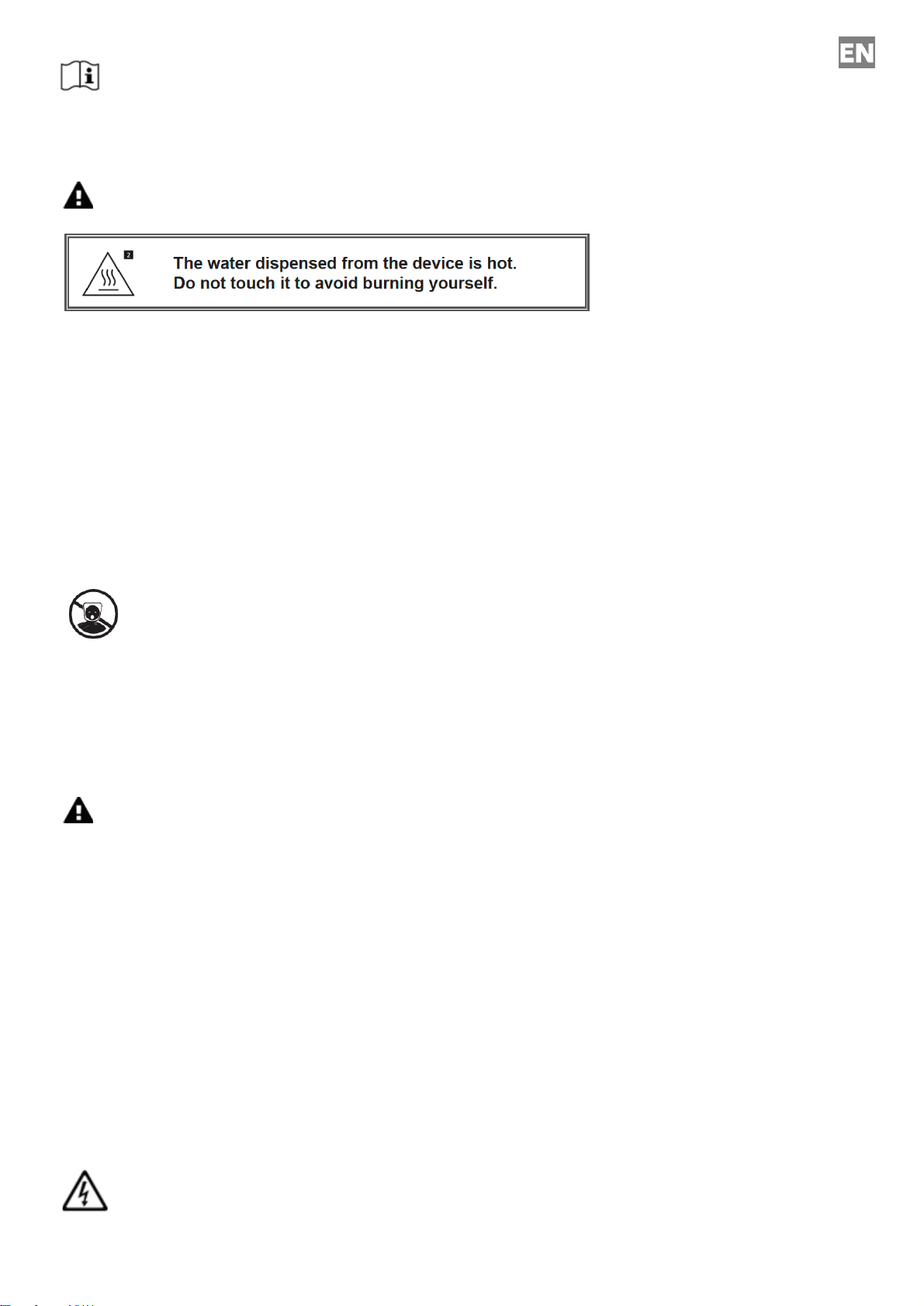
•Caution! Dispelled water is hot. Do not touch it to avoid burning yourself.
• The device is equipped with an overheating safety feature. This is activated if the temperature becomes too high.
If this is the case, you must let the device cool down before it can be used again. Switch OFF the device and then
remove the plug from the power socket. Allow the device to fully cool down. The device needs approximately 30
minutes to fully cool down.
• Remove the power plug from the power socket if the device is unused for long periods of time.
•When removing the plug from the power socket, pull the plug itself, not the cable.
• Do not operate the device using an external time switch or a separate remote-control system.
3) INSTALLING AND USING THE DEVICE
Open the packaging carefully before taking out the device. Make sure the device is complete and undamaged.
If any components are missing or damaged, contact the vendor and do not use the product. Retain the packaging or
recycle it in accordance with local regulations.
Parts & features device
Control panel details

6
Lock button: press and hold Lock button for 3-5 seconds to unlock. If there is no keypress within 10-15 seconds, the
panel will go to lock mode again. User can also lock the panel by pressing the Lock button.
Temp. button: press Temp. button to set desired temperature (45℃, 55℃, 65℃, 75℃, 85℃, 100℃, or 000(normal
temperature water))
Volume button: press Volume button to set water volume (100ml, 200ml, 300ml, 400ml, or 000(disperse water
continuously))
Milk button: add appropriate milk powder in bottle or cup, press and hold Milk button. Water with temperature 40℃
will be dispensed continuously and user can stop the water dispensing by releasing the Milk button
Coffee/Tea button: press Coffee/Tea button and 92℃, will be shown on display. Select desired
volume(000(continual), 100ml, 200ml, 300ml, 400ml). Press On/Off button to start.
On/Off button: start and stop function setting
Descaling: When operating time cumulated to 10 hours, Descaling light will flash to remind the user to do the
descaling process. Fill water tank to maximum level, add some citric acid or vinegar into the water and press and
hold Volume button for 3 seconds to enter the descaling process.
Press On/Off button to start the decaling process. Water will be dispensed. After all the water from water tank is
dispensed, the descaling process is completed, and the descaling light will be off again.
Lack of water: When water in the water tank is less than the MIN level, “E7” and “Lack of water”will flash to remind
user to refill water in water tank.
First use:
• Remove the device and accessories from the box. Remove any stickers, protective film, or plastic from the
device.
• Make sure the plug is removed from the power socket.
• Before you use the device for the first time, wipe all the removable parts with a damp cloth. Never use
aggressive or abrasive cleaning materials, a scouring sponge or steel wool; this will damage the device.
• Clean the water tank before first use. Fill the water tank with clean water, remove the water from the water
tank by turning over the device, dry the water tank compartment with a dry cloth. Repeat these steps ± 3 times.
• Do not use any washing up liquids in the water tank!
•Place the device on a flat, stable surface, in a place where it cannot fall over.
• Connect the device to the mains power.
• The device is now ready for use.

7
WATER DISPENSING
• Place the device on a flat, stable surface, in a place where it cannot fall over.
• Remove the water tank cover and fill the water tank with clean water. Make sure the water tank is filled
at least above the “MIN” mark and not above the “MAX” mark on the water tank.
• Use can either fill in water by taking out the water tank or adding water directly to water tank without detaching the
water tank from main unit.
• DO NOT fill in water with temperature over 40℃.
• There are holes in the tank above the “MAX” indication mark, which will release water in case of overfilling and
avoid vacuum from being created in the tank compartment.
• Close the water tank by placing the water tank cover back on the water tank.
• Place your cup on the removable drip tray and make sure it aligns with the spout.
• Press and hold the Lock button to unlock he control panel. Select the desired temperature and volume. Press
On/Off button.
•After ± 5 to 10 seconds the device starts to dispense water. User can press On/Off button to stop the operation.
Calibrating water temperature and volume
If users find the water temperature and volume is not accurate, user can perform a calibration process:
• Fill water in water tank to MAX level, press and hold Temp. button for 3 seconds.
• Temperature will display AUT, and Volume will display 000
• Press On/Off button before device goes to Lock mode. After that, device will enter the calibration mode: from 45-
55-65-75-85-100 sequentially. It will exit the calibration mode automatically after the process is completed.
• The calibration process takes about 4-5 minutes. Wat will flow out from dispensing nozzle during the process. Put
a large container under the dispensing nozzle to hold the water.
Remarks:
• If the device stops with beep and “E7” is shown on display panel, this means water tank is out of water. Need to fill
in cool water in water tank immediately.
• The device can memorize the last operation mode unless the power plug is disconnected from the mains.
• To have best performance of the memories function, it is recommended to operate the device for at least 60 seconds
after plugging in the device to the mains.
• Water volume dispensed may vary ± 15% due to variation of ambient temperature in different time.

8
• Caution: Prevent burns. Do not touch the hot boiling water; it is very hot.
• If you are not going to continue using the device, remove the plug from the power socket.
Thermostat
The device features a built-in thermostat that automatically shuts OFF the device in case of overheating or abnormal
operation. If the device becomes too hot (overheating), the thermostat and fuse will activate and stop the device from
working. Let it cool down for approximately 15 minutes and the fuse will reset automatically.
The device can be used again.
In case the device does not operate normally after it has cooled down, it is recommended to reset the thermostat fuse
manually by pushing the reset button key in the small reset buttonhole, until you hear a click. Please use the reset
button key for this action.
Reset key
Drainage stopper
In case the device will not be used for a long period of time, clean it and remove the wastewater.
Open the drainage stopper by turning it counter-clockwise, so the wastewater can flow out. Once all the wastewater
has been removed, place the drainage stopper back by turning it clockwise and make sure it tightens well.
Note! In case of any water leakage after filling the water tank, check that the drainage stopper is properly tightened.

9
Drip tray
When the drip tray is full, hold the service on top, and remove the drip tray by moving it upwards, releasing it from the
drip tray holders. a dry cloth and place it back at the proper position.
Water Filter Installation & Replacement (Optional accessories)
To have better water quality, water filter can be installed in the device to filter residues or unwanted substances from
tap water. Clean the filter completely before use:
• Immerse the filter in water vertically for 15 minutes.
• Rinse the filter 15 to 20 seconds
• Put the filter in filter box.
• Open the Water Tank Cover and install the filter box inside water tank.
It is recommended to replace the water filter regularly (per 150L water filtered)

10
4) CLEANING AND MAINTENANCE
Descaling
To maintain its performance, it is recommended to descale the device on a monthly basis in case of regular use.
On use a toxic free detergent such as citric acid or vinegar!
Pour some citric acid or vinegar into the water tank. Dispense the liquid until the tank is empty.
Repeat this a couple of times, to get rid of the scale completely.
After completion, the water tank and device need to be cleaned.
Pour out all boiled water and add pure water. Dispense the water until the tank is empty.
Repeat this two or few more times, each time with new fresh water, before you consume the dispensed water.
Cleaning and maintenance
•Remove the plug from the power socket and allow the device to fully cool down.
•Never immerse the device in water or any other liquid.
• Clean the device after each use.
• Clean the casing and insides with a damp cloth.
•Do not use any washing up liquids in the water tank!
•Never use aggressive or abrasive cleaning materials, a scouring sponge or a steel wool; these damages the device.
• Dry the device thoroughly.
• Store the device in a dry place.
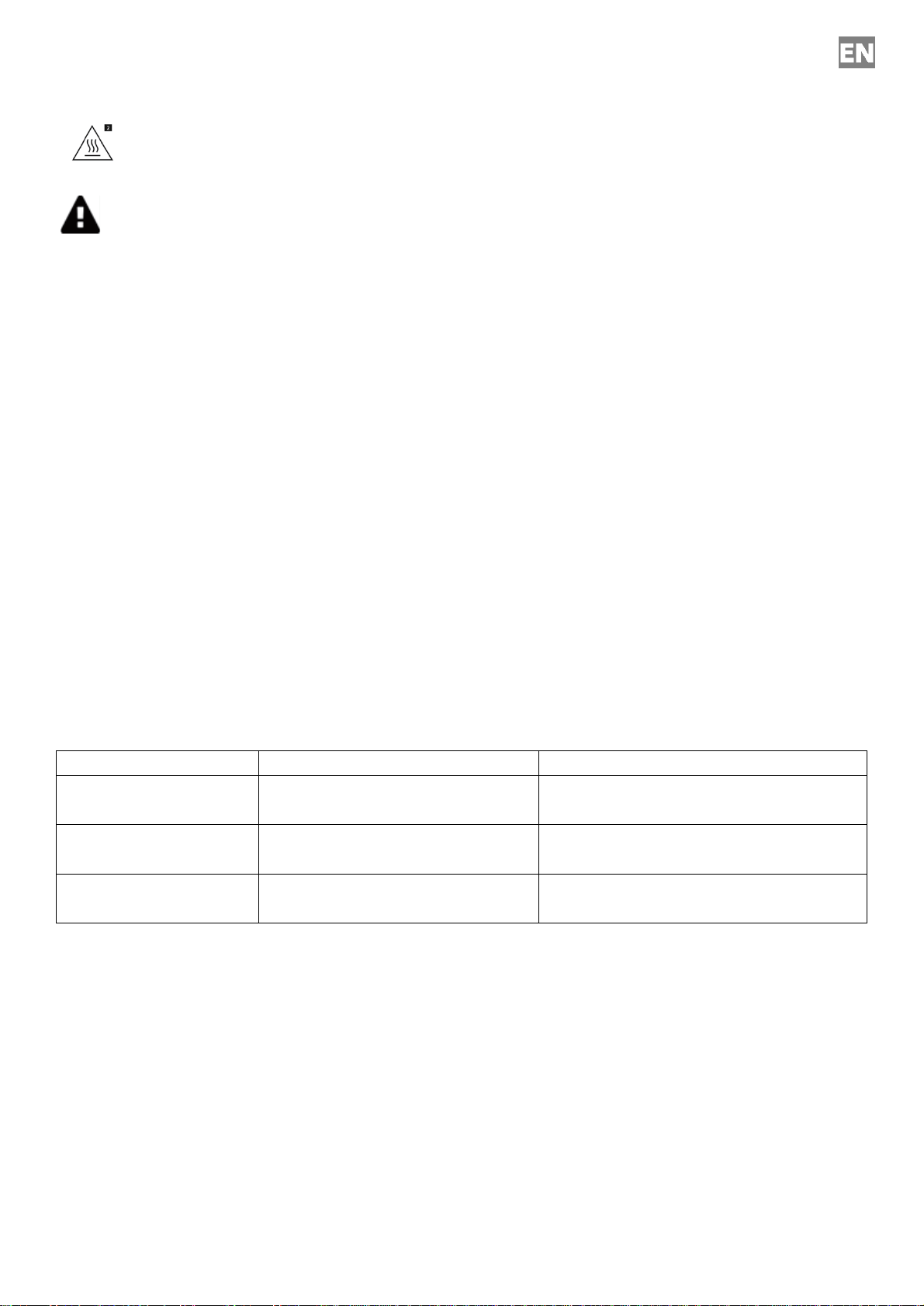
Error Code
Display shows “E7”
Lack of water
Fill water in water tank to MAX level
Display shows “E2”, “E5”
Temperature sensor problem at water
inlet
Consult local supplier for checking.
Display shows “E1”, “E4”
Temperature sensor problem at water
outlet
Consult local supplier for checking.
No display or no heating
function
Thermostat cut-off
Use reset key to press the reset hole and
reset the device
5) SPECIFICATIONS
• Voltage input: 220-240 V~, 50/60 Hz
• Power: 2200-2600 W
• Temperature setting: ambient water temperature, 45°C, 55°C, 65°C, 75°C, 85°C, 100 °C
• Volume setting: 100ml, 200ml, 300ml, 400ml, continuous flow
•Tank capacity: 2.7 L
• Dimensions: 30.5 x 15.0 x 25.5 (H x W x D)
• Weight: 2.20 kg.
Tabla de contenidos
Idiomas:
Otros manuales de Dispensador de agua de STUDIO LINEA