
Studio Evolution SE-200D Manual de usuario

Pleasereadthismanualcarefullybeforeuse.
DIGITAL
WIRELESS
MICROPHONE
SYSTEM
OPERATINGMANUAL

Thisdigitalwirelesssystemadoptsintelligentizedcryptographic
hardware.UniquesoundandRFperformance.
Withoptionalprofessionalrechargeaccessories.
Endurablerechargeablelithiumbatteries.
Frequenciesgrouping,colorfulTFTLCDandhumanizedmenu
makeiteasyforsingleormultisetsmounting.
1.BRIEFINTRODUCTION
2.MAINFEATURES
•UHFband(660690Mhz).
•Digitalaudiotransmissiontechnology.
•Uniquedigital16bitIDpilottechnology,
nocrosstalkdisturbanceevenatthesamefrequency.
•Ultrashortaudiolatency.
•48KHzaudio.
•Frequencyresponse:3020000Hz.
•ColorfulTFTdisplayandmenusettings.
•Autofrequencyscanningandspectrumdisplay.
•Workingdistance:40m.
CONTENTS
BriefIntroduction.....................................................1
MainFeatures..........................................................1
Parts(Receiver).......................................................2
Receiver Display...................................................... 3
HandheldMicOperation..........................................6
ReceiverOperation..................................................8
TechniqueSpecification...........................................10

3.PARTS
(RECEIVER)
1.POWER
2.SETUPA
3.IR(infrared)
4.UNLOCK
5.TFTDISPLAY
6.IR(infrared)
7.TFTDISPLAY
8.IR(infrared)
9.UNLOCK
10.SETUPB
11.ANTA
12.ANTB
13.MIX.OUT
14.BALANCEDOUTB
15.BALANCEDOUTA
16.DCINPUT
17.USBCHARGEOUTPUT
1716151413
10
9
8
6
5
4 321 7
1211
12 11

4.RECEIVERDISPLAY
RF:Indicatesignalintensity,thelongerlengthof
thecolor,thestrongersignal.
AF:Indicateaudiolevel,thelongerlengthofthe
color,thestrongersignal.
GR:Group:Numberabovetheiconindicatesthecurrent
frequencygroup.
CH:Channel:Numberabovetheiconindicatesthecurrent
groupfrequency.
Autoscan.Automaticallyscanupordowntosearch
foravailablefrequencyuntilthedesiredfrequencyis
reached.CanbesetunderSCANfunction.
Lockstatus,thebottonsareineffectedunderthisstatus.
Mute,indicatesReceiverisunderMUTEstatus.
IRicon,whenflashingindicatesnowissending
SYNCsignal.
Batteryicon,indicatesthehandheldmicrophone
batterystatusduringcharging.
46%IndicatethecurrentvoicevolumeofReceiver,
adjustablerangeis0%100%.
46%
RF
AF
GR/CH
GR CH
SCAN
669.20MHz
07 05

Displayduringoperation.
Note:thebelowsettingisunderunlockstatus,
longpressUNLOCKbeforesetting.
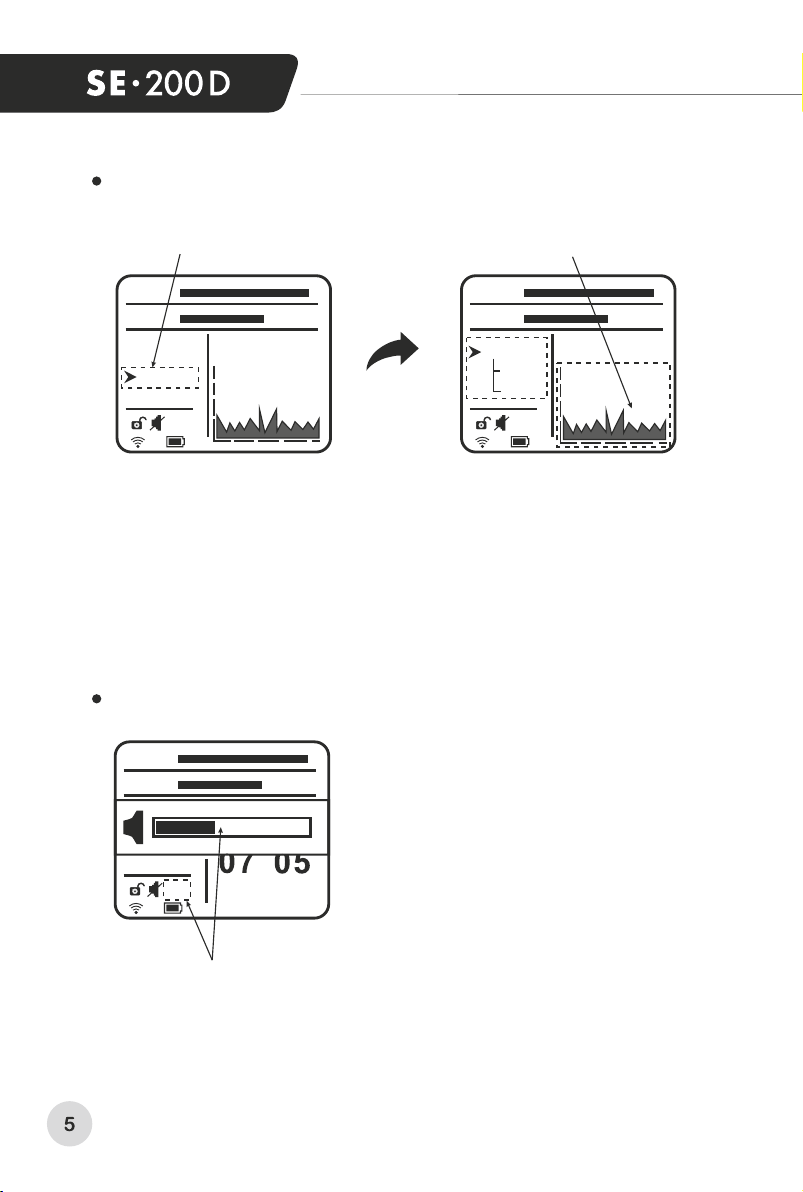
Presssetupknobtoenterintothechannelsettingmode.
ChoseGR/CHbyrotatingtheknob.Pressitforconfirmation.
Thenadjustthecontrolknobtoselecttheappropriatemenuitem
(GRorCH).Selecttheappropriategrouporchannelbyknobrotation.
Pressthecontrolknobtoconfirmtheappropriatechannel,finally
pressIRfunctionforsynchronizationwithmicrophone.
Whenthereceiverisworking,longpressUNLOCKtounlock
thesystembeforesettings.Beginfromchanneladjustmentdetails
arebelow.
Selectmenuicons. Numberschange.
Channelsettingmode.
46%
RF
AF
GR/CH
GR CH
669.20MHz
07 05
GR
CH
46%
RF
AF
GR/CH
GR CH
SCAN
669.20MHz
07 05
AdjustSETUPcontrolknob,pressSCANfunctionenterintoscan
availablefrequencymode.Thenadjustthecontrolknob,selectUP
orDOWNcanautomaticallyscanupordowntosearchforavailable
frequencyuntilthedesiredfrequencyisreached.Thisfunction
isconvenientforusertofindtheavailablefrequencyquicklyunder
differentsituation.
Voicevolume.
RotateSETUPcontrolknobtoadjusttheReceiver
voicevolume,visuallyshowedbyBarchartand%number.
Selectmenuicons.Spectrumanalysisofenviromental.
Volumesetting.
Scanavailablechannelmode.
46%
RF
AF
GR CH
46%
RF
AF
GR/CH
SCAN
669.20MHz
X:790.00MHz3MHz/div
V:REF-50dBm20dB/div
46%
RF
AF
669.20MHz
UP
DOWN
X:790.00MHz3MHz/div
V:REF-50dBm20dB/div
SCAN

5.HANDHELD
MICROPHONE
OPERATION
1.Microphonecapsule:convertsoundtoelectricalsignal.
2.LCDdisplay:indicatesthemicrophoneworkinginformation.
3.SYNCwindow:usetoreceiveIRsignal,fromReceiverIRwindow.
4.ON/OFFswitch:controlsON/OFFpowerandmutefunction.
5.BatterySink:insert1x18500lithiumbattery,notetoinsertitin
correctpolarity.
6.Miccap:unscrewitwhenchangebattery.
7.MicroUSBsocketforcharging(DC,5volts).
HANDHELD
MICROPHONE
LCD
1.Indicatesbelowworking
channel
Indicatesbelowworking
group
2.
IndicatesGroup7,Ch05
3.
Indicatesmutestatus
4.
Indicatescurrent
usingfrequency(811,5MHz)
5.
Indicatesbatterystatus,
flashingindicatesbattery
lowpower
6.
5
6
7
2
1
3
4
HIorLOindicateshighor
lowtransmitionpower
7.
CHANNEL
GROUP
MUTE
1
56
4
3
2
7
HI LO
Mhz
Mhz

Avoidholdingthemicrophoneonantennaposition:
Don’tholdthemicrophoneGrille:
HANDHELDMICROPHONEUSINGTECHNIQUE
Note!TheSYNCHRONIZATIONperiodiswithin30seconds.
AfterswitchingON,themicrophoneautomaticallyenters
thedefaultmodeandautomaticallyusesthelastsavedchannel.
Themicrophonecanonlyworkunderthesamefrequency
withReceiver.
LongpressON/OFFbuttonin3sec,ifLCDnotlight,checkwhether
batteryincorrectpolarityorbatteryislowofpower.Ifthebattery
indicatorofLCDdisplayisflashing,pleasechangewithnewbattery.
Removethebatterycover,insert1x18500Lithiumbatteryin
correctpolarity.
antenna
position
antenna
position
Tosynchronizethemicrophonewithreceiver:
1.UnlockAorB.
2.PressIR(receiver).
3.PutmicrophoneIRinfrontofreceiverIR.
4.Сheckifthesamechannelisindicatedonmicrophoneand
receiverdisplays.

6.RECEIVEROPERATION
Don’tusetwomicrophonestogether:
Avoidmicrophonelocation
infrontofloudspeakers.
Attention:theusingdistance
betweenthemicrophoneGrille
andmouthneedstobeless
than15cm.
Turnonthepowerbutton(1),LCDdisplay(5,7)willshine.
Receiverisinworkingstatus.Note:BeforeturnofftheReceiver,
turnthevolumecontrolknob(2,10)totheminimumvolume.
Adjustthevolumeasyouneedafternextturningon.
Pullouttheantenna(11),(12),makethemtobeperpendicular
tothereceiver.
ConnecttheUSBchargecable:
Connectthechargecable(attached)totheUSBsocket(17)
whiletheothersideconnecttothehandheldmicrophones.
Connectthepoweradapter(12V1A,positivecentralcontact)
totheDCsocket(16)oftheReceiverbeforeusing.Makesure,
thattheadaptorissuitablefortheReceiver.
Connecttheaudiocable:
Mixoutput:connecttheaudiocable(purchasedadditionally)
totheMIX.OUTsocket(13)whiletheothersideconnect
toINPUTsocketofthemixeroramplifier.
Balanceoutput:connectthebalanceaudiocable(attached)
totheBALANCEsocket(14/15)whiletheothersideconnect
toINPUTsocketofthemixeroramplifier.
Notes!Youmaychargemicrophonesbyanother5Vchargers
(forsmartphones).
Duringchargingthemicrophonedoesn’twork!
Donotchargenonrechargeablebatteries!

Selectfunctionbyadjusting
theSETUPknob(2/10)
(Functiondetailsrefertothe
InstructionofReceiverTFT
displayfunction).
SeebelowIRSYNCpicture,
longpressIRbuttonunder
unlockstatus,Receiverstart
sendingsignal,automatically
turntoworkaftercompletion.
LongpressIRbutton,startsendingsignalwhilesignalicon
flashing.Turnonhandheldmicrophone,puttheIRwindowinfrontof
theReceiverIRwindow.Signalicondisappearswhendevicesare
connectedbyIR.Shownfrequencyneedtobecomethesameon
handheldmicrophoneandonReceiverdisplays.
Recommendations
ofReceiverinstallation.
IRSYNCpicture
1meter
ormore
1meter
ormore
Thedistancefrom
thereceivertowallsorto
floorneedstobenotless
than1meter.Otherwise,
antennasefficiencywill
decreaseandworking
distancewillbereduced.
Pulloutantennasvertically
forbettersignalreceiving.
Tabla de contenidos
Manuales populares de Sistema de micrófono de otras marcas


Sennheiser
Sennheiser Evolution Wireless Digital EW-DX EM 2 Manual de usuario

Alpha Technologies
Alpha Technologies RBMS Manual de usuario

SWIT Electronics Co.,LTD.
SWIT Electronics Co.,LTD. CW-S150 Manual de usuario

Shure
Shure UA844 Manual de usuario

Panasonic
Panasonic SHFX70 - DVD HOME THEATER WIRELESS SYSTEM Manual de usuario

Pyle
Pyle PDWM5000 Manual de usuario