
StenoCast Realtime TV Manual de usuario

Contents
• Charging - Page 2
• Turning On - Pages 3
• Initiating Realtime - Pages 4
• Ez Verify (Test Mo e) - Page 5
• Viewing / Reviewing Text - Pages 6 - 8
• Search Feature - Pages 9 - 10
• Export / Closing Transcript - Pages 11 - 12
• Formatting Options - Page 13
• Up ating Software - Pages 14 - 15
8-Inch Realtime TV
(Transcript Viewer)
User Manual 2.0

THINGS YOU SHOULD KNOW
Page 2
Charging the 8-inch TV (Transcript Vie er):
To charge the Realtime TV, plug the AC power cor (supplie ) into the power port on
the upper right e ge of the Realtime TV. See picture 1 below. The power port is
situate on the TV’s right e ge, between the Search icon an the Back icon.
Picture 1

THINGS YOU SHOULD KNOW
Page 3
Turning on the 8-inch TV (Transcript Vie er):
1) Press an hol the On / Off button (approximately three to five secon s) until the
isplay screen turns on an you hear the “buzz.” When facing the TV screen, the
On / Off button is on the upper right-si e e ge, near the top. See Picture 1 below.
2) When the isplay screen comes on, release the On / Off button.
3) When the TV’s Operating System is fully loa e , you will see a screen lock sli e
bar (a pa lock icon) on the right si e of the isplay screen. Simply touch an hol
the sli e bar with one finger an sli e it upwar s until the screen has been
unlocke . See Picture 2 below.
4) The TV is now rea y to receive your wireless realtime transcription. Please wait
until your transmitter (ME2U, X7, RED or Ez Sen ) is plugge in an rea y to
transmit before opening your TV’s viewing software.
Picture 1
Picture 2
On / Off
UNLOCK BUTTON
SLIDE UP

FEATURES Page 4
Receiving Realtime
1) On the Homepage tap the Realtime TV icon one time.
2) The TV will automatically establish contact with your transmitter. If you o not
hit any steno strokes, your transmitter (X7, RED or Ez Sen ) will automatically
sen a test signal to your TV: “Wireless Connection Successful.” That message
will continue until your first steno stroke, at which time the test message will
cease an your realtime will be isplaye on your TV screen.
3) For ease of use, so your clients can turn the TV off uring breaks or overnight
without knowing how to appen transcripts, the TV will automatically loa the last
conclu e session an will seamlessly connect the new session with the last session.
To start a new session without loa ing the previous session, hit the “Cancel” button
as the transcript is loa ing or tap the “Menu” button an then tap the “New
Transcript” tab below. You will be aske if you want to export (save) the previous
session onto a flash rive at that time.
(1) Tap “Menu” an then (2) tap “New Transcript” to start a new session.
Search -
Back -
Menu -
Home -

FEATURES Page 5
Ez Verify—Test Mode
If the Reporter is not yet sen ing realtime to clients, you may still verify that the
Realtime TV is rea y to receive realtime. Simply plug the wireless transmitter (X7,
RED or Ez Sen ) into the Reporter’s computer. Thereafter tap the Realtime icon on
your TV to open a realtime file. The TV will automatically sen a test message to
your TV: “Wireless Connection Successful.” That message will continue until your
first steno stroke, at which time the test message will cease an your realtime will be
isplaye on your TV screen.
Note: The test message is sent an will be receive on the TV even without the
Reporter’s CAT software program being opene . The test signal is not sent when
using a USB ME2U transmitter.
Wireless Connection Successful
Receiving the “Realtime Connection Successful” message tells you the transmitter
an TV are functioning properly. If the realtime transcript is thereafter not
receive on the Realtime TV an /or other computers, that is an in ication that the
bua rate, protocol or com port settings on the reporter’s computer may be the
issue.

FEATURES Page 6
To Vie Text
• The text will automatically scroll across the TV screen.
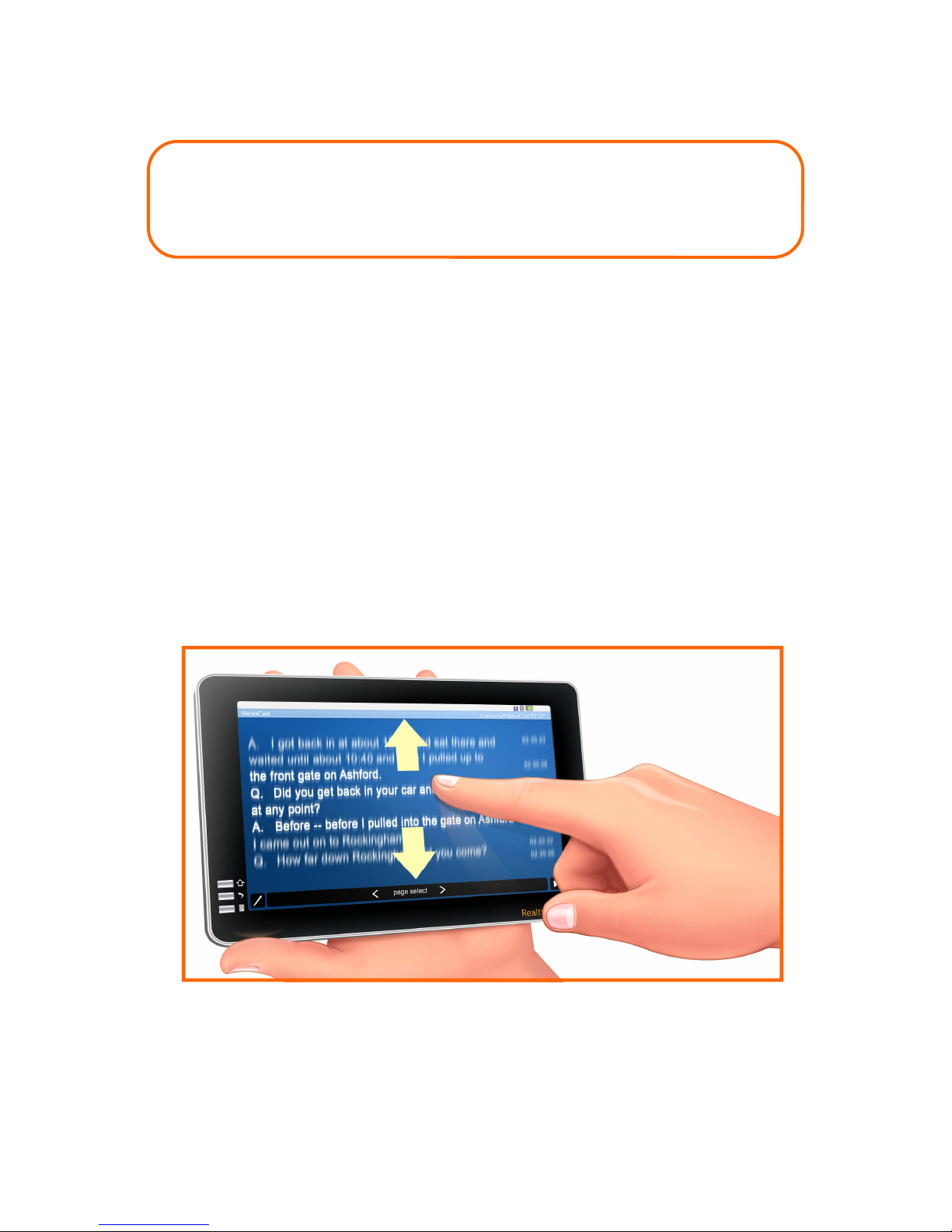
To Revie Text (Scroll back)
• Tap the Pause button one time
• To scroll back, towar s the beginning of the realtime transcript, place one finger
at the top of the screen an move it ownwar s towar s the bottom of the
screen, maintaining contact with the screen uring this motion.
• To scroll forwar , towar s the beginning of the realtime transcript, place one
finger at the bottom of the screen an move it upwar s towar s the top of the
screen, maintaining contact with the screen uring this motion.
• To return to the en (the “live” or current) portion of the transcript, tap the
Play button one time.
PAUSE BUTTON
PLAY BUTTON
FEATURES Page 7
To Revie Text (Scroll back)
• Tap the Pause button one time
• You may either tap the arrow buttons at the bottom of the isplay screen to move
backwar s or forwar s through the transcript, or you may place one finger on the
top portion of the screen an quickly sli e your finger ownwar s (to move
backwar s through the transcript) or place one finger at the bottom of the screen
an sli e your finger quickly upwar s (to move forwar s through the transcript).
• To return to the en (live) portion of the transcript, tap the Play button one time.
THINGS YOU SHOULD KNOW
Page 8
Highlighting Text
• To highlight text, simply touch (tap) the line(s) of text you wish to highlight with
one finger. You may then scroll forwar s or backwar s in or er to locate
a itional text to highlight. Make sure to maintain finger contact with the screen
in or er to scroll in either irection. If you tap the screen, that will highlight the
text. (Tap again to un-highlight) If you maintain contact with the screen, you can
scroll.
• When you wish to resume to the current (live) portion of the transcript, tap the
Play button one time (if you ha tappe the Pause button before highlighting). The
realtime transcript is being receive /store on your Realtime TV uring the
perio s when the transcript has been pause .
Note: You are not require to pause the procee ings in or er to highlight text.
To scroll, you shoul tap the Pause button first.
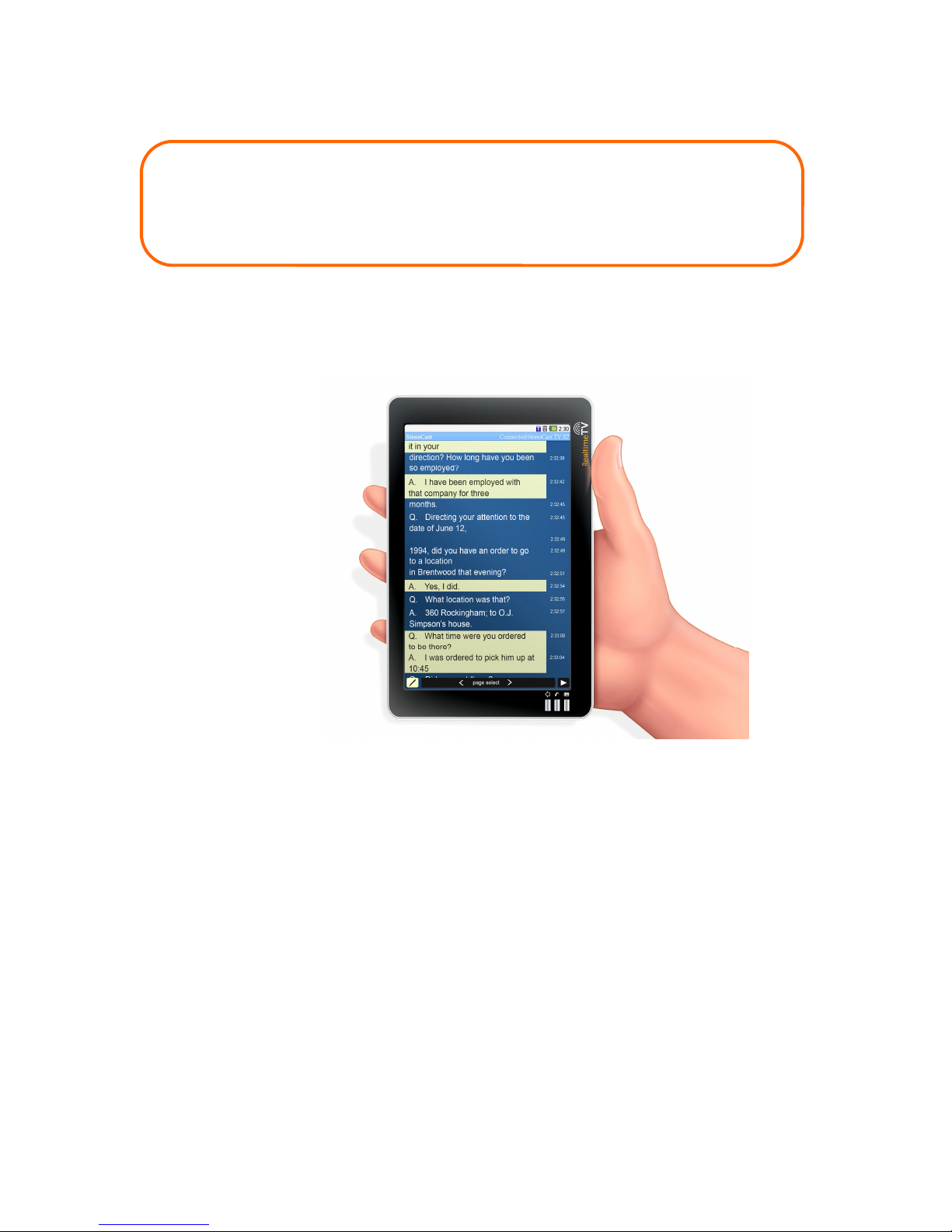
Note: Text may be
viewe an highlights
may be a e to text
in both the
Lan scape an
Portrait views.
This is an example in
Portrait view.

THINGS YOU SHOULD KNOW
Page 9
Searching for Text
With the 8-inch Realtime TV, you have two options when searching for a wor or
wor s within the realtime transcript. You may either tap the Search icon (see
Picture 1 below) or tap the Pause icon on the lower right portion of the screen (see
Picture 2 below) an then tap the Search icon that appears in the lower left corner of
the screen (see Picture 3 below).
Picture 1 Picture 2
Picture 3

THINGS YOU SHOULD KNOW
Page 10
Searching for Text cont’d
(1)
1) Tap screen
here to activate
the touch screen
keyboar .
2) Type in the wor (s) to
search on touch screen keypa
an tap the Search
button.
(2)
3) Search results appear in sha e
area. Tap on the page/line of any
results to go to that area of text
within the realtime transcript.
Tap the “X” to close the Search
function.
(3)
Tabla de contenidos


