
STB FL3500 Guía del usuario

Fingerlock
Installer manual

FL-MAIe-2602-JB
Crée le 27.05.02 Par: JMB
Contrôlé le:
FL3500
Installer manual Modifié le Par:
D:\FL3500\FL-MAIE-2602-JB.DOC 2/ 16 JMB/ 04.03.03
Contents
Table 1
1. Introduction 2
2. Components 2
3. Mounting of external housing 2
4. Mounting of internal housing 3
5. Connections 3
6. Software installation 4
7. Configuration 5
7.1. Serial port 5
7.2. Date and time setting 5
7.3. Installer menu 5
7.4. Master code 6
7.5. Hardware setting 6
7.6. Security level 7
7.7. Power supply and remote connection 7
7.8. Managers 8
7.9. Users 8
7.10. Stand-alone mode 9
7.11. Number of locks and holding time 9
7.12. Wrong trials penalties 10
7.13. Timelock feature 10
7.14. Time Delay feature 11
7.15. Installation summary 12
7.16. Timelock and Time delay configuration 13
7.17. First manager enrollment 14
8. Keypad 15
9. Maintenance 15
10. Tips 16
Installer manual FL3500
D:\FL3500\FL-MAIE-2602-JB.DOC 2/ 16 JMB/ 04.03.03
1. Introduction
Installation of the FL3500 lock requires two distinct steps
a) Hardware installation
b) Software installation and parameter setting
2. Components
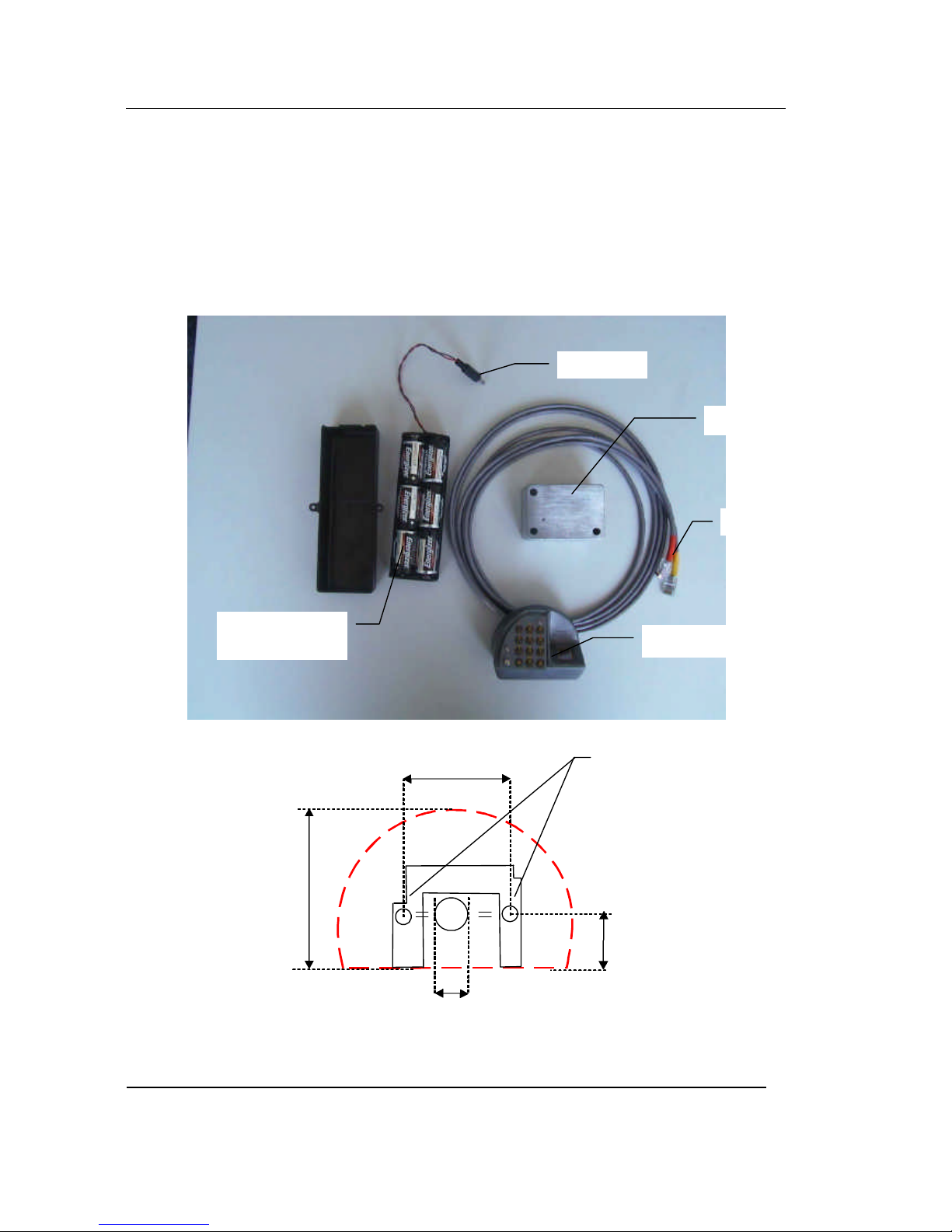
The FL3500 lock set includes the following components:
3. Mounting of external housing
Lock housing
Jack Plug
Optional battery
box with cover External housing
RJ45 connectors
M4
23.0
0.91"
15.0
0.59"
41.25
1.62"
71.0
2.80"

Installer manual FL3500
D:\FL3500\FL-MAIE-2602-JB.DOC 3/ 16 JMB/ 04.03.03
•Prepare the door according to the following hole pattern
•Mount the base plate onto the door with the two chamfer-headed screws (supplied). The
mounting pattern is identical to any standard mechanical lock.
•Thread the 2 cables through the door. Do not exert strong traction from the inside!
Always keep slack!
•Lift up keypad carefully and screw the external housing onto the base plate
Note: Do not remove the protective film of the keypad as long as the lock has not been
successfully tested
4. Mounting of internal housing
•Lock mounting footprint is the same as most locks available on the market.
Note: If available space does not allow mounting the lock as one single unit, the
electronic box can be mounted separately and connected to the mechanical portion.
This design can also be used for security reasons. (For additional information contact
STB or your nearest dealer)
5. Connections
After mounting both external and internal housings:
Mounting screw
Protective film
Ø 8.0
0.31"
66.65
2.62"
41.25
1.62"

Installer manual FL3500
D:\FL3500\FL-MAIE-2602-JB.DOC 4/ 16 JMB/ 04.03.03
•Connect the two RJ45 cables coming through the door to the corresponding plugs
(orange to orange) on the side of the internal housing:
•Insert the jack plug, linked either to the external power supply or to the battery box into
the lock housing (admitted tension 5-12V, a higher tension damages the lock)
The lock is ready to be configured.
Plug the DB9/RJ45 respectively into your PC serial port (COM) and into the free connector
of the lock
Jack plug
RS232 vers
port COM PC

Installer manual FL3500
D:\FL3500\FL-MAIE-2602-JB.DOC 5/ 16 JMB/ 04.03.03
6. Software installation
In order to set the lock parameters and enroll the first manager, install the FL3500 software
on the PC that will then be used in connection with the lock. Proceed as follows:
•Insert the CD or floppy disk into the PC
•Select setup.exe and double-click on it.
•Follow the instructions on your PC screen
7. Lock configuration
When shipped from the factory, the FL3500 Lock is in "installation mode". This means that
the only menu that is available in the software is the installation menu. It is used to set the
parameters according to the customer's choices.
7.1. Serial port selection
Start the software by double-clicking on the FL3500 icon
The window below appears on the screen:
Select the serial port used on the PC and confirm (click on <NEXT>)
7.2. Date and time setting
Note: Enter date and time, then confirm. The accuracy of these parameters is
essential for the validity of audit trail records.
7.3. Installer menu
In the main window, select the "INSTALLER" menu (other buttons are disabled,
except the "FILE" menu for exiting the FL3500 Software)

Installer manual FL3500
D:\FL3500\FL-MAIE-2602-JB.DOC 6/ 16 JMB/ 04.03.03
7.4. Master code
Enter the Master code supplied by STB to start the installation process. Keep this
Master code in a safe place, as it is necessary to gain access to the maintenance
menu and modify parameters and settings.
7.5. Hardware setting
Based on your lock configuration, select the required option:
-FL3510 →→ Identification.
-FL3520 →→ Verification + combination.
-FL3530 →→ Verification + Dallas key.
-FL3540 →→ Verification + contactless card.
Then click on <Next>

Installer manual FL3500
D:\FL3500\FL-MAIE-2602-JB.DOC 7/ 16 JMB/ 04.03.03
7.6. Security level
Select the required level. This level only modifies the acceptance threshold of the
fingerprint; it has no other influence on the security features of the lock.
(For further information about this option refer to the "FL3500 Technical
description" manual)
Note: To modify the selected parameters at any time during installation, click on
<PREVIOUS>.
7.7. Power supply and remote connection
Select the power source, battery or network, <NEXT>.
Note: External power supply (network) must have a tension between 5 and 12V.
Any tension above 16V would damage the lock.
If battery option has been selected, the following window appears:
Selection of a connection to a remote computer through a serial line is not possible
<NEXT>.
If "NETWORK" has been selected, the same window appears, but the selection of
various options is possible when a connection to a remote computer through a
serial line is present.

Installer manual FL3500
D:\FL3500\FL-MAIE-2602-JB.DOC 8/ 16 JMB/ 04.03.03
Select required options <NEXT>.
7.8. Managers
The maximum number of managers can be set between 1 and 5. <NEXT>.
Note: It is recommended to have at least two enrolled managers. Unlike
combination locks, if a manager is not in a position to operate the lock, he cannot
give his code or key to his substitute.
A manager can enroll and delete users and access the FL3500 software to modify
some lock parameters after its installation. He can only access the MANAGER
menu.
7.9. Users
The maximum number of users can be set between 1 and 50. <NEXT>.
Note: The more users are enrolled in the lock, the longer it will take to recognize a
fingerprint, especially if the lock is configured in identification mode.

Installer manual FL3500
D:\FL3500\FL-MAIE-2602-JB.DOC 9/ 16 JMB/ 04.03.03
7.10. Stand-alone mode
If "Enroll and delete in stand-alone mode" is selected, any manager can give
access or cancel users without using a PC.
Note: This option can be modified at any time through the manager menu
7.11. Number of locks and holding time
In order to have an alarm finger, select 2 locks and connect the second Lock signal
to an output relay. The lock sends a 9V tension to operate the solenoid.
Select the number of locks <NEXT>.
For each lock: Time range from 1 to 10 seconds (usual setting is 5 seconds)
<NEXT>.
For a motor lock, set opening and holding time <NEXT>.
Tabla de contenidos
Otros manuales de Cerrar de STB


