
Spedal CL586 Manual de usuario

USER MANUAL
MULTIFUNCTIONAL
DASHCAM
004C1907-EN
CL586

If you encounter any problems when reading this manual or using the product, please do
CONTENT
1. DISCLAIMER AND SAFETY GUIDELINES ��������01
1.1 Disclaimer ������������������������������������������������������������������������������01
1.2 Safety Guidelines���������������������������������������������������������������02
2. ACCESSORIES AND INTERFACES �����������������������03
2.1 In the box��������������������������������������������������������������������������������03
2.2 Product Diagram ����������������������������������������������������������������04
2.3 Installation Guideline������������������������������������������������������05
2.4 Interfaces Introduction��������������������������������������������������08
3. FUNCTIONS AND SETTINGS����������������������������������09
3.1 General Settings ����������������������������������������������������������������09
3.2 Carlink and its settings�������������������������������������������������� 11
3.3 Drive recording and its settings �������������������������������12
3.4 FM and its settings �����������������������������������������������������������13
3.5 Playback and its settings ���������������������������������������������14
4. APPENDIX�������������������������������������������������������������������������15
4.1 Specications ����������������������������������������������������������������������15
4.2 Warranty����������������������������������������������������������������������������������16

1. DISCLAIMER AND SAFETY GUIDELINES
1.1 Disclaimer
This product is a multifunctional dashcam, which will bring you a safe and pleasant
driving experience when the power supply is working normally and the components are
not damaged. Visit http://www.spedal.cc to get the complete "User Manual", pay special
attention to the cautions and warnings in it. Shenzhen Xinzhuang Gude Technology Co.
Ltd. (Spedal) reserves the right to update this User Manual.
The information in this document affects your safety and your legal rights and
responsibilities. Read this entire document carefully to ensure proper configuration
before use. Failure to read and follow the instructions and warnings in this document
may result in product loss, injury to you, or damage to your device. You must strictly
follow Spedal's guidelines to install and use the product, and never use parts that are
not provided or recommended by Spedal. Before assembling, setting up and using, be
sure to visit the ocial website of Spedal (http://www.spedal.cc) to download the "User
Manual" and carefully read all the instructions and warnings in the document. This
product is not a toy. Please do not allow children to touch this product or its parts and
wires. Please be careful when operating in scenes where children are present.
By using this product, you hereby signify that you have read this disclaimer carefully
and that you understand and agree to abide by the terms and conditions herein. The
user promises to be responsible for his actions and all consequences arising therefrom.
The user promises to use this product only for legitimate purposes, and agrees to all the
terms and contents of this document and any related policies or guidelines that Spedal
may formulate. You understand and agree that in the absence of driving records, Spedal
may not be able to analyze the cause of your product damage or accident, and cannot
provide you with after-sales service such as warranty.
In compliance with laws and regulations, Spedal reserves the right of nal interpretation
of this document and all related documents of this product. If the manual is updated,
revised or terminated, we will not notify you separately. Please visit the ocial website of
Spedal for the latest product information. Spedal is a trademark of Shenzhen Xinzhuang
Goodo Technology Co. Ltd. and its aliates. The product names, brands, etc. appearing
in this article are all trademarks or registered trademarks of their respective companies.
Notice: Spedal is not responsible for all losses caused by the user's
failure to use the product in accordance with this "User Manual”�
01

1.2 Safety Guidelines
1�2�1 Warnings
● Please use the original cable and power cords only;
● Do not exceed the rated voltage when using the device;
● Do not install or operate the device with wet hands;
● Do not install the device in places of high temperature, humidity.
● Do not install the device in places of ammable or explosive gases or liquids;
● Do not install the device in an area interfering with the driver's sight or driving safety;
● Do not install the device on the airbag cover or within the airbag’s working range;
● Do not leave the device in a closed vehicle under high temperature for a long time;
● Do not poke the device and its accessories using sharp objects such as awl or scissor;
● Do not disassemble, repair or modify the device and its accessories by yourself;
● Do not install, use or place the device within the reach of any children under 16;
● Do not cut the charging cable.
Notice: Damage caused to the dashcam as result of not obeying the
warnings above is not covered by the warranty!
1�2�2 Cautions
● Do not press the lens forcefully to avoid lens breakage or lens misalignment;
● Do not directly touch the lens surface to avoid stains that aect the recording eect;
● Do not remove the memory card to avoid le damage during the shutdown process;
● When using the memory card for the rst time, please format it on the device to ensure
stable reading and writing;
● When not using the device for a long time, please pull out the memory card to ensure
the memory card’s performance.
02

2. ACCESSORIES AND INTERFACES
2.1 In the box
Before using this product, please check whether the product package contains all of the
following items. If anything is missing, please contact Spedal or your local agent.
● Multifunctional radar detector ● In-Car charger
● Suction Mount ● Quick Guide
Notice: Please use the SPEDAL original cable and accessories only�
Gifts and accessories are not covered by the warranty� The content of
this product package is subject to change without notice, the actual
package shall prevail!
03

2.2 Product Diagram
Notice: When the function Carlink is activated, the projection chip
and the drive recording chip will work at the same time� The surface
temperature of the heatdissipating metal sheet can reach as high as
60℃, which is within normal range of working temperature� Please do
not touch the sheet surface for a long while to prevent being scalded�
GPS Input
TF Card Slot
AV-IN
Mount Locking Clip
USB / Power Input
Touch screen
Reset button
Loudspeaker
heat-dissipating metal sheet
Adjustable camera
Power button
04
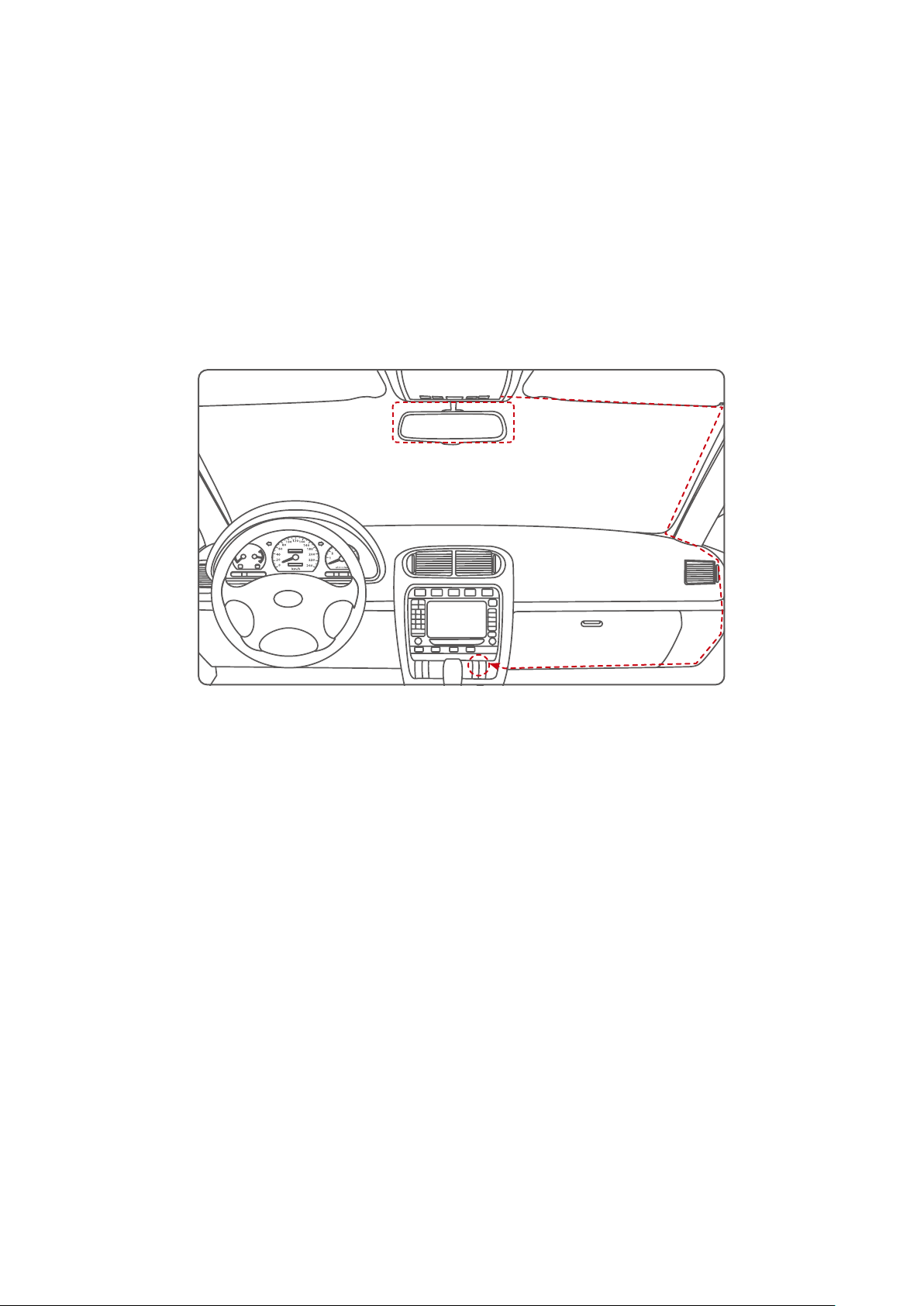
2.3 Installation Guideline
The device is in the storage state when it leaves the factory. Please follow the steps
below to prepare for installation.
1. Take the device and its accessories out of the box or plastic bag;
2. Tear o the protective lm on the screen and lens of the device if there is any;
3. Remove the wire tie that binds the wire.
2�3�1 Installation Position
● Do not install the device in a position blocking the view of the driver or in an unsafe
area.
● Install the device near the rearview mirror but not in a place blocking the driver vision.
● Install the device within the wiper blade area to ensure clear capture on rainy days.
● Do not install the device on the airbag cover or near the airbag operating range.
● Do not install the device on the windscreen protection lm to prevent damage to the
lm.
● Install the device in a position not aecting any other electronic devices in your vehicle.
Note: Please follow the instruction or warnings above strictly� Our
company assumes no responsibility for any injury or death caused by
car impact or airbag problems�
05

2�3�2 Card Installation
Install the TF card in the TF socket with the pins facing upwards. Push the TF card
forward, and the card can be removed after it pops out.
Please use the 32GB TF card that comes with the product. A third-party TF card should
meet these requirements: Class 8 or above, maximal 128GB.
Note: Installing and removing the TF card in the recording mode may
result in failure of recording videos and causing damage to the TF
card. Please turn o the device before inserting or unplugging the TF
card�
Note: When recording or snapping, if the TF card is not inserted or
the TF card is abnormal, the device will broadcast an alarm sound
of "dididi" and show a pop-up window to remind the user that the TF
card is not inserted�
06

2�3�3 lnstallation Method
1. Aim the magnetic transfer slide buckle at the mount buckle on the device.
2. Hold the device and chuck bracket with your hands, and aim the mount at the chuck
bracket on the device.
3. Select a proper position (such as the center of the rearview mirror), attach the suction
mound to the windshield and rotate the mount clockwise to lock.
4. Adjust the recording angle (it is the best angle that the car front shows in the middle of
the display).
Note: The suction mount can be replaced by the sticker mount� Select
a proper position, tear the protective paper and paste into the front
windshield (do not move it within 24 hours)
07

2.4 Interfaces Introduction
2�4�1 Main Interface
Time & Date: The time and date can be set in the settings.
Settings: General settings of the device.
Carlink: Carlink to project your mobile phone onto the dashcam.
Dashcam: Photo and video shooting during drive process.
FM: FM to transfer the sound of your mobile phone onto the car loudspeaker.
Playback: Viewing of the photos and the videos.
Note: For more detailed introduction of the device functions and
settings, please refer to chapter 3� FUNCTIONS AND SETTINGS of this
manual�
08
Carlink
Settings
12:00
08-08 Sunday
FM PlaybackDashcam
Otros manuales para CL586
1
Tabla de contenidos
Otros manuales de Cámara de salpicadero de Spedal

Spedal
Spedal CL586 Manual de usuario

Spedal
Spedal CL796W Manual de usuario

Spedal
Spedal CL588 Manual de usuario

Spedal
Spedal CL796N Manual de usuario

Spedal
Spedal minieye C2M Manual de usuario

Spedal
Spedal CL796P Manual de usuario

Spedal
Spedal CL796 Series Manual de usuario

Spedal
Spedal C326 Manual de usuario


