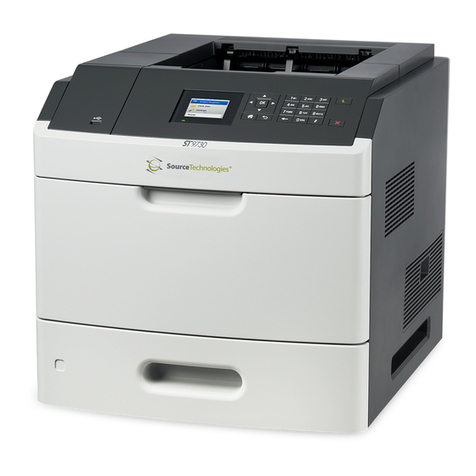
Source Technologies ST9612 Manual de usuario

Secure MICR Printer
User’s Guide
Released Electronic Copy
ST Doc Control
07/02/2009

Source Technologies, LLC ST9612 Secure MICR Printer User’s Guide
ii
Copyright
Cop right ©2009 b Source Technologies, LLC. All rights reserved.
No part of this document ma be reproduced or utilized in an form or b an means,
electronic or mechanical, including photocop ing, recording, or b an information
storage and retrieval s stem, without permission in writing from Source Technologies,
LLC.
Published in the United States of America b :
Source Technologies, LLC
291 Whitehall Park Drive
Charlotte, NC 28273
Author: Source Technologies, LLC
Notice
This manual serves as a reference for a Source Technologies Secure MICR Printer.
This manual should be used as a reference for learning more about MICR technolog
and developing MICR printing applications. This guide was produced to assist IS
Technicians and Engineers in the integration of Source Technologies’ programmed
printers with their custom MICR applications. The guide also contains information on
MICR related error messages that post to the operator panel.
To the best of our knowledge, the information in this publication is accurate: however,
neither Source Technologies, LLC, its dealers or affiliates assume an responsibilit or
liabilit for the accurac or completeness of, or consequences arising from, such
information. Changes, t pos, and technical inaccuracies will be corrected in subsequent
publications. This publication is subject to change without notice. The information and
descriptions contained in this manual cannot be copied, disseminated, or distributed
without the express written consent of Source Technologies, LLC. This document is
intended for informational purposes onl . Mention of trade names or commercial
products does not constitute endorsement or recommendation for use b Source
Technologies, LLC. Final determination of the suitabilit of an information or product for
use contemplated b an user, and the manner of that use is the sole responsibilit of
the user. We recommend that an one intending to rel on an recommendation of
materials or procedures mentioned in this publication should satisf himself as to such
suitabilit , and that he can meet all applicable safet and health standards.
All trade names or products used in this manual are for identification purposes onl and
ma be trademarks or registered trademarks of their respective companies.
Document Number: 104048
Revision: A
Copyright

Source Technologies, LLC ST9612 Secure MICR Printer User’s Guide
iii
Table of Contents
1. Printer and Driver Installation.......................................................................1
Driver Overview.................................................................................................2
Downloading the Universal Driver .....................................................................3
Unzipping the Driver..........................................................................................3
Installing the Driver............................................................................................4
Configure the Driver to enable MICR Mode ....................................................10
Configure the Driver to Recognize the Printer Secure Fonts...........................11
Configure another driver to print without MICR toner ......................................11
Selecting the Printer........................................................................................14
2. MICR Overview.............................................................................................16
The Check Clearing S stem............................................................................16
MICR Printing Standards in the United States Toda ......................................16
3. MICR Check Design .....................................................................................18
General Features of Check Design .................................................................18
Position and Dimension Gauge.......................................................................18
Design Elements in Detail ...............................................................................18
Data Elements.................................................................................................19
4. Quality Issues...............................................................................................23
Printer Features ..............................................................................................23
MICR Toner.....................................................................................................23
MICR Check Stock..........................................................................................24
5. Security Issues.............................................................................................25
6. MICR Features..............................................................................................27
Secure MICR...................................................................................................27
MICR Fonts .....................................................................................................27
Secure Fonts...................................................................................................27
MicroPrint ........................................................................................................28
Resource Storage ...........................................................................................28
MICR Toner Cartridge.....................................................................................28
7. MICR Commands .........................................................................................29
Table of Contents

Source Technologies, LLC ST9612 Secure MICR Printer User’s Guide
iv
PJL MICRJOB.................................................................................................29
Fonts and Secured Resources........................................................................29
PJL Unlock Sequence.....................................................................................30
PJL Re-Lock Sequence...................................................................................30
PJL Re-Lock Sequence With A New Password Value ....................................30
PCL Font Call Commands...............................................................................30
PJL INFO MICR COMMAND ..........................................................................32
Error Messages...............................................................................................34
Toner Cartridge and Photoconductor Units.....................................................34
Toner Cartridge and Photoconductor Units.....................................................35
Toner Low .......................................................................................................35
Toner Out ........................................................................................................36
Photoconductor Unit Life Warning...................................................................36
Replace Photoconductor (printer hard stop)....................................................37
Load MICR Toner............................................................................................37
8. MICR Command Example ...........................................................................38
PJL Unlock Sequence.....................................................................................38
PCL Initial Set-Up............................................................................................38
PCL MACRO Call............................................................................................38
PCL Font Calls, Positioning Commands and Variable Print Data ...................38
PJL Re-Lock Sequence...................................................................................39
Appendix A: E13B MICR Font Mapping .........................................................41
Appendix C: ICR Secure Numeric Font Mapping ..........................................44
Appendix D: CMC7 MICR Font Mapping ........................................................45
Appendix E: Contact.........................................................................................47
Appendix F: Photoconductor Replacement ...................................................48
NOTE: To maintain a high resolution, Source Technologies recommends printing
all documents in color.

Source Technologies, LLC ST9612 Secure MICR Printer User’s Guide
1
1. Printer and Driver Installation
Note: To access Source Technologies’ secure fonts loaded on the printer, such as
the E13B MICR font, do nload the universal driver as described in the next
section. The printer drivers on this CD may be used for general office printing but
do not facilitate using secure fonts.
For co plete infor ation on how to unpack and setup your printer, see your printer’s
user’s guide.
1. Locate the CD that was shipped with your printer and load into CD drive. The
CD should auto-run and the following screen will be displayed. If auto-run is
disabled on your co puter, browse to the CD and click Setup.exe to run
2. Click on View User’s Guide for infor ation on unpacking, installing, and
operating your printer.
Printer and Driver Installation | 1

Source Technologies, LLC ST9612 Secure MICR Printer User’s Guide
2
Driver Overview
Your new MICR printer requires specific PCL 5 co ands to load and print secure fonts
such as the MICR E13B font. These specific co ands ay be coded in to your
custo application, or if you use a software progra such as Source Technologies’
CheckPartner™ Enterprise, these co ands are auto atically sent to the printer as
needed. To print checks or other docu ents requiring secure fonts fro other Windows
applications please download the universal driver— designed specifically to allow
access to your printer’s secured resources—using the following steps:
1. Select the Driver Zip file atching your operating syste and printer odel.
2. Download this file to a location, such as the Windows Desktop.
3. Unzip this file and ake sure the “Use Saved path” option is selected.
4. Browse to the Source Tech Driver folder extracted fro the zip file.
5. Run the driver install progra . For exa ple:
Printer_UDO_2KXP03_x86_PCL_ mul_sys_en.exe
6. Follow the instructions to install the driver.
7. Configure the driver to use MICR_on.sep page separator file (used to select
MICR ode).
8. Configure the driver to “Update the Font list” using the 96XXfont.pc file. This
will enable Windows applications to recognize the printer’s secure fonts.
9. Fro the Windows application, select the installed printer.
10. Fro a Windows application, select the specific text to be printed. Then select
the secure font na e and point size using the capabilities of the particular
Windows application.
The following fonts and point size are supported.
Font Name Point Size Font Sample
MICR E13B 8
MICR CMC7 8
SECURE 36
ICR Secure 12
MicroPrint 1
Note: The fonts illustrated above may not match the size or appearance of those
printed by the MICR printer. The characters are enhanced for illustration purposes
only.
Printer and Driver Installation | 1

Source Technologies, LLC ST9612 Secure MICR Printer User’s Guide
3
Downloading the Universal Driver
1. Browse to the URL below fro your web browser.
http://www.sourcetech.co /support/drivers.asp
2. Fro this page go to the section for the particular operating syste you are
using such as Widows 2000, XP, etc.
3. Click on your specific odel such ST9612, ST9620 etc.
4. When the File Security dialog box appears, select Save.
5. When the Save As file dialog box appears browse to a folder you have
created or to the Desktop and save the driver zip file.
6. Once the file is downloaded browse to the folder where saved and double-
click the zip file to extract the driver contents. For exa ple, the zip file for
Windows 2000, XP, and Windows Server 2003 is:
Universal_Driver_2KXP03_x86.zip
Note: The remainder of the instructions applies to Windo s XP. The exact steps
may vary depending on the particular operating system you are using.
Unzipping the Driver
1. Double-click the driver zip file to launch the unzip progra installed on your
co puter.
2. Follow the steps for your particular unzip progra to extract the files. Make
sure the “Save with Paths” option is selected.
3. Browse to the location where you wish to extract the files, such as the
Desktop, and then extract the files.
4. The extracted zip files will be saved to the location selected in the previous
step. For exa ple, if you saved the file to the Desktop you should now find a
new folder on the Desktop na ed:
Source Tech Driver
Printer and Driver Installation | 1

Source Technologies, LLC ST9612 Secure MICR Printer User’s Guide
4
Installing the Driver
Note: Do not connect the printer at this time.
1. Fro the Source Tech Driver folder, double-click the driver installation
progra .
Note: The name of the driver’s .exe program ill vary depending on the
operating system being used. There ill only be one executable file
included ith the driver.
2. Click Next >.
3. Click I accept the terms, and then click Next >.
Printer and Driver Installation | 1

Source Technologies, LLC ST9612 Secure MICR Printer User’s Guide
5
4. Leave the “Save files in folder” option as shown above then click Next >.
5. After the installation progra installs the necessary files, the following
essage will be displayed revealing the next steps required to install the
driver. At the sa e ti e, an “Add Printer Wizard” will run as shown in the next
step.
Printer and Driver Installation | 1

Source Technologies, LLC ST9612 Secure MICR Printer User’s Guide
6
6. Click Cancel if connecting through USB.
7. Power on the printer and wait for the New Hardware Wizard to appear.
8. Select “No, not this time,” then Next >.
Printer and Driver Installation | 1
Tabla de contenidos
Otros manuales de Impresora de Source Technologies

Source Technologies
Source Technologies ST9822 Manual de usuario

Source Technologies
Source Technologies STm.58b Manual de usuario

Source Technologies
Source Technologies ST9822 Manual de usuario

Source Technologies
Source Technologies ST9620 Manual de usuario

Source Technologies
Source Technologies STm.57w Manual de usuario

Source Technologies
Source Technologies STm.57b Manual de usuario

Source Technologies
Source Technologies ST9510 Manual de usuario

Source Technologies
Source Technologies STm.117b Manual de usuario

Source Technologies
Source Technologies ST9817 Manual de usuario

Source Technologies
Source Technologies ST9720 Manual de usuario