
SOUNDBOKS GEN. 3 Manual de usuario

SOUNDBOKS (GEN. 3)
USER MANUAL
Benutzerhandbuch | Manuel de l’Utilisateur


3ENGLISH
SOUNDBOKS GEN. .
BATTERYBOKS & CHARGER
INTENDED USE
SAFETY WARNINGS
DISPOSAL INFORMATION
WARRANTY AND SERVICE
LIMITATION OF LIABILITY
COMPLIANCE
FINAL REMARKS
.
.
.
.
.
.
.
.
Overview
Overview
Specications
Charging the BATTERYBOKS
Warranty Information
Getting Started
Customization
SKAA & Bond Button
1.1
2.1
1.2
2.2
2.3
1.3
1.4
1.5
4ENGLISH
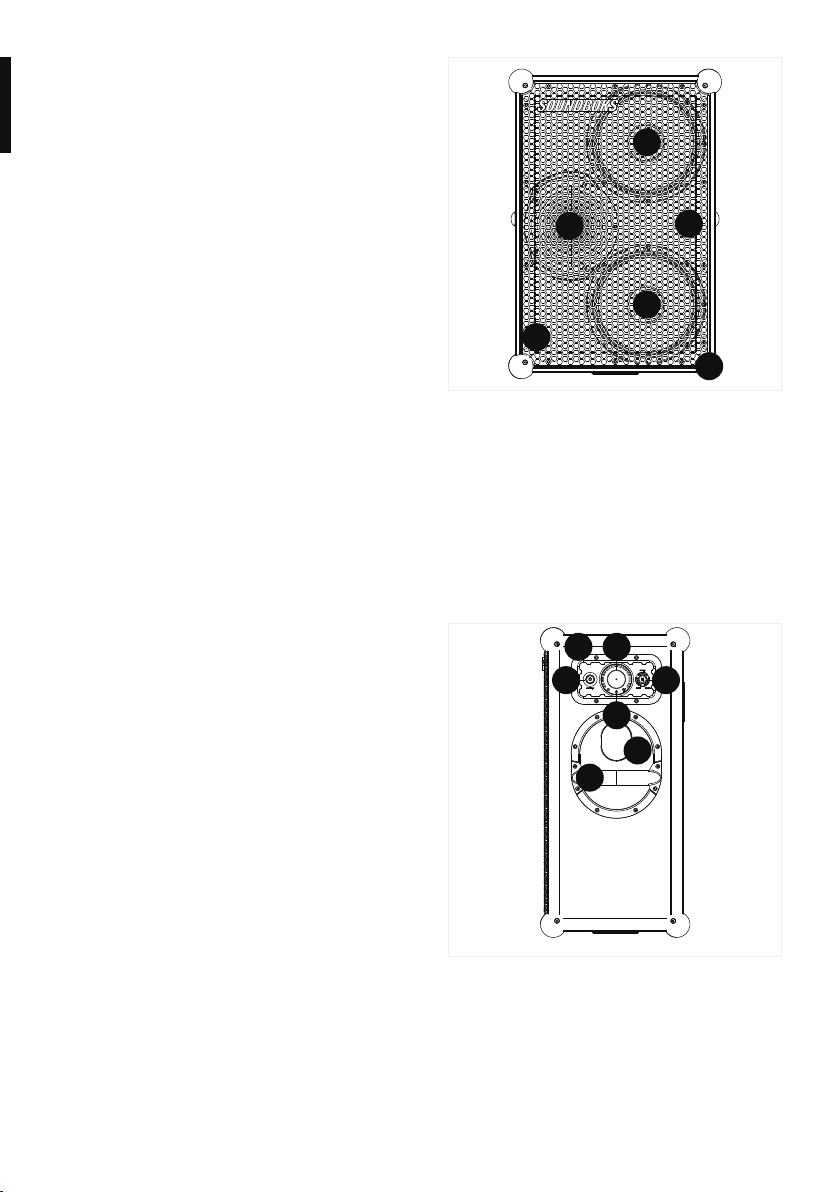
06 Ul Panel
07 POWER Button
08 TeamUP Button (SOLO/HOST/JOIN)
09 VOLUME Knob
10 Bluetooth LED Indicator
11 Pulse Reex Port
12 Powder-Coated Steel Handle
01 Bass Drivers
02 Tweeter
03 Detachable, Powder-Coated Steel Grill
04 Powder-Coated Aluminum Angles
05 Silicone Rubber Ball Corners
01
01
02 03
04
05
06
07 08
09
10
11
12
SOUNDBOKS GEN. .
Overview
Specications
Getting Started
Customization
SKAA & Bond Button
1.1
1.2
1.3
1.4
1.5
5ENGLISH
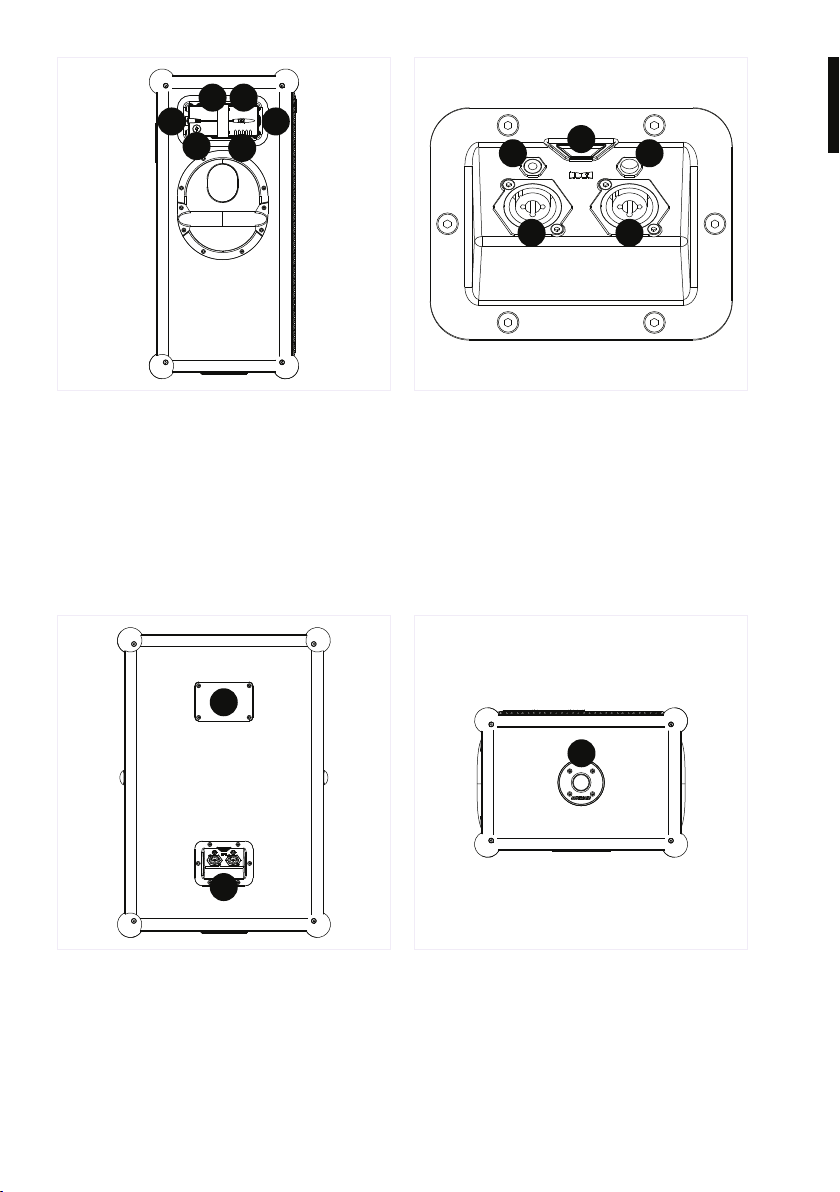
19 Unique SOUNDBOKS (Gen. 3) Team ID
20 Pro-Panel
21 SKAA Bond Button and Indicator LED
22 3.5mm (1/8”) Stereo Input
23 3.5mm (1/8”) Stereo Output
24 Combo Microphone/Instrument
(XLR, 1/4”) Inputs
25 Pole mount
13 Battery Port
14 DC Input
15 BATTERYBOKS
16 Strap
17 LED Battery Life Indicator
18 Battery Level Status Button
1314
1516
17
19
20
21
24 24
25
22 23
18

6ENGLISH
SOUND
Amplifier
Merus Audio eximo® amp switching
3 × 72W RMS class D ampliers
Advanced Bass DSP
Driver Units
2 × 10” 96dB woofers
1 × 1” 104dB compression driver tweeter
Acoustics
Effective frequency range: 40Hz - 20kHz
Custom sound prole with bass enhancer
Custom Pulse Reex Port
Connectivity
Bluetooth 5.0
TeamUp connection - Wirelessly daisy chain
up to 5 (total) nearby
SOUNDBOKS (Gen. 3) speakers (SKAA)
Compatibility
Compatible with iPhone® and Android™
Pro Panel
2 × Combo Microphone/Instrument
(XLR, 1/4”) Inputs
1 × 3.5mm (1/8”) Stereo Input
1 × 3.5mm (1/8”) Stereo Output
SKAA Bond Button
SOUNDBOKS GEN. .
Overview
Specifications
Getting Started
Customization
SKAA & Bond Button
1.1
1.2
1.3
1.4
1.5

7ENGLISH
BUILD
Dimensions
66 × 43 × 32 cm (25.6 × 17 × 13 inches
(H × W × D))
Weight
15.4 kg / 34 lb
Materials
Poplar cabinet
Powder-coated aluminum frame
Powder-coated steel grill and handles
Silicone ball corners
SMP temperature-ex adhesive
Features
Swappable grill and batteries
IP65 rated electronics coating
Pulse Reex Port
UI Panel:
Volume control
1 x Ø35mm Pole mount
Host/Join mode for wireless TeamUP
BATTERY
Design
5-Step LED battery-life indicator
Heavy-duty DC-connector
Cell Type
12.8V, 7.8Ah Lithium Iron Phosphate (LiFePO4)
Temperature range: -10 ºC to 40 ºC (14 ºF
to 100 ºF)
Capacity: 99.84Wh or 7.8Ah
Battery Life
40 hours at mid-volume
5 hours at full volume
3.5 hours for full recharge
Battery Management System (BMS)
Over and under-discharge protection
Short circuit protection
Overheat protection
Cell voltage management

8ENGLISH
Once you’ve received your SOUNDBOKS (Gen.
3), please keep the original packaging as this
will allow you to ship it back to us in case
of a return or a repair. It’s important to have
the original packaging and the SOUNDBOKS
(Gen. 3) in its original condition in order to be
eligible for a full refund. Once you’ve unboxed
your SOUNDBOKS (Gen. 3), here’s a quick
step-by-step guide to getting your music
started:
1. Charge your BATTERYBOKS for 3.5 hours
to ensure that it’s fully charged. See
BATTERYBOKS & CHARGER section for
more information.
2. Slide your BATTERYBOKS into the Battery
Port and plug in the DC plug.
3. Press the POWER button on the UI Panel
and the LED steps around the volume knob
will light up.
4. Connect your music device by one of the
following ways:
• Via Bluetooth: Your Team ID (on the back
of your SOUNDBOKS (Gen. 3)) is your
unique Bluetooth name. Once connected,
the indicator on the UI Panel will go from
ashing to showing a continuous blue light.
• Via Pro Panel: Plug cable (XLR, 1/8 “ or
1/4 “) into the Pro Panel and you’re all
set. No indicator light will show that
you’re connected.
• Via TeamUP: Set your SOUNDBOKS
(Gen. 3) in Join-mode on the UI Panel
to join another SOUNDBOKS or SKAA-
compatible device
5. Crank up your music and break through the
noise.
SOUNDBOKS GEN. .
Overview
Specications
Getting Started
Customization
SKAA & Bond Button
1.1
1.2
1.3
1.4
1.5

9ENGLISH
With the SOUNDBOKS (Gen. 3), we’ve made
it easier than ever to customize your grill.
Follow the instructions below, believe in your
creative self and transform your SOUNDBOKS
(Gen. 3) into a true work of art. Here’s a simple
step-by-step guide for how to customize your
SOUNDBOKS (Gen. 3) grill:
SOUNDBOKS GEN. .
Overview
Specications
Getting Started
Customization
SKAA & Bond Button
1.1
1.2
1.3
1.4
1.5
Remove your grill:
Find the Allen key (Alt. hex key, Allen wrench)
that’s included with your SOUNDBOKS (Gen.
3). Use the Allen key to unscrew the screws in
the grill, marked on the picture on the right.
Take off the logo:
Unscrew the SOUNDBOKS logo from behind
the grill and put it aside for now.
Get creative:
Release your inner artist and make the
SOUNDBOKS (Gen. 3) your own. The grill can
handle most types of paint, just be sure to
apply a layer of primer before and sealer after.
Back to the party:
Pop the logo and grill back on. Once
everything is back in place, connect your
music, crank it up and show off your custom
SOUNDBOKS (Gen. 3) to the world.

10ENGLISH
The following is the ofcial SKAA RECEIVER
USER’S GUIDE. It describes in detail how to
operate and troubleshoot the Bond Button,
located on the back of your SOUNDBOKS
(Gen. 3) on the Pro Panel. The Bond Button
is the control button for JOIN-mode through
the wireless daisy chaining feature, TeamUP.
Each SKAA® receiver has a Green List which
remembers your favorite transmitters. A
Green Indicator on your receiver means you
are listening to a favorite or hunting for one.
Your receiver can also explore to nd new
transmitters—an Amber Indicator means you
are exploring for transmitters that are not on
your Green List. A Cluster is a product with
two or more pieces that behave as one. The
Bond Button lets you select which transmitter
you’re listening to. The Bond Button has the
logo consisting of two arrows.
SOUNDBOKS GEN. .
Overview
Specications
Getting Started
Customization
SKAA & Bond Button
1.1
1.2
1.3
1.4
1.5
The SKAA Compatible Badge found on the
Product certies that this Product has been
tested and is fully compliant with all of the
requirements of the SKAA Standard and
has been granted SKAA Certication. This
Product will work seamlessly with other
products in the SKAA ecosystem of audio
transmitting and receiving devices. For more
information on the SKAA Standard, please
visit www.SKAA.com. The SKAA® name as
well as its associated marks, logos and icons
are trademarks or registered trademarks of
Eleven Engineering Incorporated.
Tabla de contenidos
Idiomas:
Otros manuales de Oradores de SOUNDBOKS

SOUNDBOKS
SOUNDBOKS GEN. 4 Manual de usuario

SOUNDBOKS
SOUNDBOKS GO Manual de usuario

SOUNDBOKS
SOUNDBOKS SOUNDBOKS 2 Manual de usuario

SOUNDBOKS
SOUNDBOKS SOUNDBOKS Manual de usuario

SOUNDBOKS
SOUNDBOKS SOUNDBOKS 2 Manual de usuario

SOUNDBOKS
SOUNDBOKS GEN. 4 Manual de usuario

SOUNDBOKS
SOUNDBOKS SB2 Manual de usuario


