
smart home SB-IR Remote-HH Manual de usuario

Manual for G4 Remote Control
Manual version: V1.0
Updated date: May 4, 2012
Prepared by: Mendel Lin
Email: [email protected]
Copyright: Smart Group
Content
SN Chapter Page#
1 Product Picture 1
1.1 G4 Remote Control 1
1.2 DDP and IR Receiver 3
2 Firmware Version Needed 3
3 Functions Explanation for G4 Remote Control 3
3.1 Lighting Control 3
3.2 Air Conditioning Control 5
3.3 Mood 6
3.4 Security 7
3.5 Z-Audio 8
3.6 Motor 10
3.7 Service 11
3.8 Others 12
4 P.A. and Panic Settings 12
1. Product Picture
1.1 G4 Remote Control (Model#: SB-IR Remote-HH)
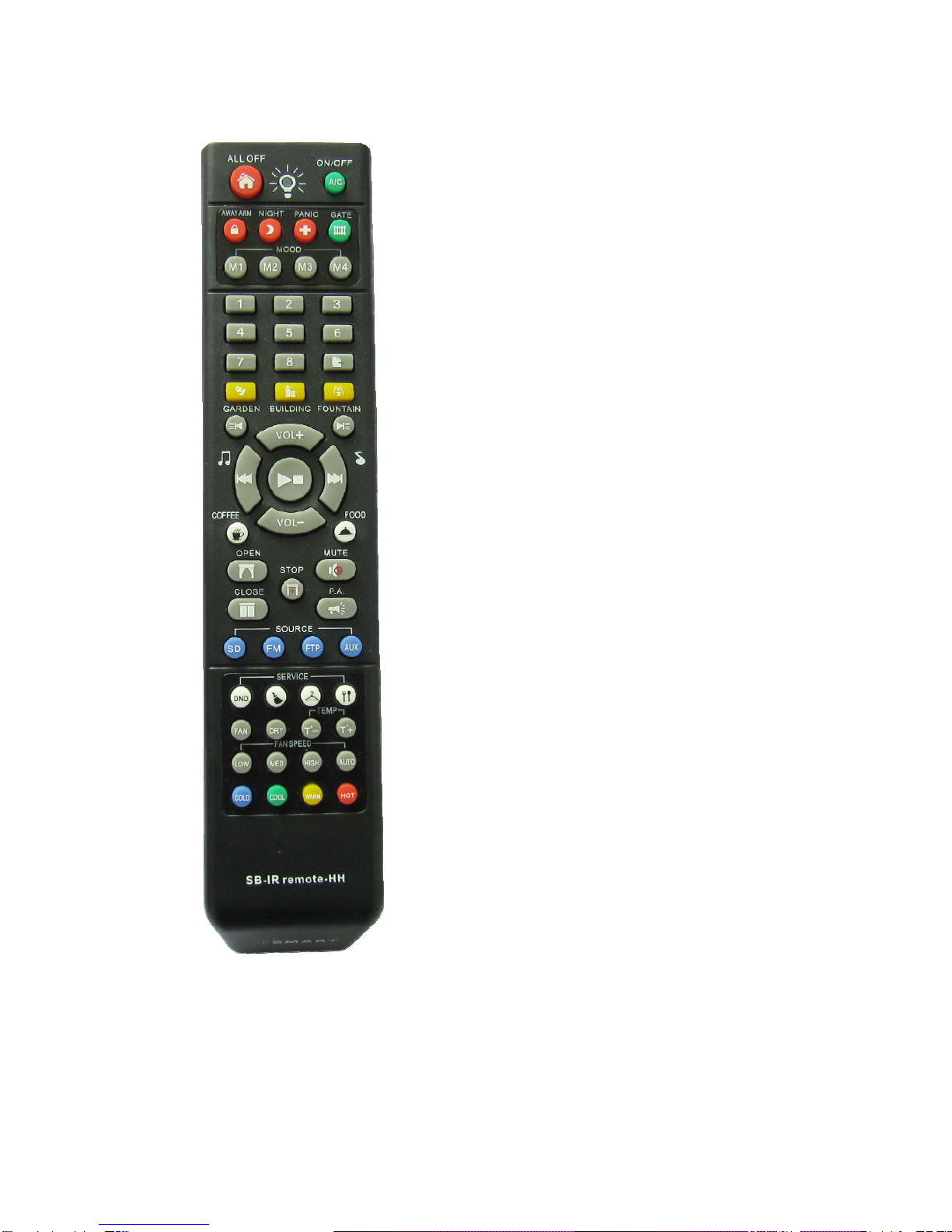
1.2 DDP and IR Receiver
DDP

IR Receiver which is connected to the back of DDP
The backside of DDP, the green connector is for IR Receiver
ersion needed
DPApr 12 2012 V1.39 or above ove
the version of devices that you have are lower than above version,
Remote Control
2. Firmware V
the firmware version of DDP needed: Smart G4 D
the firmware version of Z-Audio needed: Smart G4 Z-Audio Apr 18 2012 V1.21 or Ab
the Version of Smart Cloud software needed: V13.61 or above
If
Please upgrade it first.
3. Functions Explanation for G4

3.1 Lighting Control
3.1.1 ALL OFF
Functions: All Light Off
Programming: It depends on 1st command of the configuration of 4 buttons of 1st page on
DDP, please see the picture below:
Settings of button 1 of page 1:
Settings of button 2 of page 1:
Settings of button 3 of page 1:
Settings of button 4 of page 1:
3.1.2 Number 1,2,3,4,5,6,7,8
Button name Picture Functions
1
Linking to the left side of 1st button
2
Linking to the right side of 1st button
3
Linking to the left side of 2nd button

4
Linking to the right side of 2nd button
5
Linking to the left side of 3rd button
6
Linking to the right side of 3rd button
7
Linking to the left side of 4th button
8
Linking to the right side of 4th button
3.1.3 Dimming
Button 1 and button 2 on Remote control are for 1st button on DDP,
Button 3 and button 4 on Remote Control are for 2nd button on DDP,
Button 5 and button 6 on Remote Control are for 3rd button on DDP,
Button 7 and button 8 on Remote Control are for 4th button on DDP,
To dim or ramp the light, you can keep pressing the button of number 1-8.
3.2 Air Conditioning Control
Button name Picture Functions
A/C On/Off
Switch on/off theAC
FAN
Change the AC mode to FAN
DRY
Change the AC mode to DRY
COLD
Change the AC Mode to Cool
and set the preset
temperature to 20c

COOL
Change the AC Mode to Cool
and set the preset
temperature to 23c
WARM
Change the AC Mode to
Heat and set the preset
temperature to 25c
HOT
Change the AC Mode to
Heat and set the preset
temperature to 27c
LOW/MED/HIGH/AUTO Change the fan speed
T-, T+
Change the preset
temperature
3.3 Mood
Button name Picture Functions
M1
Linking to 1st button of 3rd page on DDP
M2
Linking to 2nd button of 3rd page on DDP
M3
Linking to 3rd button of 3rd page on DDP
M4
Linking to 4th button of 3rd page on DDP
GARDEN
To program it, go to smart cloud software, go to DDP,
please see the picture below:

BUILDING To program it, go to smart cloud software, go to DDP,
please see the picture below:
FOUNTAIN
To program it, go to smart cloud software, go to DDP,
please see the picture below:
COFFEE
To program it, go to smart cloud software, go to DDP,
please see the picture below:
FOOD
To program it, go to smart cloud software, go to DDP,
please see the picture below:
3.4 Security
Button
name Picture Functions

Away
ARM
To program it, go to smart cloud software, go to DDP, please
see the picture below:
Night
To program it, go to smart cloud software, go to DDP, please
see the picture below:
Panic
To program it, go to smart cloud software, go to DDP, please
see the picture below:
for the detail the settings, please see the below
4. P.A. and Panic Settings
To activate panic, keep pressing button PANIC for 3
seconds
Gate
To program it, go to smart cloud software, go to DDP, please
see the picture below:
3.5 Z-Audio
Butto
n
name
Picture Functions

Previo
us
Album
Previous Album/List
Next
Album
Next Album/List
VOL+
Turn up the volume
Keep pressing works for this button
VOL-
Turn down the volume
Keep pressing works for this button
Previo
us
Song
Previous song of current album
Next
Song
Next Song of current album
Play/S
top
Play or Stop
Mute
Mute
P.A.
Public Announcement
for the detail the settings, please see the below

4. P.A. and Panic Settings
To activate the P.A, keep pressing the P.A button for 3
seconds
Music
Sourc
e
Chang
ing
Music Source Changing
SD: SD Card
FM: FM Radio
FTP: FTP Server
AUX: Audio In
3.6 Motor
Button
name Picture Functions
OPEN
Open the shades
To program it, go to smart cloud software, go to DDP,
please see the picture below:
CLOSE
Close the shades
To program it, go to smart cloud software, go to DDP,
please see the picture below:
STOP
Stop the shades
To program it, go to smart cloud software, go to DDP,
please see the picture below:
Tabla de contenidos
Otros manuales de Mando a distancia de smart home


