
Siyata Mobile UNIDEN UV350 Manual de usuario
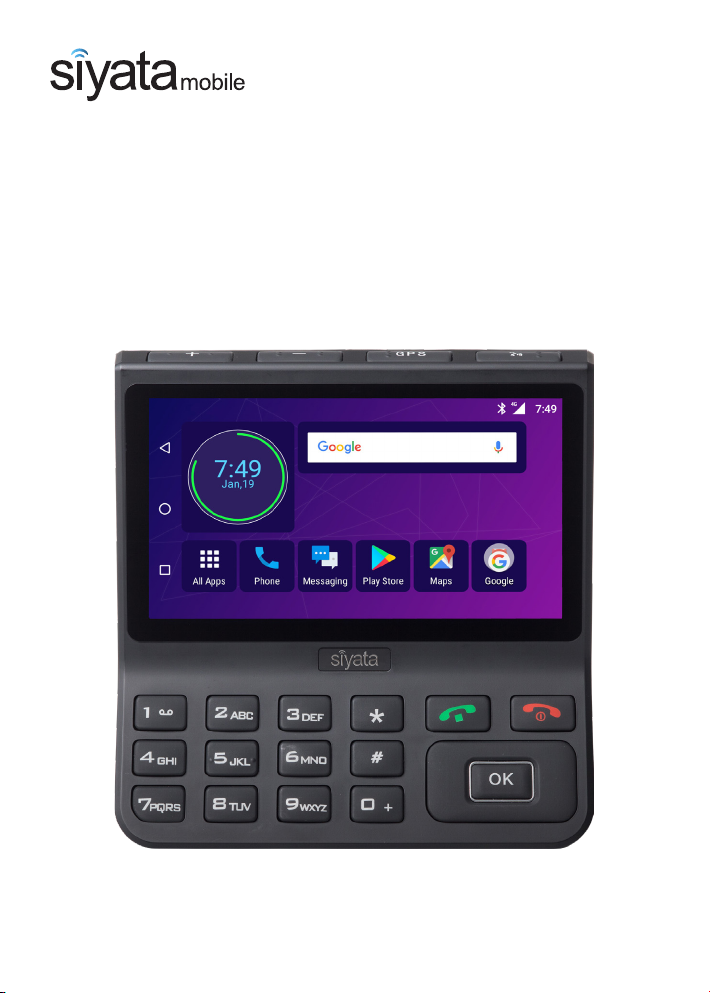
User Guide
UV350
Next Generation Vehicle Communicator

EN User Guide 1
DE Bedienungsanleitung 23
FR Guide de l’utilisateur 43

3
English
Thank you for purchasing UV350
The UV350 is intended to provide enterprise connectivity and enjoys
the advantages of today’s smart devices and 4G LTE networks for
everyday use at your work.
The device has a large 5.5” display and large, well-spaced keys and has
been especially designed to allow you to use it safely and easily while
driving.
The device has been developed taking into account the vehicle’s
environment; special requirements that a vehicle imposes for cellular
device operation, with special emphasis on sound quality; dialing
convenience and reaction time.
During the development, the device has undergone a strict series of
tests, according to the standards relating to activity in the vehicle’s
environment.
ThismanualwillhelpyoudiscovertheworldofpossibilitiesoftheUV350
device. It contains information about the features and innovations that
will help you operate the phone in the most convenient and effective
way (some features require operator support).
Please read this manual and safety guide to ensure safe and pleasant
use of the device.
The device must be installed by an Siyata Mobile Inc. approved
qualified and professional installer.
Warranty is valid for one year with an invoice from an authorized
Siyata Mobile Inc. dealer showing the purchase date.
If you have any questions or require support, please contact us at:
support@siyatamobile.com
For more information, please visit our website at
www.siyatamobile.com

4
English
Table of Contents
Safety Directives..................................................................... 6
Disclaimers ...............................................................................9
1. Your UV350..................................................................... 11
1.1 Kit Contents....................................................................11
1.2 Keys and Connectors......................................................12
1.3 Indicators and Key Functions .........................................13
1.4 Display Indicators...........................................................13
2 Basic Operations ............................................................. 14
2.1 Switching the Device On/Off..........................................14
2.2 Home Screens ................................................................14
2.3 Receiving a Call ..............................................................14
2.4 Making a Call..................................................................15
2.5 Messaging (SMS)............................................................17
3 Contacts.......................................................................... 18
3.1 Search for a Contact.......................................................18
3.2 Add a New Contact ........................................................18
3.3 Edit a Contact.................................................................19
4 Accounts......................................................................... 20
5 Settings Menu................................................................. 21
6 PTT (Push to Talk) service................................................ 22

5
English
UV350
HD QUALITY SOUND
Enjoy clear high-quality
voice calls with noise-
free and echo-filtering
technologies
IN-VEHICLE HIGH
SPEED WIFI HOT
SPOT
PUSH TO TALK OVER
CELLULAR (PoC)
ANDROID OS
ADVANCED NAVIGATION
Get to your destination
quickly and efficiently
with accurate and easy to
use GPS navigation
ALWAYS
CONNECTED AND
POWERED BY
VEHICLE BATTERY
VOICE DIALING/
SEARCHING
Use voice dialing/
searching to keep your
eyes on the road
4G LTE
Lightning fast
4G speed
connectivity
CONTACTS AND
CALENDAR
Synchronize your contacts
and calendar online with
Exchange, Google and
more
CELLULAR & GPS
ANTENNA
EXTRA LARGE WIDE
SCREEN DISPLAY WITH
LARGE BUTTONS

6
English
Safety Directives
Note: To decrease the risk of injury, please read the following
important safety information before using this device. The
manufacturer will not be held responsible for any damage resulting
from non-standard use or usage contrary to instructions appearing
in this manual.
Driving safely and in compliance with all applicable laws is your
responsibility!
Road Safety!
Please check and abide by all applicable laws and regulations on the
use of the device in a vehicle or when driving.
Service!
Do not disassemble the installed device or its accessories. In the event
of device malfunction, please contact your nearest authorized service
center.
Vehicles with installed airbags!
Airbags inflate with great power. When installing the device in the
vehicle, the qualified professional installer must verify that the device
is installed within a safe distance from the airbag. Any installation that
blocks the inflating airbag might cause very serious injuries.
Vehicle systems!
The radio frequency (RF) signals might affect electronic systems
inappropriately installed in motorized vehicles or that are not properly
protected. Prior to installing any equipment in your vehicle, you
should also consult with the equipment manufacturer for information
on radio frequency signals.

7
English
Personal medical devices!
If you have personal medical devices, such as a cardiac pacemaker
or hearing aid, it is recommended that you check with the device’s
manufacturers that it is protected against radio (RF) waves.
Hearing aids!
Digital wireless devices may interfere with hearing aids. In this case,
consult the manufacturer of the hearing aids concerning alterative
options.
Turning off the device in places in which there is a
danger of explosions!
Where there is a danger of explosions, such as in a workplace involving
explosives, fuel pumping areas, such as gas stations, areas in which
the air contains chemicals, crop particles, dust or metallic powders
and any area in which turning off a vehicle engine is recommended,
the device must be turned off and the directions and signs at the site
followed.
Warning signs!
Turn off the phone in the vehicle in places where there are warning
signs. Follow all signs and instructions.
Antenna!
When installing the device, you must use only authorized cellular
antenna. Any use of an unauthorized antenna, or changes or additions
made to the antenna, might cause damage to the device and affect its
quality of use.
Information about radio frequency signal exposure
In August 1996, the U.S. Federal Communications Commission
(FCC) established a special standard on safety in human exposure to
radio frequency energy and electromagnetic energy emitted from

8
English
transmitters. The directions in the standard correspond with the safety
standards previously established by the American National Standards
Institute and international standards institutes.
The device in your possession operates in accordance with the FCC
guidelines and international standards and operates within the
permitted frequency range.
Handling the antenna
Use only the original antenna provided with the device or a
replacement antenna approved for use by Siyata Mobile Inc. Using
antennas that have not been approved for use by Siyata Mobile Inc.,
modifications or additions may cause damage to the cellular device
and violation of the FCC regulations.
Do not use a damaged antenna. Skin contact with an antenna may
cause a slight burn. In the case of damage to the antenna, contact the
customer service center for getting a replacement antenna.
Note: additional, more detailed information on exposure to radio
frequency waves may be found on the FCC’s website at www.fcc.gov
and on the Infocell website: www.infocell.org
This device complies with all CE certificates.
The device operates in accordance with the CE guidelines and
international standards and complies within the permitted frequency
range.
This equipment is in compliance with the essential requirements and
other relevant provisions of Directive 1999/5/EC, 2011/65/EU and
2009/125/EC.

9
English
Disclaimers
•The UV350 device must be installed by an Siyata Mobile Inc.
qualified professional installer.
•Siyata Mobile Inc. will not be responsible for any issues related to
the device installation or for any damage to the vehicle resulting
from the installation or from the use of the device in your vehicle.
•Siyata Mobile Inc. is not responsible for any third-party accessories
that were not supplied with the product, and /or any damage
caused to the product by any third party accessories.
•The audio-out feature will work only in vehicles that support an
auxiliary (AUX) input to the vehicle sound system. In vehicles that
do not support an auxiliary input, a third party solution may be
necessary.
•UV350 device does not include cellular or data connectivity. These
should be purchased separately from your local mobile provider and
depend on network plans in your region. Any use of the device is
subject to the purchase of such plans and may be limited depended
on the services provided by your cellular operator.
•Siyata Mobile Inc. is not responsible for any third-party applications
and cannot guarantee that any such application will work on the
device.
•The use of third party software applications installed on the device
is subject to the acceptance of the terms and conditions of the
specific software application and is limited in accordance with the
applicable vendor terms.
•Certain trademarks used in connection with the product are
registered trademarks of their respective owners.
Use the device only in accordance with applicable laws and
regulations and keep your full attention on driving and the road
at all times
Drive safely! Check and abide by all applicable laws

10
English
The UV350 device is the first LTE all-in-one fleet communications
device for cellular voice calls, Push To Talk over cellular,
navigation, data applications, and more.
Otros manuales para UNIDEN UV350
3
Tabla de contenidos
Idiomas:
Otros manuales de Teléfono móvil de Siyata Mobile

Siyata Mobile
Siyata Mobile UR7 Manual de usuario

Siyata Mobile
Siyata Mobile VOYAGER Manual de usuario

Siyata Mobile
Siyata Mobile UNIDEN UV350 Manual de usuario

Siyata Mobile
Siyata Mobile UNIDEN UV350 Manual de usuario

Siyata Mobile
Siyata Mobile UNIDEN UV350 Manual de usuario

Siyata Mobile
Siyata Mobile CP250 Manual de usuario


