Sibata MT-05U Manual de usuario

CODE 090200-081
Thank you for purchasing this product.
●This operation manual describes the precautions that are important for preventing accidents, as well as
the procedures used to handle the product.
●To ensure safety, read this operation manual and the attached warranty thoroughly before use, and use
the product correctly.
●After reading this operation manual and the warranty, keep them handy for future reference.
OPERATION MANUAL (PC Software User Guide)

2
Table of Contents
1 Before Use ................................................................................................ 4
2 System Requirements ............................................................................. 6
3 Installing Software ................................................................................... 7
3-1 Installing Communication Software................................................................ 7
3-2 Installing USB Driver.................................................................................... 10
3-3 Connecting PC to MT-05U ........................................................................... 13
4 Uninstalling Software ............................................................................ 13
5 Introduction ............................................................................................ 15
6 Starting Software ................................................................................... 16
7 Startup Screen (Main Screen)............................................................... 17
8 Connection ............................................................................................. 18
9 Daily Check............................................................................................. 19
9-1 Check Data/Read......................................................................................... 20
9-2 Save File ...................................................................................................... 20
9-3 Start (Daily Check)....................................................................................... 21
9-4 Retry............................................................................................................. 22
9-5 Redo Check ................................................................................................. 22
10 Fit Test................................................................................................... 23
10-1 Save File .................................................................................................... 23
10-2 Display by Measurement Unit .................................................................... 24
10-3 Person........................................................................................................ 25
10-4 Respirator................................................................................................... 25
10-5 Mask Size .................................................................................................. 26
10-6 Protocol ...................................................................................................... 26
10-7 Operator..................................................................................................... 27
10-8 Start (Fit Test)............................................................................................. 27
10-9 New Test .................................................................................................... 28
10-10 Redo Test................................................................................................. 28
10-11 Print/Preview Report ................................................................................ 28
11 View Fit Test Reports ........................................................................... 29
11-1 Browse Reports.......................................................................................... 30
11-2 Import Reports............................................................................................ 31
11-3 Save File .................................................................................................... 31
11-4 Person ........................................................................................................ 31
11-5 Respirator................................................................................................... 32
11-6 Mask Size................................................................................................... 32
11-7 Protocol ...................................................................................................... 33
11-8 Test Date .................................................................................................... 33
11-9 Due Date .................................................................................................... 34
11-10 Operator ................................................................................................... 34
11-11 Save ......................................................................................................... 35
11-12 Preview/Print Report ................................................................................ 35
11-13 Preview/Print Card ................................................................................... 35
12 Fit Check ............................................................................................... 36
12-1 Check Data / Read..................................................................................... 37
12-2 Display by Measurement Unit .................................................................... 38
12-3 Person........................................................................................................ 39
12-4 Respirator................................................................................................... 39
12-5 Mask Size .................................................................................................. 40
12-6 Start (Fit Check) ......................................................................................... 40
12-7 New Check................................................................................................. 41
12-8 Redo Check ............................................................................................... 41

3
13 Training ................................................................................................. 42
13-1 Settings ...................................................................................................... 43
13-2 Start (Training) ........................................................................................... 43
13-3 Record........................................................................................................ 44
14 People ................................................................................................... 45
14-1 Configuration.............................................................................................. 46
14-2 New Data ................................................................................................... 49
14-3 Select Data................................................................................................. 49
15 Respirator ............................................................................................. 50
16 Protocol................................................................................................. 52
17 Selecting/Creating/Editing Data.......................................................... 54
17-1 Save File .................................................................................................... 54
17-2 Select Report ............................................................................................. 55
17-3 New Report ................................................................................................ 57
17-4 Delete Report............................................................................................. 58
17-5 Select Data................................................................................................. 58
17-6 Delete Data ................................................................................................ 59
18 Import Reports ..................................................................................... 60
18-1 MT-05 Data ................................................................................................ 61
18-2 Import MT-05 Data ..................................................................................... 61
18-3 Delete MT-05 Data..................................................................................... 62
18-4 Select Data................................................................................................. 62
19 Printing.................................................................................................. 63
19-1 Print Report/Card Setup............................................................................. 63
19-2 Print Next Due Report................................................................................ 64
19-3 Print Fit Test Report ................................................................................... 65
19-4 Print Daily Check Report............................................................................ 66
19-5 Print Fit Check Report................................................................................ 67
19-6 Print Fit Test Data....................................................................................... 68
20 Troubleshooting................................................................................... 69
21 Warranty and Repairs .......................................................................... 70

4
1 Before Use
Read the following before using this software.
We have released following latest version to improve the function of this instrument. For the
operation method, please refer to the following and subsequent versions.
SYSTEM VERSION 2.20
FIRMWARE VERSION 2.20
SIBATA Fit Test Software 2.20
■Please be aware that it will not be able to operate correctly, if old versions are mixed.
For details on the operation and measurement procedures of the main unit of MT-05U, also
see the “MT-05U Operational Manual (Main Unit).”
Before using communication software dedicated for MT-05U
Notes
You can use this software only when you agree to all the terms in this agreement. By installing
this product, you are deemed to have agreed to this agreement.
Read this agreement carefully before starting installation.
If you do not agree to this agreement, you may not use this software. In such case, please
return this software (all the bundled equipment, if any) to Sibata or our sales distributor.
Precautions
You are requested to install and perform initial startup of this software and configure your own
PC by yourself.
Sibata and our sales distributors are not allowed to directly operate customers’ personal
computers for using this software.
(If your Sibata representative or our sales distributor performs configuration to enlarge the
capacity of the hard disk, a failure would lead to a warranty issue of the data in hard disk. To
prevent such failures, installation and configuration work needs to be performed by the
customer.)
If you are unsure how to install or operate this software, read the user’s manual of your PC or
the MT-05U or the corresponding section of the user’s manual of this software.

5
License Agreement and Warranty
Permissions
- Use of only a set of executable software developed from a downloaded file or related
attachment files on a single computer.
- Making of only one copy of this software for the purpose of backup. Or copying of this
software to the hard disk of a computer and keeping of the original magnetic media for the
purpose of backup.
Prohibitions
- Copying and distribution of the documents such as the operational manual that comes with
this software.
- Resetting all or part of the right of use of this software.
- Inspecting the source code of this software, performing reverse engineering, decompiling,
disassembling, modification or translation for the purpose of making an imitation of this
software.
- Use of an earlier version of this software or copy of it even after receiving a magnetic media
for upgrading this software or a new version that can be fully replaced with the earlier version.
Warranty
- Although we have sufficiently verified that the functions of this software is defect-free, the
software may not always be able to operate on all personal computers and peripherals. In
such case, Sibata will make its best effort to provide a product with bug fixes that can serve
as a substitute. (Note that any defect depending on the OS cannot be addressed.)
- The descriptions in this manual do not always guarantee customer satisfaction or no
mistakes with this software.
Compensation
- Sibata is not responsible for specific damages, indirect damages, installation and operation
of this software regardless of the coverage of this agreement and compensation clauses.
Specifically, damages may include customers’ lost opportunities to earn profits or suffering
from data loss resulting from the use of this software and that this software becomes
unusable. Even having been warned the possibility of such damages, Sibata shall not be
liable therefor.
- In any case, compensation payable by Sibata shall not exceed the purchase price of this
software.
- The liability limitation and exemptions described above are applied regardless of whether
the customer returns this software.

6
2 System Requirements
●Operating system
(hereafter referred to as OS)
Windows 8.1 (32 bit, 64 bit)
Windows 10 (32 bit, 64 bit)
Windows is a registered trademark of Microsoft Corporation.
●Personal computer
(hereafter referred to as PC)
PC where the OS above runs
●Port for communication One port for the USB A connector is necessary.
The port must normally work on the computer.
●Other peripherals
(printer, etc.)
These devices must be completely known to work with the
OS above.
This software has been verified with common PCs and peripherals, but the software may not
properly run on some models.
■Do not connect the MT-05U to a PC before installing the USB driver.
■Make sure to install the USB driver before connecting the MT-05U.
■Note that these specifications may be subject to change without notice to the extent
that product functions will not be impaired.

7
3 Installing Software
3-1 Installing Communication Software
For this operation, administrative rights may be required depending on the OS you use.
You are required to uninstall (delete) the software when re-installing or upgrading it. (See 4
Uninstalling Software).
The software launches automatically when the "SIBATA Fit Test Software "CD-ROM is
inserted into the CD drive of the PC. Follow the on-screen instructions to install the software.
If it does not run automatically, use Windows Explorer to navigate to the CD-ROM directory,
and run "Install.exe".
If the following message appears, confirm that “SIBATA FitTest Software Install” is displayed
and click [Yes].
“User Account Control
Do you want to allow this app to make changes to your device?”

8
The installation program starts.
Click [Communication Software].
The preparation for installation starts.
To change the installation location, click [Browse…] and specify the desired folder. If you do
not want to change the location, click [Next>].

9
Installation starts.
Once installation is completed, the dialogue box above will be displayed. Click [Close].
■Do not connect the MT-05U to the PC before installing the USB driver.
■Make sure to install the USB driver before connecting the MT-05U.

10
3-2 Installing USB Driver
The MT-05U is equipped with a USB interface. Communication is available via the USB
interface.
To use this function, you must install the USB driver on your PC. Once you have installed the
driver, it can be seamlessly used from the second time onward.
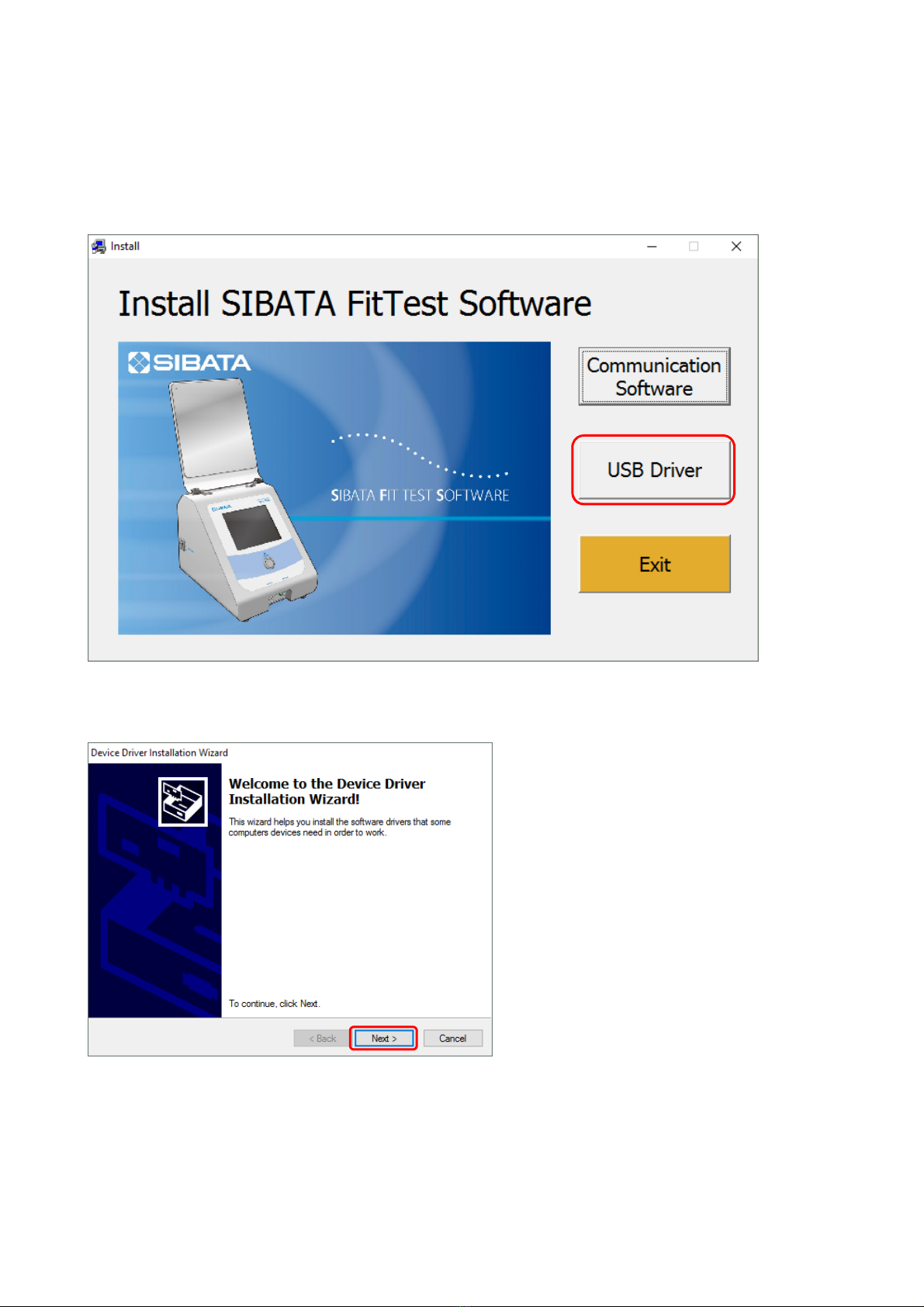
Click [USB Driver] of the installation program.
Click [Next].
Otros manuales para MT-05U
1
Tabla de contenidos
Otros manuales de Equipo de prueba de Sibata
Manuales populares de Equipo de prueba de otras marcas

SMART
SMART KANAAD SBT XTREME 3G Series Manual de usuario

Agilent Technologies
Agilent Technologies BERT Serial Manual de usuario

Agilent Technologies
Agilent Technologies N3280A Manual de usuario

Vernier
Vernier Go Direct Voltage Manual de usuario

Lifeloc
Lifeloc R.A.D.A.R. Manual de usuario

Fluke
Fluke T5-600 Instrucciones de funcionamiento e instalación