Sennheiser AMBEO Manual de usuario

AMBEO Soundbar
SB01
Instruction manual
Use the search function, the navigation (left) or the following links:
Start
“Product overview”
“Getting started”
“Installing the AMBEO Soundbar”
“Connecting devices to the AMBEO Soundbar”
“Putting the AMBEO Soundbar into operation”
“Using the AMBEO Soundbar”
“Maintaining the AMBEO Soundbar”
“Specifications”
Sennheiser electronic GmbH & Co. KG
Am Labor 1
30900 Wedemark
Germany
www.sennheiser.com
Version: 05/19 A01

Important safety instructions
2 | AMBEO Soundbar
Important safety instructions
1. Read these safety instructions.
2. Keep these safety instructions. Always include these safety
instructions when passing the product on to others.
3. Heed all warnings.
4. Follow all instructions.
5. Do not use the product near water.
6. Only clean the product when it is not connected to the power sup-
ply system. Clean only with a dry cloth.
7. Ensure circulating ventilation. The product generates heat which
is dissipated through the housing. Install in accordance with the
manufacturer's instructions.
8. Do not install near any heat sources such as radiators, stoves, or
other products that produce heat and do not expose to direct sun-
light.
9. Do not defeat the safety purpose of the polarized or grounding-
type plug. A polarized plug has two blades with one wider than
the other. A grounding type plug has two blades and a third
grounding prong. The wide blade or the third prong are provided
for your safety. If the provided plug does not fit into your outlet,
consult an electrician for replacement of the obsolete outlet.
10. Protect the power supply cord from being walked on or pinched,
particularly at plugs, convenience receptacles, and the point
where it exits from the product.
11. Use only attachments/accessories/spare parts supplied or rec-
ommended by Sennheiser.
12. Use only with shelves, racks, or tables that can safely support the
weight of the product (see instruction manual).
13. Unplug the product during lightning storms or when unused for
long periods of time.
14. Refer all servicing to qualified service personnel. Servicing is
required when the product has been damaged in any way, such as
power supply cord or plug is damaged, liquid has been spilled or
objects have fallen into the product, when the product has been
exposed to rain or moisture, does not operate normally, or has
been dropped.
15.WARNING: To reduce the risk of fire and electric shock, do not
expose the product to dripping or splashing and ensure that no
objects filled with liquids, such as vases, are placed on the prod-
uct.
16. To completely disconnect this product from the AC mains, dis-
connect the power supply cord plug from the AC receptacle.
17. The plug of the power supply cord shall remain readily accessible.

Important safety instructions
AMBEO Soundbar | 3
Hazard warnings on the bottom of the product
The product generates heat which is dissipated through
the housing! Do not touch when in use or directly after
use!
The following label is attached to the bottom of the product.
The symbols on this label have the following meaning:
Read and follow the safety and operating instructions
contained in this instruction manual.
Presence of uninsulated dangerous voltage within the
product's enclosure that may be of sufficient magnitude
to constitute a risk of fire or electric shock.
Never open the product. There is a risk of
electric shock when touching live parts.
There are no user serviceable parts inside
the product. Refer repairs to an authorized
Sennheiser service partner.
Safety instructions for lithium batteries
(remote control)
WARNING
If abused or misused, the batteries may leak. In extreme
cases, they may even present a risk of
•explosion,
• fire development,
•heatgeneration,
• smoke or gas development.
If you think batteries might have been swallowed or
placed inside any part of the body, seek immediate
medical attention.
Keep away from children.
Observe correct polarity.
Immediately remove the batteries from obviously
defective product.
Dispose of batteries at special collection points or return
them to your specialist dealer.
Do not mutilate or dismantle.
Do not expose to moisture.

Important safety instructions
4 | AMBEO Soundbar
Preventing damage to health and accidents
▷Protect your hearing from high volume levels. Permanent hearing
damage may occur when listening at high volume levels for long
periods of time.
▷The product generates stronger permanent magnetic fields that
could cause interference with cardiac pacemakers, implanted
defibrillators (ICDs) and other implants. Always maintain a dis-
tance of at least 3.94"/10 cm between the product component
containing the magnet and the cardiac pacemaker, implanted
defibrillator, or other implant.
▷Keep the product, accessories and packaging parts out of reach
of children and pets to prevent accidents. Swallowing and chok-
ing hazard.
▷Do not use the product in an environment that requires your spe-
cial attention (e.g. when performing skilled jobs).
Preventing damage to the product and malfunctions
▷If the product was moved from a cold environment to a warm one,
allow the product to stand for at least 2 hours before putting it
into operation.
Intended use/Liability
This product has been designed for playing TV sound and music via
cable connections, Bluetooth, WiFi or Ethernet. This product is
intended for private domestic use only. It is not intended for commer-
cial use.
It is considered improper use when this product is used for any appli-
cation not named in the instruction manual. Sennheiser is not liable
for damages to USB devices that are not consistent with the USB
specifications. Sennheiser does not accept liability for damage aris-
ing from improper use or misuse of this product and its attach-
ments/accessories.
Before putting the product into operation, please observe the
respective country-specific regulations.
Remove the batteries if the product will not be used for
extended periods of time.
Pack/store batteries so that the terminals cannot
contact each other – danger of shorting out/fire hazard.
Only use batteries specified by Sennheiser.
Store the products in a cool and dry place at room
temperature (approx. 20 °C/68 °F).
Do not continue to use defective batteries.
Do not heat above 70 °C/158 °F, e.g. do not expose to
sunlight or throw into a fire.

Important safety instructions
AMBEO Soundbar | 5
Notes on data collection and processing and on firmware updates
This product stores individual settings such as volume, sound and UI
settings (e.g. LED brightness), selected input and designations,
Bluetooth addresses of paired devices, WiFi settings and usage data
(e.g. power-on cycles and operating times). This data is required for
the operation of the product and is not transferred to Sennheiser or
companies commissioned by Sennheiser and is not processed.
You can update the firmware of the product for free via an Internet
connection. If the product is connected to the Internet, the following
data is automatically transferred to and processed by Sennheiser
servers in order to provide and transfer suitable firmware updates:
MAC address, IP address. The data will only be used as specified and
will not be stored permanently. If you do not want this data to be
transferred and processed, do not connect to the Internet.
Notes on the packaging
We recommend using the original packaging to ensure safe storage
and transport of the Soundbar. Damage during transport is often
caused by the use of unsuitable packaging. The original packaging of
the Soundbar provides optimal protection and minimizes the risk of
damage during transport.

Package contents
6 | AMBEO Soundbar
Package contents
SB01 AMBEO Soundbar
Power cable, country-specific
High Speed HDMI®Cable, length approx. 1 m
SB01-RC remote control (incl. 1x CR2032 battery)
SB01-MS microphone for room calibration
with microphone holder, cable length approx. 5 m
Quick guide
Safety guide
Online you can find:
•this detailed instruction manual and additional information
(www.sennheiser.com/download)
•the Sennheiser Smart Control app for configuring the AMBEO
Soundbar and for additional functions
(www.sennheiser.com/smartcontrol)
Optional accessories
SB01-WM wall mount for the AMBEO Soundbar,
bracket for wall mounting (article no.: 508612)
You can find a list of accessories on the AMBEO Soundbar
product page at www.sennheiser.com or contact your local
Sennheiser partner: www.sennheiser.com > “Service & Sup-
port”.

Product overview
AMBEO Soundbar | 7
Product overview
SB01 AMBEO Soundbar
Front
76 8 9
453
2
1
0AC0D
B
Control panel
MUTE button
Volume -button (volume down)
Volume +button (volume up)
AMBEO button
for activating the AMBEO Soundbar
(pressing for 4 seconds activates the room calibration)
Multi-function button •
for controlling the media playback
Bluetooth pairing
(by simultaneously pressing the multi-function button and
the input source button for 2 seconds)
SOURCE button (input source selection)
NFC antenna
On/off button
Vibration absorbing feet
Input for room calibration microphone
OLED display with matt, scratch-resistant surface
Status LED
AMBEO display

Product overview
8 | AMBEO Soundbar
Back
0 0E
Cooling vents
Bottom
5V⎓ 1 A
AUX IN
SW PRE
OUT
OPT IN
HDMI 3 IN
HDMI 2 IN
HDMI 1 IN
HDMI TV
(eARC) OUT
ETHERNET
USB
POWER
F G H JI M N OK L
6TR S
QP
Connections
IEC mains socket
POWER 100 - 240 V~, 50/60 Hz, 250 W
USB input (for updates only)
type B, USB 5 V⎓, 1 A
Ethernet input
RJ45, ETHERNET
HDMI output
HDMI TV (eARC) OUT 5 V⎓, 1 A
HDMI input
HDMI 1 IN
HDMI input
HDMI 2 IN
HDMI input
HDMI 3 IN
S/PDIF input,
optical, OPT IN
Output for connecting a subwoofer with power amplifier
RCA socket SW PRE OUT
RCA input sockets for an analog audio source
AUX IN
Mounting thread (under the rubber foot) for the SB01-WM
wall mount (optional accessory)
Type plate

Product overview
AMBEO Soundbar | 9
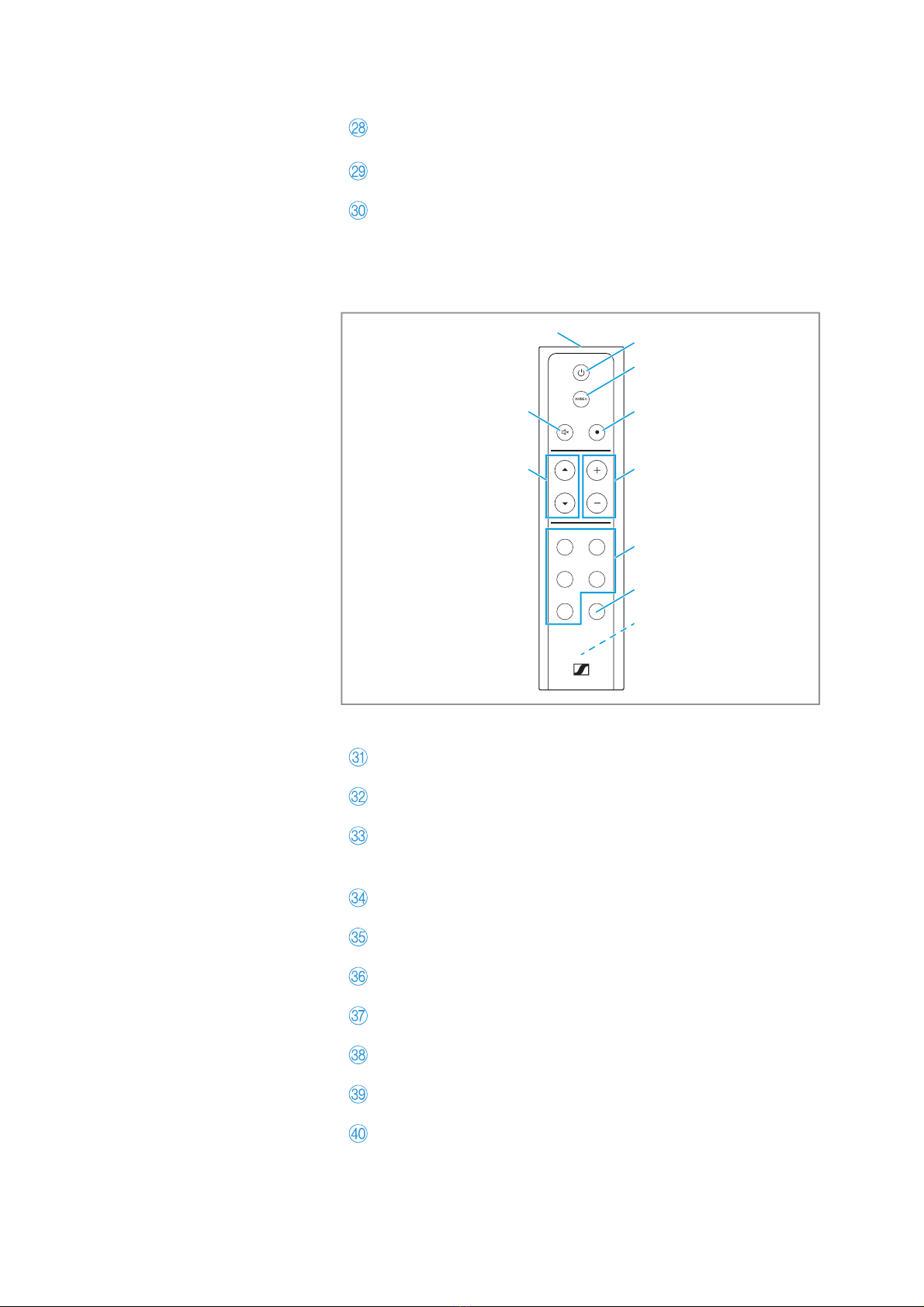
SB01-RC remote control
NEWS SPORTS
NEUTRAL NIGHT
MUSICMOVIE
VOLSOURCE
UV
W
\
[
X_
Y
Z
]
Infrared transmitting diode
On/off button
AMBEO button
for activating the AMBEO Soundbar
(pressing for 4 seconds activates the room calibration)
Multi-function button
Volume buttons
Sound profile button
Night mode button
Battery compartment (for 1x CR2032 battery)
Input source button
Mute button
Cable tie for bundling and strain-relieving the connected
cables
RESET button
SETUP button
for WiFi setup (WiFi Protected Setup; WPS)

Product overview
10 | AMBEO Soundbar
SB01-MS microphone for room calibration
a
bc
Microphone head
Omni-directional pick-up pattern
Microphone holder
Cable with 2.5 mm jack plug
Overview of the displays
Status LED
Color Status Meaning
white lights up 1x Status change e.g. volume adjustment,
sound profile selection
pulses Booting, connecting via Chromecast
blue red Connected via Bluetooth
yellow Connecting via Bluetooth
yellow
pulses Update is being loaded and installed
flashes WiFi lost (check router settings, restart
router if necessary)
orange
red Reset is terminated
WPS found
yellow Reset in progress
WPS search
red lights up Soundbar in standby mode
Otros manuales para AMBEO
3
Tabla de contenidos
Otros manuales de Oradores de Sennheiser

Sennheiser
Sennheiser SpeechLine Manual de usuario

Sennheiser
Sennheiser SENNSIS 2020-D Manual de usuario

Sennheiser
Sennheiser AUDIOBEAM - ANNEXE 213 Manual de usuario

Sennheiser
Sennheiser SL Rack Receiver DW Manual de usuario

Sennheiser
Sennheiser ASSA67W-120200 Manual de usuario

Sennheiser
Sennheiser 52 A Manual de instalación y funcionamiento

Sennheiser
Sennheiser AMBEO Manual de usuario

Sennheiser
Sennheiser Audiobeam Manual de usuario

Sennheiser
Sennheiser Audiobeam Manual de usuario