
Sengled SNAP Manual de usuario

2
Quick Start Guide
EN
1
LED + WIRELESS HD CAMERA
Internet
3
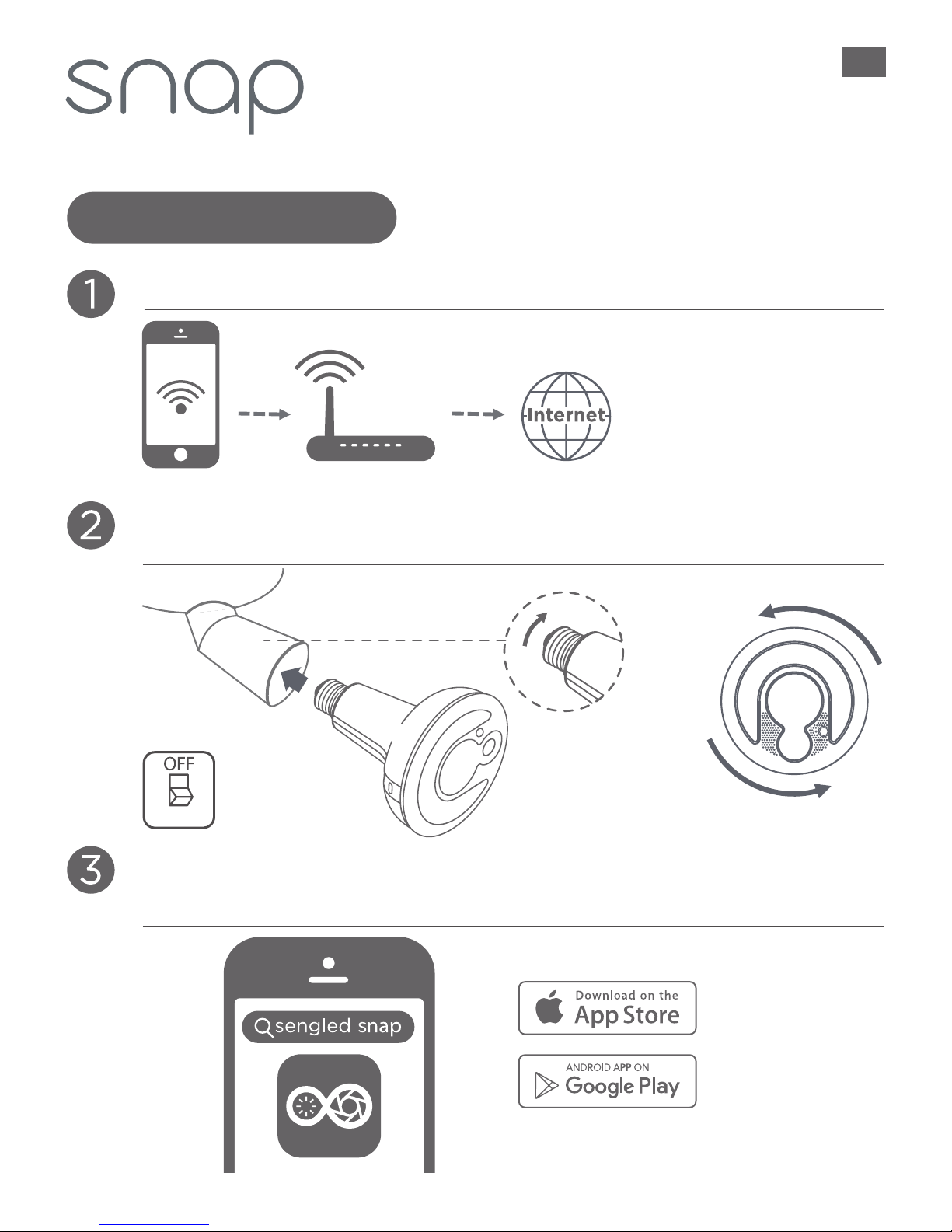
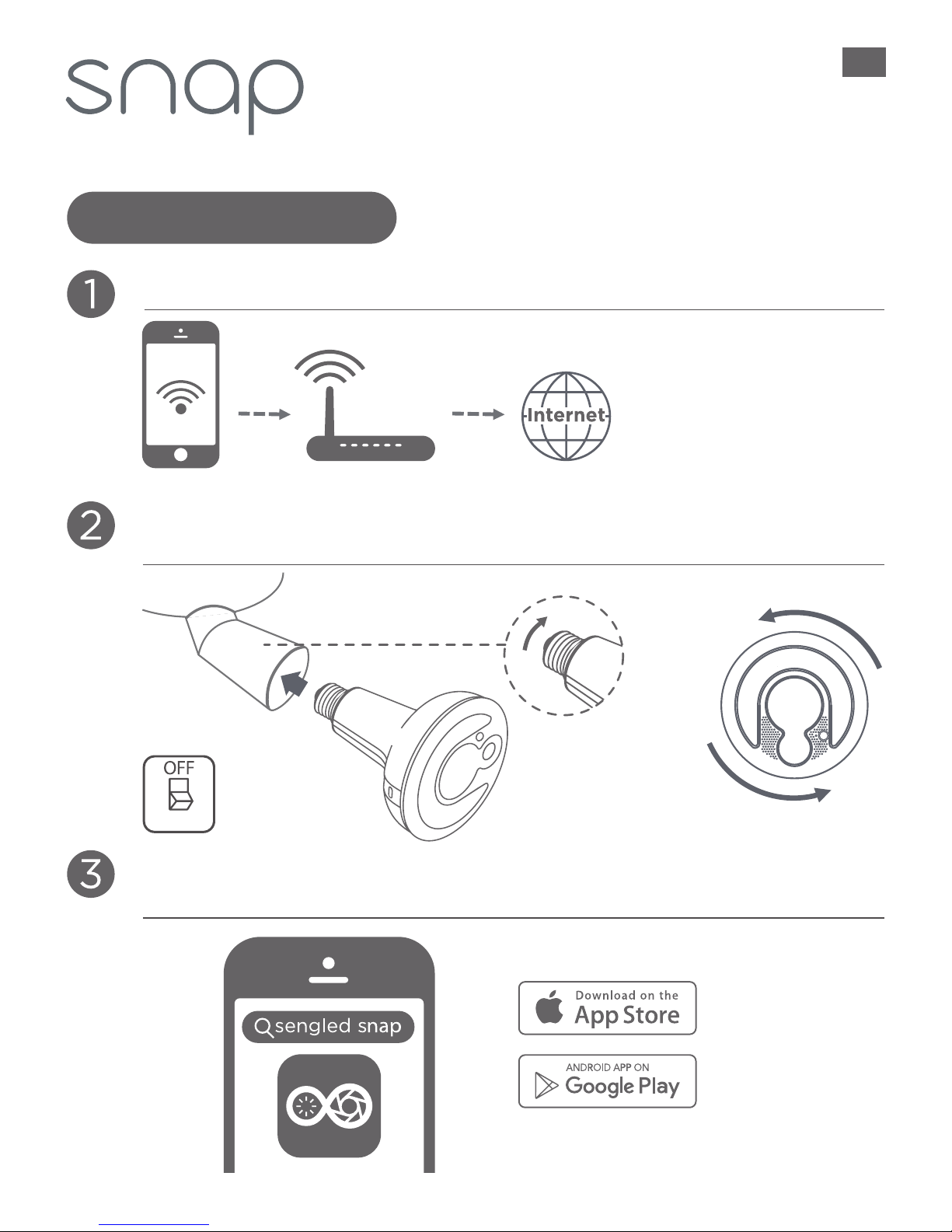
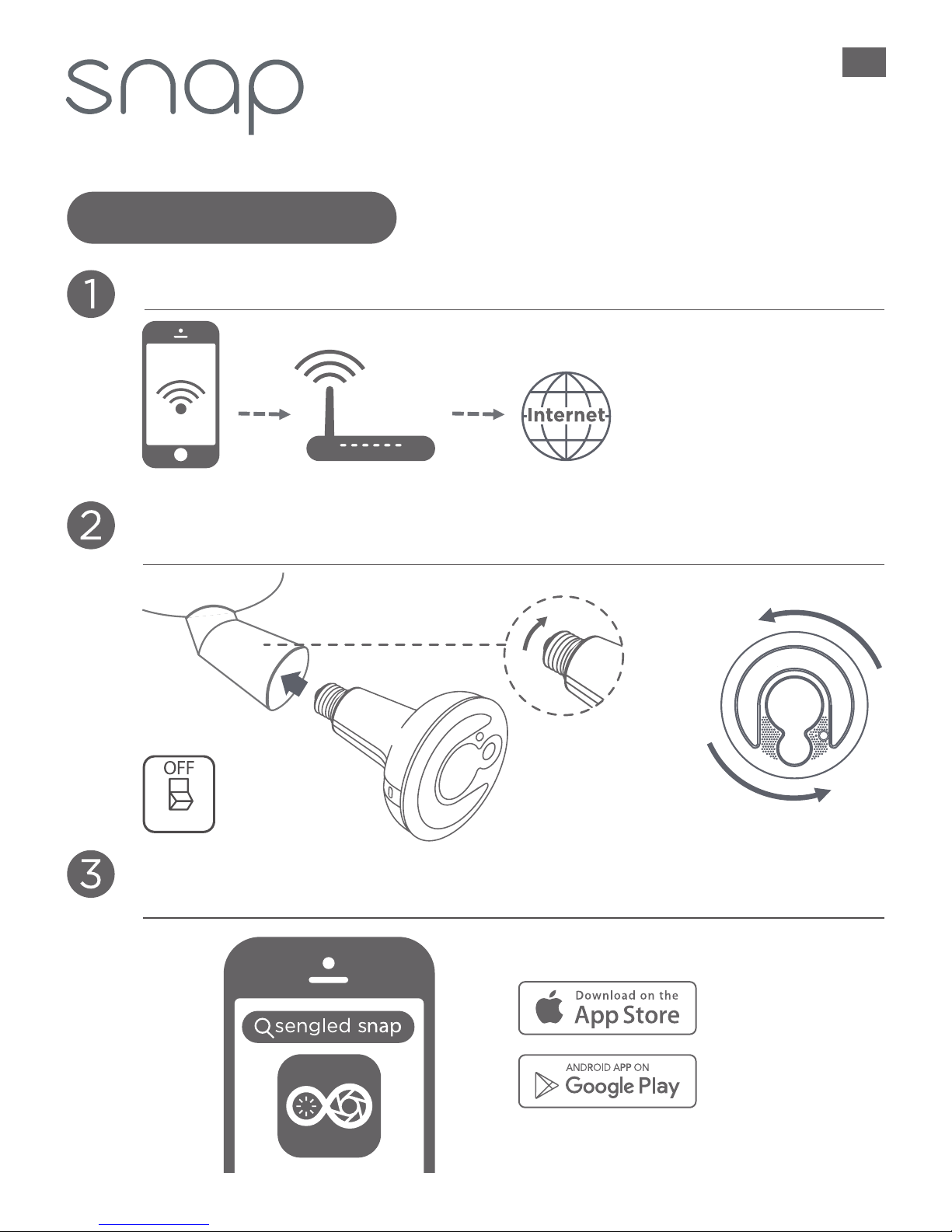
Connect your iOS or Android device to your Wi-Fi network.
Twist Snap into the socket until tight. Then rotate the bulb
counter-clockwise until the camera is at 6 o’clock.
Download & install the Snap app. Open the app and create
a new account.
6 o’clock
Tip: make sure the Wi-Fi
signal is strong at desired
socket location
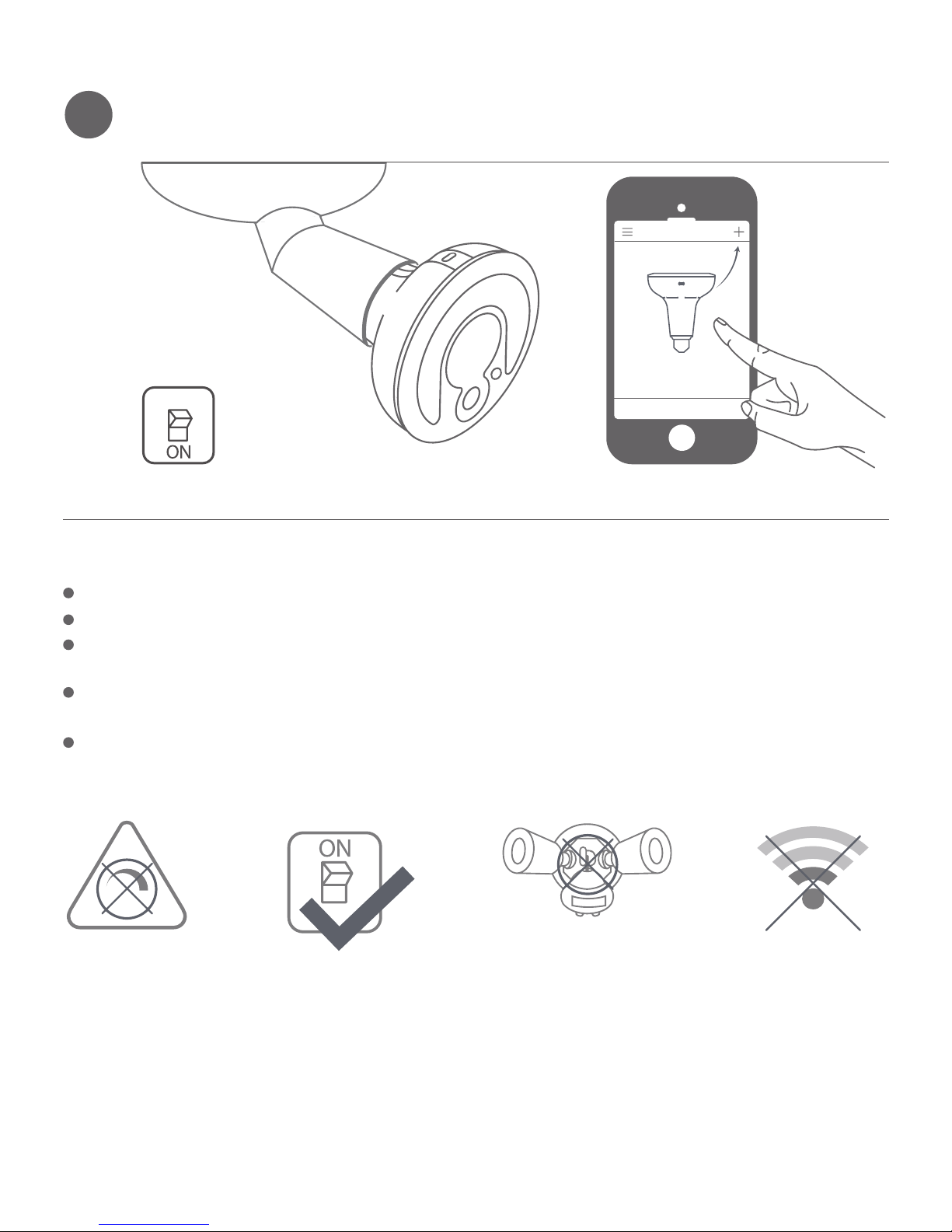
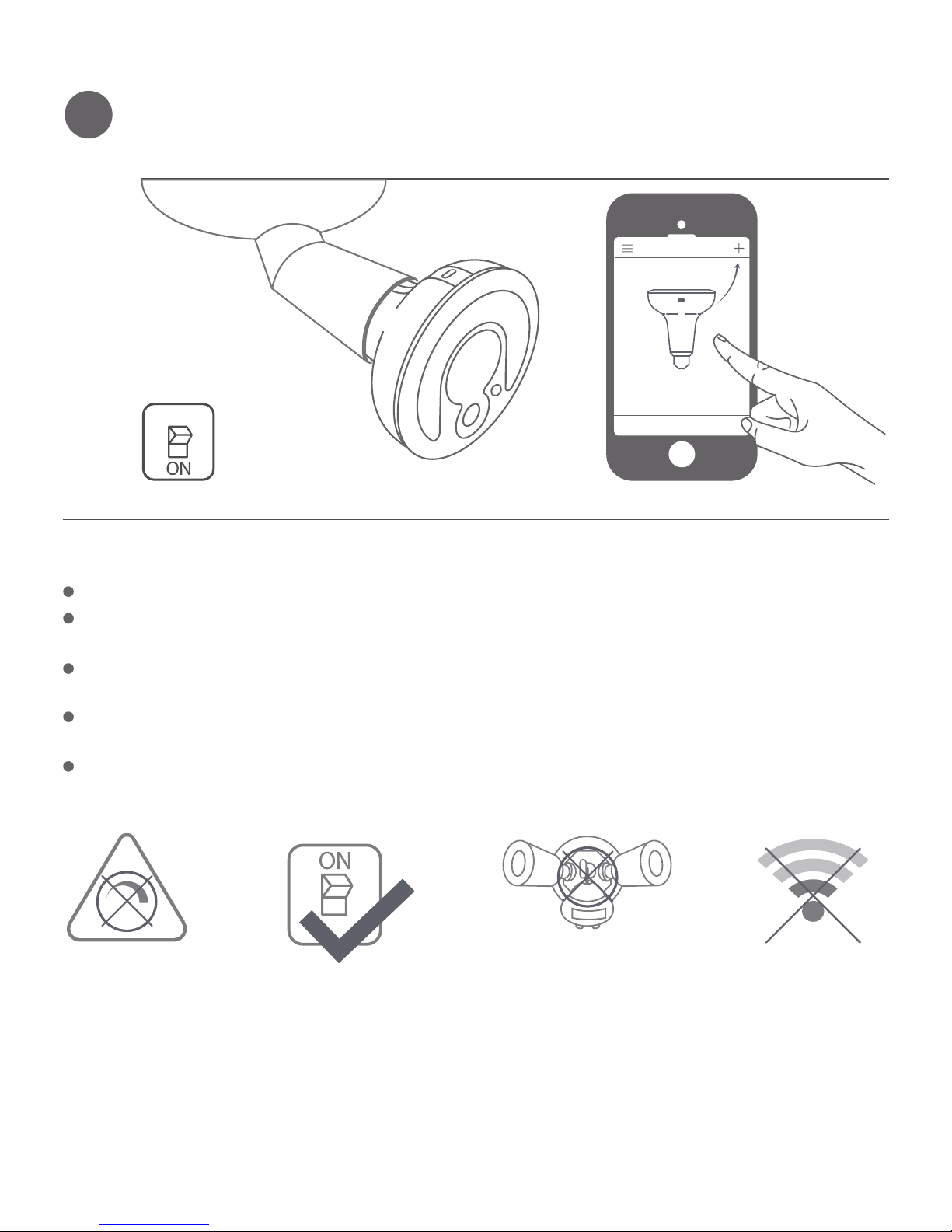
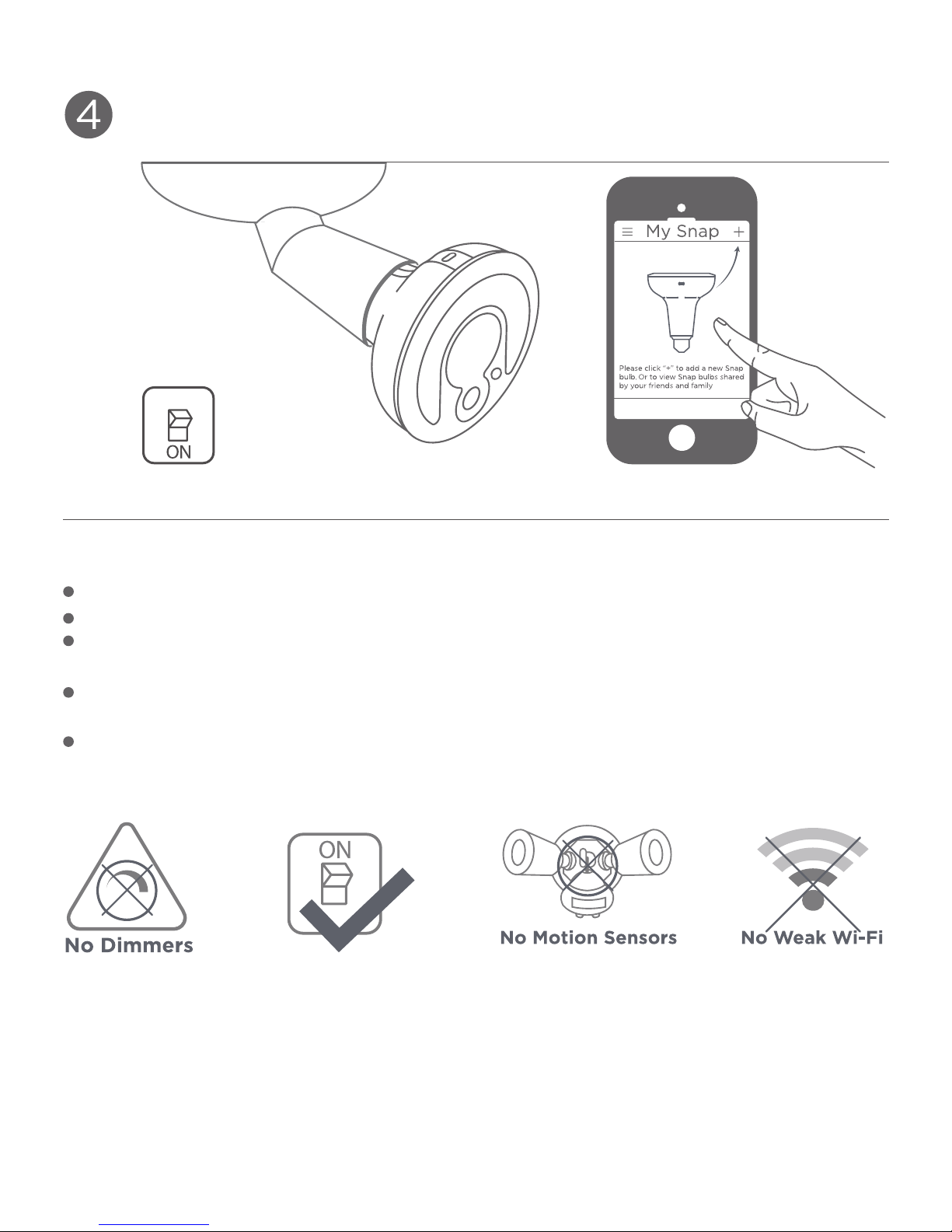
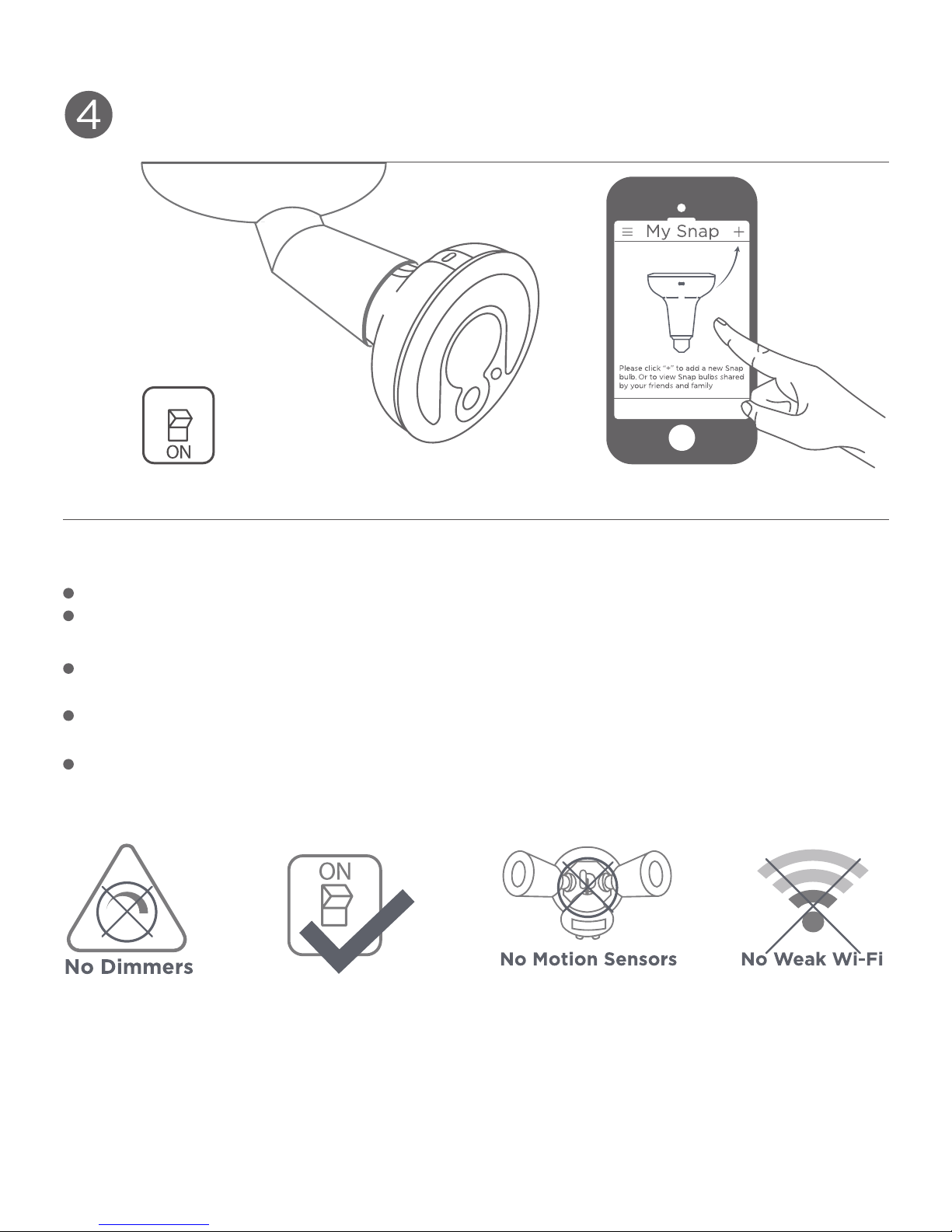
4Switch on the power to the socket and follow the in-app
instructions to set up your new Snap bulb.
My Snap
Please click “+” to add a new Snap
bulb. Or to view Snap bulbs shared
by your friends and family
ATTENTION
Do not use with dimmers.
Snap bulbs require constant power to operate.
Fixtures withmotion sensors may stop the flow of electricity to
the socket.
T
he effective range of your Wi-Fi router may not be sufficient
to reach the Snap bulb.
A Wi-Fi extender may be required to increase the range of your
Wi-Fi network.
© 2016 Sengled, Incorporated. All rights reserved. Sengled Snap is a trademark
of Sengled, Incorporated, registered in the United States and other countries.
Specifications are subject to change without notice. Other trademarks and
trade names are the property of their respective owners.
No Dimmers No Motion Sensors No Weak Wi-Fi
LED + WLAN HD Kamera
Das iOS oder Android Gerät mit dem WLAN verbinden.
6 Uhr
Schnellstartanleitung
DE
Tip: Bitte sicherstellen,
dass das WLAN Signal
am gewünschten
Montageort der Lampe
stark genug ist.
Die Snap App herunterladen, installieren und sich einlgog-
gen. Bitte einen neuen Account erstellen, falls noch keiner
vorhanden ist.
Snap im Uhrzeigersinn in die Fassung schrauben, bis sie fest
ist. Dann Snap gegen den Uhrzeigersinn drehen,bis sich die
Kameralinse unten (6 Uhr Position) befindet.
Achtung:
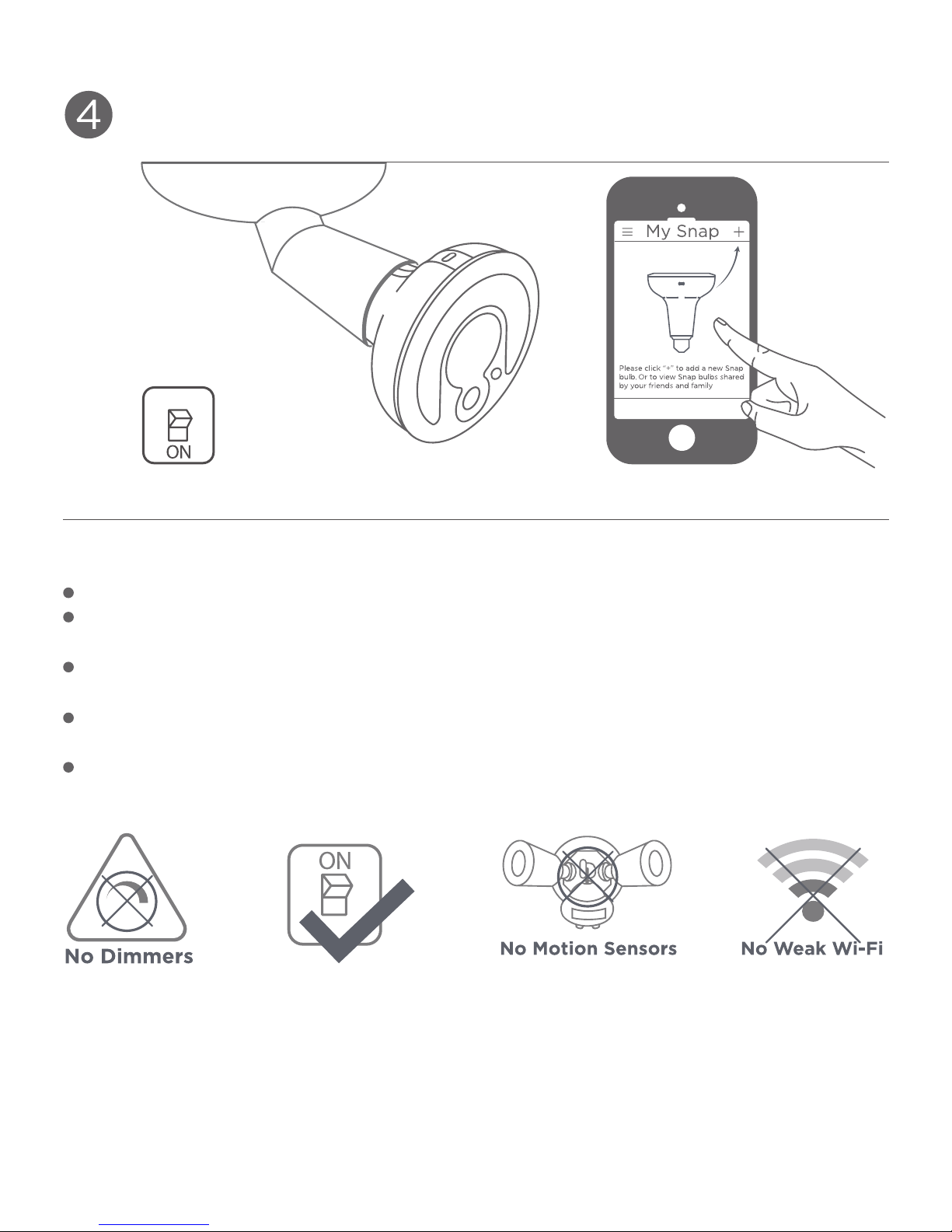
Die Lampe einschalten. Dann der Anleitung in der App folgen,
um Snap einzurichten und dem Account hinzuzufügen.
Nicht mit Dimmern benutzen.
Die Lampe benötigt zur Funktion eine dauernde Stromversor-
gung.
Lampen mit eingebautem Bewegungssensor könnten die
Spannungsversorgung unterbrechen.
Die Reichweite des WLANs muß ausreichend sein, um Snap zu
erreichen.
Eventuell wird ein WLAN Repeater benötigt, um die Reichweite
zu erhöhen.
© 2016 Sengled, Incorporated. Alle Rechte vorbehalten. Sengled Snap ist
eine Handelsmarke von Sengled Incorporated, die in den USA und in
weiteren Ländern eingetragen ist. Technische Daten können ohne vorherige
Ankündigung geändert werden.Andere Handelsmarken und Handelsnamen
sind Eigentum ihrer jeweiligen Inhaber.
2
Guide de démarrage rapide
FR
1
LED + Caméra HD sans fil
Internet
3
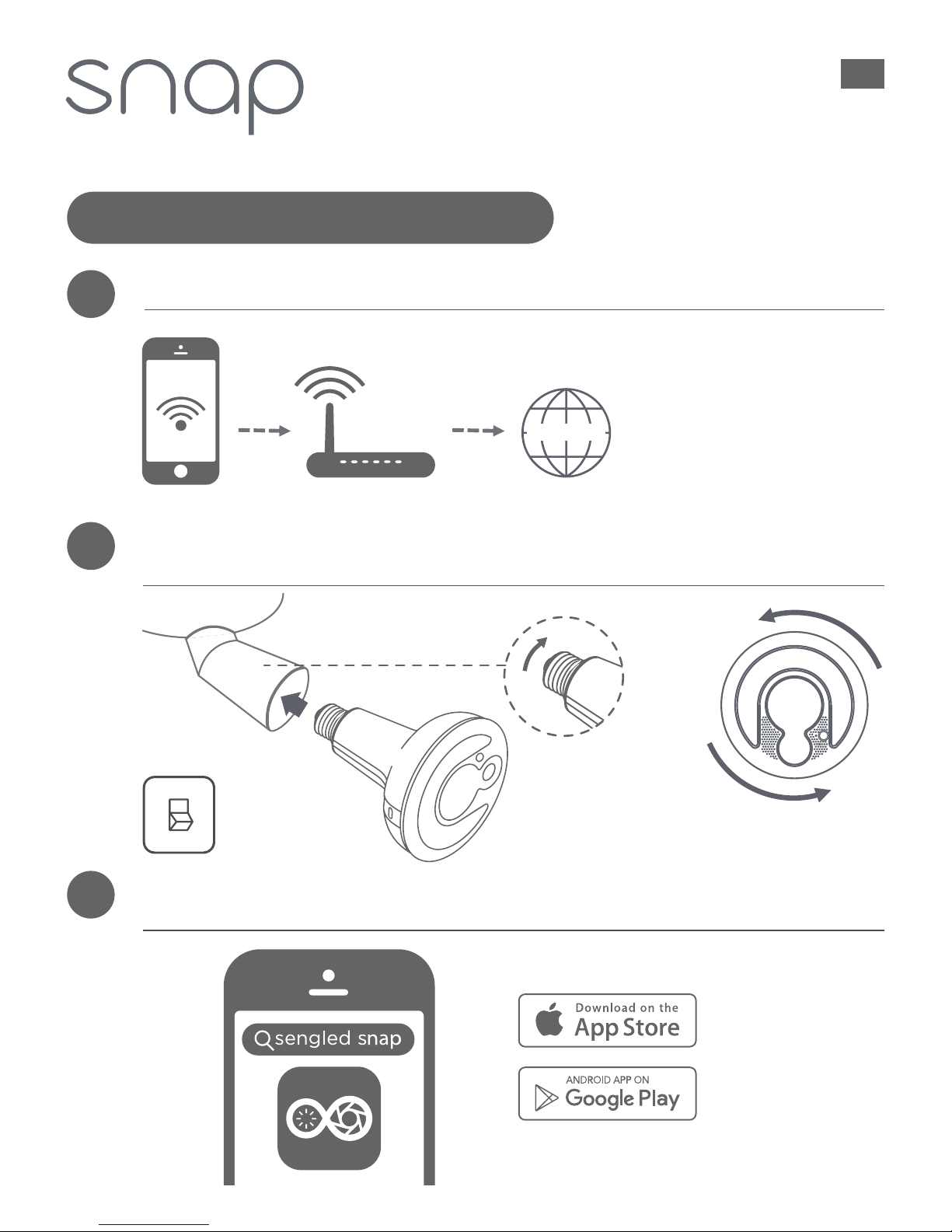
Joignez votre iOS ou votre appareil Android à
votre réseau de Wi-Fi.
Enfoncez Snap dans la douille jusqu’à être serré. Puis faites
tourner l’ampoule dans le sens antihoraire jusqu’à ce que la
caméra soit à 6 heures.
Téléchargez et configurez l’application Snap. Ouvrez
l’application et créez un nouveau compte.
6 heures
Conseil: assurez-vous que
le signal Wi-Fi est fort à
l’emplacement de la prise
électrique désirée.
Arrêt
4Branchez la sous tensionà la prise électrique et suivez les
instructions de l’application pour configurer votre nouvelle
ampoule Snap.
My Snap
Please click “+” to add a new Snap
bulb. Or to view Snap bulbs shared
by your friends and family
Attention
© 2016 Sengled, Incorporé. Tous droits réservés. Sengled Snap est une marque
déposée de Sengled, Incorporé, enregistré dans les États-Unis et d’autres pays.
Les spécifications sont sujettes à changement sans préavis. D’autres marques
déposées et des noms commerciaux sont la propriété de leurs propriétaires
respectifs.
Pas de gradateur
d’éclairage
Pas de détecteurs
de mouvement
Pas de faible Wi-Fi
N’utilisez pas avec des gradateurs d’éclairage.
Les ampoules Snap exigent une tension électrique constante
pour fonctionner.
Les luminaires avec des détecteurs de mouvement peuvent
arrêter le flux d’électricité à la prise électrique.
La portée efficace du routeur Wi-Fi peut être insuffisante
pour atteindre l’ampoule Snap.
Un extenseur de portée Wi-Fi pourrait être nécessaire pour
augmenter la portée de votre réseau Wi-Fi.
NL
LED + DRAADLOZE HD CAMERA
Sluit uw iOS of Android apparaat aan op uw Wi-Fi netwerk.
6 uur positie
Aan de slag
Tip: zorg ervoor dat het
Wi-Fi signaal sterk
genoeg is op de
gewenste locatie van het
voetje.
Download & installeer de Snap app. Open de app en maak
een nieuwe account aan.
Draai Snap in het voetje tot hij vastzit. Draai de lamp dan
tegen de klok in, tot de camera zich in de 6 uur positie
bevindt.
Schakel de stroom naar het voetje in en volg de in-app
instructies om uw nieuwe Snap lamp in te stellen.
OPGELET
Niet gebruiken met dimmers.
Snap lampen vereisen een ononderbroken voeding om te werken.
Fittingen met bewegingssensoren kunnen de stroom van
elektriciteit naar het voetje onderbreken.
Het kan zijn dat het effectieve bereik van uw Wi-Fi router
onvoldoende is om de Snap lamp te bereiken.
Eventueel is een Wi-Fi extender vereist om het bereik van uw
Wi-Fi netwerk te vergroten.
© 2016 Sengled, Incorporated. Alle rechten voorbehouden. Sengled Snap is
een handelsmerk van Sengled, Incorporated, geregistreerd in de Verenigde
Staten en andere landen. Specificaties kunnen gewijzigd worden zonder
melding vooraf. Andere handelsmerken en handelsnamen zijn eigendom van
hun respectievelijke eigenaren.
IT
LED + CAMERA HD WIRELESS
Collegare alla rete Wi-Fi il proprio dispositivo iOS o Android.
Ore6
Guida rapida
Tip:Si consiglia di
assicurarsi che il segnale
Wi-Fi sia forte nel punto
in cui si desidera ubicare
l'attacco
Scaricare e installare l’app Snap. Aprire l'app e creare un
nuovo account.
Far ruotare la Snap nell'attacco fino a fissarla saldamente in
posizione. Quindi ruotare la lampadina in senso anti-orario
finché la camera non si trova in posizione ore6.
ATTENZIONE
Inserire l'alimentazione dell'attacco e seguire le istruzioni
dell’app per configurare la nuova lampadina Snap.
Non impiegare insieme a varialuce.
Il funzionamento delle lampadine Snap richiede un'alimentazione
costante.
Apparecchi con sensori di movimento possono causare
l’interruzione del flusso di elettricità verso l'attacco.
La portata effettiva del proprio router wi-fi potrebbe non essere
sufficiente per raggiungere la lampadina Snap.
Potrebbe essere necessario un ripetitore wi-fi per ampliare la
portata della propria rete wi-fi.
© 2016 Sengled, Incorporated. Tutti i diritti riservati. Sengled Snap è un
marchio commerciale di Sengled, Incorporated, registrato negli Stati Uniti e in
altri paesi. Le specifiche sono soggette a modifiche senza previa comunicazi-
one. Altri marchi e nomi commerciali sono proprietà dei loro rispettivi
proprietari.
Otros manuales para SNAP
1
Tabla de contenidos
Idiomas:


