
Seiki SB102N Manual de usuario
USER MANUAL
SB102N
The manufacturer of this unit follows a principle of continuous improvement and has no responsibility for any
changes that are made to the unit or any liability for these changes. Thank you for choosing our products.
Bluetooth is a registered trademark of Bluetooth SIG Inc. All other trademarks and trade names are those of
their respective owners.
2.1ch
High-Denition Surround SoundBar
with Bluetooth reception / FM radio / USB port / SD card slot
Before using this product, read this manual carefully and retain it for future reference.

1
English
CONTENTS
Important Safety Instructions 2
Precautions 3
Preparations 4
What’s Included
Main Unit
Remote Control
Wall Mounting
Connecting the SoundBar 6
Power Supply
Connecting with Other Devices
Audio In
Line In
Optical Input
Operating the SoundBar 7
Sleep Timer Setting
How to Set Time
Timer Setting
USB & SD/MMC Card Playback
Bluetooth Operating
Reconnect to the Bluetooth Audio Source Device
EQ Effects
Tuning the FM Radio
Storing Your Favorite Radio Stations
Mute the Unit
Volume Level / Treble / Bass Adjustment
Professional Audio Modes
Troubleshooting 10
Specications 11
FCC 12
Warranty 13
2
English
IMPORTANT SAFETY INSTRUCTIONS
• Avoid exposing the unit to dripping or splashing liquids. In addition, avoid placing liquid-
lledobjects,suchasvases,ontheunit.
• When the main plug or an appliance coupler is used as the disconnect device, the
disconnect device shall remain readily operable. To be completely disconnected
from the power source, the speaker's main plug or the appliance coupler should be
disconnected from the main plug completely.
• Noopenamesources,suchaslightedcandles,shouldbeplacedonthespeaker.
• Allow a minimum space of 2cm around the unit for proper ventilation. In addition, do not
block any openings to the unit with items such as newspapers, curtains and furniture.
That could also interfere with the proper ventilation and potentially cause the unit to
overheat.
• Do not use in humid and/or moderate climates.
• Always dispose of used batteries in accordance with the prevailing community
regulations that apply to the disposal of batteries. If there are no local regulations
concerning battery/electronics disposal, please dispose of the device in a waste bin for
electronic devices.
• CAUTION: Always dispose of a used batterly properly to avoid the risk of an
explosion. And only replace it with the same or an equivalent type of battery.
• Donotexposethespeakerorbatterytoexcessiveheat,includingdirectsunlightorre
and do not store or use inside cars in hot weather.
• See the back of the unit for the marking plate that describes the safety-related
markings.
3
English
PRECAUTIONS
Safety Warnings
• BeforeoperatingtheSoundBar,checktoseewhatspecicationsareprovidedforthepowerof
themarkedvoltageforitsuse.Anyothervoltagethanthespeciedvoltagemaycauseareoran
electric shock.
• When unplugging the SoundBar, hold the power plug, not the cord. Pulling on the power cord could
damagethewiresinsidethecordandcauseareoranelectricshock.
• If liquid or a foreign object enters the SoundBar, unplug the power cord immediately and contact your
dealer.Discontinueusingtheunituntilitcanbetestedandveriedbyaqualiedservicetechnician.
Location
• Be sure to place the SoundBar on a dry, stable surface so it won't be knocked over and keep it away
from rain, water and moisture.
• NeverexposetheSoundBartoexcessiveheat,suchasdirectsunlight,hightemperaturesorre.
• If you are using the SoundBar for TV sound, place it securely under or above the TV screen. Do not
place a TV on top of the device.
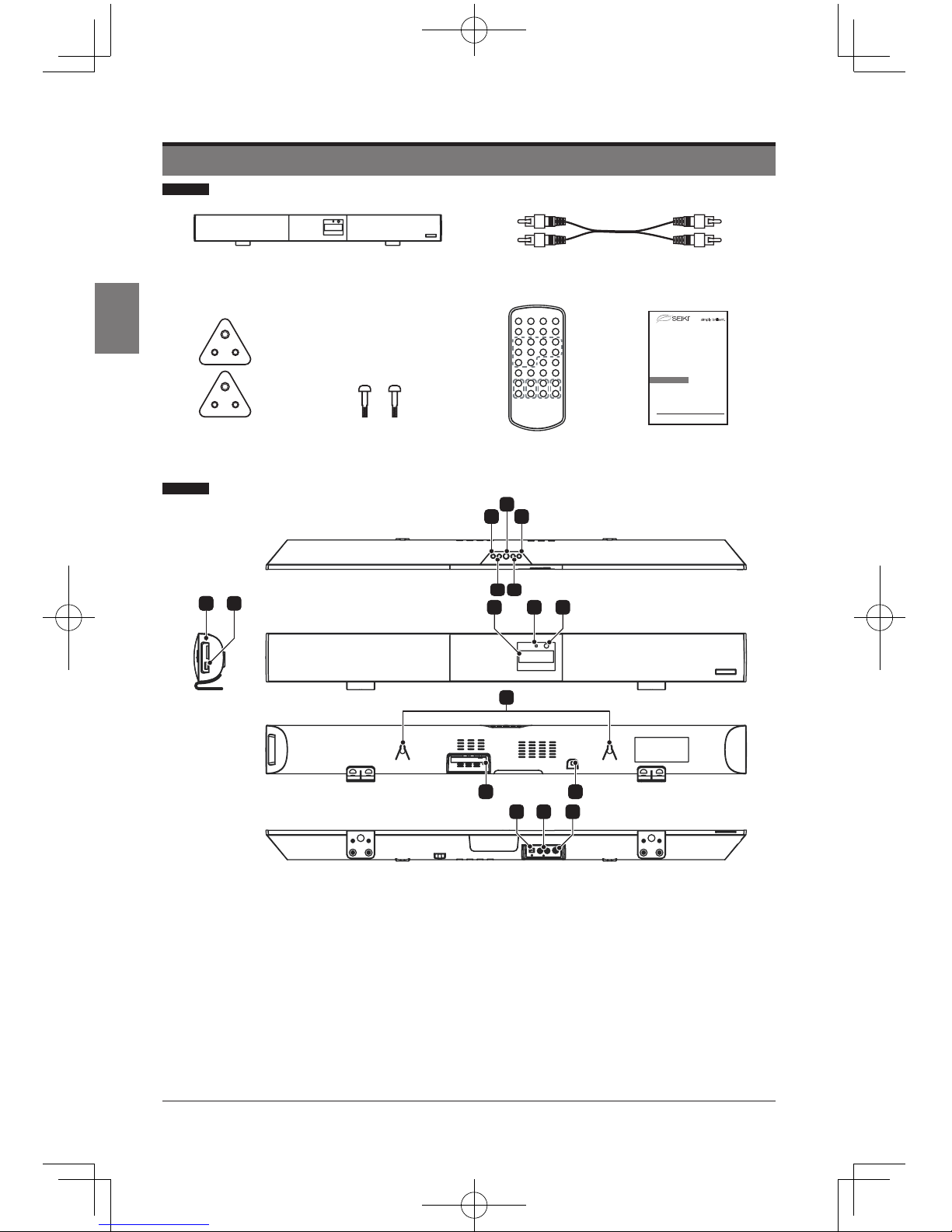
4
English
1. VOLUME - BUTTON
2. VOLUME + BUTTON
3. STANDBY BUTTON
4. MODE BUTTON
5. PAIR/PLAY/PAUSE BUTTON
6. SD/MMC CARD SLOT
7. USB PORT
8. LCD DISPLAY
9. BLUETOOTH INDICATOR
10. REMOTE SENSOR
11. HANGING HOLES
12. FM ANTENNA
13. AC CORD
14. OPTICAL IN JACK
15. AUX IN JACKS
16. LINE IN JACK
Main Unit
2
12 13
4
1 5
3
5
69
710
16
8
14
11
15
Remote Control
Audio Cable
User Manual
USER MANUAL
SB102N
Manufacturerof this unit follows a principle of continuous improvement and has no responsibility for any changes that are made to
theunit or any liability for these changes. Thanks for your choice of our products.
Bluetoothis a registered trademark of Bluetooth SIG Inc. All other trademarks and trade names are those of their respective owners.
2.1ch
High-Definition Surround SoundBar
with Bluetooth reception / FM radio / USB port / SD card slot
Beforeusing this product, read this manual carefully and retain it for future reference.
The Speaker
Fixed Supports X 2
PREPARATIONS
What’s lncluded
Bracket Screws X 2
5
English
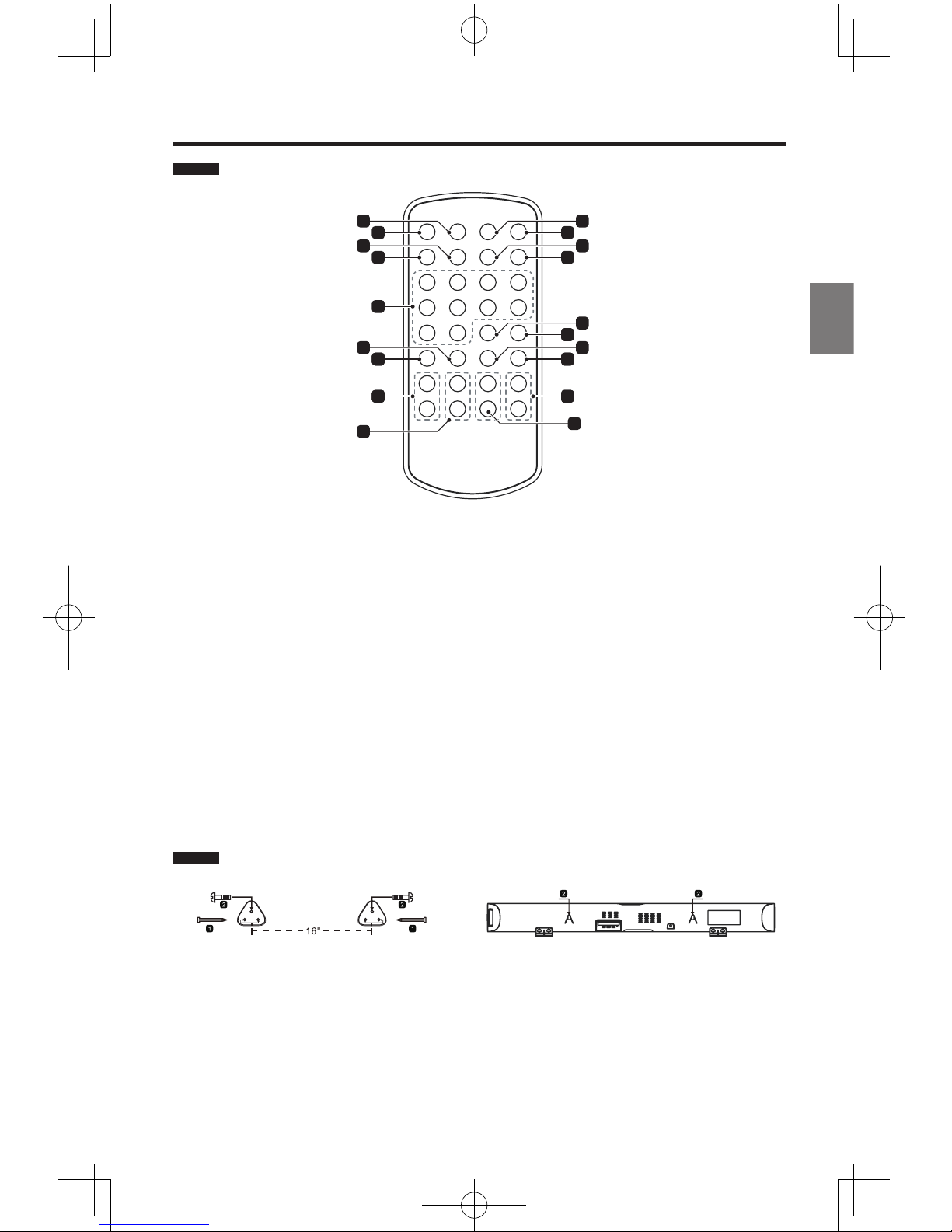
Remote Control
211
4 13
9
9
9
7 17
15
9
9
8 18
5
1 10
3 12
6 16
14
919
1. SLEEP BUTTON
2. MODE BUTTON
3. CLOCK BUTTON
4. TIMER BUTTON
5. NUMERIC BUTTONS
6. VOICE BUTTON
7. EQ BUTTON
8. BASS +/- BUTTONS
9. TREBLE +/- BUTTONS
10. MUTE BUTTON
11. STANDBY BUTTON
12. TUNING/SKIP/SEARCH BACKWARD BUTTON
13. TUNING/SKIP/SEARCH FORWARD BUTTON
14. MEM BUTTON
15. PAIR/PLAY/PAUSE BUTTON
16. MUSIC BUTTON
17. MOVIE BUTTON
18. VOL +/- BUTTONS
19. CH +/- BUTTONS
Wall Mounting
1. Use the four nails (not included)
tomountthetwoxedsupports
on the desired wall about 16”
apart (as shown). Make sure
the fixed supports are at the
same height and nailed into
wall studs or other sturdy
structure.
2. Insert a bracket screw into
eachxedsupport(asshown).
To mount SoundBar, align
holes on back of unit with
bracket screws and hang
unit in place. Make sure the
SoundBar is attached securely.

6
English
CONNECTING THE SOUNDBAR
Power Supply
Plug the AC plug into the outlet socket to connect to the main power.
Connecting with Other Devices
Audio In
• Connect the AUX IN jacks on the unit to an audio source, such as a DVD player,
with an RCA cable.
• Power on the unit and the audio device.
• Press the MODE button repeatedly to switch to AUX mode.
• Use the controls on the connected audio device to begin playing music through the
connected unit.
Line In
Follow the steps to connect the unit to another audio device:
• Connect the device into the unit’s LINE IN jack with the LINE OUT cable.
• Press the STANDBY button to turn the unit on.
• Press the MODE button repeatedly to switch the unit to LINE mode.
• Power on the device and begin to play.
Optical Input
• Connect a Digital Optical Audio Cable to the optical output on the audio source and
to OPTICAL IN on the unit.
• Power on the unit and the audio source.
• Press the MODE button repeatedly to switch to OPT IN Mode.
• Audio from the connected audio source will now play through the unit.
7
English
OPERATING THE SOUNDBAR
Before using the SoundBar to play audio from connected devices, please make the
necessary connections described in this user manual and switch the SoundBar to
the correct source for other devices.
Sleep Timer Setting
Do the following to set the sleep timer at power on modes:
• During playback, press the SLEEP button on the remote control repeatedly to cycle
through the sleep time options, Release the SLEEP button when your desired sleep
time shows on the screen. Once the sleep time is expired, the unit will be switched off.
• During playback, press the SLEEP button once to check the remaining sleep time.
How to Set the Time
• At the standby mode, press and hold the CLOCK button on the remote until the hour
ashesonthescreen;usetheTUNING/SKIP/SEARCH buttons on the remote to adjust
thehourandconrmyouradjustmentbypressingtheCLOCK button on the remote.
• When the minute starts blinking on the screen, press the TUNING/SKIP/SEARCH
buttons on the remote to set the minute accordingly, and press the CLOCK button on
theremoteagaintoconrmyoursetting.
• During playback, press the CLOCK button on the remote to check the current time.
Note: The time only could be set at standby mode.
Timer Setting
1. At standby mode, press and hold the TIMER button on the remote. The hour will begin
blinkingonthescreenwiththeashingtimericon"T."
2. Press the TUNING/SKIP/SEARCH buttons on the remote to adjust the hour.
3. Press the TIMERbuttontoconrm.Theminuteonthedisplaywillbeginblinking.
4. Press the TUNING/SKIP/SEARCH buttons on the remote to adjust the minute.
5. Press the TIMERbuttonontheremotetoconrmyoursetting.
6. After the set time is reached, the unit will power on to the radio automatically.
7. The timer function can be deactivated or activated by short pressing the TIMER button
on the remote.
USB & SD/MMC Card Playback
1. Power on the unit, insert a USB or an SD/MMC card into the unit.
2. Press MODE button repeatedly to switch to USB or CARD mode. The playback will
start automatically.
3. Press the TUNING/SKIP/SEARCH FORWARD button on the remote to skip to the next
track.
4. Then press and hold to search through the track forward.
5. Press the PLAY/PAUSE button on the remote to play or pause the selected radio
station.
6. Press the TUNING/SKIP/SEARCH BACKWARD button on the remote to skip to the
previous track.
7. Then press and hold to search through the track backward.
8. Use the numeric buttons to enter the track number to select your desired track for
playback.

8
English
Tabla de contenidos
Otros manuales de Oradores de Seiki


