
Seac ACTION Manual de usuario

OS / WINDOWS COMPATIBLE

2
Contents
ACTION MANUAL.................................................3
GENERAL WARNINGS.......................................3
HARDWARE .............................................................6
APPLICATION SOFTWARE..............................7
TECHNICAL CHARACTERISTICS ................8
Dive modes ...................................................................8
Decompression Algorithm ................................9
Levels of Protection ................................................9
Repetitive Dives ......................................................... 9
Dives with Surfacing ..............................................9
NDL - NonDecompressionLimit ..................9
Safety Stop ....................................................................10
Deep Stop........................................................................11
TTS........................................................................................11
Ascent Speed Alarm................................................12
MOD Exceeded Alarm...........................................12
Deco Violation Alarm..............................................13
Locking the Computer...........................................13
No-fly time.......................................................................14
Desaturation Time..................................................... 14
Permitted Altitude Indicator...............................15
Battery/Run-time....................................................... 15
Time and Time Zones.............................................16
Planner...............................................................................17
Divelogger .......................................................................17
KEYS NOMENCLATURE ...................................17
MENU AND SETTINGS......................................18
User Data Memory: ................................................18
Stopwatch........................................................................19
Logbook ............................................................................20
MIXES .................................................................................20
Dive parameters (DIVESET)............................. 22
Dive planner (PLANNER) ...................................23
Alarms (ALARMS).....................................................24
Display................................................................................24
System Settings (SYS SET) ...............................25
PC Mode........................................................................... 26
Info mode.........................................................................26
Reset.................................................................................... 26
OFF (FACTORY MODE)....................................... 27
USER SETTINGS RANGE .................................28
ACTION DURING THE DIVE ...........................29
SCUBA (OC) DIVE ................................................30
1. NDL Dive .....................................................................31
2. Deep Stop ..................................................................32
3. Safety Stop ................................................................33
4. DECO Dive................................................................ 34
5. Mix change during the dive..........................35
DIVE IN GAUGE MODE .....................................36
DIVE IN FREE MODE ..........................................37
AFTER THE DIVE...................................................38
Desaturation Time..................................................... 38
No-fly time.......................................................................39
Logbook ............................................................................40
Connect your ACTION computer to your
Mac or PC........................................................................41
REPLACING THE BATTERY.............................42
ACTION SERIAL NUMBER...............................43
CE CERTIFICATION..............................................43
CARE AND MAINTENANCE............................43
CERTIFICATE OF WARRANTY.......................44

ACTION
3
ACTION MANUAL
Congratulations on your purchase of a SEAC diving computer.
The SEAC ACTION dive computer is a technologically advanced device
designed and manufactured to provide all the information that every diver needs.
Periodically check www.seacsub.com for any updates to this manual.
GENERAL WARNINGS
• WARNING!
Read the user manual fully before using the SEAC computer.
Using the computer incorrectly will void the warranty and can
permanently damage the computer.
• WARNING!
Only use the dive computer after you have read all sections of the
instruction manual and you have understood how it works.
• WARNING!
The dive computer is not a substitute for diver training and should only be
used by divers who have been properly trained and who have earned the
appropriate license issued by a Certified Teaching Association.
• WARNING!
The computer does not replace an understanding of decompression
tables, which divers must always carry with them for safety, along with a
depth gauge and a dive watch.
• WARNING!
The SEAC computer is an auxiliary device during a dive. Therefore, it is
crucial that each diver always carry with them a suitable table that will
enable them to conduct the decompression phase if the unit should
malfunction.

4
• WARNING!
Freediving entails risks of syncope, taravana, pulmonary edema, and
hemoptysis, while diving with a respirator involves risks related to
decompression sickness, oxygen toxicity, nitrogen narcosis, and in general
other risks connected to the dive itself: even a thorough reading of this
manual and use of the instrument does not exclude potential dangers.
• WARNING!
The computer cannot take into account individual physiological changes
that can change from one day to the next. For this reason it's good
practice to use the device conservatively and cautiously, remaining within
the limits shown by the computer in order to minimize the risks.
• WARNING!
It is strictly forbidden to freedive in the 12 hours after diving with scuba
equipment!
Violating this rule could considerably increase the risk of decompression
sickness.
• WARNING!
Do not share one computer between two divers during the dive. Every
diver must have their own instrument to provide information and save
only that diver's data.
• WARNING!
Before diving, you must check the battery charge. Do NOT dive if the low
battery icon is shown on the display. Always check that the display shows
no signs of any malfunction and that it is clearly legible.
The Battery icon on the display has 2 segments:
Segment 1: Battery Outline ==> Battery lower than Minimum Voltage (do
not dive).
Segment 2: First Bar from the bottom ==> Battery lower than 2.1V (Low
level. The voltage could plummet during a dive in especially cold water).

ACTION
5
• WARNING!
Always check that the settings are correct for your dive, and don't allow
anyone else to tamper with your computer before the dive. If it has been
tampered with by another person, check that your settings are correct.
• WARNING!
It is important to keep in mind that your body undergoes changes, even
daily changes, that a computer cannot account for. If your physical
condition is not excellent, or if you feel any physical problems, do not dive!
• WARNING!
The normal functions of the product could be disturbed by strong
electromagnetic interference.
In this case, simply reboot the product to restore normal function,
following the instructions provided in this manual (see “Reset”) and use
the product in another position.
• WARNING!
Strictly avoid pressing on the side grill of the sensor with your fingers,
especially if the sensor compartment is full of water, because this could
distort the measurement of zero, and could therefore result in an incorrect
measurement of depth during the next dive, with the consequence that
the NDL/Deco data may also be inaccurate.
In DIVE mode, if you notice a measurement of anything other than zero
on the surface, you need to reset the device to zero out the sensor
measurement (see the instructions and warnings on using the RESET
further on in this manual) or wait a few hours for the system to reestablish
the correct zeroing.
6
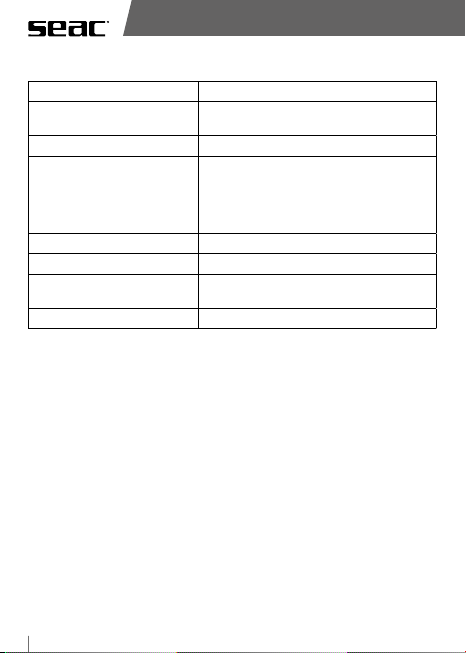
HARDWARE
Type: Wristwatch computer.
Screen: LCD Icons/Segments/Transflective matrix
with user-adjustable contrast.
Backlighting: LED, user-adjustable.
Battery: CR2450, non-rechargeable, 3V 600mAh,
user-replaceable (we strongly recommend
that you have this done at an authorized
SEAC center, also replacing the O-ring in the
battery compartment).
Buttons: 4
Alarm Type: Audible and visual.
PC/Mac connection: Serial via USB with special dedicated cable
(optional).
Maximum operating depth 100 meters/328 ft
ACTION
7
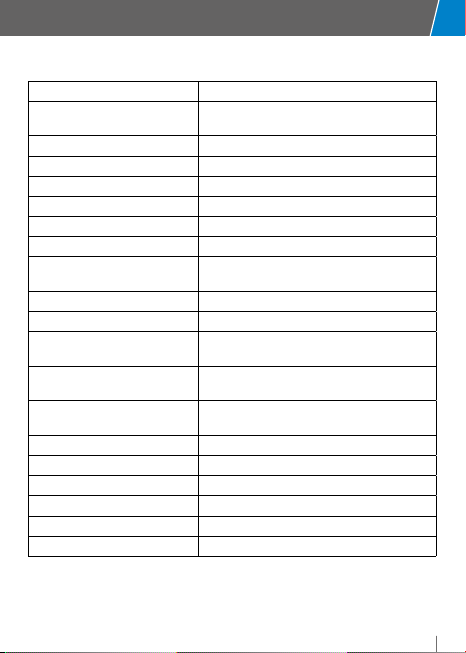
APPLICATION SOFTWARE
Updates: Supported through serial port via USB.
Factory mode: Supported to save energy, can be set by
the user.
Auto Recovery: Automatic reboot if software locks.
Restore: Manual, though combination of buttons\time.
Decompression Algorithm: Buhlmann ZHL-16C for Air/Nitrox.
Levels of conservatism: Yes, based on Gradient Factor.
Mixes Managed: Air/Nitrox, #2 (O2maximum 99%).
Dive modes: Scuba, Gauge and Apnea.
Safety Stop: Yes, user-customizable
(depth and duration).
Deep Stop: Yes, based on maximum depth reached.
Water Type: Salt/Fresh.
Alarms: MOD Violation, Ascent Speed, Deco Stop
Violation.
LogBook Sampling: Scuba/Gauge => 5 seconds;
Freediving => 2 seconds.
LogBook Capacity: Capacity approx. 40 hours (Scuba/Gauge
mode) or approx. 18 hours (Freedive mode).
Planner: NDL Aria/Nitrox Calculation.
Stopwatch: START \ STOP \ RESET \ LAP.
Set Backlighting: Auto / Manual / Dive.
Units: Metric / Imperial.
Watch: 24/12 hour format, dual time.
Reset: Tissues/Settings.

8
TECHNICAL CHARACTERISTICS
Dive modes
The computer manages three dive modes:
I. Scuba mode:
Dive: When depth exceeds 150 cm/5 ft.
Emerge:when depth is less than 90 cm/3 ft.
II. Gauge mode:
Dive: when depth exceeds 150 cm/5 ft.
Emerge: when depth is less than 90 cm/3 ft.
III. Free Mode:
Dive: when depth exceeds 100 cm/3.3 ft.
Emerge:when depth is less than 50 cm/1.6 ft.
After a dive in SCUBA / GAUGE mode, the Computer stays on the SCUBA /
GAUGE screen for 10 minutes after emerging, and therefore you cannot access
the menu and submenu.
After a dive in FREE mode, the Computer stays on the FREE screen for 15 minutes
after emerging, and therefore you cannot access the menu and submenu.
After a dive in SCUBA or GAUGE mode, FREE mode is inhibited and is not
accessible for the next 12 hours.
After a dive in GAUGE mode, because tissue saturation is calculated assuming
that the dive uses mix number 1, SCUBA mode is available.
After a dive in GAUGE mode, the Desaturation and NoFly times are updated with
the new tissue saturation data. In particular, the NoFly time is set to 24 hours,
as a precaution in favor of safety, regardless of the type of profile that was run.
After a dive in FREE mode, the residual Desaturation and NoFly time, if any
existed before the dive in FREE mode, will be left unchanged.

ACTION
9
If you Reset the Settings, the Computer will automatically start in SCUBA mode.
When the Computer is in Watch mode and you dive without manually
entering dive mode (using the LR button), the Computer will automatically
launch the mode you selected most recently.
Decompression Algorithm
The computer uses the original Buhlmann ZHL-16C Decompression Algorithm,
unmodified.
Levels of Protection
The Action allows you to select 6 levels of protection (conservatism), from 0 to 5.
Level 5 provides the maximum protection.
Repetitive Dives
All dives taken within a 48-hour period are considered “Repetitive Dives”.
Dives with Surfacing
“Surfacing” is defined as the situation in which the diver emerges after having
begun a Scuba type of dive.
Surfacing ends if the diver dives again within a period of fewer than ten minutes
from emerging; beyond this limit the current dive is considered ended.
If you change mixes during the dive and dive again within the 10 minute
Surfacing time, the mix in use is reset to the starting mix.
NDL - NonDecompressionLimit
The “NonDecompressionLimit” is defined as the time that remains at the
current depth and breathing the mix that is currently set to avoid requiring
decompression.
To avoid requiring decompression stops, the time required for the ascent must
be subtracted from the NDL.

10
Safety Stop
The user can set both the depth and the duration of the Safety Stop.
NOTES:
a) The Safety Stop is calculated and proposed if the maximum depth reached is
greater than 12 meters/40 ft.
b) The Safety Stop is shown when the diver comes within 9 meters/30 ft of the
surface.
c) The countdown begins if the diver arrives within +2 meters/+6.5 ft and
-2 meters/-6.5 ft of the stop depth set. For example: If the stop set is 5
meters/16.5 ft, the countdown starts between 7 meters/32 ft and 3 meters/10
ft. In this case then, if you go to a depth of less than 3 meters/10 ft., the stop
will be canceled.
d) The Safety Stop is not calculated and is not proposed if at least one deco stop
is underway within 9 meters/30 ft from the surface.
e) If the current dive includes one or more decompression stops, and if these
decompression stops are cleared during the ascent (before reaching 9
meters/30 ft) because of a very slow ascent or in any case a multilevel dive,
then the Safety Stop is calculated and proposed at the time and duration set
by the user.
f) If the Diver again exceeds a depth of 9 meters/30 ft after having performed
the stop, the Safety Stop is recalculated and reproposed in accordance with
the rules described above.
g) If the Diver descends to a depth greater than 9 meters/30 ft during the
countdown, it will be reset and recalculated according to the rules above.
Este manual sirve para los siguientes modelos
1
Tabla de contenidos
Otros manuales de Instrumento de buceo de Seac

Seac
Seac KS01 Manual de usuario

Seac
Seac DRIVER Manual de usuario

Seac
Seac APNEA HR Manual de usuario

Seac
Seac BCD MODULAR Manual de usuario

Seac
Seac PARTNER Manual de usuario

Seac
Seac R30 Manual de usuario

Seac
Seac guru Manual de usuario

Seac
Seac GUUN 30 Manual de usuario

Seac
Seac JACK Manual de usuario

Seac
Seac JACK Manual de usuario


