Scantech KSCAN-Magic Manual de usuario

Composite 3D Scanner
KSCAN-
Magic/MagicII
User Manual
V1.020
2021.03

II
Introduction
Please read user manual before start.
After reading, keep it safely for next time review.
All Rights Reserved @ SCANTECH (HANGZHOU) CO.,LTD
2021-2022 (杭州思看科技有限公司 2021-2022)
Some part or all this manual can’t be copied, reproduced or transmitted in any form
without the paperwork permission of SCANTECH (HANGZHOU) CO.,LTD.
Notice
The products,services or characters you have purchased will be constrained by the
commercial contract and terms of SCANTECH (HANGZHOU) CO.,LTD. The range
of your purchase or use may not include some part or all the products, services or
characters described in this manual. Unless there is another permission in the contract,
SCANTECH (HANGZHOU) CO.,LTD won’t make any representations, warranties or
implied, regarding the contents of this manual.
SCANTECH (HANGZHOU) CO.,LTD will do the best to guarantee the accuracy and
completeness of the information in the manual,but the express statement does not
represent any commitment of SCANTECH (HANGZHOU) CO.,LTD. There is no
responsibility for the errors or omissions of manual. Accepting this manual means the
customer admit that Chinese version shall prevail if there is any inconformity between
the Chinese version and the non-Chinese version.
SCANTECH (HANGZHOU) CO.,LTD reserves the rights to change any information
in the manual at any time. If the information contained in this manual has been
changed, our company won’t notice customer.
All Rights Reserved, Copyright, Infringement Must Be Investigated!

III
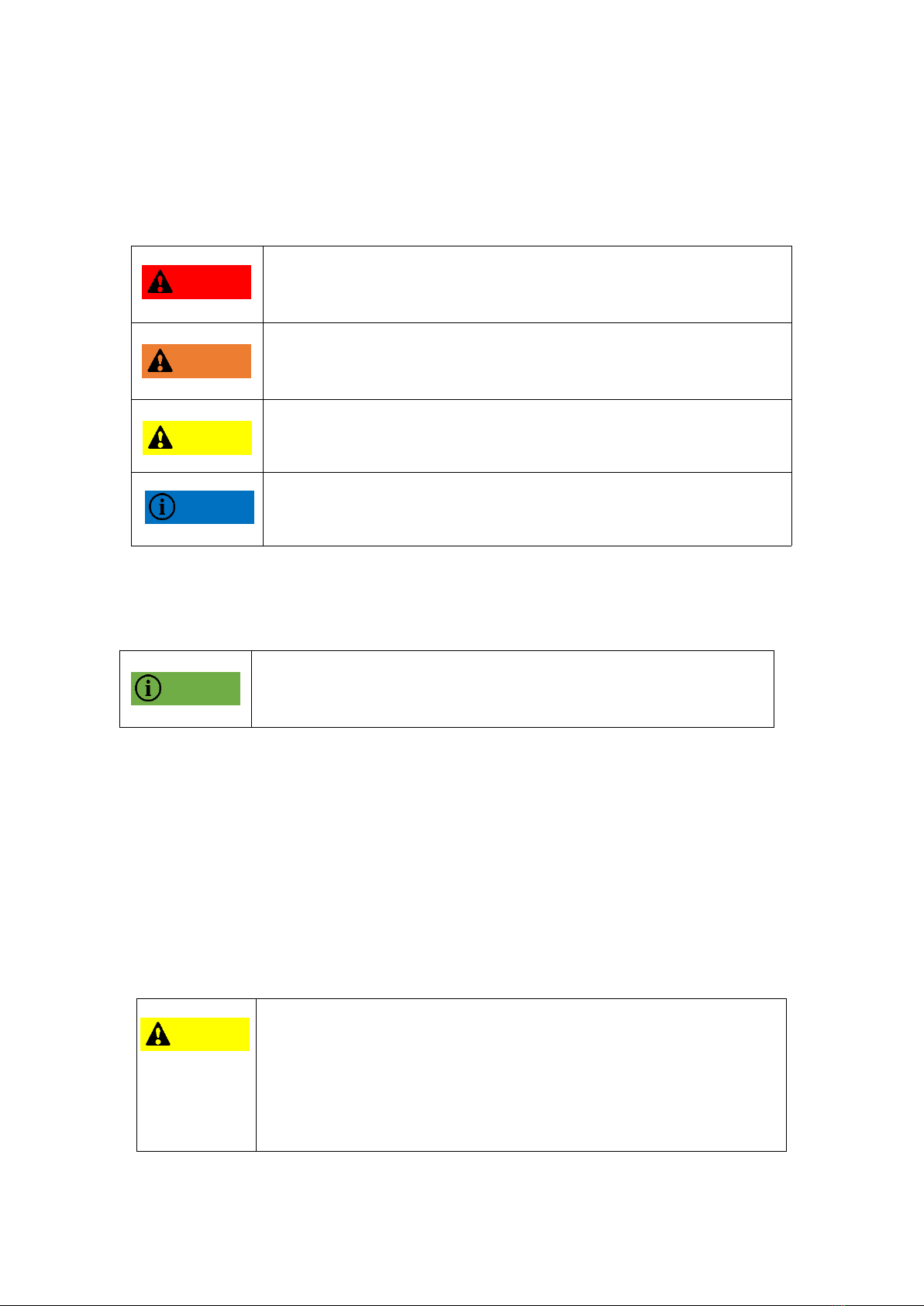
Basic label
This manual will use the following labels to describe different significance, so please
red carefully and make sure understand all of labels.
Fail to obey the announcement will cause dangerous situation or
injuries and deaths
Fail to obey the announcement may cause dangerous situation or
injuries and deaths
Fail to obey the announcement may cause minor injury
Fail to obey the announcement may damage product or surrounding
Safety Announcement
During scanning process, must obey announcement and use
product correctly
Please use it correctly
To avoid malfunction of the KSCAN series and to ensure proper use, please observe
the following precautions.
Normal Announcement
Before starting work, please confirm the function and performance
of this product, and the equipment can operate normally.
If the product malfunction, please turn off the power immediately
for preventing other damage.
Please don’t change temperature suddenly during product use,
otherwise condensation will cause equipment failure.
Danger
Caution
Warning
Caution
Attention
Notice

IV
Attention
For out of the working range, and modified products, the company
does not guarantee its function and performance.
When this product is combined with other equipment, it may not be
able to satisfy the function and performance depending on the
conditions of use and the environment. Therefore, please pay
attention to it before use.
Operation Announcement
Warnings
Please choose the correct power supply voltage. Otherwise
malfunction will cause failure or fire.
Please do not disassemble or modify the unit. Otherwise
malfunction will cause failure or fire.
Attention
In order to use this product properly and safely, please try to
avoid the following places, otherwise it may cause malfunction.
high humidity or dust;
Corrosive or flammable gas;
Splashes of water, oil, chemicals;
static electricity.
Dirty dirt, water or oil stains may affect the use of the product and
cause measurement deviations;
When it is attached to the surface of the product glass: blow off
the dirt with clean air. When the soil is dirty, wipe it off with a
soft cloth dampened with alcohol.
When it is attached to the surface of the object: please blow off
the dirt with clean air or wipe off the dirt with a clean soft cloth.
If the measuring object vibrates, it may cause a deviation in the
measured value.
After turning on the power, wait about 5-10 minutes before use.
Since the circuit will not stabilize immediately after the power is
turned on, the measured value may be deviated.
Accident Announcement
Attention
Turn off the power immediately when the following phenomenon
occurs. If you continue to use it, it may cause equipment failure.
Water or foreign matter inside the device;
The device is dropped, or the casing is damaged;

V
The device emits smoke or an unusual smell.
Storage Announcement
Attention
Do not wipe the product with a damp cloth, volatile oil, thinner,
etc. Otherwise, the product may be discolored or deformed.
When the soil is dirty, use a cotton cloth to remove the diluted
neutral detergent, wring it out, wipe it, and then wipe it off with a
soft cloth.
Please try to avoid the following places for storage;
high humidity or dust;
Corrosive or flammable gas.
Laser Safety
The laser wavelengths of the KSCAN-Magic/Magic II are as follows:
Type
KSCAN-Magic/Magic II
Blue wavelength
450nm
Laser Output, Pavg: <1mW
Infrared wavelength
850nm/940nm
Laser Output, Pavg: <1mW
Green wavelength
520nm
Laser Output, Pavg: <1mW
This product is classified as Class 2M Laser Product according to IEC 60825-1.
Complies with 21 CFR 1040.10 and 1040.11 except for conformance with IEC
60825-1 Ed. 3., as described in Laser Notice No. 56, dated May 8, 2019.
Caution: Use of controls or adjustments or performance of procedures other than
those specified herein may result in hazardous radiation exposure.

VI
Warnings
If you do not control and adjust according to the procedures
specified here, you may injure the human body (eyes, skin, etc.).
Therefore, please be sure to observe the following items.
About Class 2M laser products:
Please don't stare at laser and specular light;
Please do not intentionally point the laser towards people,
especially the eyes;
Please pay attention to the reflected light path of the laser. The
laser will be specular and diffuse. If there is danger of being
reflected by the reflected light, please cover the reflected light
with a baffle;
Do not use a concentrator, magnifying glass or microscope to
observe the laser output within 100mm.
This product does not have a mechanism to turn off the laser
irradiation when disassembling. Please do not disassemble it.
Warning Label
All bottom of products come with IEC warning label like this:

VII
Identifier Label
An ID label is affixed on the product as below.
Label placement

VIII
Contents
Introduction....................................................................................................................II
Basic label.................................................................................................................... III
Safety Announcement...................................................................................................III
Please use it correctly................................................................................................... III
Normal Announcement.................................................................................................III
Operation Announcement.............................................................................................IV
Accident Announcement.............................................................................................. IV
Storage Announcement..................................................................................................V
Laser Safety................................................................................................................... V
Warning Label..............................................................................................................VI
Identifier Label........................................................................................................... VII
Label placement..........................................................................................................VII
1 Introduction to Handheld 3D Scanner.........................................................................1
1.1 Product Overview.............................................................................................1
1.2 Product Series...................................................................................................1
1.3 Working principle............................................................................................. 2
2 Precautions before using............................................................................................. 4
2.1 Product Configuration...................................................................................... 4
2.2 Product Structure..............................................................................................8
2.3 Device connection.......................................................................................... 10
3 Software installation..................................................................................................11
3.1 Computer configuration requirements............................................................11
3.2 Scanning Software Installation.......................................................................12
3.2.1 Install 3D Scanner............................................................................... 12
3.3 Software Uninstallation..................................................................................15
3.4 Software Running Environment Settings....................................................... 16
3.5 Managing File Configuration......................................................................... 19

IX
4 Basic Operation Process............................................................................................20
4.1 Mode Selection...............................................................................................20
4.2 Photogrammetry Operation Process...............................................................21
4.2.1 Targets................................................................................................. 21
4.2.2 Ruler placement...................................................................................23
4.2.3 Shooting process..................................................................................25
4.3 Scanning process............................................................................................ 27
4.3.1 Workpiece pretreatment (optional)......................................................28
4.3.2 Quick calibration................................................................................. 29
4.3.3 Pre-scan points.................................................................................... 34
4.3.4 Scanning the laser patch (point).......................................................... 35
5 Cautions.....................................................................................................................37

1
1 Introduction to Handheld 3D Scanner
1.1 Product Overview
Handheld 3D scanners typically include a light source (laser or white light, etc.),
a structured light projector, two (or more) industrial cameras, a computing unit
for 3D digital image processing,and a calibration plate for calibrating the
above-described devices and attachments such as mark points. The industrial
camera obtains the 3D data of the object based on the principle of machine
vision, and uses the point information to automatically splicing the data to realize
the basic 3D scanning and measuring functions. The handheld 3D scanner is easy
to carry, free to use, and has great practicality.
The handheld 3D scanner produced by Hangzhou Sikan Technology uses
multiple wire lasers to acquire the 3D point cloud on the surface of the object.
The operator holds the scanner and adjusts the distance and angle between the
scanner and the measured object in real time. The system automatically acquires
the image. Measuring the 3D surface information of the object. The scanner can
be easily carried to an industrial site or a production floor, and efficiently and
accurately scanned according to the size and shape of the object being scanned
and the working environment of the scan.
1.2 Product Series
The HSCAN series of handheld 3D scanners are the basic products. When
scanning large objects, they can be used with the global photogrammetry system
to eliminate accumulated errors.
Este manual sirve para los siguientes modelos
1
Tabla de contenidos
Otros manuales de Escáner de Scantech