
Scansonic M7 Manual de usuario

UK User Manual
DE Bedienungsanleitung
DK Brugervejledning
FR Guide d'instructions
IT Manuale di istruzioni
SBruksanvisning
FI Käyttöohje

2
IMPORTANT SAFTY INSTRUCTIONS
Please read these instructions completely before operating this
product and keep them for future reference.
Heed all warnings and follow all instructions.
a. To reduce the risk of re or electric shock, do not expose this
apparatus to dripping or splashing and don't place objects lled
with liquids, such as vases on apparatus.
b. The mains plug (power adaptor) is used as disconnect device,
the disconnect device shall remain readily operable.
c. Battery shall not be exposed to excessive heat.
d. Do not install this equipment in a conned build-in space,
such as a book case or similar, and remain well ventilated
conditions. The ventilation should not be impeded by covering
the ventilation openings with items such as newspaper, table-
cloths, curtains etc.
e. No open ame sources, such as lighted candles, should be
placed on or near the apparatus.
f. Please refer to information on back of apparatus and safety
information before installing or operating.
DANGEROUS VOLTAGE: The lightning ash with arrowhead symbol, within equilateral triangle is intended to alert the user to the
presence of uninsulated dangerous voltage within the products enclosure that may be of sufcient magnitude to constitute a risk
of electric shock to persons.
ATTENTION: The exclamation point within equilateral triangle is intended to alert the user to the presence of important operating
and maintenance (servicing) instructions in the literature accompanying the appliance.
g. Danger of explosion or re if battery is incorrectly replaced.
Replace only with the same or equivalent type.
h. Only use attachments/accessories specied by the
manufacturer.
i. Keep minimum distances of 10 cm apparatus and AC adaptor
for sufcient ventilation.
j. The apparatus and AC adaptor should be used in moderate
climates.
k. Attention should be drawn to the environmental aspects of
battery disposal.
WARNING: To prevent rs or shock hazard, do not expose this
unit to rain or moisture.
SURGE PROTECTORS: It is recommended to use a surge
protector for AC connection. Lightning and power surges are not
covered under warranty for this product.
CAUTION
RISK OF ELECTRIC SHOCK
DO NOT OPEN
CAUTION: TO REDUCE THE RISK OF ELECTRIC SHOCK, DO NOT REMOVE COVER (OR BACK).
NO USER-SERVICEABLE PARTS INSIDE. REFER SERVICING TO QUALIFIED SERVICE PERSONNEL.
3
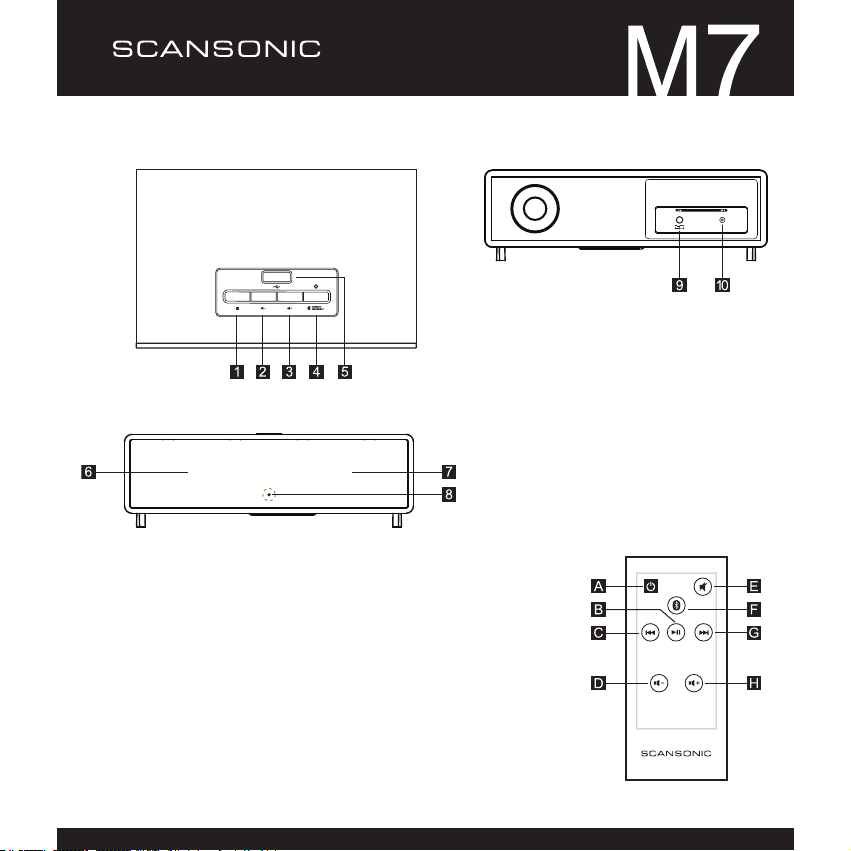
LOCATION OF CONTROLS
Front View
1. Power On/Off
2. Volume down
3. Volume up
4. Disconnect/Connect
5. USB Charging port
6. Left Speaker
7. Right Speaker
8. LED Power indicator
9. DC 18V jack
10. Line-in jack
A. Power On/Off
B. Play/Pause
C. Previous Track
D. Volume Down
E. Mute
F. Disconnect/connect
Bluetooth
G. Next Track
H. Volume Up
Top View Rear View

4
ADAPTOR
AC CONNECTION
Insert the small DC plug from the AC adaptor into the DC IN 18V jack (Figure A).
Connect the AC cord to the adaptor and connect the other end to a wall outlet
having 230V AC (Figure B).
Use only the AC adaptor supplied with this product.
BATTERY INSTALLATION
1. Eject the battery compartment (Figure C).
2. Install a CR2025 battery (Figure C).
3. Insert the battery compartment (Figure C).
Figure A
Figure B
PRECAUTIONS
Figure C
Follow these precautions when using a
battery in this device.
Warning: Danger of re or explosion, if
battery is incorrectly replaced.
Replace only with the same or
equivalent type.
Be sure to follow the correct polarity
when installing the batteries, as
indicated, in the battery compartment. A
reversed battery may cause damage to
the device.
If the device is not to be used for a long
period of time, remove the batteries to
prevent damage from possible battery
leakage.
Do not try to recharge a battery; it can
overheat and cause damage or injury.
ADAPTOR

5
OPERATION
First connection
1. Press "Power On/Off" to turn on the Scansonic M7 (Figure D).
2. Blue LED will indicate power on and the M7 will go into Bluetooth auto pairing.
3. Search Bluetooth on your phone/bluetooth device
4. Locate "M7" in the search list and connect.
Note: When using "Power On/Off" button for standby, the M7 will reconnect with latest
paired device, when powered on again If the M7 is switched off by disconnecting the
wall socket, it will start auto pairing when turned on again.
Disconnect/new pairing
1. Press " " to disconnect current phone/bluetooth device (Figure E).
2. The M7 is in auto pairing and ready to connect with a new device.
3. Search Bluetooth on your phone/bluetooth device
4. Locate "M7" in the search list and connect.
Line in/AUX
The Line in can be used to connect a phone/MP3 etc. without Bluetooth
1. Turn down the volume.
2. Connect a Mini Jack cable to the M7 (Figure F).
The sound from Bluetooth will be disconnected.
3. Connect a phone/MP3 etc. to the cable.
4. Start playing music from your device and adjust the volume.
Note: To reconnect the sound from Bluetooth, remove the cable from the M7.
USB Charge
This port is able to charge devices that support USB charge.
1. Press "Power On/Off" to turn on the Scansonic M7
2. Connect the USB cable supplied with your device (Figure G).
Note: If M7 is charging only, without any audio input, the unit will automatically enter
standby mode, after 3 hours.
When in standby mode, there is no USB charge function.
The USB Charge port is not able to transfer data or music, it's for charging only.
Top View
Power On/Off
USB charge
LINE IN
Top View
Back View
Top View
Figure D
Figure E
Figure F
Figure G

6
TROUBLESHOOTING
No sound Volume is set to minimum, increase volume.
Power is off.
Make sure the AC adaptor is plugged in and wall outlet is turned on.
Make sure audio device is connected by Bluetooth or cable.
When using Bluetooth, make sure no LINE-IN cable are plugged in.
Reset unit: Unplug AC adaptor, wait 60 seconds and plug it back in.
No response to
remote control
The power LED indicator will ash when receiving signal from the remote control.
(LED located behind speaker grill on front).
If LED does not ash:
Make sure no object blocks the signal.
Replace the remote control battery.
If LED does ash:
Reset unit: Unplug AC adaptor, wait 60 seconds and plug it back in.
SPECIFICATIONS
Power Source: DC 18V 3.0A AC Adaptor
Speaker: Subwoofer (x1) 4" 6 ohm
Full range driver (x2) 2.5" 4 ohm
Tweeter (x2) 1" 4 ohm
Output power: 7W x2 + 22W
Weight: 5 kg
Dimensions: 388 x 246 x 123 mm (WxDxH)
Correct Disposal of this product. This marking indicates that this product should not be disposed with other household
wastes throughout the EU. To prevent possible harm to the environment or human health from uncontrolled waste
disposal, recycle it responsibly to promote the sustainable reuse of material resources. To return your used device,
please use the return and collection systems or contact the retailer where the product was purchased.
They can take this product for environmental safe recycling.

DE Bedienungsanleitung

2
WICHTIGE SICHERHEITSHINWEISE
Bitte lesen Sie diese Anleitungen aufmerksam durch, bevor Sie
das Gerät in Betrieb nehmen und bewahren Sie sie für späteres
Nachschlagen auf.
Beachten Sie alle Warnhinweise und befolgen Sie alle
Anleitungen.
a. Zur Vermeidung von Feuer und Stromschlag setzen Sie das
Gerät nicht Spritzwasser oder Tropfwasser aus und stellen Sie
keine mit Wasser gefüllten Gegenstände (wie Vasen) auf dem
Gerät ab.
b. Der Netzstecker (Netzteil) dient dem Abtrennen des Geräts
vom Stromnetz, die Steckdose muss jederzeit frei zugänglich
sein.
c. Setzen Sie die Batterie nicht übermäßiger Hitze aus.
d. Bauen Sie das Gerät nicht in einem Bücherschrank oder
dergleichen ein und achten Sie stets auf ausreichende
Belüftung. Blockieren Sie die Lüftungsöffnungen nicht mit
Zeitungen, Tischtüchern, Gardinen oder dergleichen.
e. Stellen Sie keine offenen Flammen (wie brennende Kerzen)
auf dem Gerät ab.
GEFÄHRLICHE HOCHSPANNUNG: Der Blitz im gleichseitigen Dreieck weist auf gefährliche Hochspannung im Gerät hin, die zu
einem Stromschlag führen kann.
ACHTUNG: Das Ausrufungszeichen im gleichseitigen Dreieck weist auf wichtige Bedienungs- und Wartungsanleitungen in der
Dokumentation des Geräts hin.
f. Lesen Sie die Informationen auf der Geräterückseite sowie die
Sicherheitshinweise, bevor Sie das Gerät installieren oder in
Betrieb nehmen.
g. Explosions- und Feuergefahr bei falschem Einsetzen von
Batterien. Tauschen Sie Batterien nur gegen gleichwertige
Batterien aus.
h. Benutzen Sie nur vom Hersteller empfohlenes Zubehör.
i. Halten Sie rings um Gerät und Netzteil einen Mindestabstand
von 10 cm für ausreichende Belüftung ein.
j. Gerät und Netzteil sind zur Benutzung in moderatem Klima
bestimmt.
k. Entsorgen Sie Batterien stets umweltgerecht.
WARNUNG: Zur Vermeidung von Feuer und Stromschlag setzen
Sie das Gerät nicht Regen oder Feuchtigkeit aus.
ÜBERSPANNUNGSSCHUTZ: Wir empfehlen die Benutzung
eines Überspannungsschutzes. Blitzschlag und Überspannung
sind nicht von der Garantie abgedeckt.
ACHTUNG
STROMSCHLAGGEFAHR
NICHT ÖFFNEN
ACHTUNG: ZUR VERMEIDUNG VON STROMSCHLAG GERÄTEGEHÄUSE (ODER RÜCKWAND) NICHT ÖFFNEN.
ES BEFINDEN SICH KEINE VOM BENUTZER WARTBAREN TEILE IM GERÄT. WENDEN SIE SICH MIT
REPARATUREN STETS AN EINEN AUTORISIERTEN KUNDENDIENST.

3
BEDIENELEMENTE
Frontansicht
1. Ein/Aus
2. Lautstärke verringern
3. Lautstärke erhöhen
4. Trennen/Verbinden
5. USB-Ladeanschluss
6. Linker Lautsprecher
7. Rechter Lautsprecher
8. Status-LED
9. DC 18 V Netzteileingang
10. Line-Eingang
A. Ein/Aus
B. Wiedergabe/Pause
C. Vorheriger Track
D. Lautstärke verringern
E. Stummschaltung
F. Bluetooth trennen/
verbinden
G. Nächster Track
H. Lautstärke erhöhen
Draufsicht Rückansicht

4
ADAPTOR
NETZANSCHLUSS
Schließen Sie den kleinen DC-Stecker vom Netzteil am Eingang DC IN 18V an
(Abbildung A).
Schließen Sie das Netzkabel am Netzteil und dann an einer 230-Volt-Steckdose
an (Abbildung B).
Benutzen Sie nur das mitgelieferte Netzteil.
BATTERIEN EINSETZEN
1. Nehmen Sie die Batterielade heraus (Abbildung C).
2. Setzen Sie eine CR2025 Knopfzelle ein (Abbildung C).
3. Setzen Sie die Batterielade zurück (Abbildung C).
Abbildung A
Abbildung B
SICHERHEITSHINWEISE
Abbildung C
Folgen Sie den Sicherheitshinweisen,
wenn Sie dieses Gerät im Batteriebetrieb
benutzen.
Warnung: Explosions- und Feuergefahr
bei falschem Einsetzen von Batterien.
Tauschen Sie Batterien nur gegen
gleichwertige Batterien aus.
Achten Sie beim Einsetzen der Batterie
auf die korrekte Polarität, wie auf der
Batterielade dargestellt. Vertauschte
Polarität kann das Gerät beschädigen.
Bei längerer Nichtbenutzung entnehmen
Sie die Batterie, um Schäden durch
auslaufende Batteriesäure zu
vermeiden.
Laden Sie Batterien nicht auf, das kann
zu Überhitzung führen und Schäden
oder Verletzungen verursachen.
NETZTEIL
Tabla de contenidos
Idiomas:
Otros manuales de Sistema estéreo de Scansonic


