Scan Antenna Thuraya IP Manual de usuario

Product Manual and User Guide
for
62 100 – ThurayaIP Active Portable Antenna

Product Manual and User Guide – ThurayaIP Active Antenna
Version B 20. septem er 2010 Page 2 of 19
SCAN Antenna A/S – www.scan-antenna.com
The information in this document is su ject to change without notice and descri es
only the product defined in the Introduction of this documentation. This document is
intended for the use y SCAN Antenna customers only for the purposes of the
agreement under which the document is su mitted, and no part of it may e
reproduced or transmitted in any form or means without the prior written permission
of SCAN Antenna. The document has een prepared to e used y professional and
properly trained personnel, and the customer assumes full responsi ility when using
it. SCAN Antenna welcomes customer comments as part of the process of continuous
development and improvement of the documentation.
The information or statements given in this document concerning the suita ility,
capacity, or performance of the mentioned hardware products cannot e considered
inding ut shall e defined in the agreement made etween SCAN Antenna and the
customer. However, SCAN Antenna has made all reasona le efforts to ensure that the
instructions contained in the document are adequate and free of material errors and
omissions. SCAN Antenna will, if necessary, explain issues which may not e covered
y the document.
SCAN Antenna lia ility for any errors in the document is limited to the documentary
correction of errors. SCAN Antenna WILL NOT BE RESPONSIBLE IN ANY EVENT FOR
ERRORS IN THIS DOCUMENT OR FOR ANY DAMAGES, INCIDENTAL OR
CONSEQUENTIAL (INCLUDING MONETARY LOSSES), that might arise from the use of
this document or the information in it.
This document and the product it descri es are considered protected y copyright
according to the applica le laws.
SCAN Antenna logo is a registered trademark of SCAN Antenna A/S.
Other product names mentioned in this document may e trademarks of their
respective companies, and they are mentioned for identification purposes only.
Copyright © SCAN Antenna A/S 2010. All rights reserved.

Product Manual and User Guide – ThurayaIP Active Antenna
Version B 20. septem er 2010 Page 3 of 19
SCAN Antenna A/S – www.scan-antenna.com
Table of contents
1. Introduction .............................................................................................................. 5
2. Functional description ................................................................................................ 5
3. Box contents............................................................................................................. 6
4. Safety ...................................................................................................................... 6
5. Mechanical features ................................................................................................... 7
5.1 Antenna placement on flat surface.......................................................................... 7
5.2 Antenna mounting on camera tripod ....................................................................... 7
5.3 Antenna mounting on 1” racket ............................................................................ 8
5.4 Storing and carrying the antenna ........................................................................... 9
6. Interface ................................................................................................................ 10
6.1 ON/OFF switch ................................................................................................... 10
6.2 Power LED / Charging indicator ............................................................................ 11
6.3 Charger socket................................................................................................... 11
6.4 SAT connector.................................................................................................... 12
6.5 GPS connector.................................................................................................... 13
7. Power options ......................................................................................................... 14
7.1 Using attery ..................................................................................................... 14
7.2 Using charger..................................................................................................... 14
7.3 Using DC-feeder ................................................................................................. 14
8. Use of the antenna .................................................................................................. 16
9. Trou leshooting....................................................................................................... 17
10. Ca le guidelines..................................................................................................... 18
11. Specifications ........................................................................................................ 19

Product Manual and User Guide – ThurayaIP Active Antenna
Version B 20. septem er 2010 Page 4 of 19
SCAN Antenna A/S – www.scan-antenna.com
THIS PAGE INTENTIONALLY LEFT BLANK

Product Manual and User Guide – ThurayaIP Active Antenna
Version B 20. septem er 2010 Page 5 of 19
SCAN Antenna A/S – www.scan-antenna.com
1.
Introduction
Thank you for choosing a product from SCAN Antenna.
This product has een carefully
developed with your satisfaction in mind. SCAN Antenna elieves in long relationships with its
customers, and we hope that you will find the quality of this product satisfactory.
Contact info for SCAN Antenna:
SCAN Antenna A/S
Dyregårdsvej 1-3
DK-2740 Skovlunde
DENMARK
Phone (45) 43 33 16 20
Fax (45) 44 94 10 99
Email info@scan-antenna.com
WWW www.scan-antenna.com
If your antenna has een purchased through a distri utor, please contact your distri utor for
support.
2. Functional description
This product,
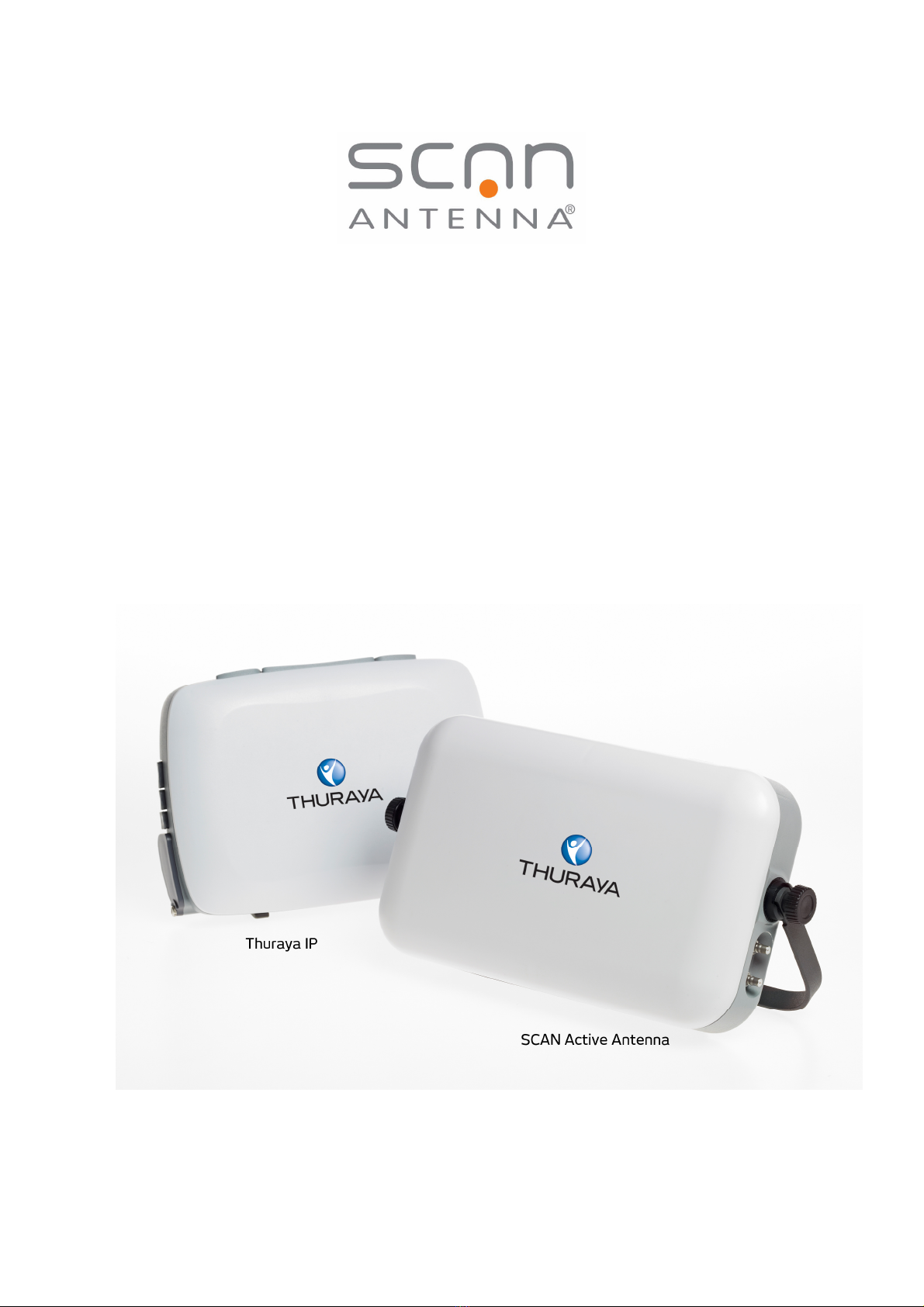
ThurayaIP Active Portable Antenna (P N 62 100)
is designed exclusively for use with a ThurayaIP terminal (model no. 9103, y Hughes Network
Systems). The use of this antenna with any other products is not supported.
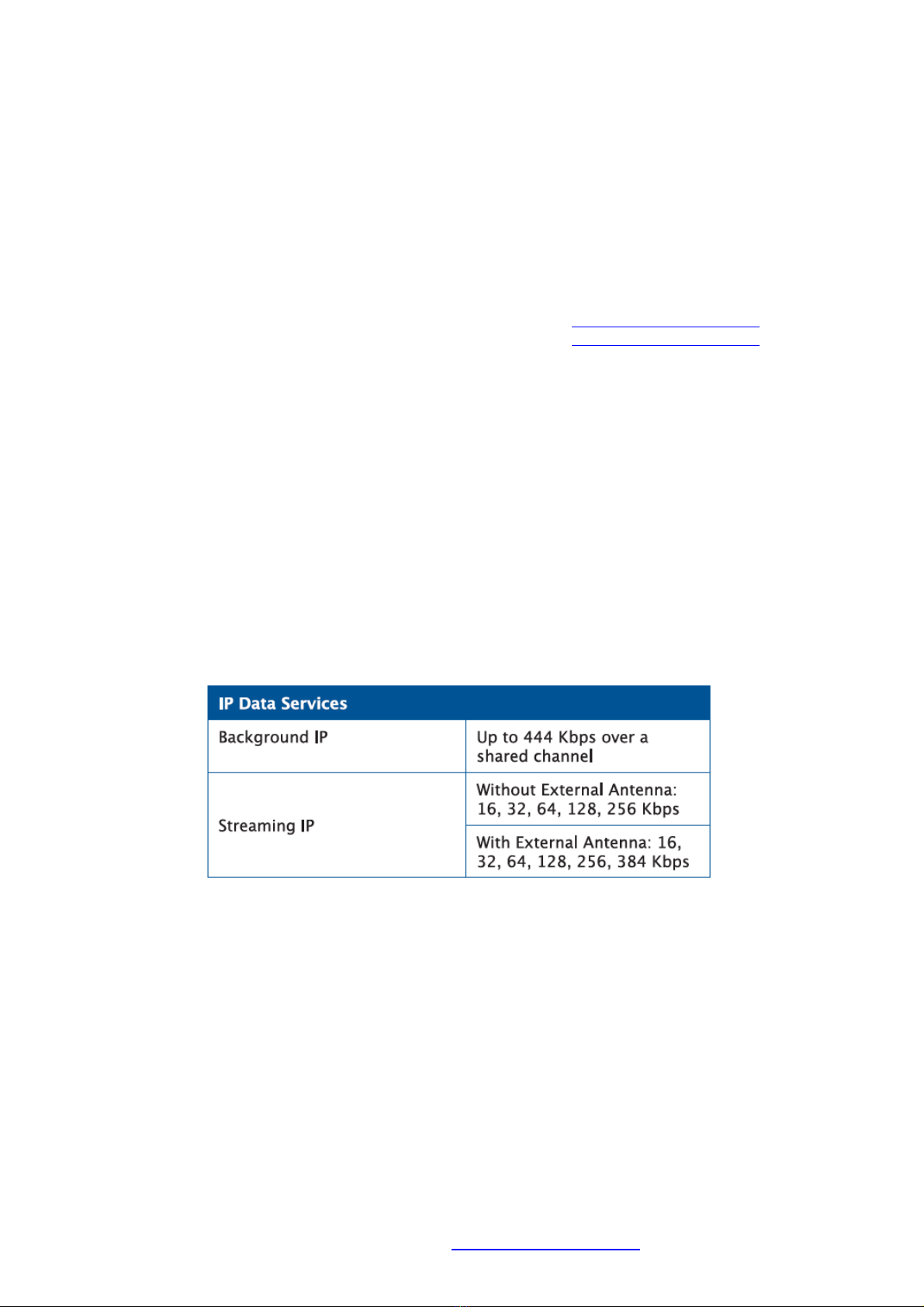
This antenna ena les the use of the highest streaming IP rates of ThurayaIP, and improves
performance for all other modes.
This antenna also ena les the use of long ca les etween the ThurayaIP terminal and the
antenna.
The antenna consists of a directional antenna, a High-Power Amplifier (HPA) for the uplink, a
Low-Noise Amplifier (LNA) for the downlink, and the necessary power supply circuitry. This
ena les the antenna to meet the required satellite link specifications for the ThurayaIP system.
The antenna must have power availa le (see chapter 7), and the antenna must e pointed
towards the satellite for proper operation.

Product Manual and User Guide – ThurayaIP Active Antenna
Version B 20. septem er 2010 Page 6 of 19
SCAN Antenna A/S – www.scan-antenna.com
3. Box contents
The antenna is delivered in a ox containing all necessary accessories, except long coaxial
ca les, which are packaged separately.
-ThurayaIP Active Porta le Antenna ( attery included)
-AC charger
-AC power cord
-1” Flange for optional mounting on racket
-User guide (this document)
-2 x 6m ca les (for SAT and GPS)
4. Safety
The antenna radiates electromagnetic waves when transmitting. In order to comply with
current FCC RF Exposure limits, the antenna must e installed in a way such that no persons
can placed directly in front of the antenna within the minimum safe distance. The minimum
safe distance for this antenna is 60 cm (2 ft).
WARNING! Maintain a distance of 60 cm (2 ft)
from the front of the antenna.

Product Manual and User Guide – ThurayaIP Active Antenna
Version B 20. septem er 2010 Page 7 of 19
SCAN Antenna A/S – www.scan-antenna.com
5. Mechanical features
5.1 Antenna placement on flat surface
The antenna can e placed on any flat surface. Adjusta le handle allows the antenna to e
fixed at the correct elevation angle. Consult the Thuraya IP user interface for the correct
elevation and azimuth angles of your position.
Loosen the finger-screws (counter-clockwise), adjust the elevation angles, and tighten them
again (clockwise).
5.2 Antenna mounting on camera tripod
The antenna has a threaded mount compati le with many camera tripods.

Product Manual and User Guide – ThurayaIP Active Antenna
Version B 20. septem er 2010 Page 8 of 19
SCAN Antenna A/S – www.scan-antenna.com
5.3 Antenna mounting on 1” bracket
The antenna comes with an extra adaptor for a 1” thread mount. The adaptor is mounted on
the rear of the antenna, if needed.
The thread is of the type 1”-14 NF.

Product Manual and User Guide – ThurayaIP Active Antenna
Version B 20. septem er 2010 Page 9 of 19
SCAN Antenna A/S – www.scan-antenna.com
5.4 Storing and carrying the antenna
When storing the antenna, place the handle in the ‘down’ position, where the handle covers
connectors and take up minimum amount of space.
When carrying the antenna, place the handle in the ‘up’ position.

Product Manual and User Guide – ThurayaIP Active Antenna
Version B 20. septem er 2010 Page 10 of 19
SCAN Antenna A/S – www.scan-antenna.com
6. Interface
The antenna has the following interfaces:
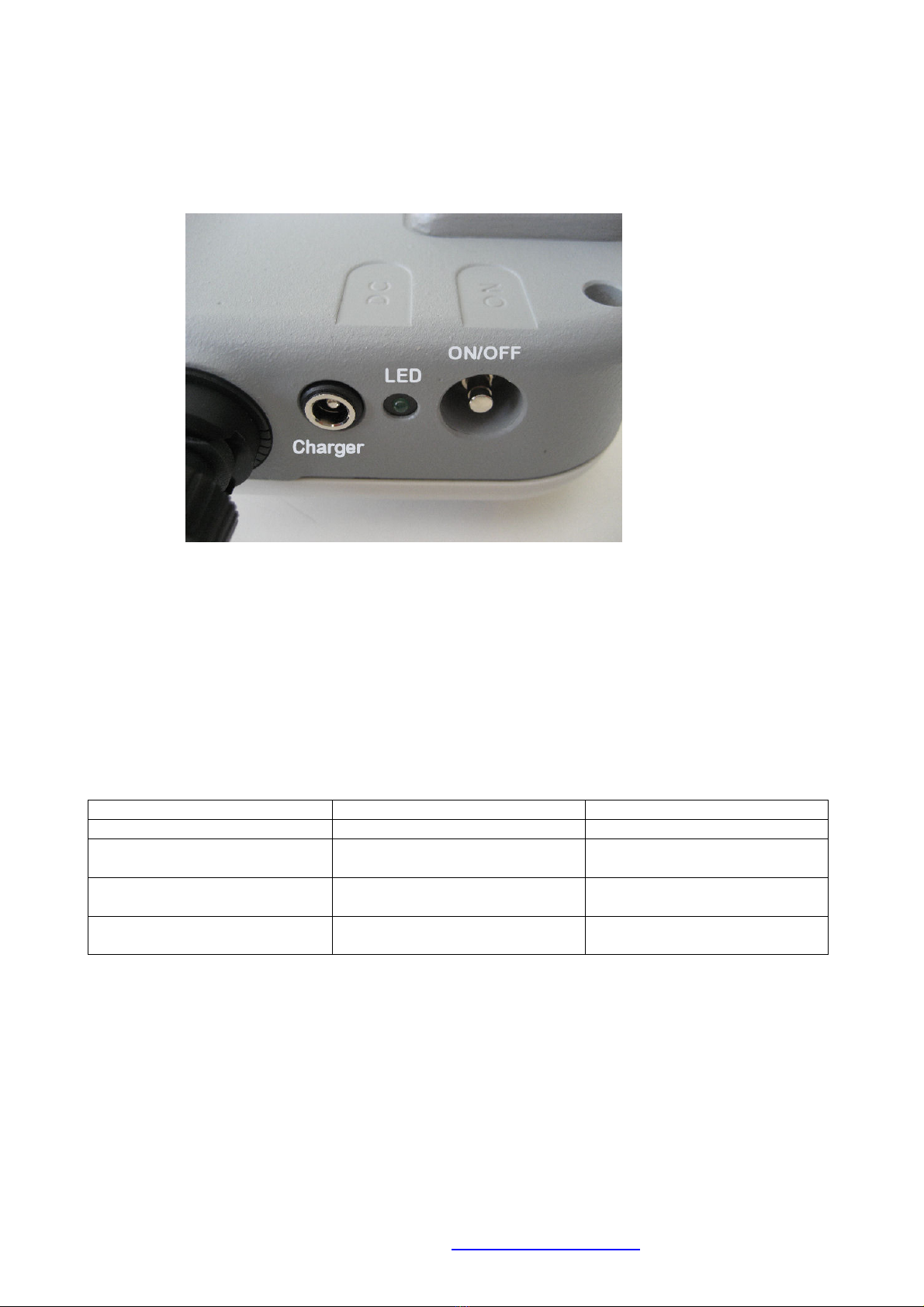
6.1 ON/OFF switch
The ON/OFF switch is used to turn the antenna on and off.
However, it is only in use if the power source of the antenna is the attery, please see chapter
5 for power options. If the power comes from the charger or the DC-feeder, the antenna will
e on regardless of the position of the ON/OFF switch.
The primary purpose of the ON/OFF switch is to avoid attery discharge, if the antenna is not
eing used.
Power Source Switch in ON position Switch in OFF position
Battery only Antenna is ON Antenna is OFF
Battery with charger or
Charger only
Antenna is ON, attery is
eing charged
Antenna is ON, attery is
eing charged
DC feeder Antenna is ON, attery is not
eing charged
Antenna is ON, attery is
not eing charged
DC feeder and
Charger Not recommended Not recommended
Este manual sirve para los siguientes modelos
2
Tabla de contenidos
Manuales populares de Antena de otras marcas

Alfa Network
Alfa Network APA-L01 Manual de usuario

Naval
Naval PR-422CA Manual de usuario

Feig Electronic
Feig Electronic ID ISC.ANTH200/200 Series Manual de usuario

TERK Technologies
TERK Technologies TV44 Manual de usuario

Directive Systems & Engineering
Directive Systems & Engineering DSE2324LYRMK Manual de usuario

HP
HP J8999A Manual de usuario