
Satechi Cyclone Micro 2 Manual de usuario

Cyclone Micro 2 Multimedia Player
Page 1.
Version 0.7
Cyclone
Cyclone
Cyclone
Cyclone
Micro
Micro
Micro
Micro 2
2
2
2
Full
Full
Full
Full HD
HD
HD
HD 1080p
1080p
1080p
1080p
HD interface Media Player
User manual Cyclone Micro 2

Cyclone Micro 2 Multimedia Player
Page 2.
Version 0.7
Contents:
Contents:
Contents:
Contents:
Safety Instructions:..................................................................................................... 4
Product Details:........................................................................................................... 6
Packaging List:........................................................................................................ 6
Front View:............................................................................................................... 6
Back View:................................................................................................................7
Remote Control:...................................................................................................... 8
User Interface:............................................................................................................. 9
Main Menu:............................................................................................................ 10
Basic Setup:...............................................................................................................11
Connecting Power:............................................................................................... 11
AV Cable:............................................................................................................... 11
HD Cable:
..........................................................................................................
12
USB Host Interface:.............................................................................................. 12
Memory Card Interface:....................................................................................... 13
Viewing Multimedia:..................................................................................................14
Movie Playback:.................................................................................................... 14
Movie Playback Options:................................................................................. 15
Advanced Video Settings:............................................................................... 16
Audio Playback:.....................................................................................................19
Audio Playback Options:..................................................................................20
Advanced Audio Settings:............................................................................... 21
Image Playback:....................................................................................................23
Image Playback Options:.................................................................................24
Advanced Image Settings:...............................................................................25
Interface

CycloneMicro2MultimediaPlayer
Page3.
Version0.7
SlideshowViewingwithBackgroundMusic:................................................26
File:..............................................................................................................................28
Settings:......................................................................................................................29
FirmwareUpgrade:...................................................................................................31
Troubleshooting:.......................................................................................................
33
ProductSpecifications:.............................................................................................35
MediaCodecInformation:.......................................................................................36
MaintenanceNotice:.................................................................................................37

CycloneMicro2MultimediaPlayer
Page4.
Version0.7
Safety Safety Safety SafetyInstructions: Instructions: Instructions: Instructions:
READTHESEINSTRUCTIONS:
Allsafetyandoperatinginstructionsshouldbereadbeforethisproductis
used.
KEEPTHESEINSTRUCTIONS:
Thesesafetyandoperatinginstructionsshouldberetainedforfuture
reference.
FOLLOWALLINSTRUCTIONS:
Alloperatinginstructionsshouldbefollowed.
AVOIDUSINGPRODUCTNEARWATER:
Donotusethisproductnearawatersource.
ALWAYSCLEANWITHADRYCLOTH:
Cleanusingasoft,dryclothonly.
HEAT:
Donotinstallnearaheatsource,suchasradiatorsorotherapparatusthat
producehighlevelsofheat.
POWEROUTAGE:
Avoiduseoftheproductduringelectricalstorms.Disconnectdevicewhen
notinuseforlongperiods.
SERVICING:
Ifproductisorbecomesdefectivepleaserefertoaqualifiedservice
technician.

CycloneMicro2MultimediaPlayer
Page5.
Version0.7
AVOIDBLOCKINGAIRVENTS:
Donotblocktheairventsinordertoavoidheatbuildup.Aminimumof5cm
isrecommendedtomaintainfreeairflow.
PROTECTTHEPOWERCORD:
Preventthepowercordfrombeingwalkedonandbeingpulledwithsudden
force.Protectthecordfrombeingpinched,particularlyatplugsandthepoint
wheretheyexitthedevice.
DONOTDROP:
Donotdroptheplayerasthiswillcauseirreversibledamage.
ONLYUSERECOMMENDEDACCESSORIES:
Itisrecommendedtouseonlymanufacturerapprovedaccessoriestoavoid
anycompatibilityissuesordamagetotheproduct.
HARDDRIVEANDOTHERMEDIASTORAGEDEVICE:
Wewillnotbeliableinanywayfordamageasaconsequenceoflossor
recoveryofdataontheharddriveandotherattachedmediastorage.
Customersareadvisedtobackupdatabeforeusingthisdevice.
Wearenotliableforcompatibilityissueswiththemediastorageunit.Itis
recommendedthatcustomersbuyacompatiblestoragemediaunitforthis
player.
CycloneMicro2MultimediaPlayer
Page6.
Version0.7
Product Product Product ProductDetails: Details: Details: Details:
Packaging Packaging Packaging PackagingList: List: List: List:
Pleaseensurethatthefollowingitemsareincludedintheboxwhenopened.
Ifanyitemsaremissing,pleasecontactyoursupplierimmediately.
MediaPlayer1x
PowerAdapter1x
RemoteControl1x
AVCable1x
SupportCD1x
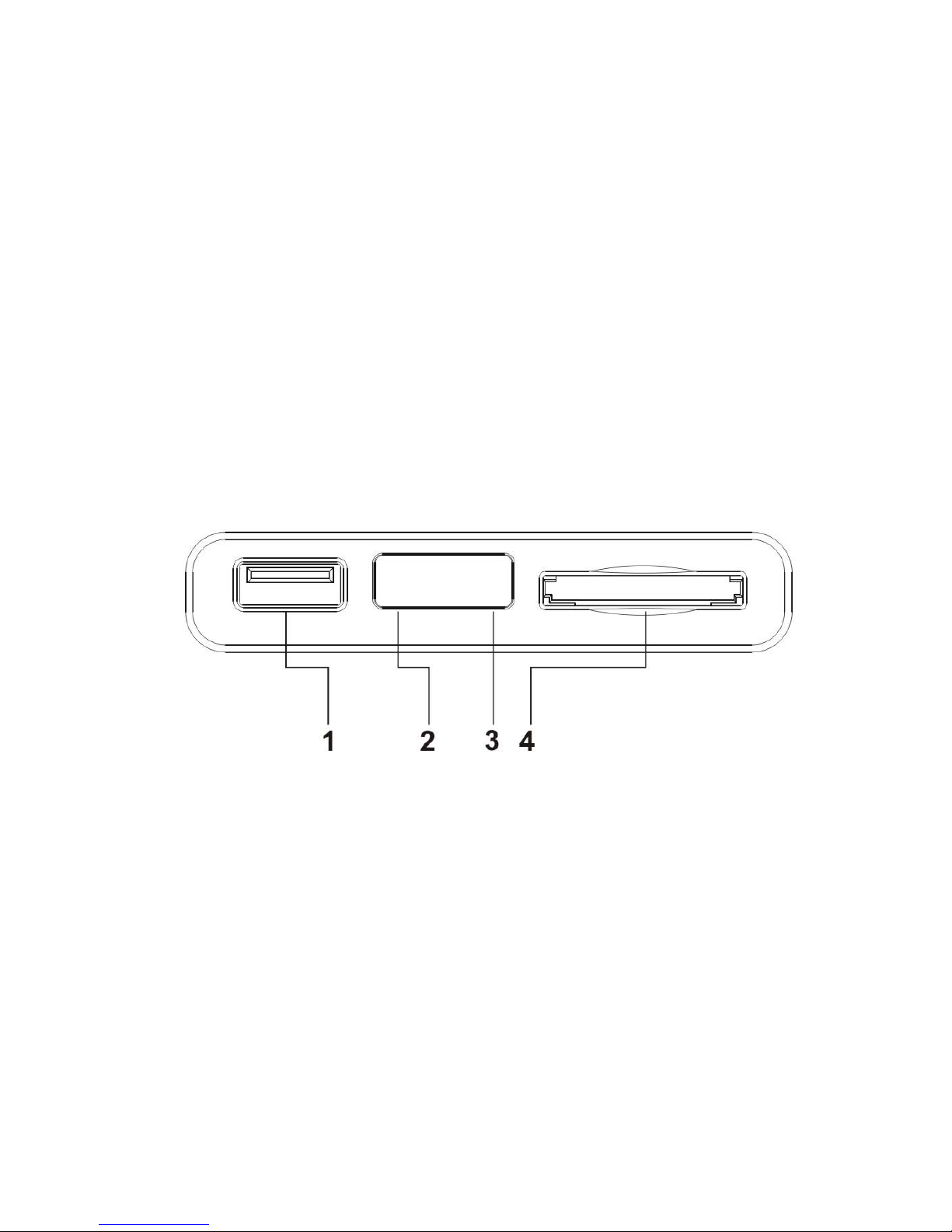
Front Front Front FrontView: View: View: View:
1USBHostUSBHostporttoconnecttomultipleexternal
storagedevices.
2LEDLightLEDlightdisplay.
TheLEDwilllightupbluewhenswitchedon.It
willlightupredwhenswitchedtostandbymode.
3IRInfraredsensor.
4CardReader2-in-1cardreader.SupportsSDandMMC
memorycards.

CycloneMicro2MultimediaPlayer
Page7.
Version0.7
Back Back Back BackView: View: View: View:
1AVOutCompositevideooutput.
2Highdefinitionvideooutputport.Usedtodisplay
highqualityvideoandaudio.
3DCIN5VPowerport
HD
INTERFACE

Cyclone Micro 2 Multimedia Player
Page 8.
Version 0.7
Remote
Remote
Remote
Remote Control:
Control:
Control:
Control:
1.Standby:Switches the Cyclone Micro 2 on and off from standby mode.
1
2
3
4
5
6
7
8
9
10
11
12
13
14
15
16
17
18
19
20
21
22
23
24
25
26
27
6.UP:Navigation button. Moves cursor up.
2.Prev :Press to return to previous file.
4.FR:Press to fast rewind.
5.Stop:Stops media playback.
3.Play/Pause:Press to pause media playback. Press again to resume media playback.
7.Return:Returns user to the previous menu.

Cyclone Micro 2 Multimedia Player
Page 9.
Version 0.7
Pressing it again to play.
14.AV/HD Interface:Toggles the Cyclone Micro 2 between AV and HD Interface.
20.HOME:Returns user to main menu.
23.Zoom:Press to zoom image files on display.
27.Setup:Shortcut access to setup menu.
26.Audio:Press to Switch the audio track .
12.Subtitle:Switch subtitle ON or OFF.
8.Enter:Pressing this button confirms or selects an action.
9.Left:Navigation button. Moves cursor left.
10.Down:Navigation button. Moves cursor down.
15.Mute:Switches on and off audio output.
13.16:9/4:3:Press to adjust the display aspect ratio.
11.Repeat:Press the Repeat button will change the repeat mode.
25.Rotate:Press to rotate image files.
21.OSD:Press to appear a number of available options.
24.GOTO:Press to select movie chapter.
16.Next:Press to go to next file.
22.Right:Navigation button. Moves cursor right.
18.FF:Press to fast forward.
19.V-:Press to decrease audio volume.
17.V+:Press to increase audio volume.

Cyclone Micro 2 Multimedia Player
Page 10.
Version 0.7
The Cyclone Micro 2 user interface hasbeen designed to allow easy access
to the media player’s many features.
Main
Main
Main
Main Menu:
Menu:
Menu:
Menu:
Upon starting the Cyclone Micro 2 this menu will be displayed first.
Movie:
Movie:
Movie:
Movie:
Provides access to movie media files.
Music:
Music:
Music:
Music:
Provides access to audio media files.
Picture:
Picture:
Picture:
Picture:
Provides access image media files.
File:
File:
File:
File:
Provides access to all available media files.
Settings:
Settings:
Settings:
Settings:
Provides access to the Setup Menu.
User
User
User
User Interface:
Interface:
Interface:
Interface:
Tabla de contenidos


