
Santa Fe Sentry Instrucciones de instalación

3
The Santa Fe Sentry is a monitoring system that gives you
real-time data about water, humidity and temperature in
crawl spaces and basements anytime from anywhere.
SANTA FE SENTRY
11/5/18
Santa-Fe-Products.com | 800.533.7533
Installation & Operation Instructions

Table of Contents
Specications .................................................3
Items Included.................................................3
Tools Required.................................................3
Location Considerations..................................4
Installation ................................................ 5-11
Home View ....................................................12
Menu.............................................................13
Site View ................................................. 14-16
History View ............................................ 17-19
Alert Rules.....................................................20
Troubleshooting ............................................21
Warranty........................................................22
CONNECT
1-800-533-7533
www.santa-fe-products.com/santa-fe-connect

3
Specications
Part Number: 4037200
Supply Voltage: 115 Volt - 1 Phase - 60 Hz
Current Draw: 0.250 Amps
Operating Temperature: 0 - 150°F, RH% accurate 32°F - 120°F
Power Cord: 6’, 115V
Water Cable: 50’, 2 Conductor 22 AWG
Connectivity: Wi-Fi
Santa Fe Sentry Crawl Space Monitor
Santa Fe Sentry Water Sensor
Power Cord (6 ft.)
Water Sensor Cable (50 ft.)
Hanging Screw
1
2
3
4
5
• Phillips Screwdriver
• Smart Phone (iPhone or Android Phone)
• Homeowner’s Wi-Fi Password
3
4
5
Items Included
Tools Required
1-800-533-7533
www.santa-fe-products.com/santa-fe-connect
12

4
Location Considerations
Place Santa Fe Sentry in the Crawl Space or Basement
Locate the Santa Fe Sentry in a central part of the crawl space
or basement.
Hang the Monitor vertically from a floor joist using the hanging
screw provided.
Plug one end of the cable into the Water Sensor and the other
end of the cable into the Monitor. Place the Santa Fe Sentry
Water Sensor (label side up) at the lowest level of the crawl
space or basement.
Water Sensor
Monitor
5
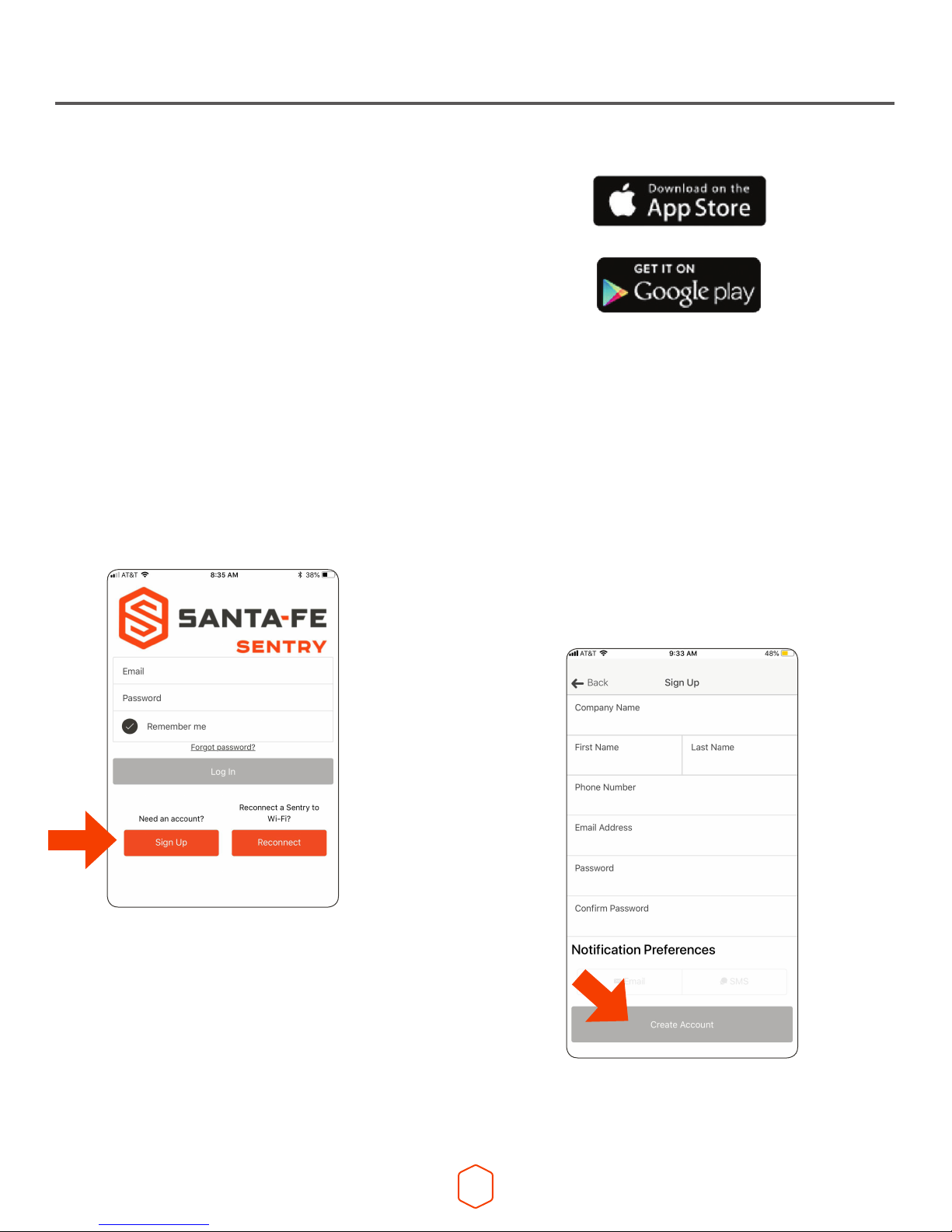
Step 1.
Download the Santa Fe Sentry app from
www.Santa-Fe-Products.com/Sentry
or search “Santa Fe Sentry” on the
App Store or Google play.
Step 2.
Launch the Santa Fe Sentry
app and enter your email and
password. Then select Sign Up.
Installation
Step 3.
Enter your account details and
select notication preferences.
Email, SMS, or both can be
selected to best meet your
notication needs. Then
select Create Account.

6
Step 4.
Launch the Santa Fe Sentry app and log
in using your email address and password
that was used to create your account
(from Step 2).
Forgot your password? Click the “Forgot
Password” link and an email will be sent to
you with a temporary password and reset
instructions.
Select LOG IN to access your Santa Fe
Sentry account. You will be automatically
routed to Home View. On your initial
login, the dashboard will be blank as
no Sentry monitors will have been added
to your account.
Installation
Step 5.
To add a Sentry site to your account,
select either the +sign in the top right
corner or ADD SITE from the drop-down
menu in the upper left corner of the
dashboard.

7
Installation
Step 6.
Follow the steps in the app.
First unplug and re-plug in
your Sentry. Press continue.
If the Sentry is blinking blue,
press Proceed and go to Step 8.
Otherwise, press Wait and go to
Step 7.

8
Installation
Step 8.
Click on the Settings button
to go to the phone’s WiFi
settings. Connect to the
Photon- network.
Once the phone connects
to the Sentry, a check mark
will appear.
Navigate back to the
Sentry app.
The Continue button will
be highlighted gray / black.
Press Continue.
Step 7.
Once the Sentry LED is blinking
blue, press Proceed.

9
Installation
Step 9.
Select the network you wish to
connect to. If the network you want
doesn’t show up here, the network
could be out of range, hidden, or 5GHz.
Enter network password if required.
Press CONTINUE to connect.
Note 1: The Santa Fe Sentry requires a
2.4GHz WiFi network, check that your
network and password are for your
2.4GHz network.
Note 2: A tan lock to the right of the
network indicates WEP router security.
You will need to provide a Key number,
an encryption type and the passcode
required by the router. A Red X to the
right indicates an Enterprise network
which is not supported by Sentry.

10
Installation
Step 11.
Add Site Info by lling in the required
elds with site specic information.
Click SAVE in the bottom right corner.
Step 10.
The Sentry will blink green
rapidly as it receives the network
credentials. The app will then
wait for verication that the
Sentry has connected to the cloud.
This may take up to two minutes.
When done ‘Sentry connected
successfully!’ will be displayed.
Press CONTINUE.
Tabla de contenidos


