S&C SpeedNet Hoja de instrucciones

S&C SpeedNet™ Radio
Instruction Sheet 1072-570
August 14, 2017
© S&C Electric Company 2010-2017, all rights reserved
Network Evaluation Guide
Table of Contents
Section Page Section Page
Introduction
Qualified Persons .............................2
Read this Instruction Sheet ......................2
Retain this Instruction Sheet .....................2
Proper Application .............................2
Special Warranty Provisions .....................2
Safety Information
Understanding Safety-Alert Messages .............3
Following Safety Instructions ....................3
Replacement Instructions and Labels ..............3
Overview .....................................4
Test Demonstrations ...........................5
SpeedNet Configuration
Factory Configuration...........................6
Radio Setup ..................................6
Basic Network Configuration .................... 11
Build a Two-Node Network ....................14
Single Link Testing
Testing with a 32-Byte Payload ..................18
Testing with a 300-Byte Payload .................18
Testing Bandwidth with Iperf ....................19
Building a Three-Node Network .................21
Testing Route Discovery ........................25
Building a Four-Node Network ..................26
Testing Alternate Routing .......................29
Building a Five-Node Network...................31
Point-to-Multipoint Network .....................34
Testing Route Optimization .....................37
AODV Gateway ..................................38
Security .........................................39
Serial Mode......................................40

2S&C Instruction Sheet 1072-570
Introduction
Qualified Persons WARNING
The equipment covered by this publication must be installed, operated, and maintained
by qualified persons who are knowledgeable in the installation, operation, and main-
tenance of radios in electric power distribution equipment, along with the associated
hazards. A qualified person is a radio technician who is qualified to install transmission-
power-limited radio equipment per FCC Part 15 and who is trained and competent in:
• The skills and techniques necessary to distinguish exposed live parts from nonlive
parts of electrical equipment
• The skills and techniques necessary to determine the proper approach distances cor-
responding to the voltages to which the qualified person will be exposed
• The proper use of the special precautionary techniques, personal protective equipment,
insulating and shielding materials, and insulated tools for working on or near exposed
energized parts of electrical equipment
These instructions are intended only for such qualified persons. They are not intended
to be a substitute for adequate training and experience in safety procedures for this type
of equipment.
Read this
Instruction Sheet NOTICE
Thoroughly and carefully read this instruction sheet before programming, operating, or
maintaining your S&C SpeedNet Radios. Familiarize yourself with the Safety Informa-
tion on page 3. The latest version is available online in PDF format at sandc.com/en/
support/product-literature/.
Retain this
Instruction Sheet
This instruction sheet should be available for reference wherever SpeedNet Radio is to be
used. Retain this instruction sheet in a location where you can easily retrieve and refer to it.
Proper Application WARNING
The equipment in this publication must be selected for a specific application. The applica-
tion must be within the ratings furnished for the selected equipment.
Special Warranty
Provisions
The standard warranty contained in the seller’s standard conditions of sale, as set forth
in Price Sheet 150, applies to S&C SpeedNet Radios, except that the first paragraph of the
said warranty is replaced by the following:
(1) General: The seller warrants to the purchaser for a period of two years from the
date of shipment that the equipment delivered will be of the kind and quality specified in
the contract description and will be free of defects of workmanship and material. Should
any failure to conform to this warranty appear under proper and normal use within two
years after the date of shipment, the seller agrees, upon prompt notification thereof and
confirmation that the equipment has been stored, installed, operated, inspected, and
maintained in accordance with the recommendations of the seller and standard industry
practice, to correct the nonconformity either by repairing any damaged or defective parts
of the equipment or (at the seller’s option) by shipment of necessary replacement parts.
The above special warranty does not apply to gateway communication devices applied
with SpeedNet Radios.

S&C Instruction Sheet 1072-570 3
Understanding
Safety-Alert Messages
Several types of safety-alert messages may appear throughout this instruction sheet as well as
on labels attached to the SpeedNet Radio. Familiarize yourself with these types of messages
and the importance of these various signal words:
DANGER
“DANGER” identifies the most serious and immediate hazards that will likely result in seri-
ous personal injury or death if instructions, including recommended precautions, are not
followed.
WARNING
“WARNING” identifies hazards or unsafe practices that can result in serious personal
injury or death if instructions, including recommended precautions, are not followed.
CAUTION
“CAUTION” identifies hazards or unsafe practices that can result in minor personal injury
if instructions, including recommended precautions, are not followed.
NOTICE
“NOTICE” identifies important procedures or requirements that can result in product or
property damage if instructions are not followed.
Following Safety
Instructions
If you do not understand any portion of this instruction sheet and need assistance,
contact your nearest S&C Sales Ofce or S&C Authorized Distributor. Their telephone
numbers are listed on S&C’s website sandc.com. Or call S&C Headquarters at
(773) 338-1000; in Canada, call S&C Electric Canada Ltd. at (416) 249-9171.
NOTICE
Read this instruction sheet thoroughly and
carefully before installing or operating your
S&C SpeedNet Radio.
Replacement
Instructions
and Labels
If you need additional copies of this instruction sheet, contact your nearest S&C Sales Ofce,
S&C Authorized Distributor, S&C Headquarters, or S&C Electric Canada Ltd.
It is important that any missing, damaged, or faded labels on the equipment be replaced
immediately. Replacement labels are available by contacting your nearest S&C Sales Office,
S&C Authorized Distributor, S&C Headquarters, or S&C Electric Canada Ltd.
Safety Information

4S&C Instruction Sheet 1072-570
Overview
The SpeedNet Network Evaluation Kit is used to demonstrate SpeedNet capabilities and
ease of use. Unlike other radios that are dedicated to a particular network topology (such
as point-to-point, point-to-multipoint, or mesh), SpeedNet technology is application-
agile so the most suitable topology can be used for a given application such as SCADA,
AMI backhaul, or peer-to-peer. Users can set up a small network to explore the dynamics
of SpeedNet technology, its conguration simplicity, and robust network reliability.
The Network Evaluation Kit allows a customer to experience superior SpeedNet Radio:
• Latency
• Bandwidth
• Routing discovery
• Route optimization
• Route recovery
• Security
• Over-the-air rmware upgrade
The network evaluation kit includes:
• 5 SpeedNet Radios
• 5 power supplies
• 5 “rubber-duck” antennas
• Ten 30 dB attenuators
• 2 CAT5 Ethernet cables
• 2 laptop PC computers with administrative privileges
• SpeedNet Client Tool installed
• Iperf Performance Measurement Tool installed
The customer will supply:
• Large lab area, radios must be separated by 4 meters
• Labels to mark radio conguration (e.g. Post-it® Notes)
To simulate an actual deployment, all radios are shipped with factory default settings.
When the first radio has been configured, the other radios are set up over-the-air with a
predetermined configuration sequence. The radios must be configured sequentially to avoid
IP conflicts, because they share the same factory IP setting. The radios can be configured
to demonstrate different network topologies, and the instructions show where to install
specific attenuators for creating various network events and demonstrating how SpeedNet
Radios adapt to them.

S&C Instruction Sheet 1072-570 5
Test Demonstrations The following SpeedNet network tests are described in these instructions:
• Set up the rst radio and change its IP address.
• Establish a two-node network—point-to-point
• Perform single-link latency test with a payload of 32 bytes and 300 bytes
• Perform a bandwidth test using Iperf
• Establish a three-node network
• Observe network entry
• Observe route discovery
• Perform three-node latency test with a payload of 32 bytes and 300 bytes
• Perform a bandwidth test using Iperf, check route optimization, and
alternate routing
• Establish a four-node network—mesh
• Observe network entry
• Observe route discovery
• Route optimization
• Alternate routing
• Establish a ve-node network—point-to-multi-point
• Observe network entry
• Observe route discovery
• Route optimization
• Alternate routing
Overview

6S&C Instruction Sheet 1072-570
Factory Configuration The demo radios are shipped with factory default settings:
• Ethernet IP = 192.168.200.1
• Wireless IP = 192.168.202.1
• Network ID = 1
Contact S&C for default credentials.
SpeedNet Conguration
Follow these steps to set up your SpeedNet Radio:
STEP 1. Access Network Connections on Laptop #1. (Start>Control Panel>View network
status and tasks)
STEP 2. Power up one of the demo radios and label it as Radio #10.
STEP 3. Connect Radio #10 and Laptop #1 with a Cat5 cable.
STEP 4. Connect the Rubber Duck antenna.
STEP 5. Click the Local Area Connection Properties dialog on Laptop #1 and click on the
Properties button. Scroll and select the Internet Protocol Version 4 (TCP/
IP v4) option. See Figure 1.
Radio Setup
Figure 1. Local Area Connection Properties dialog box.

S&C Instruction Sheet 1072-570 7
STEP 6. Step 6. Click on the Properties button. The Internet Protocol Version 4 (TCP/
IPv4) Properties dialog box will open. See Figure 2. Select the Use the Following
IP address option.
STEP 7. Enter the following:
IP address: 192.168.200.50
Subnet Mask: 255.255.255.0
Default Gateway: 192.168.200.1
STEP 8. Click the OK button on the Internet ProtocolVersion 4 (TCP/IPv4) Properties
dialog box.
STEP 9. Click the Close button on the Local Area Connection Properties dialog box.
NOTICE
Laptop firewalls must be disabled for these SpeedNet tests.
Only the Ethernet interface with the radio must be active. All other network interfaces,
including WiFi, must be turned off.
SpeedNet Conguration
Figure 2. Internet Protocol Version 4 (TCP/IPv4) Properties dialog box.

8S&C Instruction Sheet 1072-570
STEP 10. Open the Windows Command Prompt page (Start>All Programs>Accessories
>Command Prompt screens)and verify connectivity to Radio #10 with this
command: C:\Documents and Settings\>ping 192.168.200.1
STEP 11. Open the Client Tool (see Figure 3) and enter the following:
IP address: 192.168.200.1
Username: <Default Credentials>
Password: <Default Credentials>
STEP 12. Click the Login button.
Figure 3. SpeedNet Radio login dialog box.
SpeedNet Conguration
STEP 13. The Main screen will open, as shown in Figure 4. Click on the Interfaces tab.
Figure 4. Main screen for SpeedNet configuration.

S&C Instruction Sheet 1072-570 9
SpeedNet Conguration
STEP 14. The Interfaces screen will open. Click on the Wireless tab. See Figure 5.
STEP 15. Change the IP Address to: 192.168.202.10, and click on the Apply button..
Figure 5. Wireless configuration dialog box.
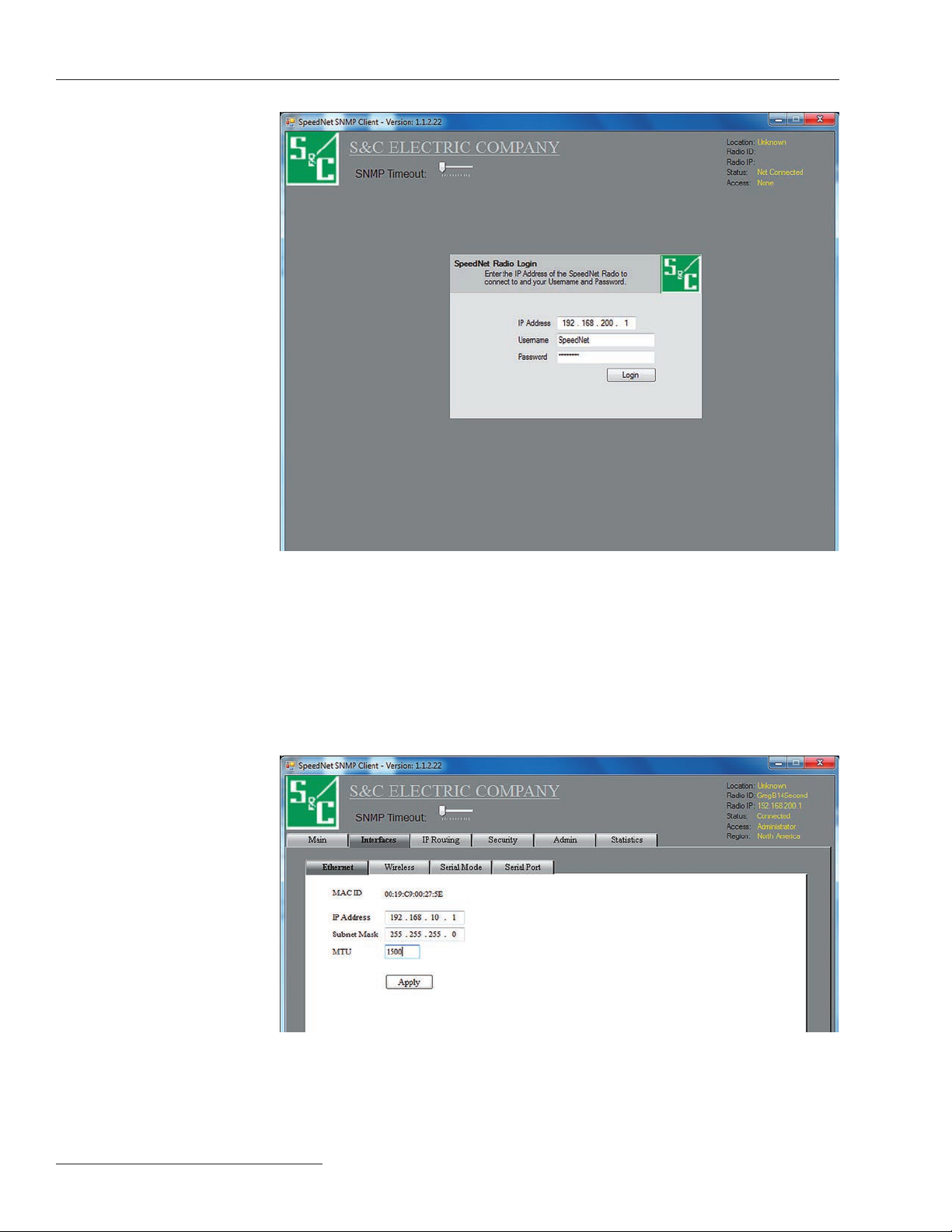
STEP 16. Open the Client Tool (see Figure 6 on page 10) and enter:
IP Address: 192.168.200.1
Username: <Default Credentials>
Password: <Default Credentials>
STEP 17. Click on the Login button.

10 S&C Instruction Sheet 1072-570
SpeedNet Conguration
Figure 6. SpeedNet Radio login dialog box.
STEP 18. The Main screen will open, as shown in Figure 4 on page 8. Click on the Interfaces
tab.
STEP 19. The Interfaces screen will open. Click on the Ethernet tab. See Figure 7.
Figure 7. Ethernet configuration dialog box.
Otros manuales para SpeedNet
5
Tabla de contenidos
Otros manuales de Radio de S&C