Sandberg Bluetooth Chameleon HeadSet II Manual de usuario

ENGLISHDANSKNORSKSVENSKASUOMI
Sandberg
Bluetooth Chameleon
HeadSet II
[125-57] Rev. 13.08.07
4506_SandManual125-57_N 14506_SandManual125-57_N 1 13/08/07 12:06:3213/08/07 12:06:32

ENGLISH
2
1 Introduction
The Sandberg Bluetooth Chameleon Headset
II (referred to as “the headset”) allows you
to make hands-free and wireless calls using
Bluetooth-compatible equipment such as a
mobile phone or computer. It gives you free
movement within a radius of up to 10 metres
from the connected device. The package in-
cludes lots of accessories enabling you to wear
the headset however you wish and be able to
charge it almost anywhere.
2 System requirements
• Bluetooth-compatible equipment with
headset support
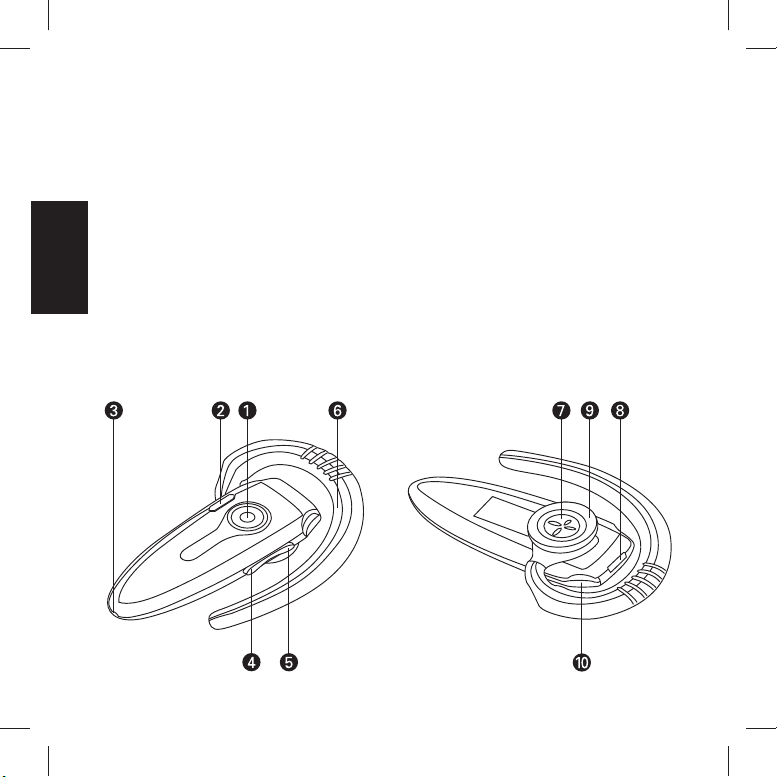
3 Overview
1. Multi-function button
2. LEDs (red and blue)
3. Microphone
4. Volume down
5. Volume up
6. Ear clip
7. Speaker
8. Charger socket
9. Ear clip fastener
10. Carrying strap fastener
4506_SandManual125-57_N 24506_SandManual125-57_N 2 13/08/07 12:06:3213/08/07 12:06:32

ENGLISH
3
4 Charging the headset
Before the headset is used for the first time, it
must be charged.
1. Connect the charger to the headset (8).
Select USB power, car charger or normal
power via the supplied mains adapters.
2. Leave the headset connected for around
three hours until the red LED (2) goes off.
The headset is now fully charged and ready
for use.
5 Connecting the headset
Connect the headset to a device (e.g. mobile
phone or computer) as follows:
1. Switch on the headset by pressing and hold-
ing button (1) for two seconds. If the head-
set does not find any paired devices nearby,
it will automatically start pairing. The LEDs
(2) light up red and blue alternately.
2. The headset can now be paired with the
desired device. The pairing code for the
headset is 0000. The unit you attempt to
connect to must have Bluetooth enabled
and be configured to accept contacts from
other Bluetooth devices. (If necessary, refer
to the instructions for the device to find out
how to do this.)
3. Activate the headset by pressing button (1)
briefly.
NB: The headset will only start automatic pair-
ing if no previously paired devices are within
range. Therefore if you wish to pair several
devices with the headset, only one device
must be paired at a time, whilst the others are
switched off.
5.1 How to make calls when connected to your
mobile phone
1. To make a voice call: Press and hold
button (4) until you hear a beep. Say
the voice dial command. End the call by
pressing button (1) briefly.
2. To dial the number: Dial the number on
the telephone as you would for a normal
call. The headset is automatically acti-
vated when the call is made. End the call
by pressing button (1) briefly.
3. To redial: Press and hold button (5) for
three seconds until you hear a beep. The
last-dialled number is then called. End
the call by pressing button (1) briefly.
NB: Voice dialling requires the mobile phone
to support this function. If necessary, refer to
the instructions for the telephone for more
information.
4506_SandManual125-57_N 34506_SandManual125-57_N 3 13/08/07 12:06:3213/08/07 12:06:32

ENGLISH
4
Call management:
• To answer an incoming call:
Press button (1) briefly.
• To transfer a call from the headset to the
mobile phone:
Press and hold buttons (1) and (4) for three
seconds until you hear a beep.
• To mute the microphone:
Press and hold buttons (1) and (5) for three
seconds until you hear a beep.
Repeat to reactivate the microphone.
6 Customising the headset
The package includes a range of accessories
aimed at optimising comfort.
Ear clip
Sturdy ear clip that can be adapted to the
shape of the ear.
Flex ear clip
An elegant ear clip that is highly flexible.
Ear cap
This ear cap ensures optimum sound by direct-
ing and focusing the sound towards the ear.
This ear cap enables you to wear the headset
without an ear clip.
Mini ear cap
This ear cap enables you to wear the headset
without an ear clip.
Carrying strap
Enables you to wear the headset around your
neck.
Ear clip
Ear cap
Flex ear clip
Mini ear cap
Strap
4506_SandManual125-57_N 44506_SandManual125-57_N 4 13/08/07 12:06:3213/08/07 12:06:32

ENGLISH
5
6.1 Changing the coloured bezel
The supplied coloured bezels allow you to
customise the headset according to mood and
style.
To remove the existing bezel:
To attach the new bezel:
7 Internet telephony
The Sandberg Bluetooth Headset is well suited
for Internet telephony. Internet telephony al-
lows you to chat over the Internet.
Various Internet telephony programs can be
downloaded via the Internet.
8 Troubleshooting
If you have any problems connecting your
headset to a device, check the following:
• Check that the headset is switched on and
the blue LED (2) is flashing.
• Ensure that the distance between the de-
vices does not exceed ten metres. Place the
devices closer together if necessary.
• Devices you attempt to connect to must
have Bluetooth enabled and be configured
to accept contacts from other Bluetooth
devices. (See the device manual on how to
do this.)
If you have any problems connecting your
headset to a computer, check the following:
• Check that the computer’s Bluetooth func-
tionality supports headsets.
• Check that the headset is set as the pre-
ferred device under the sound settings in
Windows control panel.
For further help or assistance in connection
with your Sandberg product, see details on the
last but one page of these instructions.
Have fun with your Sandberg Bluetooth
Chameleon HeadSet II.
4506_SandManual125-57_N 54506_SandManual125-57_N 5 13/08/07 12:06:3213/08/07 12:06:32

6
DANSK
1 Introduktion
Sandberg Bluetooth Chameleon Headset
II (fremover kaldet ”headsettet”) giver dig
mulighed for håndfri og trådløs samtale via
Bluetooth-kompatibelt udstyr, f.eks. mobiltele-
fon og computer. Du kan frit bevæge dig i en
radius på op til 10 meter fra den tilsluttede
enhed. Med i pakken følger en stor mængde
tilbehør, der gør det muligt at bære headsettet
efter smag og behov, samt at kunne oplade det
næsten uanset hvor du befinder dig.
2 Systemkrav
• Bluetooth kompatibelt udstyr med headset
understøttelse
3 Oversigt
1. Multifunktionsknap
2. Lysdioder (rød og blå)
3. Mikrofon
4. Reducere lydstyrke
5. Forøge lydstyrke
6. Ørebøjle
7. Højtaler
8. Tilslutning af oplader
9. Fastgørelse af ørebøjle
10. Fastgørelse af bærestrop
4506_SandManual125-57_N 64506_SandManual125-57_N 6 13/08/07 12:06:3213/08/07 12:06:32

7
DANSK
4 Opladning af headsettet
Inden headsettet kan tages i brug for første
gang, skal det lades op.
1. Tilslut opladeren til headsettet (8). Vælg
mellem strøm fra USB, bil eller normalt
strømstik via de medfølgende tilslutningsa-
daptere.
2. Lad headsettet være tilsluttet i omkring 3
timer indtil den røde lysdiode (2) stopper
med at lyse.
Headsettet er nu fuldt opladet og klar til brug.
5 Tilslutning af headsettet
Headsettet tilsluttes en enhed (f.eks. mobiltele-
fon eller computer) på følgende måde:
1. Tænd headsettet ved at holde knap (1) inde
i 2 sekunder. Finder headsettet ikke nogle
parret enheder i nærheden, vil det auto-
matisk starte parring. lysdioderne (2) lyser
skiftevis rødt og blåt.
2. Headsettet kan nu parres med den ønskede
enhed. Parringskoden til headsettet er 0000.
Enheden du prøver at oprette forbindelse
til skal have aktiveret Bluetooth funktionen
og være konfigureret til at lade sig kontakte
af andre Bluetooth enheder. (se eventuelt
i vejledningen til enheden hvordan dette
gøres).
3. Aktiver headsettet ved at trykke kort på knap
(1).
Bemærk! Headsettet vil kun starte automatisk
parring, hvis ingen i forvejen parret enheder
er i rækkevidde. Hvis flere enheder skal parres
med headsettet bør derfor kun én enhed parres
ad gangen, mens de andre holdes slukket.
5.1 Ved tilslutning med mobiltelefon kan
opkald foretages på følgende måde
1. Taleopkald: Hold knap (4) inde til du kan
høre et bip. Indtal taleopkalds komman-
doen. Afslut opkaldet ved at trykke kort
på knap (1).
2. Taste nummeret: Tast nummeret på
telefonen som ved normale opkald.
Headsettet aktiveres automatisk, når
opkaldet foretages. Afslut opkaldet ved
at trykke kort på knap (1).
3. Genkald: Hold knap (5) inde i 3 sekunder
indtil du kan høre et bip. Det sidste
opkaldte nummer bliver nu kaldt. Afslut
opkaldet ved at trykke kort på knap (1).
Bemærk! Taleopkald kræver, at mobiltelefonen
understøtter denne funktion. Se eventuelt
i vejledningen til telefonen for yderligere
information.
4506_SandManual125-57_N 74506_SandManual125-57_N 7 13/08/07 12:06:3213/08/07 12:06:32

8
DANSK
Håndtering af opkald:
• Besvare indkommende opkald:
Tryk kort på knap (1).
• Overfør opkald fra headsettet til mobiltele-
fonen:
Hold knap (1) og (4) nede i 3 sekunder til du
kan høre et bip.
• Afbryd mikrofon:
Hold knap (1) og (5) nede i 3 sekunder til du
kan høre et bip.
Gentag for at aktivere mikrofonen igen.
6 Tilpasning af headsettet
Med i pakken findes en række tilbehør, som gør
det muligt at optimere komforten.
Ørebøjle
Kraftig ørebøjle der kan tilpasses til ørets form.
Ørebøjle flex
En elegant ørebøjle med høj fleksibilitet.
Earcap
Denne earcap sikrer optimal lyd ved at dirigere
lyden fokuseret mod øret.
Denne earcap gør det muligt at bære headset-
tet uden ørebøjle.
Earcap mini
Denne earcap gør det muligt at bære headset-
tet uden ørebøjle.
Bærestrop
Gør det muligt at bære headsettet omkring
halsen.
Ørebøjle
Ear cap
Ørebøjle flex
Mini ear cap
Bærestrop
4506_SandManual125-57_N 84506_SandManual125-57_N 8 13/08/07 12:06:3313/08/07 12:06:33

9
DANSK
6.1 Udskiftning af farvefront
Med de medfølgende farvefronte kan du
tilpasse headsettet efter dit humør og stil.
Sådan afmonteres den eksisterende front:
Sådan monteres den nye front:
7 Internet telefoni
Sandberg Bluetooth Headset er velegnet til
Internet telefoni. Med Internet telefoni er det
muligt at føre samtaler over Internettet.
Programmer til Internet telefoni kan hentes i
forskellige udgaver på Internettet.
8 Problemløsning
Hvis du har problemer med at få headsettet
forbundet med en enhed kontrolleres følgende:
• Kontrollér at headsettet er tændt og at den
blå diode (2) blinker.
• Sørg for at afstanden mellem enhederne
ikke overstiger 10 meter. Sæt evt. enhederne
tættere ved hinanden.
• Enheder du prøver at oprette forbindelse til
skal have aktiveret Bluetooth funktionen og
være konfigureret til at lade sig kontakte af
andre Bluetooth enheder. (Se i manualen til
enheden, hvordan dette gøres)
Hvis du har problemer med at få headset-
tet forbundet med en computer kontrolleres
følgende:
• Kontrollér at computerens Bluetooth funk-
tion understøtter headsets.
• Kontrollér at headsettet er valgt som den
foretrukne enhed under lydindstillingerne i
Windows kontrolpanel.
Hvis du får behov for yderligere hjælp eller
vejledning i forbindelse med dit Sandberg pro-
dukt, kan du se detaljer herom på næstsidste
side i denne brugsanvisning.
God fornøjelse med dit Sandberg Bluetooth
Chameleon HeadSet II.
4506_SandManual125-57_N 94506_SandManual125-57_N 9 13/08/07 12:06:3313/08/07 12:06:33

10
NORSK
1 Innledning
Sandberg Bluetooth Chameleon Headset II
(heretter kalt ”headsettet”) gir deg mulighet
for håndfri og trådløs samtale via Bluetooth-
kompatibelt utstyr, f.eks. mobiltelefon og
datamaskin. Du kan bevege deg fritt i en radius
på opptil ti meter fra den tilkoblede enheten.
Med i pakken følger det mye tilbehør som gjør
det mulig å bruke headsettet etter egen smak,
samt å kunne lade det nesten uansett hvor du
befinner deg.
2 Systemkrav
• Bluetooth-kompatibelt utstyr med støtte for
headsett
3 Oversikt
1. Multifunksjonsknapp
2. Lysdioder (rød og blå)
3. Mikrofon
4. Senk lydstyrken
5. Hev lydstyrken
6. Ørebøyle
7. Høyttaler
8. Tilkobling av lader
9. Feste for ørebøyle
10. Feste for bærestropp
4506_SandManual125-57_N 104506_SandManual125-57_N 10 13/08/07 12:06:3313/08/07 12:06:33
Tabla de contenidos
Idiomas:
Otros manuales de Auriculares de Sandberg

Sandberg
Sandberg Bluetooth Office Headset Pro+ Manual de usuario

Sandberg
Sandberg 126-23 Manual de usuario

Sandberg
Sandberg Bluetooth Office Headset Pro Manual de usuario

Sandberg
Sandberg 125-37 Manual de usuario

Sandberg
Sandberg ANC FlexMic Manual de usuario

Sandberg
Sandberg Blue Storm Manual de usuario

Sandberg
Sandberg Pro 126-06 Manual de usuario

Sandberg
Sandberg 125-60 Manual de usuario

Sandberg
Sandberg 126-06 Manual de usuario

Sandberg
Sandberg Blue Storm Manual de usuario


