
Sabiana CB-E Manual de usuario

A 10/20
cod. 4051343
ISTRUZIONI PER L’USO
OPERATING INSTRUCTIONS
GEBRAUCHSANWEISUNG
MODE D’EMPLOI
INSTRUCCIONES DE USO
CBCB--EE

ITALIANO 3 - 4
ENGLISH 5 - 6
FRANÇAIS 7 - 8
DEUTSCH 9 - 10
ESPAÑOL 11 - 12

3
Italiano
Comando elettronico CB-E
Il comando CB-E consente di poter accendere o
spegnere l’apparecchio (Stand-by) e quindi
di poter impostare facilmente la ventilazione
agendo in modo progressivo sulla velocità del
ventilatore lasciando il controllo della tempera-
tura ad un cronotermostato centralizzato che,
oltre al consenso al funzionamento del venti-
latore, controllerà anche l’apertura e chiusura
della valvola acqua posta sulla tubazione di
collegamento.
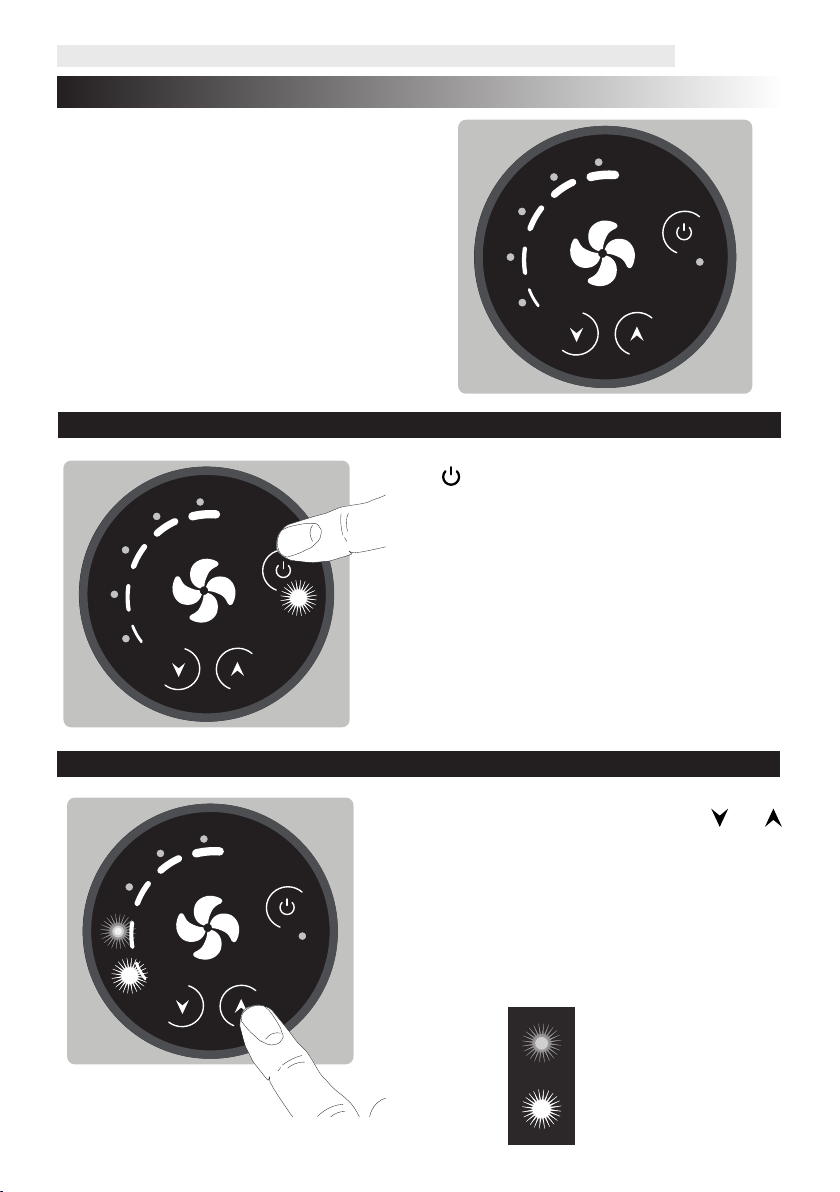
»On / Stand-by
Il tasto consente di attivare l’apparecchio op-
pure di metterlo in condizione di stand-by.
• Premendo il tasto il comando viene acceso e si
attiva l’unità.
• Premendo nuovamente il tasto il comando
e l’unità si portano in stato di stand-by.
Il led indica lo stato di ON e di stand-by del
comando.
»Impostazione della velocità di ventilazione
Minima luminosità
Massima luminosità
E’ possibile impostare la ventilazione agendo in
modo progressivo sulla velocità del ventilatore
premendo i tasti e .
Il livello di ventilazione sarà indicato dai led, che
si accenderanno in modo progressivo,in base alla
velocità in cui il ventilatore si trova.
Ad ogni led di indicazione sono associati due step
di ventilazione, distinguibili tra loro dall’intensità
luminosa.

4
Italiano
»Set di temperatura soddisfatto
Il funzionamento dell’apparecchio è gestito da un
termostato o cronotermostato centralizzato.
Al raggiungimento del set di temperatura impo-
stato il ventilatore si ferma e si spengono i led di
indicazione della ventilazione.
La condizione di funzionamento soddisfatta viene
segnalata dal comando con l’accensione intermit-
tente del led di stand-by:
1 secondo acceso e 5 secondi spento per indica-
re che il ventilatore è fermo per via del controllo
esterno.
On / 1s
O / 5s
»Blocco Tasti
Volendo evitare che la velocità del ventilatore, una
volta selezionata, non possa essere modicata da
altre persone, è possibile attivare la funzione di
“blocco dei tasti”.
Portare il comando nella condizione di ON.
Tener premuti contemporaneamente per 5 secon-
di i tasti e .
Tutti i led delle velocità lampeggiano per 2 volte
per per confermare l’avvenuta operazione.
Ripetere l’operazione per sbloccare i tasti del co-
mando.
»Regolazione luminosità led
In fase di stand-by la luminosità dei led si dimezze-
rà rispetto al valore scelto.
Portare il comando nella condizione di stand-by.
Tener premuti contemporaneamente per 5 secon-
di i tasti e .
I led si accendono alla massima luminosità.
Agire con i tasti e per aumentare o diminuire
la luminosità dei led al valore desiderato.
5
English
CB- E electronic control
The CB-E control allows the device to be switched
on or o (Stand-by) and therefore to easily set
the ventilation by progressively acting on the
fan speed, leaving the temperature control to
a centralised programmable thermostat which,
in addition to enabling fan operation, will also
control the opening and closing of the water valve
on the connection pipe.
»On / Stand-by
The button allows to activate the device or put
it in stand-by mode.
• Pressing the button, the control is switched on
and the unit is activated.
• Pressing the button again, the control and the
unit go to stand-by mode.
The LED indicates the ON and stand-by status of
the control.
»Setting the ventilation speed
Minimum brightness
Maximum brightness
You can set the ventilation by progressively
acting on the fan speed by pressing the and
buttons.
The ventilation level will be indicated by the LEDs,
which will light up progressively, depending on
the speed of the fan.
Two ventilation steps are associated to each
indication LED, which can be distinguished from
each other by the light intensity.

6
English
»Set temperature reached
The operation of the device is controlled by a
central thermostat or programmable thermostat.
When the set temperature is reached, the fan
stops and the ventilation indicator LEDs switch o.
The operating condition reached is signalled by
the control by the intermittent switching on of
the stand-by LED:
1 second on and 5 seconds o, to indicate that the
fan is stopped due to external control.
On / 1s
O / 5s
»Key Lock
In order to avoid that the fan speed, once selected,
can be modied by other people, it is possible to
activate the "Key Lock" function.
Set the control to ON.
Press and hold the and buttons
simultaneously for 5 seconds.
All speed LEDs ash twice to conrm the operation.
Repeat the operation to unlock the control
buttons.
»LED brightness adjustment
During stand-by the brightness of the LEDs will be
halved compared to the chosen value.
Put the control in stand-by mode.
Press and hold the and buttons
simultaneously for 5 seconds.
The LEDs light up at maximum brightness.
Use the and buttons to increase or decrease
the brightness of the LEDs to the desired value.

7
Français
Commande électronique CB-E
La commande CB-E permet d’allumer ou
d’éteindre l’appareil (veille) et donc pouvoir ré-
gler facilement l’aération en agissant progressi-
vement sur la vitesse du ventilateur, en laissant
le contrôle de la température à un chronother-
mostat centralisé qui, en plus de consentir au
fonctionnement du ventilateur, contrôlera éga-
lement l’ouverture et la fermeture de la vanne
d’eau située sur la tuyauterie de raccordement.
»On / Veille
La touche permet d’activer l’appareil ou de le
mettre en mode veille.
• En appuyant sur la touche, la commande s’allume
et l’unité est activée.
• En appuyant à nouveau sur la touche, la com-
mande et l’unité se mettent en état de veille.
La LED indique l’état de marche et de veille de la
commande.
»Réglage de la vitesse d’aération
Luminosité minimale
Luminosité maximale
Il est possible de régler l’aération en agissant pro-
gressivement sur la vitesse du ventilateur en ap-
puyant sur les touches et .
Le niveau d’aération sera indiqué par les LED, qui
s’allumeront progressivement, en fonction de la
vitesse à laquelle le ventilateur se trouve.
Deux étapes d’aération sont associées à chaque
LED d’indication, qui se distinguent l’une de
l’autre par l’intensité lumineuse.

8
Français
»Réglage de température satisfait
Le fonctionnement de l’appareil est contrôlé par
un thermostat ou un chronothermostat centralisé.
Lorsque la température réglée est atteinte, le ven-
tilateur s’arrête et les LED d’indication de l’aéra-
tion s’éteignent.
La condition de fonctionnement satisfaite est si-
gnalée par la commande avec l’allumage intermit-
tent de la LED de veille:
1 seconde allumée et 5 secondes éteintes pour
indiquer que le ventilateur est arrêté en raison du
contrôle externe.
On / 1s
O / 5s
»Verrouillage des touches
Pour éviter que la vitesse du ventilateur, une fois
sélectionnée, ne soit modiée par d’autres per-
sonnes, la fonction « verrouillage des touches »
peut être activée.
Mettre la commande sur ON.
Garder enfoncées simultanément pendant 5 se-
condes les touches et .
Toutes les LED de vitesse clignotent 2 fois pour
conrmer l’opération.
Répéter l’opération pour déverrouiller les touches
de commande.
»Réglage de la luminosité des LED
En mode veille, la luminosité des LED sera réduite
de moitié par rapport à la valeur choisie.
Mettre la commande en mode veille.
Garder enfoncées simultanément pendant 5 se-
condes les touches et .
Les LED s’allument à la luminosité maximale.
Utiliser les touches et pour augmenter ou di-
minuer la luminosité des LED à la valeur souhaitée.

9
Deutsch
Elektronische Steuerung CB-E
Steuerung CB-E ermöglicht es, das Gerät ein-oder
auszuschalten (Stand-by) und somit auf einfache
Weise die Belüftung einzustellen, indem sie
progressiv auf die Lüftergeschwindigkeit einwirkt,
wobei die Temperaturregelung einer zentralen
Thermostat-Zeitschaltuhr überlassen wird, die
nicht nur den Lüfterbetrieb zulässt, sondern auch
das Önen und Schließen des Wasserventils am
Anschlussstutzen steuert.
»On / Stand-by
Mit der Taste können Sie das Gerät aktivieren
oder in den Stand-by-Modus versetzen.
• Durch Drücken der Taste wird die Steuerung
eingeschaltet und das Gerät aktiviert.
• Ein erneutes Drücken der Taste versetzt die
Steuerung und das Gerät in den Stand-by-Modus.
Die LED zeigt den ON- und Stand-by-Modus der
Steuerung an.
»Einstellung der Ventilatorgeschwindigkeit
Minimale Helligkeit
Maximale Helligkeit
ZurEinstellungdesVentilatorsdieGeschwindigkeit
über die Tasten und verstellen.
Die Ventilatorstufe wird durch die LEDs angezeigt,
die progressiv je nach Ventilatorgeschwindigkeit
aueuchten.
Jeder LED sind zwei Ventilatorgeschwindigkeiten
zugeordnet, die durch eine unterschiedliche
Helligkeit erkennbar sind.

10
Deutsch
»Temperatureinstellung erfolgreich
Der Betrieb des Geräts wird durch ein zentrales
Thermostat oder eine Thermostat-Zeitschaltuhr
gesteuert.
Wenn die eingestellte Solltemperatur erreicht
ist, stoppt der Ventilator und die Ventilator-LEDs
erlöschen.
Die erfüllte Betriebsbedingung wird durch die
Steuerung bei Einschaltung der blinkenden
Stand-By-LED gemeldet:
1 Sekunde ON und 5 Sekunden OFF, was bedeutet,
dass der Ventilator aufgrund der externen
Kontrolle steht.
On / 1s
O / 5s
»Tastensperre
Will man vermeiden, dass die
Ventilatorgeschwindigkeit nach Wahl nicht
durch andere Personen verstellt wird, kann die
Tastensperre aktiviert werden.
Die Steuerung auf ON stellen.
Gleichzeitig die Tasten und 5 Sekunden lang
gedrückt halten.
Alle Geschwindigkeits-LEDs blinken zweimal, um
den Vorgang zu bestätigen.
Den Vorgang wiederholen, um die Steuertasten zu
entsperren.
»Einstellung der Helligkeit der LEDs
Im Standby-Betrieb wird die Helligkeit der LEDs im
Vergleich zum gewählten Wert halbiert.
Die Steuerung in den Stand-By-Modus schalten.
Die Tasten und 5 Sekunden lang gedrückt
halten.
Die LEDs leuchten mit maximaler Helligkeit.
Mit den Tasten und die Helligkeit der LEDs
auf den gewünschten Wert bringen.
Tabla de contenidos
Idiomas:
Otros manuales de Panel de control de Sabiana


