Ruwido Z1 Manual de usuario

Operating Instructions
Congratulations on purchasing this high performance easytip Z1
universal remote control. Great care has been taken over the
design and manufacture of this product and in normal use it will
give many years of satisfactory service. The following pages
describe how to get the best from your new remote.
Inserting and changing the batteries
Your easytip Z1 is powered by two alkaline 1.5 V batteries
(IEC LR 03, AAA). Wherever possible, ensure that new
batteries are used. Never mix old and new batteries
together as this will effect the performance of the
controller and shorten the battery life. Once the batteries
have been inserted, check that the red light flashes when
any of the keys of your remote are depressed, this confirms
correct installation of the batteries.
Please Note:
Insert batteries following the markings on the inside of
the battery compartment.
Immediately dispose of any leaking batteries.
Dispose of old batteries as per manufacturers instructions.
GB User Manual
D Bedienungsanleitung
I Istruzioni per l’usoF Mode d’emploiNL Gebruiksaanwijzing
User Manual
Helpline 00800 31133113 1

1. Useful Tips before programming
your easytip Z1
In the back pages of this manual you will find the 4-digit
codes which allow you to set up your easytip Z1 controller.
After finding your brand of TV in the back pages of the
manual, you will see alongside several 4-digit codes. You
should start with the first 4-digit code in the list. If after
programming this first 4-digit code your easytip Z1 does
not operate correctly, then move to the next 4-digit code
in the list until you have tried every code. These code
numbers are specific to the Z1 remote and are not a
reference to your particular model of TV. Each code
number in the back of the book performs a particular
function when activated. As you progress through the
code list against your brand of TV, certain controls on the
handset may not function correctly, this is perfectly normal
and can often be solved by continuing through the other
codes in the list. Do not assume that the first number that
operates your TV is the correct and final code. You must
ensure that before contacting the HELPLINE, you have
tried and tested all the codes against your brand of TV.
User Manual
Helpline 00800 31133113Helpline 00800 31133113
2

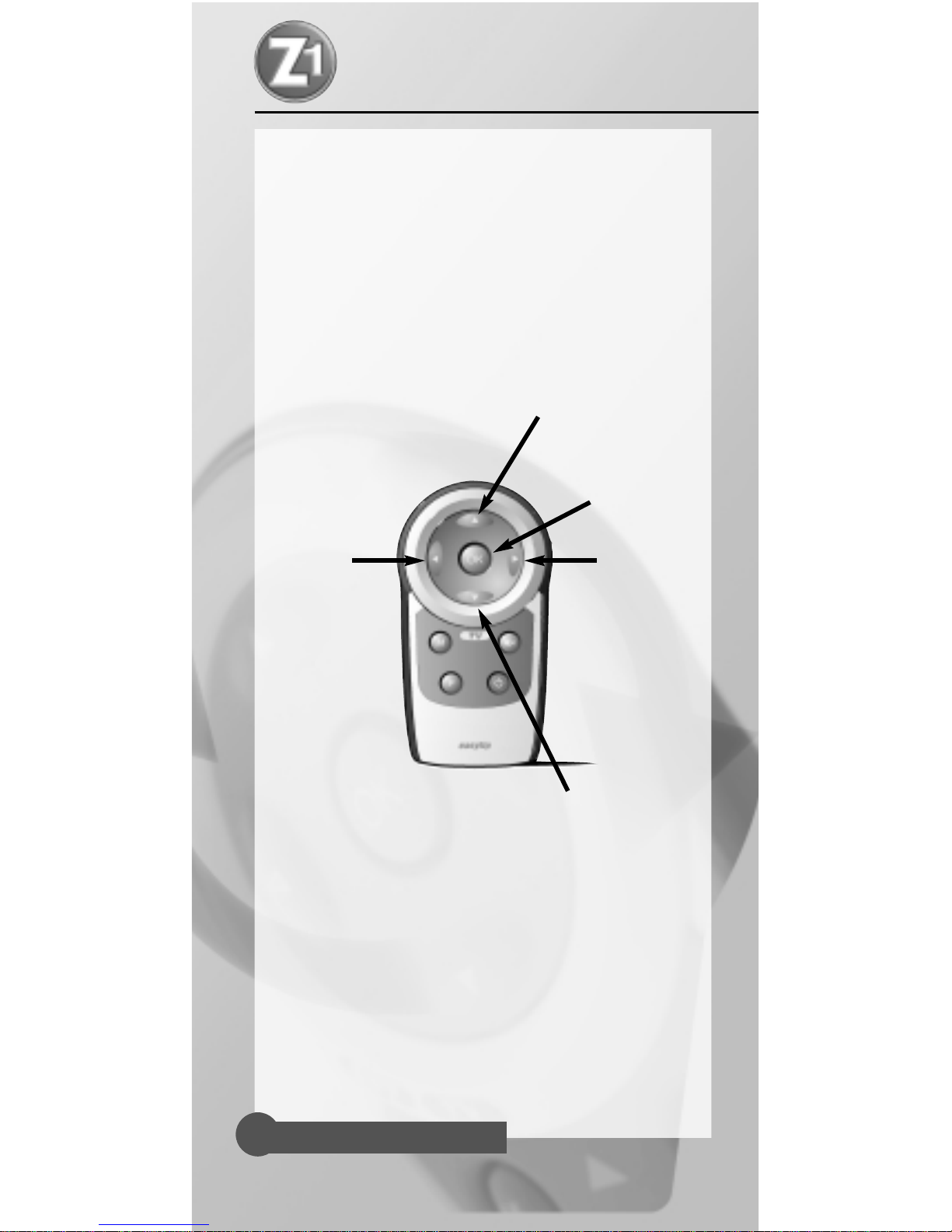
Function keys explained
ON/OFF Power/Standby
MUTE Sound Mute
MENU On-screen Menu
F Function Key for Programming
OK Norm, AV function and
confirmation key in the menu
Volume +/- Volume up/down
Programme +/- Channel up/down
Please note: Some TVs may not support all of these functions.
GB User Manual
D Bedienungsanleitung
I Istruzioni per l’usoF Mode d’emploiNL Gebruiksaanwijzing
User Manual
Helpline 00800 31133113Helpline 00800 31133113 3
Programme +/-
Volume +/-
OK
MUTE
MENU
ON/OFF
F

Function keys for programming
the 4 Digit Code
Since the easytip Z1 has not got a numeric keypad, the
function keys on your controller are assigned to numbers
as follows:
1 = Up
2 = Left
3 = (OK/Norm)
4 = Right
5 = Down
e.g.:
To enter the code 1353, press in succession the
following keys:
Up for 1
(OK/Norm) for 3
Down for 5
(OK/Norm) for 3
The combination of these keys equals the code 1353.
User Manual
Helpline 00800 31133113
4
Programme + = 1
Programme – = 5
Volume + = 4
OK/Norm = 3
Volume – = 2

Two Ways of programming your Z1
• By Direct Code input from codes at the back of the
manual (preferred)
• By Search Mode (secondary method)
We would normally recommend using the dedicated code
numbers in the back of this booklet to setup your remote.
These numbers are particular to your brand of TV and will
inevitably give best results. As a secondary setup method,
your remote can undertake a complete code search. The
code search method is often used when a particular brand
is not listed, or when some features are not responding to
direct code input. As there are a great number of codes for
the unit to select and test, search mode can take upto 15
minutes to complete.
The 5 Second Rule
Your new easytip Z1 needs your help to get started.
We recommend that you study the step by step
instructions before programming the codes. The basis of
this programming is the 5 Second Rule. Each successive
action when programming must be completed within 5
seconds or the unit will revert back to normal operation.
This is deliberate so that other users of your remote will
not inadvertently reprogram the unit.
GB User Manual
D Bedienungsanleitung
I Istruzioni per l’usoF Mode d’emploiNL Gebruiksaanwijzing
User Manual
Helpline 00800 31133113 5

Quick Set-up Reference
Step 1 Insert batteries (checking correct polarity)
Step 2 Switch on the TV (fully on with a broadcast picture
on the screen)
Step 3 Press and hold the (F) key until the LED flashes
twice in quick succession. (approx 2 seconds)
Step 4 After the two flashes, remove your finger from the
(F) key and within 5 seconds input the correct code
from the manual.
Step 5 After you have input the code, wait for the LED to
flash twice, this confirms that the number you
selected has been installed into the unit correctly.
Step 6 Once the code has been installed, press the
(ON/OFF) key on the controller. If the TV responds
by going into standby mode then continue to try
all the other functions. If some functions do not
work correctly then move to the next code in the
list repeating from step 3.
What to do if the TV does not respond
• Either the 4-digit code, or part of the programming
sequence was not completed within 5 seconds or the
code was not recognised. Please re-check the 4-digit
code in the manual or move onto the next code in the list
against your particular brand. Also ensure that the codes
entered are from the correct section of the manual.
User Manual
Helpline 00800 31133113
6

Programming the easytip Z1 in
automatic mode
Note:
it is advised not to use search function before using the direct
codes at the back of the manual.
If the listed codes failed to operate the TV, or if the
manufacturer was not included in the manual, then the
search mode should be used. Search mode allows the
controller to search and test every code in its memory.
During search mode the remote is sending a signal to your
device every other second. If the unit finds a compatible
signal it will power down the device into standby mode. If
this happens then test all the other functions of the
remote. If some functions do not work correctly then its
possible your remote has found the first of many
compatible codes. At this point you should continue the
search until a more compatible code is found. As there are
many codes for the controller to select and test, search
mode take upto 15 minutes to perform.
How to run the search mode (code 1111)
Step 1 Switch on your TV (fully on with a broadcast
picture on the screen).
Step 2 Press and hold the (F) key until the LED flashes
twice. (approx 2 seconds)
Step 3 Within 5 seconds input the code 1111 (up, up, up,
up). After you have input the code, wait for the
LED to flash twice, this confirms that the number
you selected has been installed into the unit
correctly.
GB User Manual
D Bedienungsanleitung
I Istruzioni per l’usoF Mode d’emploiNL Gebruiksaanwijzing
User Manual
Helpline 00800 31133113 7

Step 4 Within 5 seconds after the double flash press and
hold the (ON/OFF), this will start the search mode.
You must hold this key down continually to enable
the search. Confirmation of the search can be
noted by the red LED flashing every other second.
If the remote finds a compatible code the TV will
go into standby mode. After this test all other
functions of the remote.
PLEASE DO NOT ASSUME THAT THE FIRST CODE
FOUND IS THE CORRECT CODE.
Step 5 After your TV, has switched into standby mode,
press and hold the (F) key until the LED flashes
twice. This will store the code.
IMPORTANT!
Code search begins from the last code number found in the
previous search. When the end of the code list is reached the
LED flashes 3 times in quick succession and the search
restarts from the beginning of the list.
Determining the 4-number
code found by automatic code search
(after using search facility)
It is useful to know which code your device responded to
in case it is inadvertently changed at any later date.
Step 1 Press and hold the (F) key until the LED flashes 3
times. (approx 2 seconds)
Step 2 After the two flashes and within 5 seconds input
the code 1112. After you have input the code, wait
for the LED to flash twice, this confirms that the
number you selected has been installed into the
unit correctly.
User Manual
Helpline 00800 31133113
8

Step 3 To determine the stored code press the following
keys:
up for the first digit
left for the second digit
(OK/Norm) for the third digit
right for the fourth digit
After pressing one of these keys, count the number
of flashes emitted by the LED. As long as you do
not exceed 5 seconds between each process you
can press any of these keys as often as you want.
So you do not have to hurry or panic if you miss a
flash.
Make sure that you count the flash that occurs
including the initial flash when depressing the key.
Example:
After pressing the (Programme +) key the LED flashes
once. So the first digit of your code is 1.
After pressing the (Volume -) key the LED flashes
thrice. So the second digit of your code is 3.
After pressing the (OK/Norm) key the LED flashes
five times. So the third digit of your code is 5.
After pressing the (Volume +) key the LED flashes
thrice. So the fourth digit of your code is 3.
In this example the code is 1353.
Please make a note of the codes in the box below
for eventual reprogramming.
Please write down your 4-digit code here:
CODE
GB User Manual
D Bedienungsanleitung
I Istruzioni per l’usoF Mode d’emploiNL Gebruiksaanwijzing
User Manual
Helpline 00800 31133113 9

2. Special functions of your easytip Z1
To get the maximum out of your easytip Z1 universal
remote control some additional functions have been
included, however, to maintain the units small profile and
to save untidy printing on the remotes surface, some
function are operated by multiple key selection.
Switch to AV
To switch to an external device (e.g. VCR, DVD-Player or
SAT Receiver) connected to your TV it maybe necessary to
switch to the dedicated AV channel.
Check, in the manufacturers operating manual, if your TV
supports this function.
To switch to the AV channel do as follows.
Step 1 Press the (F) key quickly.
Step 2 Press the (OK/Norm ) key quickly.
Now your TV should switch to the AV channel.
If your TV does not respond, check if it really supports this
function and if you have found the optimal code for your
TV.
User Manual
Helpline 00800 31133113
10
Tabla de contenidos
Idiomas:
Otros manuales de Mando a distancia de Ruwido

Ruwido
Ruwido 850A Manual de usuario

Ruwido
Ruwido easytip 4 Manual de usuario

Ruwido
Ruwido 2779 Series Manual de usuario

Ruwido
Ruwido Swisscom Box Manual de usuario

Ruwido
Ruwido 827A01 Manual de usuario

Ruwido
Ruwido Easytip 7 Manual de usuario

Ruwido
Ruwido H1 Manual de usuario

Ruwido
Ruwido tantum RC 12123 Manual de usuario

Ruwido
Ruwido Easytip S series Manual de usuario

Ruwido
Ruwido Amadeus Symphony Manual de usuario