
RoyalTek REV-2000 Guía de inicio rápido
RoyalTek GPS Receiver RGM-2101/RGM-3000/REB-12R REV-2000 Operational Manual
1
RoyalTek Evaluation Kit REV-2000 Operational Manual
QUICK START:
::
:RS-232(P1) USB(P3)
SW2 SW4 SW3 SW4 SW3 SW5
REB-12R(
((
(3.3V、
、、
、TTL、
、、
、HA)
))
)→↑↑↓↑→
REB-12R(
((
(5.0V、
、、
、TTL、
、、
、HA)
))
)←↑↑↓↑→
REB-12R(
((
(3.3V、
、、
、TTL、
、、
、HS)
))
)→↑↑↓↑←
REB-12R(
((
(3.3V、
、、
、RS232、
、、
、HS)
))
)→↑↓
←
REB-12R(
((
(5.0V、
、、
、TTL、
、、
、HS)
))
)←↑↑↓↑←
REB-12R(
((
(5.0V、
、、
、RS232、
、、
、HS)
))
)←↑↓
←
REB-2101、
、、
、RGM-2101 →↑↑↓↑
RGM-3000 →↑↑↓↑
SW5
SW2
SW3
SW4

RoyalTek GPS Receiver RGM-2101/RGM-3000/REB-12R REV-2000 Operational Manual
2
Installation Photo
RGM-3000M ( TOP )
RGM-3000E
RGM-2101M
REB-12R
( BOTTOM )

RoyalTek GPS Receiver RGM-2101/RGM-3000/REB-12R REV-2000 Operational Manual
3
Introduction
REV-2000 is an evaluation kit for Royaltek GPS
series, RGM-2101/ RGM-3000/ REB-12R /
REB-2101。It is convenient to test the GPS
performance、cold start / warm start / hot start、
position update and so on by using the REV-2000.
REV-2000 helps you understand the operation and
performance of Royaltek’s GPS in a couple of
minutes. It can also provide you to design the OEM
products that use RoyalTek’s GPS .
Packing list
The evaluation kit contains as follows:
No. Items Specification Quantity Description
1 REV-2000
Evaluation Board 115*160mm 1
Provide power for GPS and convert the
signal from TTL to RS-232 or USB
connecting to PC.
2 Power adapter AC 110V or AC 220V
7.5V/1.0A/2.5mm/1.8M 1 AC/DC adaptor
3 RS232 Cable 9pin/1.5M 1
RS-232 cable connecting evaluation
board with PC.
4 USB Cable A to B type/1.5M 1 USB cable connecting evaluation board
with PC.
5 Test Cable FLAT cable 22P 200mm 1 FLAT cable connecting evaluation board
with User’s Machine.
1. REV-2000 Evaluation board
2. Power Adapter 4. USB Cable
3. RS232 Cable 5. Test cable

RoyalTek GPS Receiver RGM-2101/RGM-3000/REB-12R REV-2000 Operational Manual
4
LXHS/LXHA switch
Getting started
To Setup REV-2000
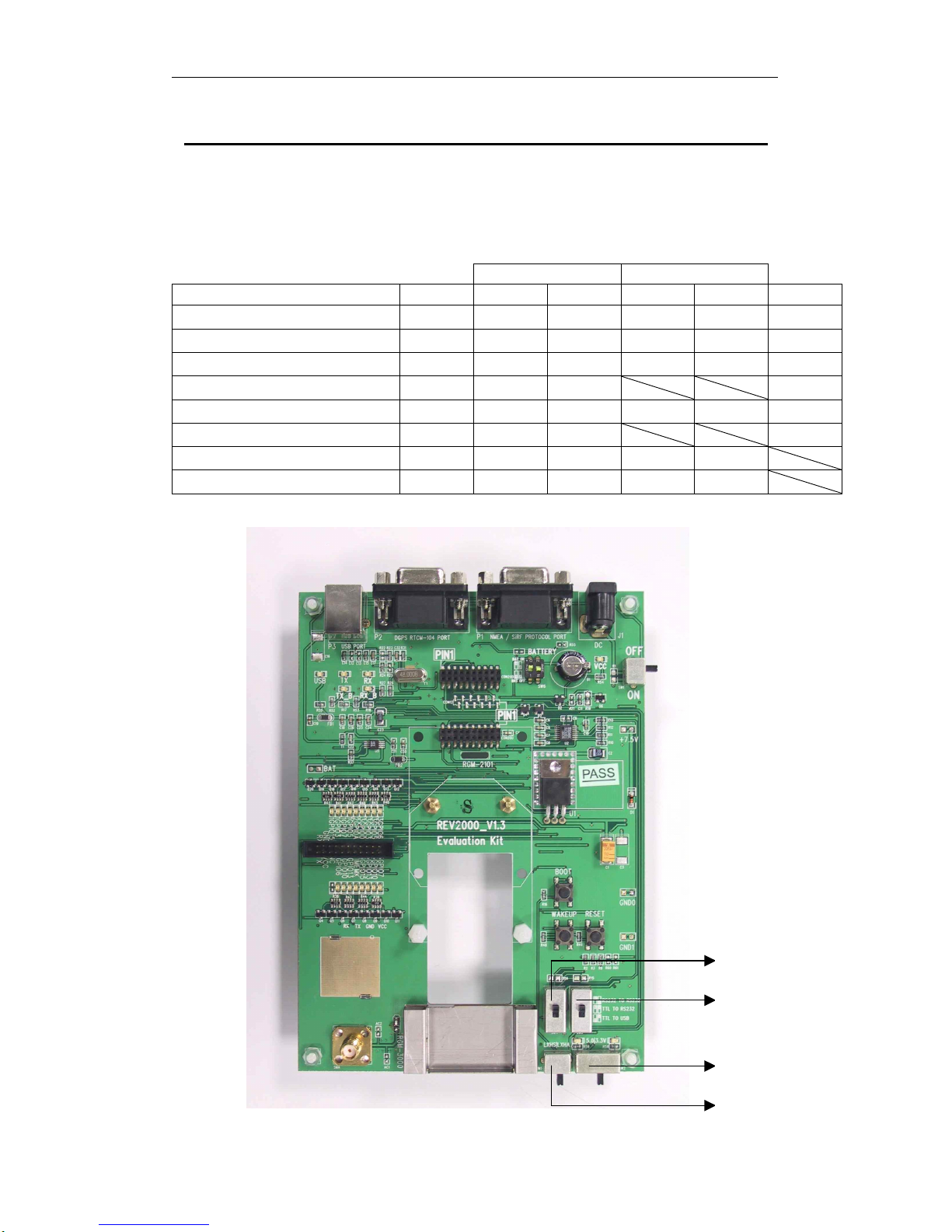
The interface of REV-2000 is shown as follows:
BOOT
switch
Power
switch
Power adapter
RESET
switch
P1 NMEA / SiRF port
Connecting to PC/Laptop
P2 DGPS RTCM-104
port
P3 USB port
WAKEUP
switch
Transmitting
switch
REB-12R socket
BATTERY
switch
RGM-2101/REB-2101
socket
RGM-3000
socket
Test IO connector
Power swutch

RoyalTek GPS Receiver RGM-2101/RGM-3000/REB-12R REV-2000 Operational Manual
5

RoyalTek GPS Receiver RGM-2101/RGM-3000/REB-12R REV-2000 Operational Manual
6
Power switch ( SW1 )
The Power switch is for power ON or OFF .
Power mode switch ( SW2 )
The power adapter of REV-2000 is 110V AC/ 7.5V
DC adaptor. It converts the 110 AC to DC.
RoyalTek can also provide you 220V AC power
adapter. Beware of the AC power of your office and
tell RoyalTek’s sales person for preparing the
correct power code for you.
REV-2000 provides 2 power modes on borad, 3.3V
and 5V. SW2: Left for +5V, Right for 3.3V. The
3.3V is for RGM-2101/ RGM-3000 / REB-2101.
The 5V is for REB-12R.
Transmitting switch ( SW4 、
、、
、SW3 )
RS232 TO RS232 : convert the signal from RS232
to RS-232 connecting to PC use P1.
TTL TO RS232 : convert the signal from TTL to
RS-232 connecting to PC use P1. TTL TO USB :
convert the signal from TTL to USB connecting to
PC use P3.
LXHS/LXHA switch ( SW5 )
It can choice the LXHS or LXHA of REB-12R.
BATTERY switch ( SW6 )
Enable: The battery will supply the power to engine
board or module.
Disable: The battery disconnected with engine
board or module.
BOOT switch
The BOOT switch is for program upgrade. When
push the BOOT switch, the GPS engine board is
waiting for program upgrade and output nothing
when running SiRF demo program.
Please refer the program upgrade session for
program update.
DC input
The power input can be DC input instead of
using AC power adapter. The input range of the
DC input is from 6.5V ~ 12V. We suggest you
use +7.5V as the DC input.
Reset switch
It is used for external reset.
Wakeup switch
It is used for external wakeup.
P1
This is NMEA/SiRF protocol output/input port.
Please connect it to PC or Laptop RS-232 port.
P2
This is DGPS input port.
P3
This is NMEA/SiRF protocol output/input port.
Please connect it to PC or Laptop USB port.
CON20D/CON20U
This is the socket for REB-12R. Please refer the
hardware interface section for the pin
assignment.
CON8
This is the socket for RGM-2101 or REB-2101.
Please refer the hardware interface section for the
pin assignment.
CON22
This is the socket for RGM-3000. Please refer
the hardware interface section for the pin
assignment.
RS-232 setup procedure
(1) Plug the REB-12R on the CON20D /
CON20U or Plug the RGM-2101 / REB-2101
on the CON8 or Plug the RGM-3000 on the
CON22
(2) Plug the active antenna into the external
antenna connector. The suitable view angle of
the active antenna is necessary. Caution:
Please do not put any metal stuff on the
antenna.

RoyalTek GPS Receiver RGM-2101/RGM-3000/REB-12R REV-2000 Operational Manual
7
(3) Connecting the RS-232 cable between
REV-2000 P1 and PC.
(4) Plug the power adapter. (or connecting the
DC power input, 6.5V ~ 12V)
After you finish setup, it is like as follows:
COM port
AC power
COM port

RoyalTek GPS Receiver RGM-2101/RGM-3000/REB-12R REV-2000 Operational Manual
8
USB setup procedure
(5) Plug the REB-12R on the CON20D /
CON20U or Plug the RGM-2101 / REB-2101
on the CON8 or Plug the RGM-3000 on the
CON22
(6) Plug the active antenna into the external
antenna connector. The suitable view angle of
the active antenna is necessary. Caution:
Please do not put any metal stuff on the
antenna.
(7) Connecting the USB cable between
REV-2000 P3 and PC.
After you finishing setup, it is as like as follows:
USB port

RoyalTek GPS Receiver RGM-2101/RGM-3000/REB-12R REV-2000 Operational Manual
9
How to Install & Operate USB for
Windows ?
Getting Started
Step 1:Plug USB connector to REV-2000 P3.
Step 2: After plug to USB connector to your
Notebook PC or Handheld PC, it will automatically
detect the hardware and show up pop-up dialog as
follows. Click “Next>” button.
Assert the “Search for the best driver for your device”.
Click “Next>” button.
USB port

RoyalTek GPS Receiver RGM-2101/RGM-3000/REB-12R REV-2000 Operational Manual
10
Please assert the “Specify a location” and
select the correct directory of the driver,
It will find the driver from the CD-Disc
”\USB_DRIVER” in CD-Disc. Click the “Next>”
button.
automatically. Click “Next>” button
Otros manuales para REV-2000
1
Tabla de contenidos
Otros manuales de Placa madre de RoyalTek

Manuales populares de Placa madre de otras marcas


Telit Wireless Solutions
Telit Wireless Solutions SL869-3DR Manual de usuario

Gigabyte
Gigabyte GA-9IVDT Manual de usuario

Texas Instruments
Texas Instruments ADS8372EVM Manual de usuario

Commell
Commell MS-C73 Manual de usuario

IBT Technologies
IBT Technologies MB860 Manual de usuario

Nvidia
Nvidia TEGRA DG-04927-001_V01 Manual de usuario


