
RockJam RJPS200 Manual de usuario

RJPS200 Karaoke Machine with Bluetooth®
User Guide
Please read this user guide first before operating the karaoke machine and save it for future
reference.
Congratulations on your purchase of this RockJam Karaoke Machine. To get the most from
your purchase, please take a few minutes to read these instructions.
C
I
H
C
O
E
L
O
V
M
A
.
V
.
C
V
O
R
E
L
T
U
S
M
A
E
M
A
N
L
C
A
E
B

1
Warnings
This product is designed for indoor use only. Do not expose to rain or other kinds of moisture as
that could lead to the risk of electric shock.
Do not open the karaoke machine casing except for inserting CD+G/CD discs or batteries. This
could lead to damage or risk of electric shock.
Do not use any power adapter with the karaoke except for the one supplied with it.
Important Safety Instructions
1. Read instructions - All the safety and operating instructions should be read before the
appliance is operated
2. Retain instructions - The safety and operating instructions should be retained for future
reference.
3. Heed Warnings - All warnings on the appliance and in the operating instructions should be
adhered to.
4. Follow instructions - All operation and use instructions should be followed.
5. Water and Moisture - The appliance should not be used near water; for example, near a
bathtub, washbowl, kitchen sink, laundry tub, in a wet basement, or near a swimming pool, and
the like.
6. Ventilation - The appliance should be situated so that its location or position does not
interfere with its proper ventilation. For example, the appliance should not be situated on a bed,
sofa, rug, or similar surface that may block the ventilation openings; or placed in a built-in
installation, such as a bookcase or cabinet that may impede the flow of air through the
ventilation openings.
7. Heat - The appliance should be situated away from heat sources such as radiators, stoves or
other appliances (including amplifiers) that produce heat.
8. Power Sources - The appliance should be connected to a power supply only of the type
described in the operating instructions or as marked on the appliance.

2
9. Power-Cord Protection - Power supply cords should be routed so that they are not likely to
be walked on or pinched by items placed upon or against them, paying particular attention to
cords at plugs and the point where they exit from the appliance.
10. Cleaning - The appliance should be cleaned only with a lightly dampened cloth. Do not use
solvents that will damage the plastics finish.
11. Long Periods of Non-Use - The power adapter should be unplugged from the power outlet
when left unused for a long period of time. Batteries should be removed when not being used.
12. Object and Liquid Entry - Care should be taken so that objects do not fall and liquids are not
spilled into the enclosure through openings.
13. Damage Requiring Service - The appliance should be serviced by qualified service
personnel when:
•The power supply cord or the plug has been damaged; or
•Objects have fallen, or liquid has been spilled into the appliance; or
•The appliance has been exposed to rain; or
•The appliance does not appear to operate normally or exhibits a marked change in
performance; or
•The appliance has been dropped, or the enclosure damaged.
14. Servicing - The user should not attempt to service the appliance beyond that described in
the operating instructions. All other servicing should be referred to qualified service personnel.
FCC Statement
This equipment has been tested and found to comply with the limits for a Class B digital
device, pursuant to Part 15 of the FCC Rules. These limits are designed to provide
reasonable protection against harmful interfernce in a resisential installation. This eqipment
generates uses and can radiate radio frequency energy and, if not installed and used in
accordance with the instructions, may cause harmful interference to radio communications.
Howerver, there is no guarantee that interference will not occur in a particular installation,If
this equipment does cause harmful interferrence to radio or television reception, which can be
deterined by turning the equipment off and on, thte user is encouraged to try to correct the
interference by one of more of the following measures:
-- Reorient or relocate teh receiviing antenna.
-- Increase teh separation between the equipment and receiver.
-- Connect the equipment into an outlet on a circutt different from that to which the receiver is
connected.
-- Consult the dealer or an experienced redio/TV ttechnician for help.
Changes or modifications not expressly approved by the party responsible for compliance
could void the user's authority to operate teh equipment.

3
Index
Warnings ........................................................................................................................1
Important Safety Instructions, FCC Statement ..............................................................1
Package Contents..........................................................................................................5
Location of Controls (Front)............................................................................................6
Location of Controls (Rear) ............................................................................................7
Initial Setup.....................................................................................................................8
Connecting the Microphones .....................................................................................8
Connecting the Karaoke Machine to a TV .................................................................8
Connecting to the Electricity Supply...........................................................................9
Battery Operation.......................................................................................................9
Switching the Karaoke Machine On/Off ...................................................................10
Lightshow Selection and Switching off the Lightshow..............................................10
Operation......................................................................................................................11
Playing a CD+G or Audio CD...................................................................................11
Using the Microphones ............................................................................................12
Echo and AVC Controls ...........................................................................................13
Skipping Forward \ Backwards.................................................................................14
Repeat Mode ...........................................................................................................14
Track Programming .................................................................................................15
Stopping Playback and Switching Off ......................................................................16
LINE IN ....................................................................................................................16
.................................................................................................................................16
.................................................................................................................................17
Bluetooth Operation.................................................................................................17

4
Troubleshooting Guide.................................................................................................20
No Power .................................................................................................................20
The Karaoke Machine Switches Off Unexpectedly..................................................20
No Lightshow Effect.................................................................................................20
No Sound - General.................................................................................................20
No Sound –If connected to a TV.............................................................................21
Lyrics do not appear on the TV screen ....................................................................21
No sound from the microphone................................................................................21
Bluetooth® device pairing problems ........................................................................21
Other Bluetooth® problems .....................................................................................22
Product Disposal Instructions.......................................................................................22
Specifications ...............................................................................................................23
AUDIO......................................................................................................................23
CD+G/CD PLAYER..................................................................................................23
BLUETOOTH ® .......................................................................................................23
MISCELLANEOUS ..................................................................................................23

5
Package Contents
Please make sure that the following items are included.
Main unit
1 or 2 x 16-Song Chart Hit CD+G discs are optionally included.
(See product gift box supplied for details of any included CD+Gs.)
C
I
H
C
O
E
L
O
V
M
A
.
V
.
C
V
O
R
E
L
T
U
S
M
A
E
M
A
N
L
C
A
E
B
6
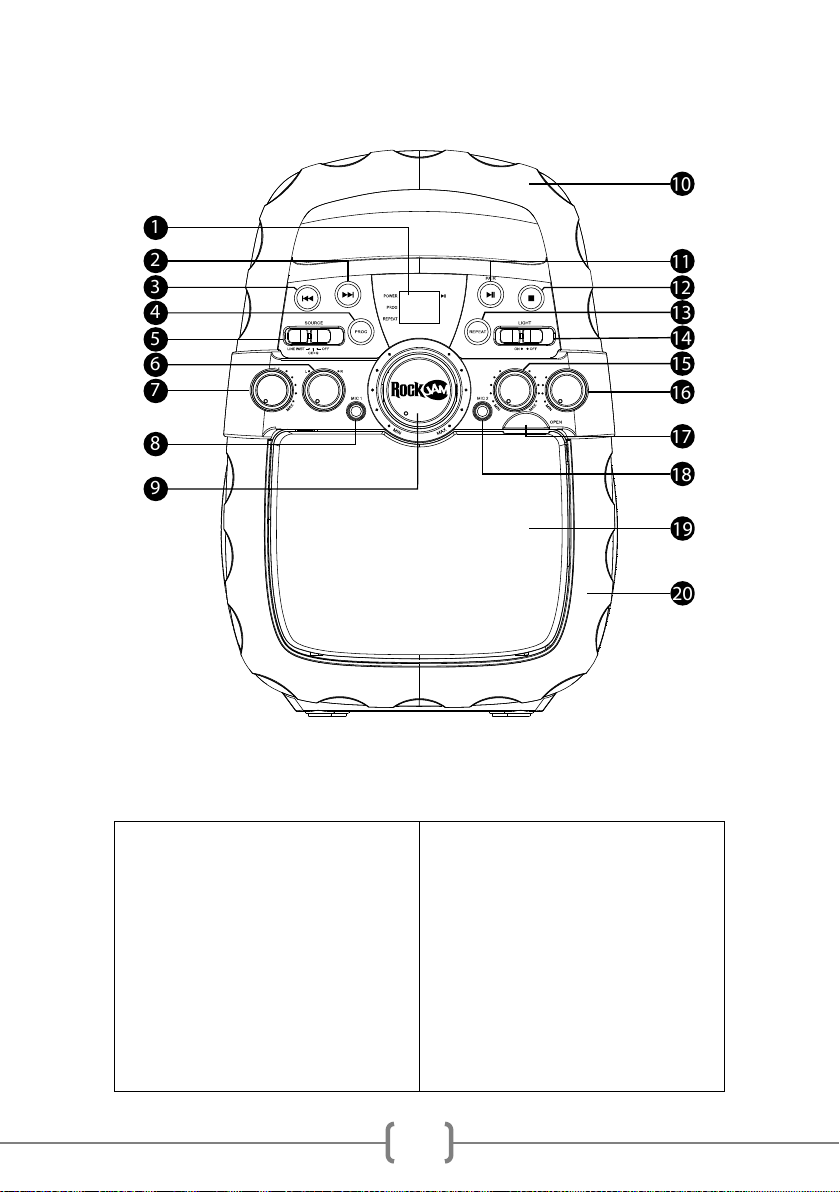
Location of Controls (Front)
1) LED display
2) FWD Button
3) REV Button
4) Program Button
5) ON/OFF/SOURCE Button
6) Speaker Balance
7) AVC Control
8) MIC 1 Socket
9) Master Volume
10) Carry Handle
11) PLAY/PAUSE/PAIR Button
12) STOP Button
13) Repeat Button
14) LIGHT ON/OFF Switch
15) Echo Control
16) MIC Volume
17) CD Door Opening
18) MIC 2 Socket
19) CD Door
20) Lightshow
C
I
H
C
O
E
L
O
V
M
A
.
V
.
C
V
O
R
E
L
T
U
S
M
A
E
M
A
N
L
C
A
E
B

7
Location of Controls (Rear)
21) Stereo Speaker
22) LINE IN Socket
23) Video Output
24) Audio R (Right Output)
25) Audio L (Left Output)
26) DC 5V Power
27) Battery Compartment
28) Stereo Speaker

8
Initial Setup
Connecting the Microphones
Connecting the Karaoke Machine to a TV
C
I
H
C
O
E
L
O
V
M
A
.
V
.
C
V
O
R
E
L
T
U
S
M
A
E
M
A
N
L
C
A
E
B
R L
Microphones:
Connect a microphone into MIC
1 Socket (1) as well as MIC 2
Socket (2) (if desired).
Note: Do not drop or tap the
microphones as damage to the
microphones or speakers may
occur.
Do not twist the microphone
cable as it will cause damage to
the internal conductors.

9
To output the song lyrics and audio to your TV, work through the following steps:
Connect the RCA video cable (Yellow) to the VIDEO OUT socket and the audio cables (White
(L) and Red (R)) to the AUDIO OUT (L + R) sockets located on the back of the Karaoke
machine. Connect the other end of the RCA video cable (Yellow) to the TV VIDEO IN socket
and the audio cables (White and Red) to the TV AUDIO IN sockets.
Using the TV remote control select the correct source input for the karaoke machine (AV1, AV2
etc.)
Notes:
• This unit can be used with or without a TV, but it is highly recommended to use a TV in order
to utilize all the features.
• To see the lyrics on the screen, you must use a CD+G disc.
Connecting to the Electricity Supply
Battery Operation
Insert the power supply into a
220V-240V AC / 50Hz switched
power outlet.
Note:
Make all connections before
connecting to the AC power.
Alternatively, the karaoke machine
can be powered using 6 x 1.5V
Alkaline ‘C’ Type batteries. Open
the battery cover and insert the
batteries with the correct polarity
as indicated by the engraving in
the battery compartment. Do not
mix batteries of different type or
old and new batteries. Remove
batteries when using AC power.
Tabla de contenidos
Otros manuales de Sistema de karaoke de RockJam


Manuales populares de Sistema de karaoke de otras marcas


Karaoke Warehouse
Karaoke Warehouse Player 2000 Manual de usuario

VocoPro
VocoPro DVG-888K II Manual de usuario

ION
ION DISCOVER KEYBOARD USB Manual de usuario

The Singing Machine
The Singing Machine SMVG-620 Manual de usuario

Singsation
Singsation CENTER STAGE FREESTYLE Manual de usuario

RSQ
RSQ NEO K-2 Manual de usuario


