Riversimple Rasa Beta Manual de usuario

Rasa Beta Operating
Manual
©Riversimple2021
Issue D
March 2021

Rasa Beta Operating Manual
Contents page
1. Introduction and Scope 1
2. General safety precautions 1
3. Description of the Rasa Beta 3
3.1 Rasa Beta general arrangement and dimensions 3
3.2 The Boot 4
3.3 Rasa Interior 4
3.4 Visual Display Unit 6
3.5 Keys 6
3.6 Headlamp switch 7
3.7 Indicator/ Main Beam Stalk 7
3.8 Wiper/ Washer Stalk 8
3.9 Heating and Ventilation Controls 9
3.10 Ancillary Equipment 9
3.11 Safety 9
4. Operating the Rasa Beta 10
4.1 Starting the Rasa Beta 10
4.2 Stopping the Rasa Beta 10
4.3 In case of an accident 10
5. Refuelling Procedure 11
5.1 Refuelling at Abergavenny 11
6. Maintaining the Rasa Beta 15
6.1. Tyre Inflation 15
6.2 Topping up the washer fluid 15
7. Safety systems overview 20
7.1 Crash detection 20
7.2 Hydrogen leak detection 20
7.3 Powertrain isolation 21
Amendment record 21
1

Rasa Beta Operating Manual
1. Introduction and Scope
The purpose of this document is to provide information and instruction to allow safe operation of
Riversimple Rasa Beta Fuel Cell Electric Vehicles (FCEV). This includes:
●An overview of the main safety hazards and general precautions;
●Instructions on how to re-fuel the Rasa Beta from the HRS and using compressed hydrogen
gas;
●Instructions on how to operate the Rasa Beta; and
●Details of safety systems.
Instructions within this document are applicable to Rasa Beta vehicle developed by Riversimple for
use on public roads by the general public. These are assigned VIN numbers ending with six digits
sequentially starting from 000001 up to 000017. Users should be aware that these vehicles are of a
trial nature and should be treated accordingly.
This manual should be read by anyone intending to use or operate Rasa Beta produced by
Riversimple.
2. General safety precautions
Compressed hydrogen gas and a high voltage electrical system are installed on the Rasa Betas. If not
handled correctly these can present significant safety hazards. To minimise any risks the following
general safety precautions must be followed:
●Only trained technicians are allowed to work on Riversimple vehicles, including the Rasa
Beta;
●Do not store the Rasa Beta in enclosed buildings unless approved by Riversimple;
●Do not attempt to raise or tow the Rasa Beta by any means without consent from
Riversimple;
●High voltage enclosures are clearly marked with the high voltage symbol (Figure 1) and
should never be touched, tampered with or opened except by trained technicians;
Figure 1: High voltage safety symbol
●High voltage wires and connectors are clearly identifiable as bright orange and should never
be tampered with or adjusted except by trained technicians;
1

Rasa Beta Operating Manual
●Areas of the Rasa Beta that contain hydrogen components are clearly marked with the
hydrogen safety symbols (Figure 2) and should be treated with caution appropriate to
handling flammable substances and compressed gases;
Figure 2: Hydrogen, flammability and compressed gas safety symbols
●Hydrogen gas is extremely flammable and burns with an invisible flame. Keep any potential
ignitions sources well away from the Rasa Beta;
●The hydrogen system working pressure on the Rasa Betais 35 MPa (5075 psi). Do not
attempt to refuel or connect the vehicle hydrogen storage and delivery system to sources of
compressed hydrogen higher than the system working pressure;
●If there’s any likelihood of damage to hydrogen components, including the storage tank and
supply lines, do not attempt to operate or refuel the Rasa Beta;
●Hydrogen leak detection systems are installed on the Rasa Beta. In case of a leak the driver’s
visual display unit will display a red triangular H2 symbol between the dials (Figure 3). An
audible warning will also sound from the driver’s display. In this circumstance turn-off and
leave the vehicle immediately. The hydrogen supply will have been isolated and the fuel cell
will shut-off once any hydrogen in the supply lines has been depleted;
Figure 3: Rasa Beta Visual Display Unit with warning red triangular H2 symbol.
2

Rasa Beta Operating Manual
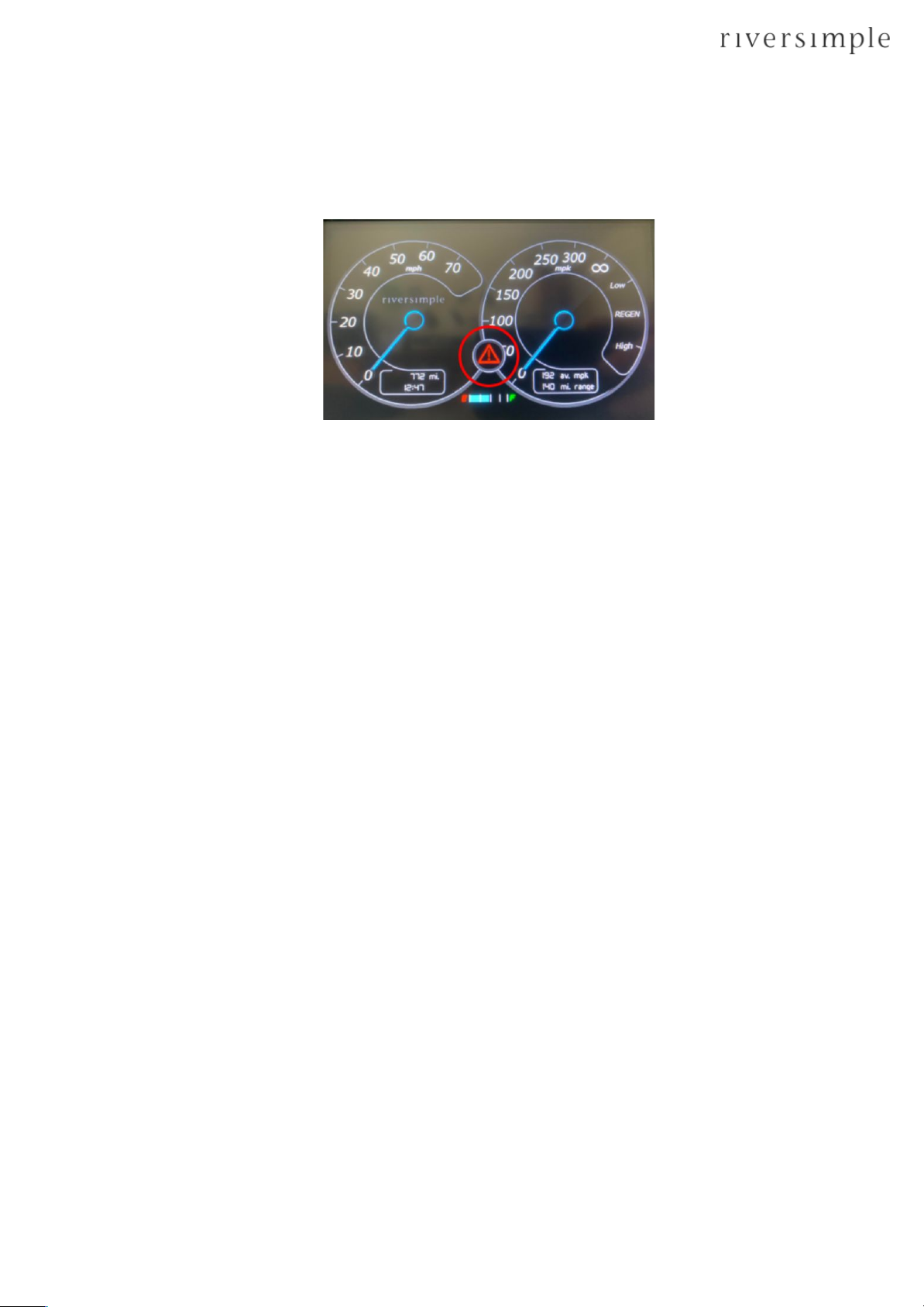
●In case of a serious fault with the high voltage electrical system or its associated controls the
driver’s visual display unit will display a notify stop ‘!’ warning sign (Figure 4). The audible
warning will also sound from the display.
Figure 4: Rasa Beta Visual Display Unit with warning red triangular stop ‘!’ symbol.
3. Description of the Rasa Beta
3.1 Rasa Beta general arrangement and dimensions
Rasa Beta vehicles are designed as ‘local-cars’ to accommodate two passengers and have a range of
approximately 200 miles on one tank of hydrogen. Several innovative features are incorporated into
the design, including:
●A network electric powertrain, which integrates a liquid cooled fuel cell, lithium-ion
capacitors and in-wheel electric motors for propulsion;
●Standard friction braking system integrated with regenerative braking provided by the
in-wheel motors;
●Carbon fibre monocoque chassis and sub-frames;
●Capacitors mounted within a custom designed enclosure integrated into the front sub-frame
of the Rasa Beta;
●Hydrogen and fuel cell system integrated into the rear sub-frame of the Rasa Beta along with
a hydrogen storage tank and single stage pressure regulator for gas delivery to the fuel cell;
●Hydrogen receptacle that is compatible with standard hydrogen refuelling nozzles;
●Electronic control for implementing safety systems related to high voltage electrical isolation
and hydrogen safety.
This section describes and illustrates the general arrangement of the Rasa Beta. Masses and
dimensions are provided in Table 1.
3

Rasa Beta Operating Manual
Table 1: Rasa Beta dimensions and weights
Figure 5 illustrates side views of the Rasa Beta. Note the location of key Rasa Beta systems and low
seating.
Figure 5: Side view general arrangement
3.2 The Boot
●Total Volume (as if the rear of the Rasa Beta was filled with a liquid that could reach every
point): 281.0 litres
●Usable Volume (including the parcel shelf): 220.5 litres
●Usable Volume (not including parcel shelf): 159.7 litres
To open the boot, reach through behind the seat on the driver’s side, and pull the black lever
towards you.
3.3 Rasa Interior
Controls for the Rasa Beta differ from those of a traditional manual internal combustion engine car.
Being powered by electric motors there is no gearbox and hence no gear lever or clutch pedal. There
are three driving modes, neutral, forward and reverse, as shown in Figure 6. Accelerator and brake
pedals are laid out in a similar way to a normal automatic car, as shown in Figure 7.
4
Dimensions (mm)
Masses (kg)
Length: 3676
Empty weight: 660
Width: 1610
Gross mass: 910
(empty weight + payload)
Height: 1332
H2 storage: 1
Ground clearance: 118
Outside turning circle:
1172

Rasa Beta Operating Manual
Figure 6: Rasa Beta driving mode controls (infotainment system may differ from that shown)
Figure 7: Interior of the Rasa Beta
5

Rasa Beta Operating Manual
3.4 Visual Display Unit
A Visual Display Unit (VDU) is incorporated into the dashboard, which communicates Rasa Beta
speed, fuel economy, distance travelled and fuel levels to the driver (Figure 8). Approval compliant
warning symbols are included in the display. The VDU will also display a yellow (Figure 9) or red
(Figure 3) warning triangle in the event of a hydrogen system fault. In the event of a yellow warning
please contact Riversimple so the fault can be investigated. In the case of a red warning triangle the
Rasa Beta must be stopped and switched off immediately. Please contact Riversimple without delay.
Figure 8: Rasa Beta Visual display Unit
Figure 9: Rasa Beta Visual Display Unit with warning yellow triangular H2 symbol.
3.5 Keys and fob
You need three keys for the Rasa Beta (one for each door and one for the ignition) and one
immobiliser, as shown by Figure 10.
6

Rasa Beta Operating Manual
Figure 10: Rasa Beta keys and immobiliser fob
3.6 Headlamp switch
The headlamp switch is found to the right of the steering wheel (Figure 11). To turn on the sidelights,
rotate once to the right. To operate the headlamps rotate twice to the right. To operate the rear fog
lights, rotating to the left. Pulling the switch out in any of the above positions operates the interior
light.
Figure 11: Rasa Beta headlamp switch and ignition switch
3.7 Indicator/ Main Beam Stalk
●The indicator/ main headlamp beam stalk is situated to the left of the steering wheel (Figure
12). Push upwards to indicate right and push downwards to indicate left. Indicators are of
7

Rasa Beta Operating Manual
the self-cancelling type, however the driver should always ensure indicators are cancelled
when not needed.
●To flash the headlamp, pull the main headlamp beam stalk away from the dashboard. Push
the main headlamp beam stalk toward the dashboard to operate the main beam, and back
away from the dashboard to cancel.
●Leaving the indicator pushed up or down when not in use will operate the parking lamps.
Care should be taken not to drain the battery if this function is used.
Figure 12: Rasa Beta Indicator/ Main Beam Stalk
3.8 Wiper/ Washer Stalk
●The wiper/ washer stalk is situated to the right of the steering wheel (Figure 13). Push the
wiper/ washer stalk up one click for intermittent; push it up two clicks for slow; and push it
up three clicks for fast. Push the wiper/ washer stalk down for a single wipe. You can rotate
the thumbwheel to vary intermittent speed.
●Pull the wiper/ washer stalk away from the dash to operate the windscreen washers.
8
Otros manuales para Rasa Beta
1
Tabla de contenidos
Otros manuales de Vehículo eléctrico de Riversimple