
Rivera Headmaster Manual de usuario

Headmaster 1.0 p 1
OWNERS MANUAL
Version 1.1
December, 2001

Headmaster 1.0 p 2
Introduction
The Head Master is a programmable, foot operated MIDI Controller. It contains 30
Stored Programs.
Each Stored Program contains 16 MIDI Program Change Commands, one for each of
the 16 MIDI channels. (The Head Master only sends MIDI Program Change commands,
not MIDI Control or System Exclusive commands)
Each Stored Program also contains a special non-MIDI Command to control the internal
relays.
Each Command contained in a Stored Program can be turned ON or OFF individually.
When a Command is turned ON, it is referred to as Active.
Stored Programs are activated by the 6 Program Select Buttons. When a button is
pressed, ALL Active Commands in the Program will be sent to the MIDI devices and the
relays.
Bank Select Buttons can be used to select one of 5 sets of 6 Stored Programs
controlled by the Program Select Buttons.
Stored Programs can be created or changed using the onboard Programming Buttons.
The Stored Programs are saved in Non-Volatile memory. The term "non-volatile" means
that the Programs are retained when the power is turned off.
Programs, Programs And More Programs
The word "Program" will be used quite a bit in this manual. It is used to describe:
• The Stored Programs contained in the Head Master memory.
• MIDI Program Change Commands - sent by the Head Master to MIDI devices.
• The Program Select Buttons - the 6 buttons on the front of the Head Master.
• The Programming Buttons - the array of seven membrane switch buttons to the right
of the LED display, that are used to create and change the Stored Programs.
I know this may seem a little bit confusing, but it's hard to avoid using that word.

Headmaster 1.0 p 3
The Top Panel
PROGRAMMING BUTTONS
Use these buttons to create
or change stored programs
PROGRAM SELECT BUTTONS
Press one of these buttons to
send a stored program to
the MIDI devices
A stored program can contain
up to 16 MIDI Program Change
commands and a special
Relay Command
BANK SELECT BUTTONS
The Head Master contains 30 Stored Programs
The Bank Select Buttons are used to select
which set of 6 Stored Programs is controlled
by the 6 Program Select Buttons
When you press one of these buttons, the
Bank is changed but NO MIDI commands
are sent
LED DISPLAY
In Normal Mode, shows the
current Bank and last Button
In Programming Mode, shows
the MIDI channel or
Program Change

Headmaster 1.0 p 4
The Back Panel
AUX POWER OUT
Supplies a limited amount
of DC power for other gear
such as stomp boxes
RELAYS
Three single pole double throw
(SPDT) relays for controlling
non-MIDI amps
MIDI OUT
Standard MIDI Output
Use this to control any
MIDI device.
RIVERA AMP
Special combination
MIDI Output and DC Power
Input
Only works with Rivera Amps
that provide power
NEVER connect this to a
regular MIDI device
AUX POWER IN
Supplies power to the
Head Master when it is used
WITHOUT a Rivera Amp that
provides power
NEVER use the RIVERA AMP
POWER IN and AUX POWER IN
at the same time

Headmaster 1.0 p 5
Banks And Buttons
When designing a foot-operated controller there is always the question:
How Many Buttons?
Fewer buttons make the unit smaller, lighter, easier to pack and easier to fit on a
crowded stage.
More buttons give the player a larger number of choices. But if the buttons must be
operated with a foot, they can't be placed too close together. This means that a foot-
operated controller with lots of buttons gets really big.
To achieve a compromise between size and flexibility, the Head Master is organized as
a set of 5 banks of 6 buttons each. This results in a unit having 30 available Stored
Programs, but only 8 buttons - 2 to select the Bank and the other 6 to select the
Program.
As shown on the next page, Bank Switching allows 6 buttons to control 30 Stored
Programs. Think of the Bank Selector as a control that tells the Buttons WHICH set of 6
Stored Programs to control.
Bank + And Bank –
The Bank Select Buttons are labeled Bank + and Bank -.
When you press Bank +, the bank is incremented by one.
If Bank 5 is selected, and Bank + is pressed, the Bank rolls over to 1.
When you press Bank -, the Bank is decremented.
If Bank 1 is selected, and Bank – is pressed, the Bank rolls over to 5.
NO MIDI COMMANDS ARE SENT when the Bank Select buttons are pressed.
The LED display shows the CURRENT Bank, and the LAST Button pressed.
Example:
If Bank 1 is selected, and Button 2 is pressed, the display shows
Bank 1 Button 2
If Bank + is then pressed, the display shows
Bank 2 Button 2
But, since no MIDI Commands have been sent, you are still playing the Program
Bank 1 Button 2

Headmaster 1.0 p 6
Banks and Buttons
1
1
BUTTONS STORED PROGRAMS
WHEN BANK 1 IS SELECTED
Bank 1 Button 1 controls Stored Program 1,
Bank 1 Button 2 controls Stored Program 2,
Bank 1 Button 3 controls Stored Program 3,
Bank 1 Button 4 controls Stored Program 4,
Bank 1 Button 5 controls Stored Program 5,
Bank 1 Button 6 controls Stored Program 6.
2
23
34
45
56
67
8
9
10
11
12
13
14
15
16
17
18
19
20
21
22
23
24
25
26
27
28
29
30
1
BUTTONS STORED PROGRAMS
WHEN BANK 2 IS SELECTED
2
3
4
5
6
7
18
29
310
411
512
613
14
15
16
17
18
19
20
21
22
23
24
25
26
27
28
29
30
Bank 2 Button 1 controls Stored Program 7,
Bank 2 Button 2 controls Stored Program 8,
and the pattern repeats for all remaining
Banks and Buttons until finally,
Bank 5 Button 6 controls Stored Program 30

Headmaster 1.0 p 7
Inside A Stored Program
1
MEMORY SLOTS CONTAINING
MIDI PROGRAM CHANGE
COMMANDS
STORED PROGRAM
MIDI CHANNELS
2
3
4
5
6
7
8
9
10
11
12
13
14
15
16
17 MIDI Channel 17 is NOT a real MIDI channel.
It is the special Relay Channel.
MIDI Channel 17 CANNOT be used
to control MIDI devices.
It can ONLY be used to control the relays.
1-128
1-128
1-128
1-128
1-128
1-128
1-128
1-128
1-128
1-128
1-128
1-128
1-128
1-128
1-128
1-128
1-128
A Stored Program is controlled by a Bank-Button pair
Each Stored Program contains 16 MIDI Program Change Commands,
one for each of the 16 MIDI Channels
It also contains a special, non-MIDI code to control the Relays
Each Bank-Button-MIDI Channel combination represents one slot in the memory
Each slot can be turned ON or OFF

Headmaster 1.0 p 8
Stored Program Example
1
STORED PROGRAM
MIDI CHANNELS
2
3
4
5
6
7
8
9
10
11
12
13
14
15
16
17
64
25
99
16
32
MEMORY SLOTS CONTAINING
MIDI PROGRAM CHANGE
COMMANDS
CONTROLED BY
BANK 3 BUTTON 4
Here is an example of a Stored Program
In this example, the slots for MIDI Channels 4, 5, 9 and 16 contain Program Change
commands
All other slots have been turned OFF
Imagine that you are currently using Bank 2
Press Bank + to change to Bank 3
(No MIDI Commands are sent by changing Bank)
Now, press Button 4
The Head Master will examine ALL of the slots of the Stored Program
Slots that have been turned OFF will be ignored
All MIDI Commands in active slots will be sent

Headmaster 1.0 p 9
So, Pressing Button 4 while in Bank 3 will command the Head Master to send:
Program Change 64 on MIDI Channel 4
Program Change 25 on MIDI Channel 5
Program Change 99 on MIDI Channel 9
Program Change 16 on MIDI Channel 16
AND
Special Relay Command 32 to the Relays
Programming The Head Master
During programming, the Bank, Button, MIDI Channel and Program Change values
must be displayed, and edited. Since we decided to make the unit small, there was not
room for individual displays for all of these values.
So, we have to share the display, by the use of Programming Modes.
The three modes are:
Normal Mode
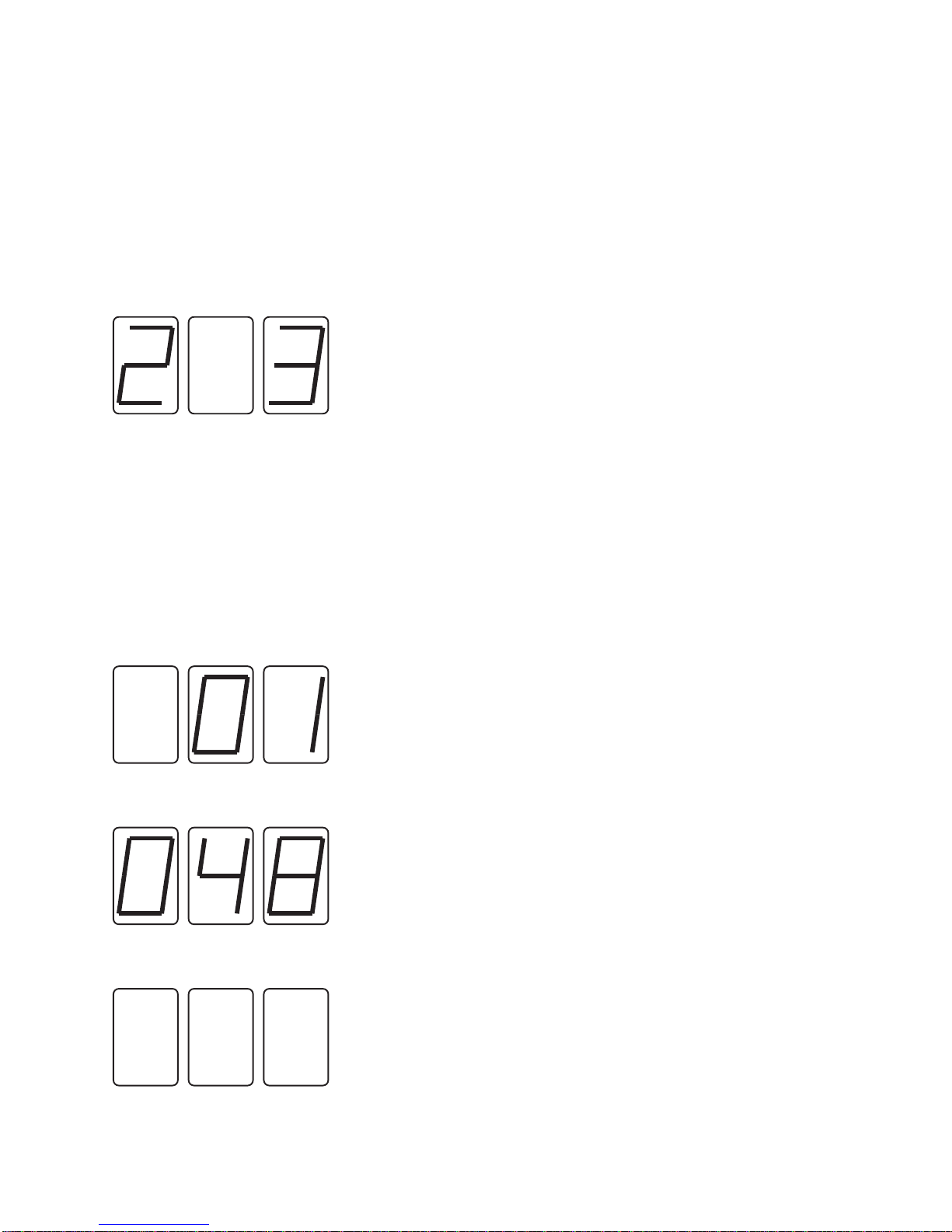
The display shows the CURRENT Bank and LAST Button
MIDI Channel Mode
The display shows the MIDI Channel
Program Change Mode
The display shows the MIDI Program Change
It is always possible to know what mode the Head Master is in by looking at the display.
The illustration on the next page shows how the digits are grouped to make mode
identification easy.
Headmaster 1.0 p 10
Modes Diagram
The left digit is the Bank
The right digit is the Button
The center digit is blank
The left digit is blank
The right two digits show the MIDI Channel
Two digits are always used,
so MIDI Channel 1 is displayed as 01
The programming modes are used to
examine, change or create stored programs
All three digits show the MIDI Program Change
Three digits are always used,
so Program Change 48 is displayed as 048
If all of the digits are blank, the Program Change for
this combination of Bank-Button and MIDI Channel
has been turned OFF
It is always possible to determine
the mode by looking at the display
MIDI CHANNEL SELECT MODE
PROGRAMMING MODES
NORMAL MODE
PROGRAM CHANGE SELECT MODE
PROGRAM CHANGE SELECT MODE
Este manual sirve para los siguientes modelos
1
Tabla de contenidos
Manuales populares de Equipo de grabación de otras marcas


Strymon
Strymon NIGHTSKY Manual de usuario

Mitsubishi Electric
Mitsubishi Electric 16CH DIGITAL RECORDER DX-TL5000U Manual de usuario

Tews Technologies
Tews Technologies TPMC465 Manual de usuario

Honeywell
Honeywell Excel 50 Manual de usuario

SeaLevel
SeaLevel COMM+8.LPCI Manual de usuario

Arturia
Arturia AUDIOFUSE STUDIO Manual de usuario


