RHEONICS SR Manual de usuario

PROFINET Field Device Specification:
Rheonics, SME
Covers sensor Types: SR, SRV, SRD, DVP, DVM

2
GLOBAL SUPPORT
For Support, visit: https://support.rheonics.com
EUROPE HEADQUARTERS
Rheonics GmbH
Klosterstrasse. 19
8406 Winterthur Switzerland
Tel: +41 52 511 32 00
US HEADQUARTERS
Rheonics, Inc.
3 Sugar Creek Center Blvd, Ste 100
Sugar Land, TX 77478
United States of America
Tel: +1 713 364 5427
Website: https://rheonics.com
Support Portal: https://support.rheonics.com
Sales E-Mail: info@rheonics.com
© COPYRIGHT RHEONICS 2021
No part of this publication may be copied or distributed, transmitted, transcribed, stored in a retrieval system,
or translated into any human or computer language, in any form or by any means, electronic, mechanical,
manual, or otherwise, or disclosed to third parties without the express written permission of Rheonics. The
information contained in this manual is subject to change without notice.
TRADEMARKS
Rheonics is a trademark of Rheonics, Inc. Other product and company names listed in this manual are trademarks
or trade names of their respective manufacturers.

Operators Manual
Contents
3
Contents
1Before you begin...................................................................................4
2Which gds file do i need?.......................................................................5
3Product overview..................................................................................6
4Profinet Installation ..............................................................................7
5Getting started......................................................................................8
6Installation process .............................................................................11
7Device configuration settings ..............................................................15
8Sensor status and parameter status ....................................................18
9Cyclic input data..................................................................................22
10 Units table ..........................................................................................30
11 Troubleshooting..................................................................................31
12 Notes/Errata .......................................................................................33

PNET Operators Manual
PNET -OP-2022
Chapter 1
Before you begin
4
1Before you begin
1.1 About the manual
This manual provides information on Profinet support on Rheonics devices. This document
specifies all the device-specific features and documents PROFINET Protocol implementation
details.
Important Instructions
This manual assumes that the following conditions apply:
•The sensor has been installed correctly and completely according to the installation
•The installation complies with all applicable safety requirements.
•The user is trained in relevant safety standards.
1.2 Purpose
This specification is designed to complement the SME Installation Manual by providing a
complete, clear description of this Field Device from a PROFINET Communication perspective.
1.3 Who should use this document?
The specification is designed to be a technical reference for PROFINET End Users. This document
assumes the reader is familiar with PROFINET Protocol requirements and terminology.
1.4 Warning
Before connecting the PROFINET Communicator in an explosive atmosphere, make sure
instruments are installed in accordance with intrinsically safe or EX classification-specific field
wiring practices. Explosions can cause serious injury or death.
1.5 Nomenclature
Abbreviation (short form)
Full-term
Meaning
SRV
Symmetric Resonator
Viscometer
Viscosity sensor
SRD
Symmetric Resonator
Densitometer
Density and Viscosity sensor
DVP
Density Viscosity Probe
HPHT inline probe
DVM
Density Viscosity Module
HPHT inline module
RCP
Rheonics Control Panel
Software for data acquisition
and configuration
SME
Smart Module Electronics
Sensor electronics
Table 1. Defined Acronyms
1.6 Related Documentation
You can find all product documentation on the USB stick shipped with the SME and on our
website at https://rheonics.com/resources

PNET Operators Manual
PNET -OP-2022
Chapter 2
Which GDS file do I need?
5
2Which GDS file do I need?
Rheonics GDS File provides the configuration information, parameters, modules, diagnostic and
vendor and device identification; to be used by the controller.
For up-to-date information, please check the page:
https://support.rheonics.com/support/solutions/articles/81000401423-profinet-
gsd-file-for-rheonics-inline-viscometer-and-density-meter

PNET Operators Manual
PNET -OP-2022
Chapter 3
Product overview
6
3Product overview
The Rheonics SME provides clients PROFINET interface to get digital data on devices ordered with
Profinet connectivity. This document provides guidance for field connection by an end user.
Note: If your sensor was ordered without Profinet, it is possible to upgrade it to add profinet
remotely. Contact Rheonics Sales team to order.
Figure 1. SME sensor electronics unit.
3.1 Process Interface
The SME is compatible with various Rheonics instruments. This includes Type: SR (SRV & SRD),
Type: DV (DVP, DVM) and other instruments using the SME electronics from Rheonics.
Figure 2. Rheonics Sensor for Viscosity and density measurements.
3.2 Reference to other instruments.
Manuals and guides for digital instruments are modular. General instructions give information
about the functioning and installation of instruments. Operational instructions explain the use of
the digital instrument features and parameters. Fieldbus specific information explains the
installation and use of the instrument on that Fieldbus network.
•SRV USER MANUAL
•SRD USER MANUAL
•DVP USER MANUAL
•DVM USER MANUAL
•SENSOR INSTALLATION MANUAL
•RHEONICS CONTROL PANEL USER MANUAL

PNET Operators Manual
PNET -OP-2022
Chapter 4
Profinet Installation
7
4Profinet Installation
4.1 Instrument overview:
Figure 3. SME-DRM Diagram.
4.2 Ethernet PIN assignment PROFINET
RJ45 Connector
Receptacle
Pin Number
Wire Color
Description
1
Yellow
Transmit+
2
Orange
Transmit-
3
White
Receive+
4
Not Used
5
Not Used
6
Blue
Receive-
7
Not Used
8
Not Used

PNET Operators Manual
PNET -OP-2022
Chapter 5
Getting started
8
5Getting started
5.1 Components Used
•Rheonics SRV, SRD, DVP or DVM w/ Firmware V03.30/0 or higher
•Siemens PLC S7-1212
•Configuration software: TIA Portal
•Software sensor: Rheonics Control Panel (RCP)
•Windows 10 64 bit
•GSDML file
•Ethernet Switch
5.2 System Connections
Connect Rheonics sensor, PLC, and PC (with RCP software installed) with an Ethernet Cable. We
recommend using an Ethernet Switch.
Connect SME to the PC running RCP to configure the SME.
Figure 4. Communication diagram for rheonics sensor-PLC and PC.

PNET Operators Manual
PNET -OP-2022
Chapter 5
Getting started
9
5.3 Configure Rheonics SME
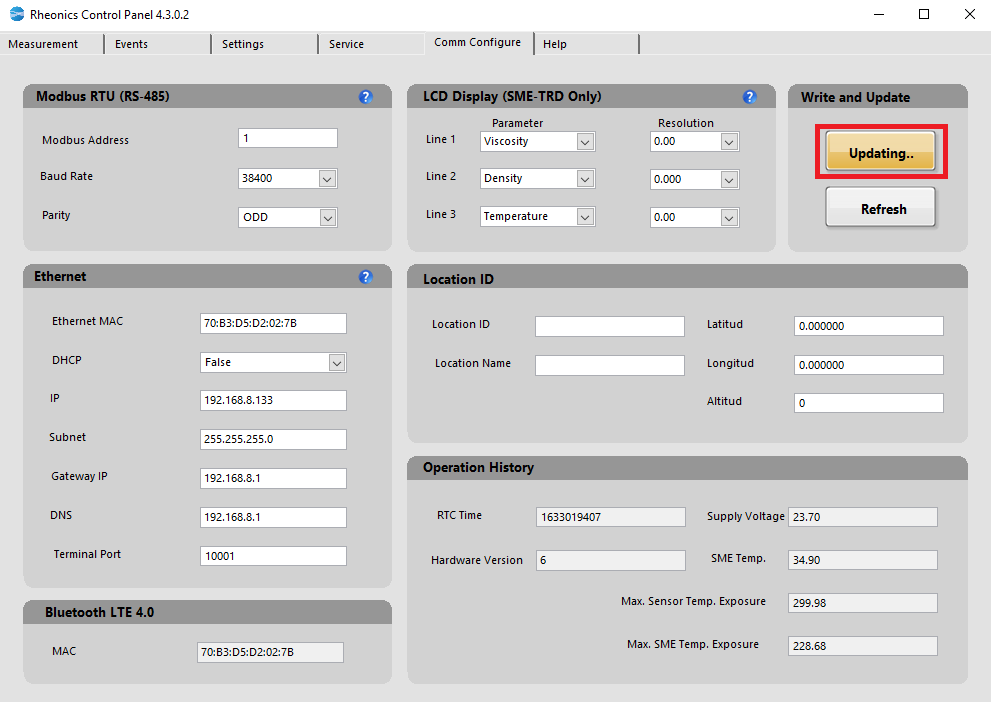
Open RCP software on the connected PC, connect to the SME using USB and configure the SME
to use DHCP. Make sure it has a valid IP address. Figure 5 shows a standard configuration that can
be used for the correct performance of the system.
Figure 5. Configuration in RCP to use Profinet with DHCP.
5.3.1 Go to the “Comm Configure tab” in the RCP; In the Ethernet section input
all the parameters.
5.3.2 Click on the “Update SMET” button to upload the new settings into the SME
5.3.3 For Static IP address go to the “Comm Configure” tab in the RCP; in the
Ethernet section click the dropdown menu in DHCP and select false (This
will disable DHCP function) –input the static IP address, subnet and
gateway to use. Check RCP manual for detailed instructions.
Este manual sirve para los siguientes modelos
4
Tabla de contenidos
Otros manuales de Accesorios de RHEONICS