RF-Star RF-DG-32A Manual de usuario

RF-DG-32A
www.szrfstar.com Ver1.0 - Mar., 2020
Shenzhen RF-star Technology Co., Ltd. Page 2 of 19
Table of Contents
Table of Contents................................................................................................................................................................ 2
1 Description ........................................................................................................................................................................ 3
2 Preparation before Use ................................................................................................................................................ 4
3 Preparation for Development Environment .......................................................................................................... 5
3.1 Install Wireshark................................................................................................................................................. 5
3.2 Configure Wireshark Environment .............................................................................................................. 6
3.3 Install Python....................................................................................................................................................... 7
3.4 Install Pyserial v3.4 ........................................................................................................................................... 8
4 Instruction for Use ........................................................................................................................................................10
5 Application, Implementation, and Layout.............................................................................................................15
5.1 Recommended Operation Conditions .....................................................................................................15
5.2 Basic Operation of Hardware......................................................................................................................15
5.3 Trouble Shooting..............................................................................................................................................15
5.3.1 Unsatisfactory Transmission Distance........................................................................................15
5.3.2 Vulnerable Module..............................................................................................................................16
5.3.3 High Bit Error Rate .............................................................................................................................16
5.4 Electrostatics Discharge Warnings ...........................................................................................................16
5.5 Soldering and Reflow Condition.................................................................................................................16
5.6 Optional Packaging.........................................................................................................................................17
6 Revision History ............................................................................................................................................................18
7 Contact Us.......................................................................................................................................................................19

RF-DG-32A
www.szrfstar.com Ver1.0 - Mar., 2020
Shenzhen RF-star Technology Co., Ltd. Page 3 of 19
1 Description
1. This sniffer packet capture tool RF-DG-32A can be used to capture 1M / 2M bps data under the BLE5.0 protocol.
2. It is backward compatible with BLE 4.2 and can fully capture BLE4.2 data packets.
3. This tool supports capturing broadcast packets and data packets of our Nordic solutions nRF52810, nRF52832,
nRF52840 and TI solutions CC2640R2F, CC2642R, CC2652R and other series BLE5.0 modules.
Bluetooth Protocol
Support or Not
Description
BLE4.2
Yes
RF-star sniffer is backward compatible with BLE4.2
BLE5.0
1 Mbps
Yes
2 Mbps
No
If the user needs to work at 2M bps, the program can be
adjusted to 1 Mbps first for data capture test.
Long range
No
nRF52832 chip does not support long range mode.
Extend packet
No
Nordic official firmware does not support extend packet.
If Wireshark is adopted to capture the packets, the extend
packet can be captured but no detailed information.
For the official reply about not being able to capture the extend packet, please check the following link:
https://devzone.nordicsemi.com/f/nordic-q-a/53885/rookie-seeking-help-to-receive-extended-adverts/217939#217939

RF-DG-32A
www.szrfstar.com Ver1.0 - Mar., 2020
Shenzhen RF-star Technology Co., Ltd. Page 4 of 19
2 Preparation before Use
1. Prepare an RF-DG-32A and a Bluetooth slave device with data to be captured.
2. Download the Wireshark software to install and configure the environment.
Wireshark download address: https://www.wireshark.org/#download
Wireshark environment configuration tutorial: https://www.cnblogs.com/unrulife/p/10818248.html
3. Install the python v2.7.x environment.
Python v2.7.x environment download address: https://www.python.org/downloads/release/python-2716/

RF-DG-32A
www.szrfstar.com Ver1.0 - Mar., 2020
Shenzhen RF-star Technology Co., Ltd. Page 5 of 19
3 Preparation for Development Environment
Download the above three APPs.
The compressed package file nrfsniffer200beta312oct20181c2a221.zip (hereinafter collectively referred to as the zip)
is decompressed as shown in the following figure:
Note: Do not change the installation steps, otherwise the installation may fail.
3.1 Install Wireshark
1. Double-click Wireshark-win64-3.0.1.exe to install, all the way to choose “next”, select the Wireshark Desktop Icon
to create a shortcut:

RF-DG-32A
www.szrfstar.com Ver1.0 - Mar., 2020
Shenzhen RF-star Technology Co., Ltd. Page 6 of 19
2. As shown below, select USBPcap and install it:
3. The remaining steps just need to be allowed and accepted until the installation is complete, and then restart the
computer.
3.2 Configure Wireshark Environment
1. Open Wireshark -> help -> about Wireshark -> folder -> double-click to open Extcap path, as shown in the figure
below:
2. Unzip the zip file and copy the four files in the extcap folder to the Wireshark extcap path just opened. The following

RF-DG-32A
www.szrfstar.com Ver1.0 - Mar., 2020
Shenzhen RF-star Technology Co., Ltd. Page 7 of 19
figure shows the copied effect:
3. Then double-click the personally configured websites in Wireshark, as shown below:
4. Open the profiles folder under the pop-up folder.
5. Then copy the Profile_nRF_Sniffer_v2_001 folder in the decompressed zip file to the profiles folder, as shown below
is the effect of the copy:
3.3 Install Python
1. Double-click python-2.7.16.amd64.msi to install and keep clicking “next” until the following interface:

RF-DG-32A
www.szrfstar.com Ver1.0 - Mar., 2020
Shenzhen RF-star Technology Co., Ltd. Page 8 of 19
2. Here you need to select the option in the red box, that is, add an environment variable, and then click “next” until
the installation is completed.
3.4 Install Pyserial v3.4
1. Press the Windows key and R key to bring up the run, then enter cmd and press Enter to enter the command line
interface (note that running cmd as an administrator, the computer used for the demonstration is the administrator
by default. If not, please google "How to Run cmd as administrator "), enter" pip -version "command in the cmd
window to query the pip version of python, as shown in the figure below, it means that pip has been started normally
and the version number is 18.1.
2. Enter “python -m pip install --upgrade pip” command to update pip, as shown below, the update is successful.
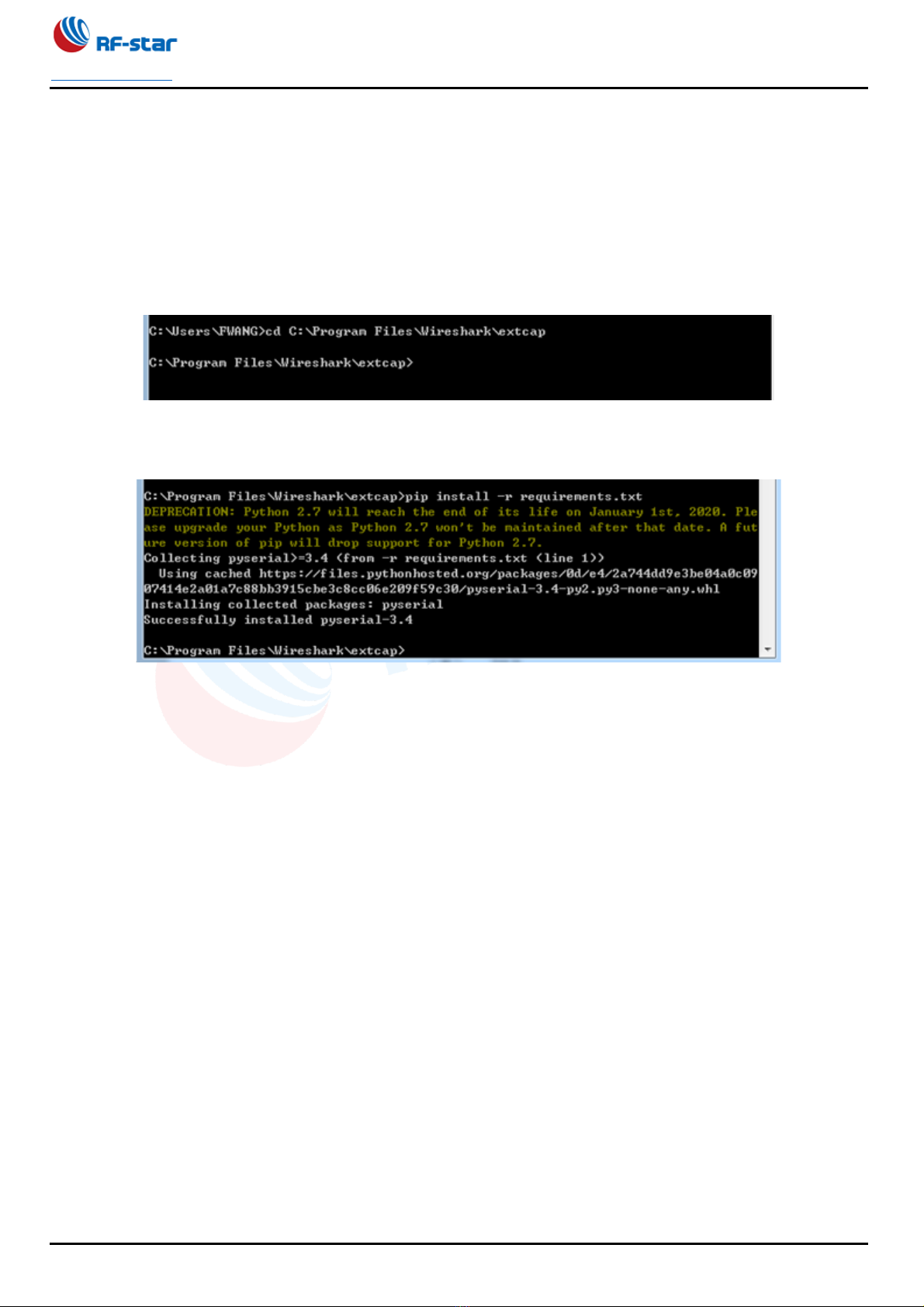
3. Enter the "cd C:\ Program Files\Wireshark\extcap" command to locate the cmd interface to the "C:\Program

RF-DG-32A
www.szrfstar.com Ver1.0 - Mar., 2020
Shenzhen RF-star Technology Co., Ltd. Page 9 of 19
Files\Wireshark\extcap" directory. Note that at this time, the extcap directory of the Wireshark installation directory
is just our Where you copy the four files here, the Wireshark installation directory is different, this path may be
different, please adjust it yourself, as shown below after switching:
(If the switch is not smooth, you can also directly click and hold the shift button in the C:\Program
Files\Wireshark\extcap folder, right-click on the blank space of the mouse, and select "Open command window here"
in the pop-up menu. To switch.)
4. After changing directories, enter the "pip install -r requirements.txt" command, and the installation of pyserial v3.4
will be started automatically. The following figure shows the success:

RF-DG-32A
www.szrfstar.com Ver1.0 - Mar., 2020
Shenzhen RF-star Technology Co., Ltd. Page 10 of 19
4 Instruction for Use
1. After the software is successfully installed, connect the RF-DG-32A to the PC via USB, open Wireshark, and select
nRF sniffer COMx.
2. Select -> View -> Interface Toolbar -> nRF sniffer in the toolbar, the following interface will appear (by default, all
BLE broadcast signals are captured).
Tabla de contenidos