
Reed Instruments R2165 Manual de usuario

Thermal
Imaging
Camera
Instruction
Manual
R2165
W
A
R
R
A
N
T
Y
W
A
R
R
A
N
T
Y
1 YEAR
1 AN
G
A
R
A
N
T
I
E
G
A
R
A
N
T
I
E
W
A
R
R
A
N
T
Y
W
A
R
R
A
N
T
Y
G
A
R
A
N
T
I
E
G
A
R
A
N
T
I
E
W
A
R
R
A
N
T
Y
W
A
R
R
A
N
T
Y
G
A
R
A
N
T
I
E
G
A
R
A
N
T
I
E
White background
Transparentbackground
White
Black
1 YEAR1AN
REED Instruments

2
Table of Contents
Introduction ................................................................................................ 3
Product Quality........................................................................................... 3
Safety ......................................................................................................3-4
Features...................................................................................................... 4
Included...................................................................................................... 5
Specications..........................................................................................5-6
Instrument Description ............................................................................... 7
Display Description .................................................................................... 8
Emissivity.................................................................................................... 9
Software Installation................................................................................. 10
Operating Instructions.........................................................................10-19
Power ON/OFF .................................................................................... 10
Main Menu ......................................................................................10-13
Enable/Disable Center Point, High/Low Temperature Spots
or Region of Interest (ROI) ........................................................... 11
Color Palette Selection ..............................................................11-12
Enable/Disable Temperature Points ............................................12-13
Select Image Mode ......................................................................... 13
Advanced Settings Menu ...............................................................14-19
Setting the Language ....................................................................... 14
Setting the Date and Date Format.................................................... 14
Switching the Unit of Measure (°F/°C).............................................. 15
Setting the High/Low Alarm Values.................................................. 15
Adjusting Emissivity.......................................................................... 16
Setting the LCD Brightness.............................................................. 16
Enabling/Disabling Auto Power OFF...........................................16-17
Changing USB Mode ....................................................................... 17
Enable/Disable Auto Save ................................................................ 17
System Settings ............................................................................... 18
Device Information ........................................................................... 18
Factory Reset ................................................................................... 18
Formatting the SD Card ................................................................... 19
Turning the LED Flashlight ON/OFF ......................................................... 19
continued...
REED Instruments

3
Saving, Viewing & Deleting Images.......................................................... 19
Charging the Battery ................................................................................ 20
Applications.............................................................................................. 20
Accessories and Replacement Parts ....................................................... 21
Product Care ............................................................................................ 21
Product Warranty ..................................................................................... 21
Product Disposal and Recycling .............................................................. 21
Product Support....................................................................................... 22
Introduction
Thank you for purchasing your REED R2165 Thermal Imaging Camera.
Please read the following instructions carefully before using your instrument.
By following the steps outlined in this manual your meter will provide years
of reliable service.
Product Quality
This product has been manufactured in an ISO9001 facility and has been
calibrated during the manufacturing process to meet the stated product
specications. If a certicate of calibration is required please contact the
nearest authorized REED distributor or authorized Service Center. Please
note an additional fee for this service will apply.
Safety
• Never attempt to repair or modify your instrument. Dismantling your
product, other than for the purpose of replacing batteries, may cause
damage that will not be covered under the manufacturer's warranty.
Servicing should only be provided by an authorized service center.
• Do not point the thermal imager (with or without the lens cover) at
intensive energy sources as this can damage the thermal imager.
•
Do not use the thermal imager in a temperature higher than 122°F (50°C).
• Always charge the battery between 32 to 122°F (0 to 50°C).
• Clean the case with a damp cloth and a diluted soap solution.
• Do not use abrasives, isopropyl alcohol, or solvents to clean the
instrument, lens or screen.
continued...
REED Instruments

4
• Do not clean the infrared lens too vigorously, this can damage the
anti-reective coating.
• Store the thermal imager in cool and dry environment.
• Please use the correct emissivity to obtain accurate
temperature measurements.
• To ensure accuracy, please let the instrument warm up for 10 minutes
before taking a measurement if it has not been used for a long time.
• When being charged, the internal temperature of the product will
rise, which will lead to inaccurate temperature measurement, it is not
recommendedto take measurements during or right after charging
the instrument.
Features
• 160 x 120 infrared resolution (19,200 pixels)
• 2.8" color TFT Display
• Built-in LED ashlight
• Choice of 7 color palettes
• Intuitive on-screen measurement tools
• 3 image modes (Thermal, Visual Image, Thermal Blending)
• High and Low temperature spot and alarm indicators
• IP65 and 6.5' (2m) drop tested
• Rechargeable li-ion battery
• Tripod mountable for continuous long-term monitoring
• View, analyze stored data and generate reports or project in real-time
• Low battery indication and auto shut-off
REED Instruments

5
Included
• Thermal Imaging Camera
• USB Cable
• 32GB Micro SD Card
• Soft Carrying Case
Specifications
Imaging and Optical Specifications
Field of View (FOV): 56 x 42°
Optimal Focal Distance: 0.25m (0.82')
Spatial Resolution: (IFOV) 6.1 mrad
Thermal Sensitivity (NETD): <0.05°C (50mK)
Image Capture Frequency: 9Hz
Focus: Fixed
Measurement
Temperature Range: 14 to 752°F (-10 to 400°C)
Accuracy: ±3.6°F (2°C) or ±2% of reading,
for ambient temperature at 77°F (25°C)
Resolution: 0.1°F/°C
Detector Specifications
Detector Type: Uncooled microbolometer,
Focal plane array (UFPA)
Spectral Range: 8 to 14μm
IR Resolution: 160 x 120 (19,200 pixels)
Image Presentation and Measurement Analysis
Display: 2.8" color TFT
Color Palettes: 7 (Ironbow/Rainbow/Rainbow(HC)/
Lava/Red-Hot/White-Hot/Black-Hot)
Image Modes:
Thermal, Visual Image, Thermal Blending
On-Screen Temperature Markers: 7 (Center / High Temp / Low Temp /
Region of Interest / Up to 3 points)
Center Spot: Yes continued...
REED Instruments

6
Emissivity: Adjustable (0.01 to 0.99)
Temperature Alarm Indicators: High/Low (User adjustable)
Automatic Hot/Cold Detection: Auto hot or cold spot-meter markers
General Specifications
Digital Camera: Yes
Digital Camera Resolution: 640 x 480 pixels
Display Resolution: 320 x 240 pixels
Image Format: BMP
LED Flashlight: Yes
External Memory: Micro SD card
Auto Shut-off: Yes (user adjustable 5/10/30 minutes)
Tripod Mountable: Yes
Low Battery Indicator: Yes
Power Supply: 3.7V/5000mAh rechargeable
Li-ion battery
Battery Life: Approx. 6 hours
Charging System: In Camera
Charge Time: 4 hours
PC Connectivity: USB Cable (Type-C)
Software: Yes (download from website)
Software Functionality: Image Analysis / Report Generation /
Live Camera Feed
Software OS Compatibility: Windows 7/8/10/11
Supported Languages: English and French
Product Certications: CE, IP65, 6.5' (2m) drop test
Operating Temperature: 32 to 122°F (0 to 50°C)
Storage Temperature: -4 to 140°F (-20 to 60°C)
Operating/Storage Humidity Range:
10 to 90%
Maximum Operating Altitude: 6561' (2000m)
Dimensions: 9.3 x 3 x 3.4" (236 x 76 x 86mm)
Weight: 1lbs (454g)
REED Instruments
7
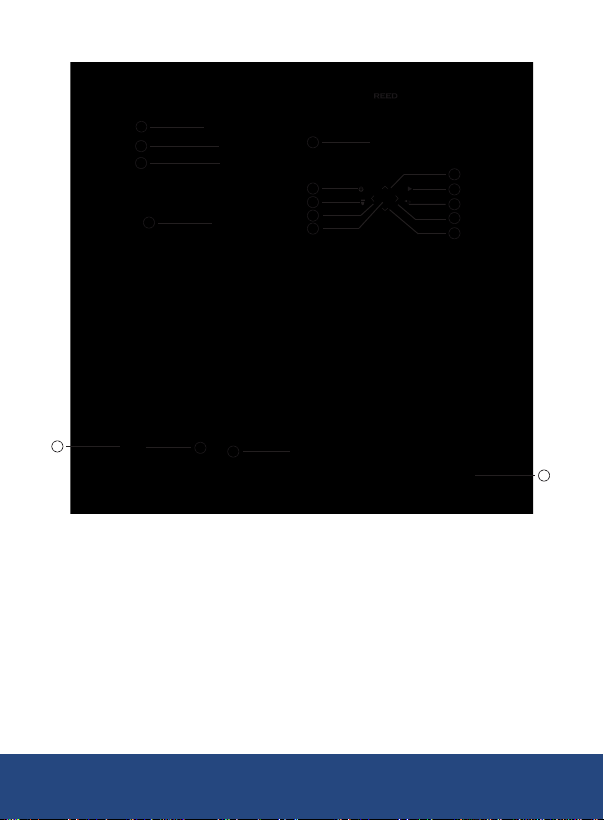
Instrument Description
SET
1
4
5
7
2
6
3
8
9
10
11
12
13
14
15
16
17
18
1. Micro SD Card Slot
2. USB Interface
3. Interface Cover
4. LED Lights
5. Infrared camera lens
6. Visual light camera lens
7. Trigger
8. LCD display
9. Power button
10. Flashlight button
11. Left button
12. Down button
13. Up button
14. Replay button
15. Right button
16. Back button
17. SET button
18. Tripod mounting hole
REED Instruments

8
Display Description
3
6
2020/03/02
37.0°C
43.1
28.7
09:39
28.7 43.1
10
11
12
13
1. Center Spot Temperature
2. Minimum Spot Temperature
3. Maximum Spot Temperature
4. Center Spot Menu Settings
5. Color Palette Menu Settings
6. Spot Menu Settings
7. Image Mode Menu Settings
8. Advanced Menu Settings
9. Minimum Spot Temperature
10. Center Spot
11. Maximum Spot Temperature
12. Battery Status Indicator
13. Date & Time
REED Instruments

9
Emissivity
This thermal imager measures infrared energy from the surface of the
object and uses this data to calculate an estimated temperature value.
Surfaces that are good at radiating energy (high emissivity), the emissivity
factor is ≥0.90. Shiny surfaces or unpainted metals are not good at
radiating energy (low emissivity) have an emissivity of <0.6. To more
accurately measure materials with a low emissivity, an emissivity correction
is necessary. Emissivity is set directly as a value or from a list of emissivity
values for some common materials.
The following table gives typical emissivity of some materials:
Material Emissivity
Asphalt 0.95
Concrete 0.95
Hard plaster 0.90
Wood (natural) 0.93
Lime Stone 0.98
Ballast chipping 0.95
Paper (every color) 0.95
Plastics non lm 0.95
Tissue (fabric) 0.95
Sand 0.90
Glass wool 0.90
Melted asphalt 0.93
Screed/pavement 0.93
Foamed polystyrene 0.94
Material Emissivity
Drywall 0.95
Render 0.94
Smoothing cement 0.90
Lacquer 0.92
Latex paint 0.97
Wallpaper 0.93
Tilling 0.93
Parquet oor 0.90
Laminate 0.90
PVC-Floor 0.92
Brick 0.93
Cliff 0.97
Roong cardboard 0.93
Stucco 0.91
REED Instruments
10
Software Installation
Visit www.REEDInstruments.com/software to
download the R2165 software.
Full specications and Operating System compatibility can be found on
the product page at www.REEDInstruments.com.
If you have specic questions related to your application and/or questions
related to software setup and functionality please contact the nearest
or 1-877-849-2127.
Operating Instructions
Power ON/OFF
Press and hold the POWER button for 3 seconds to power on.
Main Menu
1. Press the SET button to enter the main menu.
3
6
2020/03/02
37.0°C
43.1
28.7
09:39
28.7 43.1
10
11
12
13
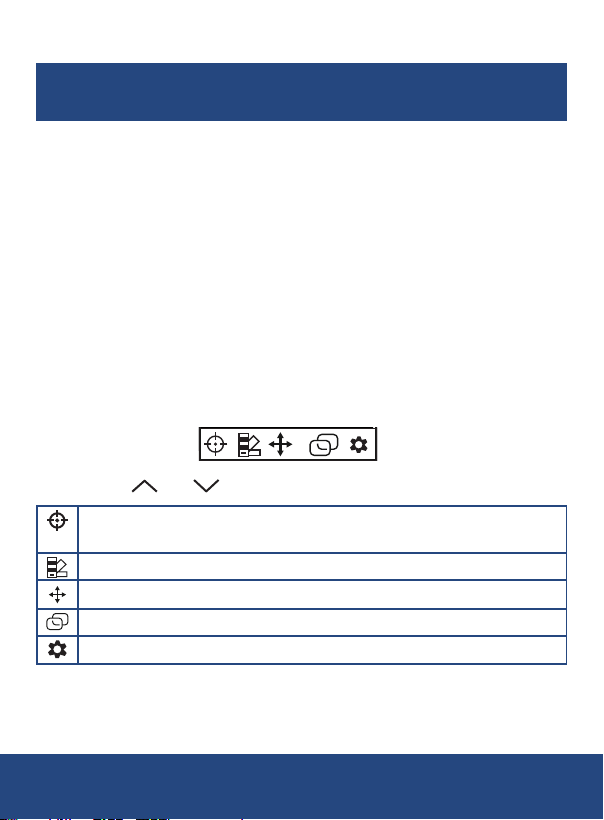
2. Use the and buttons to scroll through the list of parameters.
Enable/Disable Center Point, High/Low Temperature Spots or
Region of Interest (ROI)
Select Color Palette
Enable/Disable Temperature Points
Select Image Mode
Advanced Settings Menu
3. Follow the instructions below to adjust each parameter.
continued...
REED Instruments
Tabla de contenidos
Otros manuales de Cámara térmica de Reed Instruments


