
Reality Works GUIDE WELD LIVE Manual de usuario

User Guide
RealCareer® Welding Solutions – guideWELD® LIVE welding guidance

2RealCareer® Welding Solutions – guideWELD® LIVE real welding guidance system
Table of Contents
Introduction to guideWELD® LIVE 3
System Includes 3
Assembly Instructions 4
Speed Sensor and Speed Shield Assembly 4
Helmet and Angle Sensor Assembly 4
Battery Installation 5
Speed Shield Cleaning Instructions 5
Reference Guide to System Pieces 6
Speed Sensor 6
Helmet and Display 6
Available Default WPS 7
Helmet Set-up 8
Calibration Process 9
Angle Sensor Calibration (continued) 11
Welding Icons/Guides 12
Main Menu Setup 13
Speed Sensor (setup) 14
Bind 14
Test Channels 15
Diagnostics (setup) 16
Turn Logging On/O 16
Helmet 16
Angle Sensor 16
Speed Sensor 16
Firmware (setup) 17
Versions 17
Update Helmet 17
Update Sensor 18
Update Flash Memory 18
Precision Levels (setup) 19
Precision Levels (setup continued) 20
Change Default Precision Levels 20
Change Measurement Units 20
Change Language 20
Troubleshooting 21
Speed Sensor 21
Helmet Angle Sensor Calibration 22
Angle Sensor 23
Safety & Warnings 24
Need More Help? 24

3RealCareer® Welding Solutions – guideWELD® LIVE real welding guidance system
Introduction to guideWELD® LIVE
guideWELD® LIVE real welding guidance system that shows the welder their Welding Speed,
Work Angle, and Travel Angle. The guidance system is a series of welding indicators that help
the welder create proper welding technique while doing actual welding!
System Includes
1. Auto-darkening Welding
Helmet with Guidance
Display and an SD card
with 18 default Welding
Procedure Specications
(WPS’s) in Helmet
2. Angle Sensor
(connected to Helmet)
3. Stick Calibration Fixture
4. Speed Shield with Brackets
5. Screw knobs
6. Speed Sensor with base
7. Eight rechargeable batteries
with battery charger
8. Accessories/supplies: screwdriver, arm band,
extra protective speed lens, helmet protective
shield, helmet manual, guideWELD LIVE Quick Start Guide
9. Downloadable guideWELD® LIVE Curriculum
Additional Resources:
www.realityworks.com/guideweldlive-downloads
1. User Guide
2. guideWELD® LIVE Curriculum
3. Available Standard WPS Lists and WPS Editor
4. Product Support tutorials and documents
6
4
1
5
23
7
8

4RealCareer® Welding Solutions – guideWELD® LIVE real welding guidance system
Assembly Instructions
Speed Sensor and Speed Shield Assembly
Connect the Speed Sensor and Speed Shield to the base by attaching the two screw knobs.
Both sides of each have pre-drilled holes.
1. Position threaded holes on
the Speed Sensor (orange
arrows) to the inside of the
base arm (green arrows)
2. Position the threaded holes
on Speed Shield Bracket
(orange arrows) to the
outside of the base arm
(blue arrows)
3. Line up the 2 screw knobs*
to the outside of the
Speed Shield Bracket
to the base arm
(red arrows)
4. Screw until tight
* These knobs are also used for adjusting the alignment of the Speed Sensor.
Helmet and Angle
Sensor Assembly
Connect the Helmet with the Angle Sensor by plugging
in the white cord plug of the Angle Sensor with the
black cable jack connector**
1. This is located on the right side of the guideWELD LIVE
Helmet, wrapped over the Helmet’s halo.
** The Angle Sensor comes pre-assembled.
1
battery installation on page 5 >

5RealCareer® Welding Solutions – guideWELD® LIVE real welding guidance system
Battery Installation
guideWELD LIVE has two battery packs
that are located on the Speed Board and
on the Helmet. Both locations take two
rechargeable AA batteries.
NOTE: Each unit is shipped with
rechargeable batteries installed. An
additional four rechargeable batteries
and battery charger are included.
System Battery Life
The bottom right screen on the
guideWELD LIVE Helmet will display the
battery status icons. The bottom left icon
is the helmet battery status and the
bottom middle-left icon is the speed
sensor battery status.
The following is the life expectancy for
each battery pack before recharging:
• Helmet battery life expectancy: 6.5 hours per continuous use
• Speed Board battery life expectancy: 8 hours per continuous use
NOTE: For best usage, if using product on a day-to-day basis, charge overnight to ensure
fully charged batteries with every use.
Speed Shield Cleaning Instructions
Speed Shield:
• Keeping the shield clear of dust, debris, and other welding partials will give the tracking
sensors the best visual of welding arc
• Clean the shield after each use for best results; wipe it with a dry cloth
Protective Speed Lens:
• Keep lens free of dust, debris, and other welding partials
• Clean lens every 2-3 days of welding use for best results; wipe it with a dry cloth
Helmet batteries (screwdriver needed)
Speed Sensor Batteries

6RealCareer® Welding Solutions – guideWELD® LIVE real welding guidance system
Reference Guide to System Pieces
Use the images below as you walk through the set-up of
your guideWELD LIVE Helmet and the calibration process.
Speed Sensor
1. On/o button
(back of Speed Sensor)
2. Binding button
(back of Speed Sensor)
3. Calibration button
4. Battery compartment
(two AA batteries)
5. Alignment button
6. Arc-o speed Indicators
7. Alignment lasers
(front of Speed Sensor)
Helmet and Display
guideWELD LIVE periphery guidance
is located inside the auto-darkening
Helmet using the chosen WPS as the
guide for each and every weld.
1. Battery compartment
(two AA batteries)
2. Work Angle guidance indcator
3. Travel Angle guidance indicator
4. Speed guidance indicator
5. Helmet display on/o button
6. Menu select button
7. Menu navigation buttons
8. Menu display
9. SD card port
Work Angle (45)
Speed
Travel Angle (10)
6
5
1 2
3
77
3
5
9
8
67
2
4
1
4

7RealCareer® Welding Solutions – guideWELD® LIVE real welding guidance system
Available Default WPS
guideWELD® LIVE welding guidance system has 18 default WPS capability to weld for the
tee joint, lap joint, and v-groove joint. The tee joint is in a 2F position, lap joint is in the 2F
position, and the v-groove joint is in the 1G position. All base material is mild steel with
several material thicknesses available in MIG and Stick.
Default MIG WPS
Default Stick WPS
WPS
Number
Material
Thickness
Welding
Position
Joint
Design
Consumable
Type
Electrode
Size
Amp
Range
Welding
Work Angle
Welding
Travel Angle
Welding
Travel Speed
(inch) (AWS Wire Class) (inch) (amps) (Range of Degree) (Range of Degrees) (ipm)
TARGET TARGET TARGET TARGET
SM2FT1351/8 1/8 2F Tee E7018 1/8 120 45 20 11
SM2FL1351/8 1/8 2F Lap E7018 1/8 120 45 20 11
SM1GG1351/8 1/8 1G V-Groove E7018 1/8 120 90 20 11
SM2FT1401/4 1/4 2F Tee E6013 1/8 95 45 20 7
SM2FL1401/4 1/4 2F Lap E6013 1/8 95 45 20 7
SM1GG1401/4 1/4 1G V-Groove E6013 1/8 95 90 20 7
SM2FT1303/8 3/8 2F Tee E6010 1/8 90 45 20 6
SM2FL1303/8 3/8 2F Lap E6010 1/8 90 45 20 6
SM1GG1303/8 3/8 1G V-Groove E6010 1/8 90 90 20 6
Base Material (type): All StickWPS’s are tested with STEEL
Welding Polarity: DC
Mode of Wire Transfer: All WPS’s for SMAW process
Measurement Units: All WPS’s are available in Metric and Imperial.
NOTE: Customizable WPS available
WPS
Number
Material
Thickness
Welding
Position
Joint
Design
Specied
Weld Size
Volt
Range
Wire Feed
Speed
Welding
Work Angle
Welding
Travel Angle
Welding
Travel Speed
(T1, T2) (AWS A2.4) (volts) (WFS) (Range of Degree) (Range of Degrees) (Minimum ipm)
TARGET TARGET TARGET TARGET TARGET
GM2FT10216G 16-18ga 2F Tee 0.09 17 180 45 10 14.7
GM2FL10216G 16-18ga 2F Lap 0.06 17 180 45 10 16.2
GM1GG8216G 16-18ga 1G V-Groove 0.06 17 145 90 10 13.7
GM2FT1401/8 0.125 2F Tee 0.125 18 270 45 10 13.2
GM2FL1281/8 0.125 2F Lap 0.125 17.5 265 45 5 14.7
GM1GG1271/8 0.125 1G V-Groove 0.125 18 230 90 10 13.2
GM2FT1701/4 0.25 2F Tee 0.25 23 360 45 5 8.5
GM2FL1701/4 0.25 2F Lap 0.25 23 360 45 5 10.0
GM1GG1461/4 0.25 1G V-Groove 0.125 22.5 340 90 10 7.7
Base Material (type): All MIGWPS’s are tested with STEEL
Welding Polarity: DC
Filler Metal Size (diam.): AllWPS’s are tested with 0.035
Mode of Wire Transfer: All WPS’s for GMAW process
Filler Metal Type (AWS classication): AllWPS’s are ER70S wire
Measurement Units: All WPS’s are available in Metric and Imperial.
NOTE: Customizable WPS available

8RealCareer® Welding Solutions – guideWELD® LIVE real welding guidance system
Helmet Set-up
View Reference Guide to System Pieces
(page 6) for button positioning and
helmet guides.
1. Turn on the Helmet and Speed Sensor
2. Look at the menu display, use navigation
buttons to determine a choice on each of
the following screens
3. Choose WPS Selection
to start a new WPS or
Choose Weld with WPS,
which is the previous WPS
used. Press the menu
select button to conrm
4. Choose Process.
Press the menu select
button to conrm
5. Choose Joint Type.
Press the menu select
button to conrm
6. Choose Material.
Press the menu select
button to conrm
7. Choose Thickness.
Press the menu select
button to conrm
8. Choose WPS.
Press the menu select
button to conrm*
9. Choose desired indicators
to display. Press the menu
select button to conrm
10.Choose starting position.
Press the menu select
button to conrm
* Only one option may be available based on previous selections.
9RealCareer® Welding Solutions – guideWELD® LIVE real welding guidance system
Calibration Process
NOTICE: The calibration process will need to be
completed before each weld!
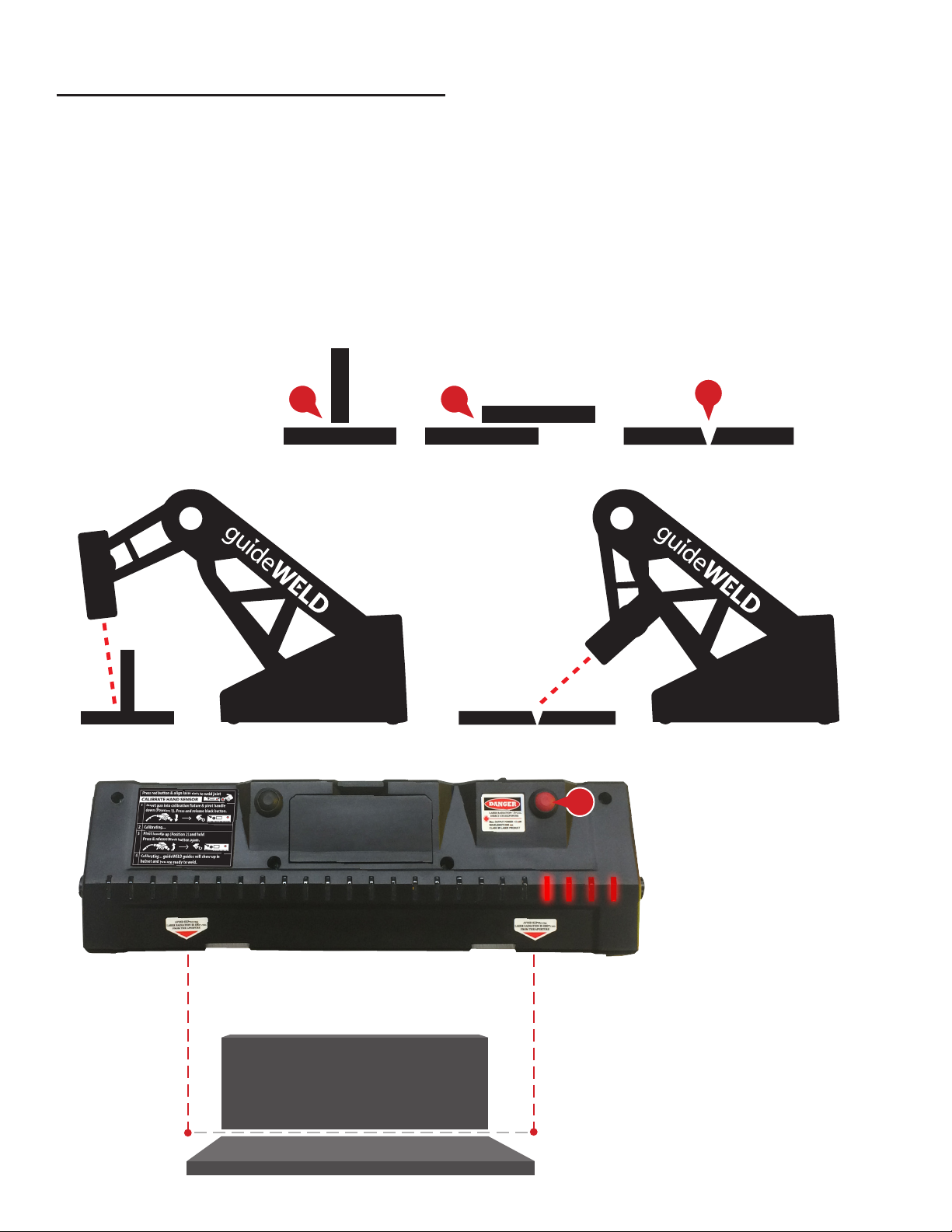
The process includes Speed Sensor alignment and Angle Sensor calibration. The process is
the same for Stick or MIG welding except when of using the Stick Calibration Fixture (for Stick
welding only).
Speed Sensor Alignment
Joint/Coupon types
1. Tee (2F)
2. Lap (2F)
3. V-Groove (1G)
Based on chosen joint type, align Speed Sensor to welding coupon
4. Press the red alignment laser button and align laser dots to weld joint
Tee or
Lap Position
V-Groove or
Lap Position
Joint/Coupon Side Views
Tee Joint/Coupon Alignment*
3
1 2
4
calibration continued on next page >
* Laser dots must be within 1/2 inch of
welding joint line (in front or behind)
for optimal speed feedback.

10 RealCareer® Welding Solutions – guideWELD® LIVE real welding guidance system
Calibration Process (continued)
Angle Sensor Calibration
During calibration process and during weld, maintain a rm grasp on welding gun and
Angle Sensor. For best results, keep Angle Sensor in the same location (between palm of
hand/glove and welding gun) without movement.*
1. Tighten the Angle Sensor straps to the palm
of your hand. Cover your hand and the Angle
Sensor with a welding glove
OR
Cover your hand with the welding glove, then
tighten the Angle Sensor straps to the palm of
the glove-covered hand
2. Determine if welding left- or right-handed--use left side calibration xture for left-handed
users, or right side for right-handed users
3. Determine if calibrating for MIG
or Stick process
a. For MIG, insert the welding
gun into the calibration xture
b. For Stick, insert the welding
gun into the Stick
Calibration Fixture
4. Tighten the small screw knob
a. For MIG, tighten so the
welding gun nozzle can just
slide in and out of the xture
with minimal clearance
b. For Stick, tighten on Stick
Calibration Fixture so it cannot
be easily be removed
MIG Calibration Setup Stick Calibration Setup
*Angle Sensor must be on palm side during
welding for accurate guidance feedback.
Angle Sensor calibration continued on next page >
Tabla de contenidos
Otros manuales de Sistema de soldadura de Reality Works


Manuales populares de Sistema de soldadura de otras marcas


TAFA
TAFA 30*8B35 Manual de usuario

Lincoln Electric
Lincoln Electric INVERTEC V350-PRO CE Manual de usuario

ESAB
ESAB Buddy Arc 145 Manual de usuario

CIGWELD
CIGWELD 636804 Guía rápida

Red-D-Arc
Red-D-Arc DC-400 Manual de usuario

Hobart Welding Products
Hobart Welding Products Spool Gun DP 3035-10 Manual de usuario


