
Ratoc Systems Converter Manual de usuario

FireWire-Ultra SCSI
Converter
FR1SX
User’s Guide
Dec. 2006
Rev. 5.0

FR1SX
1.Introduction ....................................................1
1-1. Package Contents ......................................................... 1
1-2. Layout ............................................................................. 2
1-3. System Requirements .................................................. 3
1-4. Restrictions & limitations ........................................... 4
2. Installation .....................................................5
2-1.Connecting the FR1SX to a SCSI device ................... 5
2-2. Repeater function ......................................................... 8
3. How to check if device is working .............9
3-1. Windows System ......................................................... 10
3-1-1. Mass Storage Device ......................................... 11
3-1-2. Scanner device, Tape drive, CD/DVD burner, etc.......... 12
3-2. Mac OS X ..................................................................... 17
3-2-1. Mass Storage Device ......................................... 17
3-2-2. Scanner device, Tape drive, CD/DVD burner, etc.......... 18
3-3. Mac OS 9 ..................................................................... 19
3-2-1. Mass Storage Device ......................................... 19
3-2-2. B’s Crew SIM Driver ......................................... 20

4. Configuration Utility ................................. 23
4-1. You can change following settings ............................ 23
4-2. Installing Utilities on Windows ................................. 25
4-3. FR1 Utility (Mac OS X) ............................................. 30
4-4. Installing the FRUty (Mac OS 9) ............................. 32
4-5. Examples of configuration settings .......................... 35
5. Firmware Update....................................... 36
5-1. Updating firmware on Windows ................................ 3 6
5-2. Updating firmware on Mac OS X .............................. 3 8
5-3. Updating firmware on Mac OS 9 .............................. 40
5-4. Specific firmware revision for specific SCSI device .................. 42
6. Format Utility(Windows Only) ................ 43
6-1. How to use FRFMTW9X on Windows Me/98SE ................... 43
6-2. How to use FRFMTW2K on Windows XP/2000 ................... 46

7. Troubleshooting ......................................... 47
7-1. General Hardware Troubleshooting ........................ 47
7-2. When copying files is failed ....................................... 48
7-3. When a new drive letter is not assigned ................. 49
7-4. When the green power LED does not come on ...................... 50
7-5.
Wrong drive name appears on the removable icon ....................
51
7-6. Wrong device icon appears in My Computer ........ 53
7-7. When Version Conflict message appears ............... 55
7-8. Write error happens woth an old Castlewood ORB .............. 56
7-9.
Castlewood ORB can not be recognized when you start your
computer with ORB connected.
..... ....................................... .56
7-10. CD-R/RW writing software can not recognize the CD-R/ RW
drive connected to the FR1SX, even though the MacOS recognizes
the CD-R/RW ........................................................................... 56
8. Optional items ............................................ 57
9. Registration and Tech-Support ............... 58
10. Specifications ........................................... 59
Appendix .......................................................... 60

1
1.Introduction
The FR1SX is a Firewire to Ultra SCSI Converter for use in Firewire port
enabled system. This User’s Guide describes how to install and use the FR1SX.
README file in the CD-ROM may include the newer information. For the
latest information, go to http://www.ratocsystems.com/English/.
1-1.Package Contents
FR1SX FireWire-Ultra SCSI Converter
FR1SX CD-ROM
IEEE1394 6pin- 6pin cable
Quick installation guide
Software License Agreement
If any of these items are missing, contact the supplier immediately.
NOTE

2
1-2. Layout
AC Adapter jack
Power LED (Green)
Fig. 1 shows the front side layout of the FR1SX. Power LED light-on
state indicates the FR1SX is powered. If this LED is NOT lit, an optional AC
adapter is needed. Refer to Chapter 8 regarding optional items.
High-Density 50 pin
SCSI connector
Fig. 2 shows the back side layout of the FR1SX. The FR1SX has a High-
Density 50 pin SCSI male connector. If you have a SCSI device with a different
type such as High-Density 68 pin, Centronics 50 pin or D-Sub 25 pin, you can
use an optional adapter. In such a case, refer to Chapter 8.
Fig. 1 Front Side
Fig. 2 Back Side
6 pin FireWire
(IEEE1394) port

3
1-3. System Requirements
System
IEEE 1394 (Firewire) enabled system
OS
• Mac OS X 10.1.x or later / Mac OS 9.1 or later
• Windows Server 2003/XP/2000/Me/98SE
SCSI device
• High-Density 50 pin female SCSI-2 connector on a SCSI device (If the SCSI
connector type is different, refer to Chapter 8)
• Term-Power output capability
Caution: As FR1SX gets electric power from Term-Power on SCSI
bus, this output capability is required. If Term-Power output is not
available at your SCSI device such as iomega zip drive, optional AC
adapter is needed. Refer to Chapter 8.
• Terminator ( must be attached to the SCSI device properly )

4
1-4. Restrictions & Limitations
• FR1SX does not support multiple SCSI IDs. (If multiple SCSI device is
connected, the lowest SCSI ID’s device is recognized by the FR1SX.)
• FR1SX doesn’t support LUN(Logical Unit Number).
• (For Windows Users Only) Booting system from a SCSI device through the
FR1SX is not supported, because of Windows system limitation.
• (For Mac Users Only) If the system has a built-in firewire port, the system
can be booted up from the SCSI device( ie. HDD) through the FR1SX. Some-
times firmware update for Mac may be required. Regarding firmware update
for Mac, go to http://www.apple.com.
NOTE: Apple Firmware doesn’t support boot up from external CD-ROM
through FireWire.
5
2.Installation
Follow the steps through to connect the FR1SX to a SCSI device
2-1.Connecting the FR1SX to a SCSI device
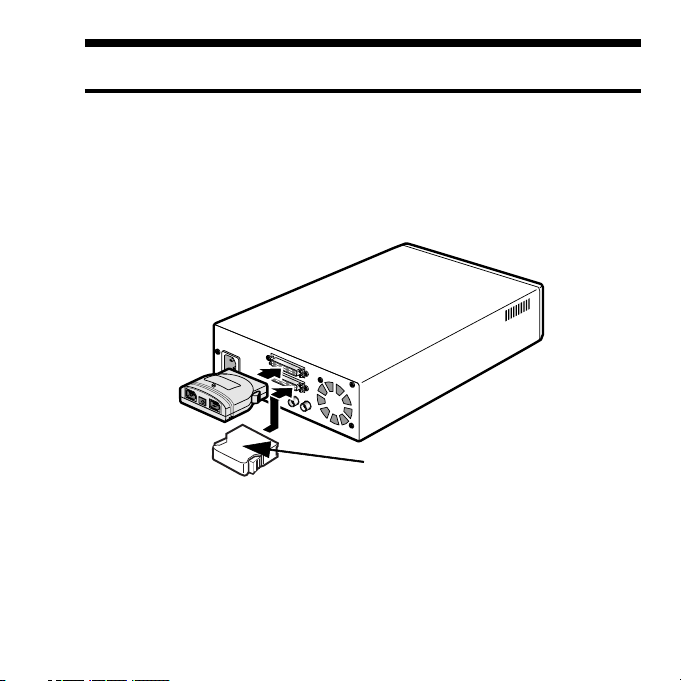
1. Make sure if the SCSI device is turned OFF before connecting the
FR1SX. Connect the FR1SX to a SCSI device, as Fig.3 shows. If the SCSI
connector is different, you can use an optional adapter. Regarding optional
adapters, refer to Chapter 8.
Terminator
Fig. 3

6
2. Make sure that the SCSI ID of the SCSI device is set properly. It must be
from 0 to 6. ID 7 is reserved for the FR1SX. SCSI ID is usually set with a
switch on the back of the SCSI device. For more information how to set SCSI
ID, refer to the SCSI device’s manual.
3. Attach an active terminator to the SCSI device, as Fig.3 shows. If the SCSI
device has an internal terminator instead of external terminator, it must be
enabled.
4. Turn ON the SCSI device and check if the green LED on the FR1SX is lit.
If the green LED is not lit, the SCSI device doesn’t have Term-Power output
capability. If the SCSI device doesn’t have this capability, an optional AC
Adapter is needed. Regarding optional items, refer to Chapter 8.
Tabla de contenidos


