Quadro T-S704SR Manual de usuario

ENGLISH
User manual
Upute za uporabu/Izjava o jamstvu (HR)
Uputstva za upotrebu/Prava potrošača i saobraznost (SRB)
Uputstva za upotrebu/Garantna izjava (MNE)
HRVATSKI
SRPSKI
И005 13
Android Tablet 7"
T-S704SR

ENGLISH
TABLE OF CONTENT
Safety Precautions ............................................................................1
Description.......................................................................................5
Introduction .....................................................................................6
Turn On and Turn Off ..................................................................6
Touch screen ..............................................................................6
Desktop operation ............................................................................7
Desktop .....................................................................................7
Locking desktop..........................................................................7
Operation.........................................................................................8
Program operation ......................................................................8
Player...................................................................................8
Music ...................................................................................8
Sound recorder.....................................................................8
Camera ................................................................................9
Taking pictures......................................................................9
Recording video ....................................................................9
Browser................................................................................9
Play Store...........................................................................10
Calendar.............................................................................10
Clock..................................................................................10
Alarm clock.........................................................................10
Calculator ...........................................................................11
Downloads..........................................................................12
Maps..................................................................................12
E-mail ................................................................................12
File manager.......................................................................14
Settings..............................................................................15
Charging the device ..................................................................17

1
ENGLISH
Safety Precautions
Read these safety instructions before using your device and store them for possible
future reference. Always follow these basic safety precautions when using your Tablet.
This reduces the risk of fire, electric shock, and injury.
BATTERY, CHARGER, AND OTHER ACCESSORIES
If the charger cord is damaged, have it repaired by the manufacturer, its service or a
similarly qualified person in order to avoid any hazard.
The charger is not intended for use by persons (including children) with reduced physical,
sensory or mental capacity. Persons who have not read the manual, unless they have
received explanations by a person responsible for their safety and supervision should not
use this unit. Children should be monitored to ensure that they do not play with the
charger.
The charger should always be readily accessible. The device should not be exposed to
dripping or splashing water. No objects filled with liquids such as vases shall be placed on
the device. Always leave a minimum distance of 10 cm around the unit to ensure sufficient
ventilation. Naked flame sources, such as candles, should not be placed on top of the
device. The device is intended for use only in a temperate climate. CAUTION: Danger of
explosion if battery is incorrectly replaced or not replaced by the same type or equivalent.
The battery should not be exposed to excessive heat such as sunshine, fire or similar.
Different types of batteries, new and used batteries should not be mixed. The battery
must be installed according to the polarity. If the battery is worn, it must be removed from
the product. The battery must be disposed of safely. Always use the collection bins
provided (check with your dealer) to protect the environment. At full volume, prolonged
listening to the portable audio device may damage the user's hearing and cause hearing
troubles (temporary or permanent deafness, hearing drone, tinnitus, hyperacusis).
So we recommend not to listen the portable audio device at high audio volume and no
more than one hour per day at medium audio volume.
SWITCH OFF IN RESTRICTED AREAS
Switch the mobile device off where the use of mobile devices is not allowed or where there
is a risk of causing interference or danger, for example on board an aircraft, near medical
equipment, fuel, chemicals or blasting sites.
ROAD SAFETY COMES FIRST
Check the current laws and regulations regarding the use of mobile devices in the areas
where you drive.

2
Do not handle the mobile device when driving.
Concentrate fully on the driving
Use a hands-free kit whenever possible
Leave the road and park up before making or receiving a call, if the driving conditions
allow.
Radio signals could affect some of the car's electronic systems such as the audio stereo
and alarm systems.
If the car is equipped with an airbag, do not hinder its deployment with fixed or wireless
equipment. This could result in serious injury due to inadequate performance.
INTERFERENCE
All wireless devices are susceptible to interference which may affect their performance.
AUTHORISED PERSONNEL
Only qualified people are authorized to install or repair this product
ACCESSORIES
Only use batteries, chargers and other accessories which are compatible with this
equipment. Do not connect incompatible products.
KEEP THE EQUIPMENT DRY
This equipment is not water proof. Keep it dry.
CHILDREN
Keep your mobile device in a safe place, out of the reach of young children. The mobile
device contains small parts that may present a choking hazard.
Precautions for use
This mobile device meets guidelines concerning the exposure to radio waves.
Your mobile device is a radio transmitter and receiver. It was designed to meet the limits
recommended by international guidelines to limit the exposure to radio waves. These
guidelines were developed by and independent scientific organization, The ICNIRP; and
include safety margins designed to ensure the protection of all, regardless of age and
health.
The recommendations on exposure guidelines for mobile devices employ a unit of
measure known as the Specific absorption rate or SAR. The SAR limit defined in the ICNIRP
recommendations is 2.0 watts/kilogramme (W/kg) averaged over 10 grams of tissue. In
tests to determine the SAR, the equipment is used in standard usage positions at its
ENGLISH
Safety Precautions

3
highest certified power level in all tested frequency bands. The actual SAR level of a device
in use may be lower than the maximum value because the equipment is designed to only
use the necessary power required reaching the network. That amount changes depending
on a number of factors such as the distance from a network base station.
Radio frequency interference
Radio frequency output from electronic devices can interfere with other electronic
equipment and cause malfunctions. Although this mobile device has been designed in
accordance with EU regulations on radio frequency emission, mobile device wireless
transmitters and electrical circuits can cause interference with other electronic equipment.
We therefore recommend taking the following precautions:
Aircraft: Wireless equipment can cause interference in aircraft.
Turn off your mobile device before boarding the aircraft
Do not use on the ground until allowed to do so by the flight crew.
Vehicles: mobile device radio frequency emissions can affect the electronic systems of
motor vehicles. In relation to your vehicle, check with the manufacturer or dealer.
Medical implants :
Medical equipment manufacturers recommend a minimum distance of 15 centimeters
between a wireless device and an implanted medical device such as a pacemaker or
defibrillator to avoid any interference with the medical device. It is recommended that
people fitted with such devices :
-Always keep wireless equipment more than 15cm away from the medical device.
-Never carry wireless equipment in a breast pocket.
-Place such equipment at the opposite ear to the medical device.
-Turn off the wireless equipment if they think it is interfering with their device
-Follow the instructions provided by the medical implant manufacturer.
If you are fitted with a medical implant and have any questions related to the use of your
mobile/wireless equipment, you should consult your doctor
Hearing:
Warning: Using a headset risks not be able to correctly hear outside sounds. Do not use a
headset when it could endanger your safety. Some mobile devices can interfere with the
proper operation of hearing aids.
Other medical devices: Radio transmitting equipment including mobile devices may
interfere with the proper operation of insufficiently protected medical equipment. Consult
ENGLISH
Safety Precautions

4
a doctor or the medical equipment manufacturer to find out whether the equipment is
sufficiently protected from external radio wave signals. Turn of your device where
required by regulations, particularly in hospitals.
Health facilities: Hospitals and health facilities may be using equipment which is
particularly sensitive to external radio frequency emissions. Turn off the mobile device
when staff or notices tell you to.
Blasting sites and marked areas :
Turn off your device in potentially explosive areas. Follow all official instructions. Sparks in
such areas can cause an explosion or a fire, resulting in serious injury or death. Turn off
your equipment in petrol/gas stations, especially when near the fuel pumps. Strictly follow
usage restrictions in fuel depots, chemical plants or in places using explosives.
Potentially explosive areas are often, but not always, clearly signed. These include areas
where it is normally considered advisable to turn of vehicle engines, the area below deck
on ships, chemical storage or transfer plants, and areas where the air contains chemical
products or particles, such as grain, dust and metal powder. Check with the makers of LPG
(such as propane or butane) vehicles that the device can be used safely in their vicinity.
All our mobile devices conform to international standards and regulations, and if need be
national ones, with a view to limiting user exposure to electromagnetic fields. These
standards and regulations were adopted after the completion of extensive scientific
research. This research established no link between the use of the mobile device and any
adverse effects on health if the device is used in accordance with standard practices.
However if you would like to reduce the level of exposure to radio frequency radiation you
can limit your use of wireless, because the time in contact with is a factor of exposure for a
person, and you can move away the device from you, because the exposure level
decreases with a smaller distance.
Power supply: DC5V 2A
Adaptor technical data: INPUT : AC100-240V 50-60HZ
OUTPUT: DC5V 2A
ENGLISH
Safety Precautions

5
ENGLISH
Description
power switch
3.5mm stereo headphone jack
USB OTG connector
DC 5V/2A power connector
volume up/down
microSD card slot
front camera

6
ENGLISH
Introduction
Thank you for purchasing this device. This device enables you to surf the internet via
wireless connection with multimedia playback. This manual contains important safety
information and operation instructions, so please read all the instructions carefully before
using the device and keeps it for future reference.
NoteWe have done our best to produce a complete and accurate manual. However, we
cannot ensure there are no errors or omissions. We also have no responsibility for
damages or losses of data caused by improper operation.
Turn On and turn Off
Turning on: Press and hold the power switch for five seconds
Turning off: Press and hold the power switch for five seconds – Tap Turn Off – Tap
OK
Screen locking/unlocking: Press the power switch to lock/unlock the screen.
Force shut-down: If the device doesn't have response, press the Reset key to
restart the device.
Note: Do not force shut down the device unless necessary. Under normal condition,
please follow the normal procedure to turn off the device.
Reset key: Press the Reset key to restart the device.
Touch screen
Tap: Tap to select an icon or option.
Tap and hold: Tap and hold an icon to drag it to the desktop.

7
ENGLISH
Desktop operation
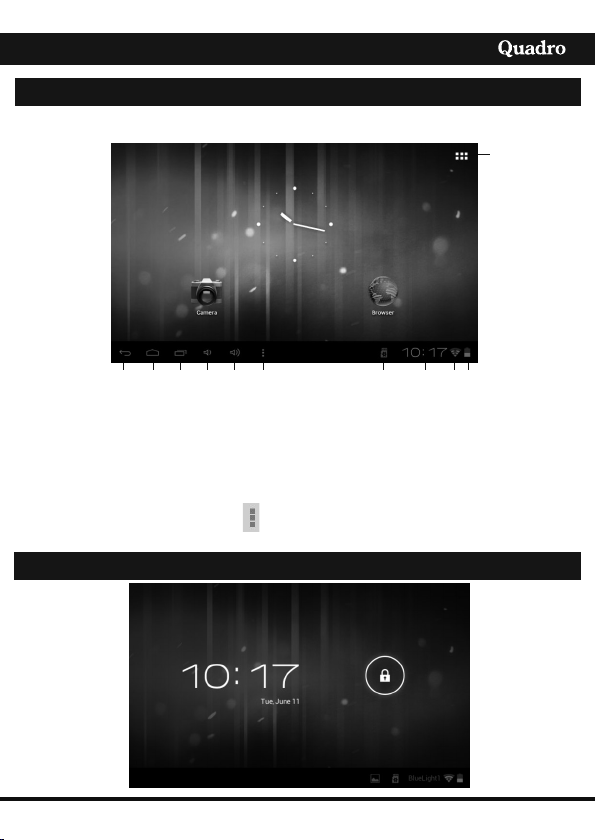
1
2 3 4 567 8 9 10 11
1. Tap to view all applications 6. Volume +
2. Return to current operation 7. Menu function shortcut
3. Return to desktop directly 8. TF card connection status
from the program interface 9. Current time
4. Multi-page task selection key 10. 3G/WIFI connection signal symbol
5. Vulume - 11. Battery status
On desktop, tap the Menu key to show the menu list and perform the
operation.
Locking desktop
Desktop
Drag and drop: Drag and drop on the desktop to switch among different interfaces.

8
ENGLISH
Operation
Tap and hold the unlocking switch and the A, B symbols as shown in the picture
appear; point A is the camera icon and point B is the unlocking icon. The system will
prompt about the path of unlocking. The ripple at point B in the picture is the path of
the prompt. Tap and drag the unlocking switch to point B to unlock the screen and tap
and drag the unlocking switch to point A to activate the camera function.
Program operation
Player
1. AVI, WMV, RM, RMVB, 3GP, MKV, MP4, ASF, VOB, MPG, MOV up to 1080P
2. HD-Definition
3. The compatible picture formats are: JPEG, BMP, GIF, PNG
Music
1. Support music format: MP3, WMA, OGG, FLAC, WAV, ACC.
2. Tap Music icon.
3. Select desired music to play from the music/album/artist/playing list.
4. Tap Previous/ Pause /Next icon for operation.
8. To return to previous interface while playing music, tap or
Sound Recorder
Tap the sound recorder icon to open it.
Tap to start recording, tap to stop the recording.To discart recorded message
tap ”Discart” to save it tap “Done”.
Tabla de contenidos
Otros manuales de Tableta de Quadro