
Qian ANJET58 Manual de usuario

Please read carefully before using your equipment
and save it for future reference use. (Page 1)
Por favor lea cuidadosamente antes de usar su equipo
y guárdelo para uso de futuras consultas. (Página 15)
ANJET 58
MOD. QIT581701
USER MANUAL
MANUAL DE USUARIO
THERMAL MINI PRINTER
MINI IMPRESORA TÉRMICA
ANJET58


1
WARRANTY AND PRODUCT INFORMATION
These terms shall be governed and construed under laws of the
jurisdiction in which the product was purchased, if any term here is
held to be invalid or unenforceable, such term (in so far as it is invalid
or unenforceable) shall be given no effect and deemed to be excluded
without invalidating any of the remaining terms. Qian reserves the right to
amend any term at any time without notice.

2
ABOUT THE MANUAL
Thank you for your purchase of the QIT581701 thermal printer.
This manual can help you learn how to use this product. Please
read this manual before use and after using the product to answer
any questions that may arise.
Note
Due to our constant efforts to improve and update the function
and performance of the product, our company reserves the right
to change the hardware and software specications in the manual
without prior notice.
If you nd errors or omissions in the content of this manual, please
go to your sales agent, Thank you.
Without the prior written permission of our company, the content
of the corresponding manual attached to the product must not be
reproduced, transmitted, transcribed, stored, etc.
Declaration
This product is a type A product, it can cause radio interference
in the living environment, in this case, the user must protect the
interference with effective protective measures.

3
SECURITY ADVICE
● Do not disassemble the printer without rst reading the user manual.
● The printer must be installed in a solid place to avoid vibration or impact
damage to the printer.
● Do not store or use the printer in an environment of high temperature,
humidity and intense pollution.
● The printer's power adapter must be connected to the ground, you must
avoid connecting it to the same outlet with higher voltage equipment so
that it can damage the printer.
● Use the standard power adapter in the printer.
● When connecting the connecting line cable, make sure the printer is
closed.
● When the printer is printing, do not open the paper cover, otherwise it
may cause an unexpected situation and even damage the printer.
● After printing, the print head will be in high temperature, please do not
touch it, to avoid burn.
● Do not use substances such as benzene, solvent or alcohol to clean the
printer housing. At the same time, do not use corrosive chemicals or
detergents to clean the printer, avoid damaging the printer.
● Please use print paper approved by our company or standard
recommendation, otherwise it can lead to poor print quality, and even
damage the printer core.
● If you want the printing ink on your ticket to stay longer, we suggest that
you change the type of paper that gives you the most durability.
Saving time of thermal printing paper printing letter is related to the quality
of thermal printing paper, if you want to print long-term preservation bills,
please choose a long-term thermal paper .
● The printer is only suitable for use at an altitude below 2187.2 yd.
● The printer is only suitable for use in non-tropical climates.

4
APPLICATION AREA
● POS system printing for electronic cash register.
● Printing of the electronic transfer system.
● Printing of invoices, postage, aviation, civil.
● Consultation and printing of service system invoices.
● Printing invoices of the industry of any sector.
● Print tax invoices.
Package:
● 1 Mini printer
● 1 AC/DC power adapter
● 1 Roll of paper
● 1 USB cable
● 1 User manual
● 1 Installation disc
Characteristics of the printer:
● High print quality, low cost.
● High printing speed and silent.
● Bitmap printing.
● Easy and simple installation of paper roll.
● Small power supply, saves space and allows easy setup
● Supports GB18030 large font, easy to print characters rare.
● Support to congure printing with multiple languages.
● Support to download and print logos and graphics.
● Compatible with Windows and Linux.
● You can receive data in print at the same time.
● You can adjust the size, rotate the characters between the lines of
impression.

5
SPECIFICATIONS

6
CONNECTING THE PRINTER
1. Connect the power adapter cable to the printer power supply interface.
2. Connect the data cable to the printer interface.
3. Connect the money drawer cable to the printer interface.
7
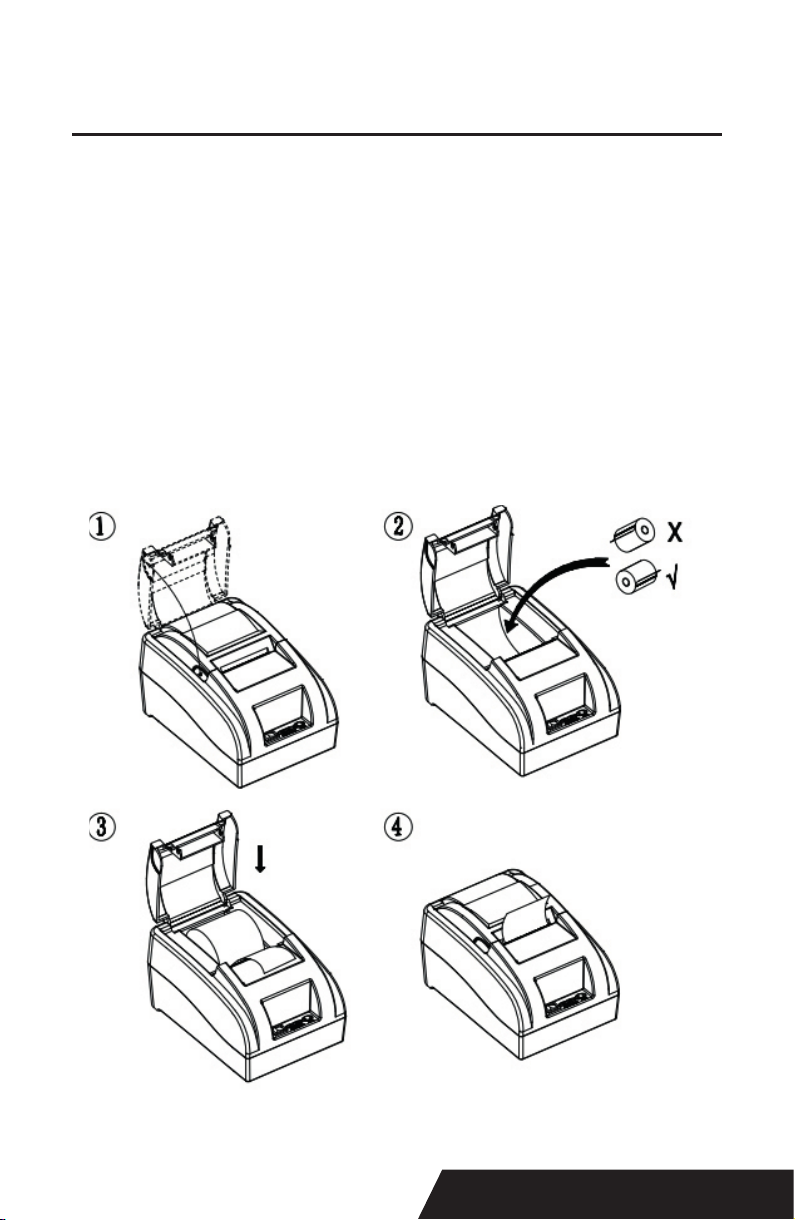
INSTALL THE PRINT PAPER
The 58mm Thermal Printer uses QIT581701 thermal paper, using the easy
mode it is convenient to install the paper.
1. Press the cover opening button, open the cover the printer.
2. Place the thermal print paper in the paper support according to the
following image.
3. Remove some paper from the compartment.
4. Leave a small excess of printing paper.
Note: Be careful of the direction of the roller, if the address is on the back,
the content will not be printed out.

8
SWITCH, FEED NAME, INDICATOR AND
FUNCTION
1. Power switch
The switch can be turned on and off from the printer power supply.
2. FEED
Press the button, if you press and hold this button you will continue to receive
blank roll paper.
3. Short paper (paper)
This indicator and the Error light ashing at the same time indicate that the
printer has no paper, this indicator and the Error lamp off means that the prin-
ter has paper.
4. Power light
The light on indicates that the printer is connected to the power supply, this
light off indicates that the printer is turned off.
5. Light error (Error)
When the printer does not have paper, the print head overheats, the cover is
not closed properly, etc., the indicator lights ash.
Este manual sirve para los siguientes modelos
1
Tabla de contenidos
Idiomas:
Otros manuales de Impresora de Qian


