protech PT6 Manual de usuario

Security system for Mobile phone
( Android USB 5pin )
6 Ports with a remote control
INSTALLATION MANUAL
(MODEL : PT6)

Security system for Mobile phone
( Android USB 5pin )

2 Introduction
3 Safety information
4 Important safety instruction
5 Checking the parts
6 Details of the control box
7 Details of the remote control
8 Overview of installation procedure
9 Step 1. Mounting the IR sensor
10 Step 2. Assembling & Mounting the cradle
A Assembling the cradle
B Mounting the cradle
C Adjustig for the degree of cradle
11 Step 3. Connecting the charging & security cable Mobile phone
12 Step 4. Installing the control box
13 Step 5. Turn on the controlbox
14 Step 6. Testing the sensor connection
15 Charging & Security system
16 Manufacturer Information
INTRODUCTION
SAFTY INFORMATION
BEFORE INSTALLATION
INSTALLATION
LIMITED WARRANTY & Packaging information
CONTACT INFORMATION
Contents·1
Contents

2·Introduction
Introduction
KEY FEATURES
* This security system kit contains all the materials needed to build an anti-theft/anti-lost
system for a product displayed in an exhibition or retail store.
* The security system prevents a product from being lost or stolen with alarming sounds when
it is separated from the security sensor or when the security cable is cut-off.
* An administrator can turn off the alarming sound conveniently with the remote control of the security system kit
* The security system performs battery-charging and security function at the same time, hence
it can produce a stable and aesthetic exhibition environment.

Safety Warnings·3
Safety Warnings
The below are provisions to maintain safety of the user and prevent damage to property. Please read the provisions thoroughly and
properly use the product.
Warning: The user may be injured or property may be damaged for failure to comply with the provisions.
•Please only use the AC power adapter specified by the manufacturer!
- There is a danger of short circuit and fire.
•Do not spill water or liquid on the product or install in places with water or high humidity!
- There is a danger of short circuit and fire.
- Do not connect to the power supply in a wet condition (if connected, pluck out the power plug), remove the moisture with a dry towel.
•Never disassemble, repair, or remodel the product!
- There is a danger of fire and injury.
•Do not pluck out or touch the power plug and charger/sensor cable line with moist hands!
- There is a danger of electric shock, short circuit, and fire.
•Do not use a damaged power cable or plug, damaged charger/sensor cable, or loose outlet!
- There is a danger of electric shock, short circuit, and fire.
•Do not destroy the AC power cable and charging and security cable by forcefully bending it or by pressing it with a heavy object!
- There is a danger of electric shock, short circuit, and fire.
•Pluck out the power plug immediately if an unusual sound, smell, or smoke is detected, excluding the buzzer sound from the product!
- There is a danger of electric shock, short circuit, and fire.
•Do not touch the power plug, charging and security cable in the event of lightning and thunder!
- There is a danger of electric shock.
•Do not wind the AC power cable, charging and security cable around your neck or body!
- There is a danger of death or serious injury.
•Do not expose the product to fire or other electric heaters!
- There is a danger of fire or damage to the product.
•Do not forcefully bend or pull the cable!
- There is a danger of damage to the product or injury to the user.
•When the cable is disconnected or breaks away, don not touch the cable bare hands, but always wear protective hand gloves!
Safety Warnings: Prohibited activities to prevent electric shock, short circuit, fire, explosion and injury.

4·Inportant Safety Instructions
Important Safety Instructions
Warning: Failure to comply with the provisions may result in injury to the user
or damage to property.
• Do not install in places with water or high humidity!
- There is a danger of short circuit and fire.
• Do not install in unstable or shaky places!
- The equipment falling may cause injury.
- Call the service center if the equipment is damaged due to a fall.
• Do not install in places with high temperature fluctuations!
- Dew formation on the equipment may become the cause of electric shock or fire.
• Do not install in places exposed to direct light or where ventilation is poor!
- Overheating of the equipment or components or malfunctioning may cause fire.
• Do not put the product in or near a heater, microwave, oven, or high-pressure vessels!
- It can become a cause of deformation, destruction, or fire.
• Do not drop the product or inflict outside stimulation!
- There is a danger of incurring damage.
- Damage or malfunction may occur if the product is bent or twisted.
• Only the consumables or special editions such as cradle or charging and security cables designated by the manufacturer must be used!
- Otherwise, the life of the security alarm device may shorten or the product may malfunction.
- It may not be safe for the user to use a consumable or special editions not authorized by the manufacturer.
• Do not stab a security alarm device or basic component in your body, such as eyes or ears, and do not put it in your mouth!
- There is a danger of suffocation or incurring serious injury to your body.
• Always use and keep the product in clean places!
- A large amount of dust may become the cause of malfunctioning of the security alarm device.
The specifications and design of the product may be modified without prior notice for the improvement of product performance.
The below are provisions to maintain safety of the user and prevent damage to property. Please read the
provisions thoroughly and use the product properly.

· Plug gender will be enclosed in the package as correct shape of
each country is being used
· The design of remote controller is subject to change
·There are two types as below.
·These two types can be purchased optionally according to the request of the buyer.
Auxiliary paper: 2EA Adhension tape : 1EA
Checking the parts·5
Before Installation
Carefully unpack the packaging and make sure you’ve received all the parts. Cradle and Charging & Security Cables are optional. So, depending on
your order, the number of them can not be the same as described below.
CHECKING THE PARTS
Elective items are changeable upon the request of the buyer
A-1
Charging & security cable (6EA)
Length : 1,300 ±30MM
B-1
Cradle assy. set (6Set)
- Cradle (6EA)
- Bottom lid (6EA)
- 3x8mm Screw (4EA)
Bottom lid
Cradle
Screw
Control box
Instruction manual
AC adaptor
Remote control
IR sensor
Power cable
4.5 X 12mm Screw (2EA)
Key (2EA)
1
3 4 5
86 7
1
2
3
4
5
8
6
7
2

6·Details of the control box
Before Installation
DETAILS OF THE CONTROL BOX
1
2
3
4
5
6
7
Speaker
Sound the alarm when something wrong happens on the security system.
LED lamp
When the power switch is on, red light turns on and DC power is supplied.
Power ON/OFF Key
Turn the key to the "ON" direction
Area for double-sided tape
Attach double-sided tape for mounting the control box
Mini USB port
Plug-in the Mini USB connector of the IR sensor
USB ports
Plug-in the USB connectors of the charging & security cable
Power-in port
Plug-in the power tip of the AC adaptor
1
2
3
4
5 6 7

Details of the control box·7
Before Installation
DETAILS OF THE REMOTE CONTROL
1
Protective film
To operate the remote control, peel off the Protective film
LED indicator
To turn off the alarm through the remote control, when the
alarmoff button is pushed, LED indicator is twinkling
Alarm off button
Turn off the alarm sound of the control box
2
3
1
3
2
CAUTION
RISK OF EXPLOSION IF BATTERY IS REPLACED
BY AN INCORRECT TYPE.
DASPOSE OF USED BATTERIES ACCORDING
TO THE INSTRUCTIONS

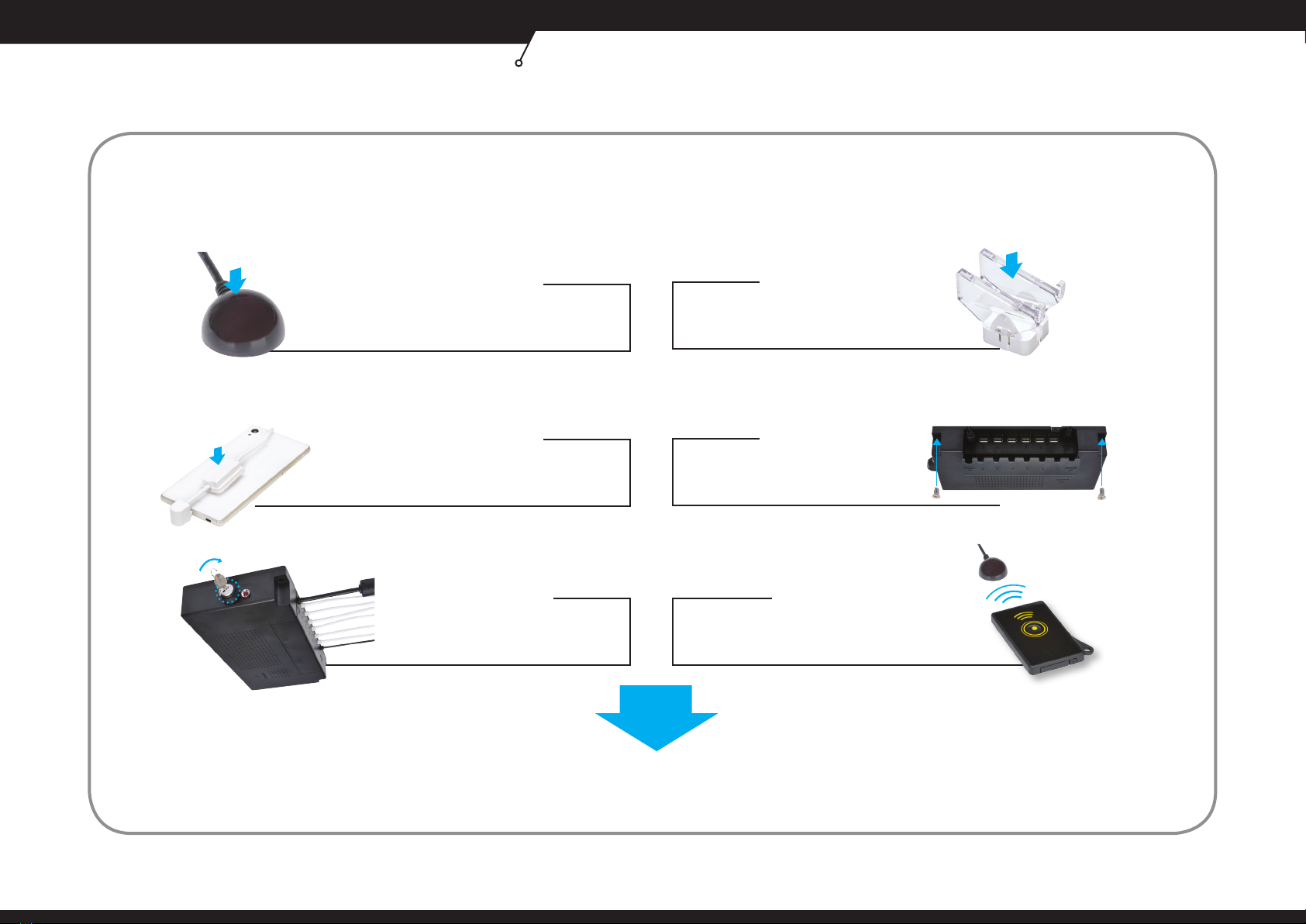
8·Overview of installation procedure
Installation
OVERVIEW OF INSTALLATION PROCEDURE
Step 3.
Step 1. Step 2.
Connecting the charging & security cable
Mounting the IR sensor Assembling & mounting the cradle &
Adjusting degree of cradle
Step 4.
Installing the control box
Step 5.
FINISH
Step 6.
Turn on the control box Testing the sensor connection
Tabla de contenidos
Otros manuales de Accesorios para teléfonos celulares de protech