PROEL STRWIFI Manual de usuario

STRWIFI
WI-FI Audio Streamer
USER’S MANUAL
MANUALE D’USO
ENGLISH
ITALIANO


3
IMPORTANT SAFETY INSTRUCTIONS
Watch for these symbols:
The lightning ash with arrowhead symbol within an equilateral triangle is intended to alert the user to the presence of uninsulat-
ed “dangerous voltage” within the product’s enclosure, that may be of sucient magnitude to constute a risk of electric shock
to persons.
The exclamaon point within an equilateral triangle is intended to alert the user to the presence of important operang and
maintenance (servicing) instrucons in the literature accompanying the appliance.
1. Read these instrucons.
2. Keep these instrucons.
3. Heed all warnings.
4. Follow all instrucons.
5. Do not use this apparatus near water.
6. Clean only with dry cloth.
7. Do not block any venlaon openings. Install in accordance with the manufacturer’s instrucons.
8. Do not install near any heat sources such as radiators, heat registers, stoves, or other apparatus (including ampliers) that produce heat.
9. Do not defeat the safety purpose of the polarized or grounding-type plug. A polarized plug has two blades with one wider than the oth-
er. A grounding-type plug has two blades and a third grounding prong. The wide blade or the third prong are provided for your safety. If
the provided plug does not t into your outlet, consult an electrician for replacement of the obsolete outlet.
10. Protect the power cord from being walked on or pinched, parcularly at plugs, convenience receptacles, and the point where they exit
from the apparatus.
11. Only use aachments/accessories specied by the manufacturer.
12. Use only with the cart, stand, tripod, bracket, or table specied by the manufacturer, or sold with the apparatus. When a
cart is used, use cauon when moving the cart/apparatus combinaon to avoid injury from p-over.
13. Unplug this apparatus during lightning storms or when unused for long periods of me.
14. Refer all servicing to qualied service personnel. Servicing is required when the apparatus has been damaged in any way, such as power
supply adapter is damaged, liquid has been spilled or objects have fallen into the apparatus, the apparatus has been exposed to rain or
moisture, does not operate normally, or has been dropped.
15. Warning: to reduce the risk of re or electric shock, do not expose this apparatus to rain or moisture.
16. Do not expose this equipment to dripping or splashing and ensure that no objects lled with liquids, such as vases, are placed on the
equipment.
17. To completely disconnect this apparatus from the ac mains, disconnect the power supply adapter from the ac receptacle.
18. The mains plug of the power supply cord shall remain readily operable.
19. This apparatus contains potenally lethal voltages. To prevent electric shock or hazard, do not remove the chassis, input module or ac
input covers. No user serviceable parts inside. Refer servicing to qualied service personnel.
20. This owner’s manual should be considered as a part of the product, it must accompany it at all mes, and it needs to be delivered to the

4
new user when this product is sold. In this way the new owner will be aware of all the installaon, operang and safety instrucons.
21. This apparatus should only be connected to a power source of type specied in this owner’s manual or on the unit.
22. You can clean the exterior of the unit with compressed air or with a dry cloth.
23. Don’t clean the unit using solvents like trichloroethylene, thinners, alcohol, or other volale or ammable uids.
24. To reduce the risk, close supervision is necessary when the product is used near children.
DISPOSAL OF OLD ELECTRICAL & ELECTRONIC EQUIPMENT
This marking shown on the product or its literature, indicates that it should not be disposed with other household wastes at the
end of its working life. To prevent possible harm to the environment or human health from uncontrolled waste disposal, please
separate this from other types of wastes and recycle it responsibly to promote the sustainable reuse of material resources.
Household users should contact either the retailer where they purchased this product, or their local government oce, for de-
tails of where and how they can take this item for environmentally safe recycling. Business users should contact their supplier and check the
terms and condions of the purchase contract. This product should not be mixed with other commercial wastes for disposal.
DECLARATION OF CONFORMITY
The product is in compliance with the following European Direcves:
EMC 2014/30/EU, RED 2014/53/EU, LVD 2014/35/EU, RoHS 2011/65/EU and 2015/863/EU, WEEE 2012/19/EU.
CONDITIONS OF USE
Proel do not accept any liability for damage caused to third pares due to improper installaon, use of non-original spare parts, lack of
maintenance, tampering or improper use of this product, including disregard of ascertainable and applicable safety standards. Proel strongly
recommends that this apparatus must be installed taking into consideraon all current Naonal, Federal, State and Local regulaons. The
product must be installed by qualied personal. Please contact the manufacturer for further informaon.
PACKAGING, SHIPPING AND COMPLAINT
This unit package has been submied to ISTA 1A integrity tests. We suggest you control the unit condions immediately aer unpacking it.
If any damage is found, immediately advise the dealer. Keep all unit packaging parts to allow inspecon.
Proel is not responsible for any damage that occurs during shipment.
Products are sold “delivered ex warehouse” and shipment is at charge and risk of the buyer.
Possible damages to unit should be immediately noed to forwarder. Each complaint for manumied package should be done within eight
days from product receipt.
WARRANTY AND PRODUCTS RETURN
Proel products have operang warranty and comply their specicaons, as stated by manufacturer.
Proel warrants all materials, workmanship and proper operaon of this product for a period of two years from the original date of purchase.
If any defects are found in the materials or workmanship or if the product fails to funcon properly during the applicable warranty period,
the owner should inform about these defects the dealer or the distributor, providing receipt or invoice of date of purchase and defect
detailed descripon. This warranty does not extend to damage resulng from improper installaon, misuse, neglect or abuse. Proel S.p.A.
will verify damage on returned units, and when the unit has been properly used and warranty is sll valid, then the unit will be replaced or
repaired. Proel S.p.A. is not responsible for any "direct damage" or "indirect damage" caused by product defecveness.

5
Index
1. Introduction ..............................................................................................................................................................6
2. What's in the Box .....................................................................................................................................................6
3. Main Features ..........................................................................................................................................................7
4. Specification ............................................................................................................................................................. 8
5. Interface ................................................................................................................................................................... 9
6. Connection Diagram ...............................................................................................................................................11
7. 4STREAM APP ......................................................................................................................................................... 11
7.1 4Stream App Download .....................................................................................................................................11
7.2 Connecon ........................................................................................................................................................12
7.2.1 First me use: WIFI Setup .............................................................................................................................12
7.2.2 First me usage, WIRED NETWORK Setup ...................................................................................................14
7.2.3 BLUETOOTH ...................................................................................................................................................14
7.3 4STREAM app features ......................................................................................................................................15
7.3.1 Device sengs ..............................................................................................................................................15
7.3.2 To play local storage music ............................................................................................................................16
7.3.3 To play music from a NAS home server using DLNA ......................................................................................16
7.3.4 To use LINE IN mode ......................................................................................................................................17
7.3.5 To use BLUETOOTH mode ..............................................................................................................................17
7.3.6 To use OPTICAL IN mode ...............................................................................................................................17
7.3.7 To use USB mode ...........................................................................................................................................17
7.4 Streaming Services ............................................................................................................................................18
7.4.1 Spofy ...........................................................................................................................................................19
7.4.2 AirPlay ...........................................................................................................................................................19
7.5 Mulroom and Mulzone..................................................................................................................................20
7.5.1 Add / Remove Device to Mulroom ..............................................................................................................21
7.6 Le and Right Channels .....................................................................................................................................21
7.7 Preset .................................................................................................................................................................22
7.8 Source Mode Change ........................................................................................................................................22
7.9 Restore Factory Seng ......................................................................................................................................22
7.10 Firmware Update .............................................................................................................................................23
8. Play on PC ...............................................................................................................................................................23
8.1 To Play Music From iTunes on Mac and Windows PC ........................................................................................23
8.2 To Play Music From Windows PC via Foobar2000 .............................................................................................24
9. Web Interface ......................................................................................................................................................... 26
9.1 Playback Interface ..............................................................................................................................................26
9.2 Web Interface Menu .........................................................................................................................................27
9.3 Audio Sengs ....................................................................................................................................................28
9.4 Sengs Menu ....................................................................................................................................................28

6
1. Introducon
2. What's in the Box
STRWIFI is a high-end audio streaming receiver with network and Bluetooth connecvity. Applying
STRWIFI to a P.A. system will enable you to stream music from your smart device, USB, NAS or streaming
services, such as Spofy, Tidal or Qobuz in high resoluon by 4STREAM App, AirPlay, Bluetooth or other
third party compable apps. Mulple units can be combined to set up a wireless mulroom or mul-
zone whole audio system, for a new experience to play and enjoy music.
Main Unit x1
Power Adapter x1
User's Manual x1
Antenna(3dB) x2
MINIJACK-RCA Stereo Cable x1
RCA-RCA Stereo Cable x1

7
3. Main Features
• Streaming music via ETHERNET network (WIFI and WIRED) with no distance limitaon or thru
BLUETOOTH 5.0 up to 15 meters.
• High quality music streaming with sample rate decoding up to 192kHz, 24bit.
• Supports streaming source from online services, smart device memory, USB pen drive, NAS,
BLUETOOTH and line in.
• Spofy, Airplay, Qplay, DLNA, UPnP streaming protocols supported, 3rd party app compable.
• Mulroom and mulzone streaming enabled by mulple units connected in the same network.
• Free iOS and Android app available with global online update for new features.
• Spofy, Deezer, Tidal, Qobuz, iHeartRadio, TuneIn, Napster online streaming services integrated
to use in the app.
• PC streaming from iTunes.
• Analogue and Digital input for connecng external audio devices.
• EQ adjustment via app.
• Preset playlist available for quick access.

8
4. Specicaon
I/O Interface
DC Input DC 12V/1A
Analogue Audio Input RCA 2V RMS
Digital Audio Input S/PDIF Opcal
Analogue Audio Output RCA, Subwoofer
Digital Audio Output S/PDIF Coaxial, Opcal
Trigger Output 12V
USB USB Storage Drive connecon
Ethernet RJ45
LED Indicator Display Status
Reset Buon Short press to switch input mode, Press twice to reset WiFi/BT, Press 3 mes to
restore factory sengs, Long press to standby, press again to wake up
Network
Wireless Network IEEE 802.11 b / g / n 2.4GHz
BT 5.0
Wired Network Ethernet RJ45
Streaming Protocols AirPlay / DLNA / UPnP / Spofy Connect / Qplay
Audio Param-
eter
Music Format FLAC / MP3 / AAC / AAC + / ALAC / APE / WAV
Audio Decode 192kHz / 24bit
Frequency Response 20Hz-20kHz
THD + N 0.03%
SNR >100dB
Bluetooth Range 15m
Applicaon Android and iOS APP 4Stream
For MAC & Windows PC iTunes / Foobar2000 and other support UPnP, DLNA 3rd party program
Audio Source
Online Music Streaming
Services
Spofy / Deezer / TuneIn / Tidal / Qobuz / Napster / iHeartRadio / QQ Music /
QQFM
Local Storage Music le storage in Mobile phone, NAS & USB disk drive
Analogue Input RCA
Digital Input Opcal
General Dimension 14.7x11.9x4cm
Weight 338g

9
5. Interface

10
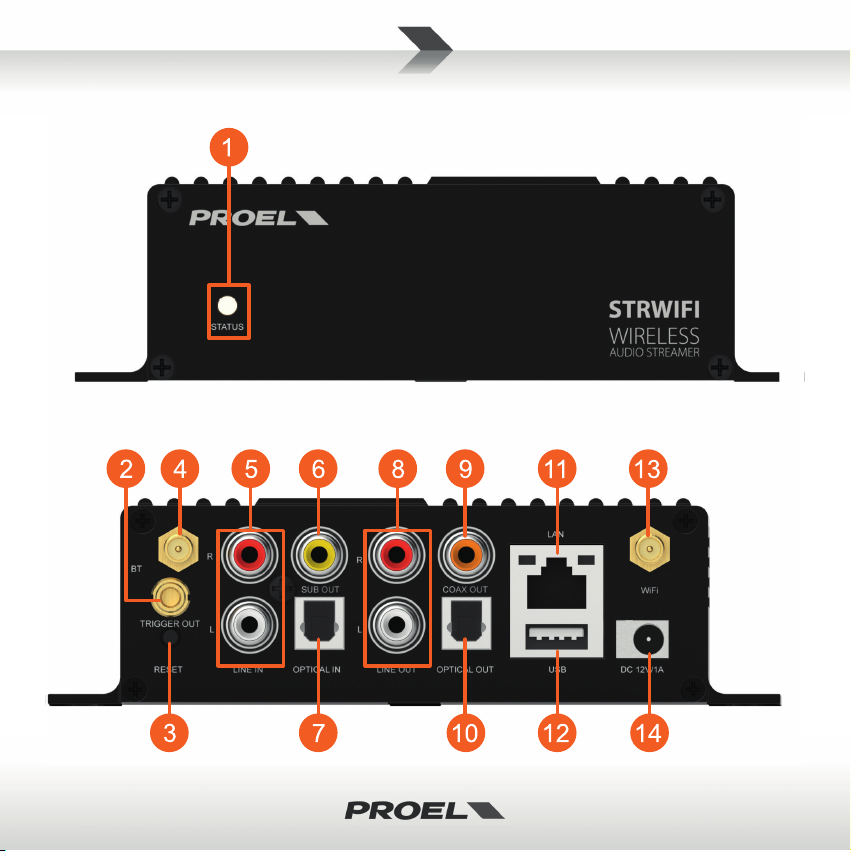
STATUS: this LED shows the device INPUT mode by means of its colour.
WHITE: WIFI & NETWORK mode
Flashing fast: device is boong
Flashing slow: waing for WiFi connecon (pairing mode)
Solid: WiFi is connected
BLUE: BLUETOOTH mode
Flashing slow: waing for Bluetooth connecon (pairing mode)
Solid: Bluetooth is connected
PURPLE: OPTICAL IN mode
GREEN: ANALOGUE LINE IN mode
RED: USB IN mode
TRIGGER: 12V trigger output to use with other devices.
RESET:
SHORT PRESS: switch INPUT mode
LONG PRESS: switch OFF or ON the unit
SHORT PRESS TWICE in BT mode: disconnect current connected BT device and enter pairing mode
SHORT PRESS TWICE in WIFI mode: disconnect current WIFI connecon and enter pairing mode
SHORT PRESS THREE TIMES: restore the factory sengs.
BLUETOOTH antenna: to connect the supplied BLUETOOTH antenna.
LINE IN: to connect an external audio source, such as TV, CD player and so on.
SUB OUT: to connect an external acve subwoofer.
OPTICAL IN: to connect an external digital source provided with opcal output.
LINE OUT: to provide an analogue audio signal to other devices.
COAX OUT: to provide a digital audio signal to other devices with coax digital input.
OPTICAL OUT: to provide a digital audio signal to other devices with opcal digital input.
LAN: to connect to a ETHERNET wired network thru a router.
USB: to connect a USB pen drive (1024 tracks maximum).
WIFI antenna: to connect the supplied WIFI antenna.
DC IN: to connect the 12V/1A AC/DC adapter supplied with the unit.
Tabla de contenidos
Idiomas:
Manuales populares de Hardware de red de otras marcas

Matrix Switch Corporation
Matrix Switch Corporation MSC-HD161DEL Manual de usuario

B&B Electronics
B&B Electronics ZXT9-IO-222R2 Manual de usuario

Yudor
Yudor YDS-16 Manual de usuario

D-Link
D-Link ShareCenter DNS-320L Manual de usuario

Samsung
Samsung ES1642dc Instrucciones de uso

Honeywell Home
Honeywell Home LTEM-PV Instrucciones de montaje