Probrite TPAR-BZ Guía de configuración

Before returning to the store, call or email PROBRITE
Customer Service 9am-5pm EST Monday to Friday.
1-844-507-5651
PROBRITE.COM
Questions? / Missing Parts? / Need Accessories?
Visit us online anytime or call us to get information on our product range, download
detailed spec & photometric files, find product and mounting accessories, view
installation tutorials and videos, and learn about our DLC® rebate eligible products.
INSTALLATION,
USAGE, & CARE GUIDE
PAR TWIN HEAD
FLOOD LIGHT
Model No.
Mfr. SKU
TPAR-BZ
TPAR-WH
104-08600001-1
104-08600003-1

3PROBRITE.COM
Please call 1-844-507-5651 or email support@probrite.com for further assistance.
2
Visit www.probrite.com/install for installation video tutorials and product support
Pre-Installation
PLANNING INSTALLATION
Before installing the light fixture, ensure that all parts are present. Compare parts with the
Hardware Included and Package Contents sections. If any part is missing or damaged, do
not attempt to assemble, install, or operate this light fixture.
Estimated installation time: 15 minutes
Table of Contents.......................... 2
Safety Information........................ 2
Pre-Installation.............................. 3
Planning Installation...................... 3
Specifications................................... 3
Tools Required................................. 3
Hardware Included......................... 4
Package Contents.......................... 4
Installation..................................... 5
Care & Cleaning............................ 9
Troubleshooting........................... 9
Warranty......................................... 9
Table of Contents
Safety Information
IMPORTANT
THIS PRODUCT MUST BE INSTALLED IN ACCORDANCE WITH THE APPLICABLE NATIONAL
ELECTRICAL CODE AND LOCAL BUILDING CODES BY A PERSON FAMILIAR WITH THE
CONSTRUCTION AND OPERATION OF THE PRODUCT AND THE HAZARDS INVOLVED.
PRECAUTIONS
☐Please read and understand this entire
manual before attempting to assemble,
install, or operate this light fixture.
☐This light fixture requires a 120-Volt AC
power source.
☐Some codes require installation by a
qualified electrician.
☐This light fixture must be properly
grounded.
☐Make sure connections are secure using
wire nuts, crimp-on lugs or other ap-
proved connecting devices
☐This light fixture should be installed
outdoors to a wall or eave.
☐This product may contain chemicals
known to be hazardous. Thoroughly
wash hands after installing, handling,
cleaning or otherwise touching the
product.
WARNING: Turn the power o at the circuit
breaker or fuse. Place tape over the circuit
breaker switch and verify power is o at the
light fixture.
WARNING: Risk of fire. Keep the light fixture at
least 3 in. (76mm) from combustible materials.
CAUTION: Burn hazard. Allow the light fixture
to cool before touching.
NOTICE: Do not connect this fixture to a
dimmer switch.
NOTICE: FCC Regulations state that any
unauthorized changes or modifications to
this equipment not expressly approved by the
manufacturer could void the user’s authoriza-
tion to operate this equipment.
Power Requirements (Input Voltage) 120V
Dimmable Non-Dimming (Do not wire to dimming switch)
Operating Modes Switch-Controlled:
Flip switch to turn light fixture ON and OFF. Use
included light sensor cap on fixture's light sensor
to utilize this mode setting.
SPECIFICATIONS
TOOLS REQUIRED
Wire strippers/
cutters
Circuit tester
Safety
goggles
Work
gloves
Silicone
Sealant
Ladder
Phillips
Screwdriver
INFORMATION: This equipment has been tested and found to comply with the limits for a Class B digital device, pursuant
to Part 15 of the FCC Rules. These limits are designed to provide reasonable protection against harmful interference in a
residential installation. This equipment generates, uses and can radiate radio frequency energy and, if not installed and
used in accordance with the instructions, may cause harmful interference to radio communications. However, there is no
guarantee that interference will not occur in a particular installation. If this equipment does cause harmful interference to
radio or television reception, which can be determined by turning the equipment OFF and ON, the user is encouraged to
try to correct the interference by one or more of the following measures:
• Reorient or relocate the receiving antenna.
• Increase the separation between the equipment and receiver.
• Connect the equipment into an outlet on a circuit dierent from that to which the receiver is connected.
• Consult the dealer or an experienced radio/TV technician for help.

5PROBRITE.COM
Please call 1-844-507-5651 or email support@probrite.com for further assistance.
4
Visit www.probrite.com/install for installation video tutorials and product support
Pre-Installation (continued)
HARDWARE KIT
NOTE: Hardware not shown to actual size.
AA BB
CC
Part Description Quantity
AA #8-32 x 3/4" philips mounting bracket screw 4
BB Wire nut 3
CC Allen key 1
PACKAGE CONTENTS
Part Description Quantity
ALight Fixture 1
BLeveling Bubble 1
CMounting plate tightening bolt (pre-installed) 1
DMounting plate with gasket (pre-installed) 1
EHanger Wire for hands-free installation (pre-installed) 1
Installation
1For best results
☐Install light 8-15 feet above the ground.
☐Do not mount fixture close to reflective
surfaces such as windows, white walls,
white surfaces and water.
☐When installing two fixtures on one
switch, make sure the switch is rated for
at least a 1A inductive load.
☐Do NOT wire to dimming switch.
☐When mounting to a wall, make sure
the fixture is 7 in. on center away from
eave and 13 inches on center away from
inside corner of the exterior wall (fig 1).
Wall Mount
Eave Mount
1-1/2" 1-1/2"
Round Octagonal
A
C
E
D
B
NOTE: Mounting plate (D ) mounts to
recessed mounted standard junction boxes.
Junction box must be at least 1-1/2 inch in
depth for proper installation for recessed
mount application (fig 2).
(fig 1). (fig 2).
2Shut electric power off
☐At wall switch verify it is in the o position
(fig 1).
☐At the main electrical panel turn o the
circuit breaker that supplies power to the
outlet box you are working on (fig 2).
☐For screw-in type fuses unscrew the fuse
that supplies power to the outlet box you
are working on (fig 3).
(fig 1). (fig 2).
(fig 3).
7 in.
13 in. 13 in.

7PROBRITE.COM
Please call 1-844-507-5651 or email support@probrite.com for further assistance.
6
Visit www.probrite.com/install for installation video tutorials and product support
☐If necessary, strip 3/8" of insulation
from junction box or fixture (A) wires
(fig 1).
☐Connect fixture black wire to house
black wire, the (+) line, and fixture
white wire to house white wire, the (-)
common by twisting the exposed wires
together and using the wire nuts (BB).
Ensure no loose wires.
Installation (continued)
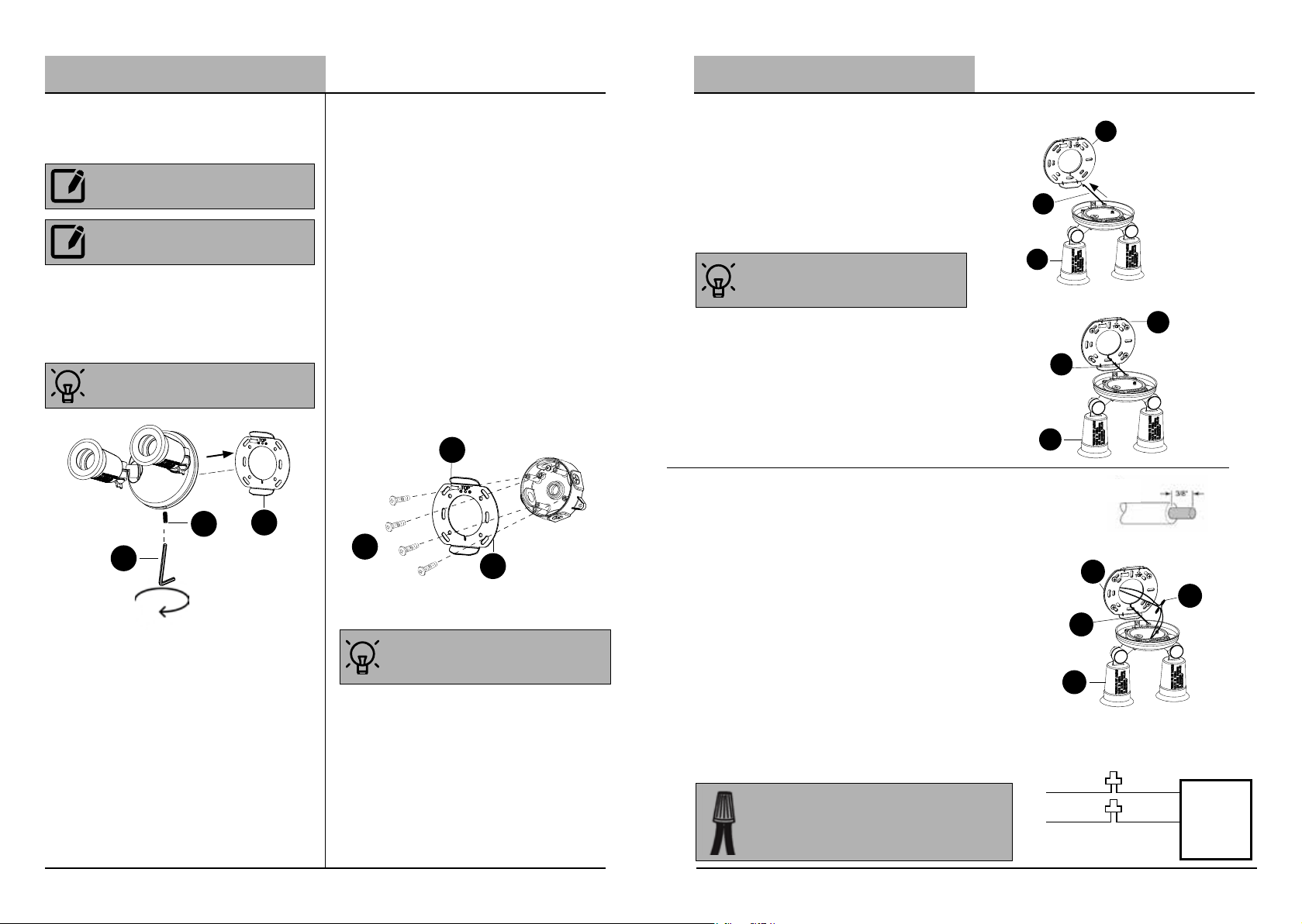
3Remove the
mounting plate
C
DD
D
NOTE: The mounting plate (D) comes pre-as-
sembled on the light fixture (A) for shipping.
NOTE: The mounting plate tightening bolt (C)
comes pre-installed on the light fixture.
☐Remove the mounting plate (D) from
the back of the fixture by loosening
the mounting plate tightening bolt (C)
using the allen key (DD).
4Installing the
mounting plate
☐Route the junction box wires through
the large center hole in the mounting
plate (D).
☐Align the holes on the mounting brack-
et (D) with the holes on your junction
box. Use two (2) or four (4) depending
on the number of screw holes available
on the junction box to attach mounting
bracket.
☐For wall mount, the "TOP" arrow must
point upward.
☐For eave mount, the "TOP" arrow must
point toward the building.
Installation (continued)
5Hang fixture to
mounting plate
☐For hands free mounting, place the hook
into the slot of the junction box plate (D)
to support the fixture while connecting the
wires.
6Making the electrical
connections
TIP: Ensure the light fixture (A) can safely
hang onto the mounting plate (D) to allow for
use of two hands to make the wiring (fig 2).
connections.
A
D
E
A
E
D
BB
(fig 1).
(fig 2).
TIP: Only unscrew the tightening bolt (C) far
enough to remove the mounting plate (D). Do
not fully remove the tightening bolt (C).
TIP: Use the leveling bubble (B) on the
mounting plate (D) to ensure a level install.
E
D
A(fig 1).
TIP: Hold stripped ends near each other and align any
frayed strands (do not twist wires).
Push the wires into wire nut (BB) and use your fingers
to twist the wire nut clockwise until tight. Check for
tightness by pulling wires.
LIGHTING
FIXTURE
(+) LINE
(-) COMMON
BLACK
WHITE
AA
D
B

9PROBRITE.COM
Please call 1-844-507-5651 or email support@probrite.com for further assistance.
8
Visit www.probrite.com/install for installation video tutorials and product support
C
CC
A
Installation (continued)
7Mounting the light
fixture
☐Once the fixture is wired, place the light
fixture (A) onto the mounting plate (D)
so the top sloped grove on the plate
rests on the top sloped grove on the
back of the fixture.
☐Verify the fixture is flush with the wall.
☐Tighten the mounting plate tightening
bolt (C) until the bolt firmly pushes
against the mounting plate (D).
8Caulking around the
light fixture
☐Caulk around the mounting plate (D)
and surface with silicone sealant (not
included).
9Installing bulbs and
adjusting the light heads
☐After fixture is securely mounted, install
two PAR halogen or LED bulbs (sold
separately) into the lamp heads.
☐Loosen the thump screw, then use your
hand to pan and tilt each individual light
head on the fixture (A) to point towards
the direction desired. Tighen the screws
under each lamp head to fix the desired
angle.
☐From the breaker and switch, turn power
back ON to the light fixture to check if it
lights up.
D
NOTICE: Failure to properly caulk around the
surface and mounting plate (D) could lead
to water damage and is not covered under
warranty.
NOTE: When attaching this fixture (A) to an
external, surface mount junction box, caulk the
inside of the light fixture before attaching to the
mounting plate (D).
A
Care and Cleaning
☐Shut o main power supply before cleaning the product. To prolong the original
appearance, clean the light fixture with clear water and a soft, damp cloth only.
☐Do not use abrasive cleaners or cleaners that contain alcohol. Do not apply paints,
solvents, or any other chemicals on this light fixture. They could cause a premature
deterioration of the finish and may void the warranty.
☐Do not spray the light fixture with a hose or power washer.
Troubleshooting
If Light does not come on:
☐Verify that the power is turned ON from the circuit breaker and wall switch.
☐Verify the wiring for the fixture is done properly.
☐Verify the line voltage is correct.
This is a limited warranty oered by Probrite for a period of three years from the date of
purchase to its customers. Probrite warrants to customers that the products will be free from
defects in material and workmanship. The obligation of Probrite under this warranty is limited
to the provision of replacement of products and is extended to the original purchaser of the
product on presenting valid purchase receipt or other proof of date of original purchase
acceptable to Probrite. The receipt is required for rendering the warranty performance. Any
warranty claims without original proof of purchase would not be accepted. It should be noted
that the warranty does not apply to Probrite products that have been altered or repaired
by unauthorized personnel, have been subjected to neglect, abuse, misuse or accident or
damages caused during shipping. Any other products not manufactured by Probrite which
have been supplied, installed and/or used in conjunction with Probrite products are not
covered under this warranty. Any damages caused by replacements bulbs, LEDs or corrosion
or discoloration of brass components are also not covered by this warranty.
Limitation of Liability:
In no event Probrite shall be liable for indirect, consequential, incidental or special damages,
or lost profits. Probrite is not liable for any claims or damage arising out of or connected
with the manufacture, sale, delivery, use, maintenance and repair or modification of Probrite
products, or supply of any replacement parts that, exceed the purchase price of Probrite
products giving rise to a claim. Labor charges to remove or install the fixtures will not be
accepted.
To Claim:
Please contact PROBRITE customer service at 1-844-507-5651 or email
copy of the purchase receipt and a brief description of the problem.
3-Year Limited Warranty
WARNING: Risk of fire. Keep the lamp heads
at least 12 in. from combustible materials.
CAUTION: Keep lamp heads 30° below
horizontal to prevent water damage and
electrical shock.
IMPORTANT INFORMATION: PAR Halogen/LED
bulbs are sold separately. If you need to
purchase please contact your retail store.

11 PROBRITE.COM
Please call 1-844-507-5651 or email support@probrite.com for further assistance.
10
Visit www.probrite.com/install for installation video tutorials and product support

Before returning to the store, call or email PROBRITE
Customer Service 9am-5pm EST Monday to Friday.

1-844-507-5651
PROBRITE.COM
Questions? / Missing Parts? / Need Accessories?
RETAIN THIS MANUAL FOR FUTURE USE
Para las translaciones en español,
visit www.probrite.com/install
Este manual sirve para los siguientes modelos
3
Tabla de contenidos
Otros manuales de Foco de Probrite

Probrite
Probrite PWRF50-PC-4K-BZ Guía de configuración

Probrite
Probrite STLR15-PC-4K-BZ Guía de configuración

Probrite
Probrite PWRF20-4K-WH Guía de configuración

Probrite
Probrite LUNA20-PC-4K-BZ Guía de configuración

Probrite
Probrite FSN50-PC-4K-BZ Guía de configuración

Probrite
Probrite Fusion X FSNX15-5CCT-BZ Guía de configuración

Probrite
Probrite FSN50-PC-4K-WH Guía de configuración

Probrite
Probrite FSXD30-PC-4K-BZ Guía de configuración

Probrite
Probrite PWRF50-PC-4K-WH Guía de configuración

Probrite
Probrite LYRA20-PC-4K-BZ Guía de configuración