
Precise Innovation Caref Manual de usuario

Precise Innovation presents:
USER MANUAL

Let the FUN Begin! The goal of Caref is simple…to give parents greater peace of
mind and children a greater sense of freedom when they should be focusing as
much on fun as on safety. We believe in ACTIVE kids, and Caref will allow your kids
to stay in touch with you, and you them…wherever they may be!
In addition to GPS tracking, Caref also contains an SOS button, and has two-way
voice communication. This will give you the ability to FIND your kids, allow them to
have FUN, and give them the FREEDOM to live!
Caref is not a substitute for supervision of any person wearing the product.
Accuracy of watch location is determined by GPS satellite and cell signal strength.
GPS accuracy may be aff ected while watch is indoors or being used in urban areas
(GPS doesn’t like big buildings!).
What Can Caref Do?
• Locate your child from a mobile
• Parents can call their child’s Caref Watch directly
• Child can call two numbers at the touch of a button
• SOS button alerts and calls parents
• Parent can send Text Message Directly to Caref
• Much More
Things you will need to ACTIVATE Your Account and Watch:
• Charged Caref GPS Cell Phone Watch
• Caref Box (contains activation numbers you will need)

(1): Cell signal indicator
(2): Battery Power Indicator
(3): Indicator for SOS alarm successfully activated
(4): Day of Week
(5): SOS Key: Child holds down button for three seconds to place SOS to pre-
programmed numbers (programming of three numbers done on mobile app)
(6): USB Slot for USB charger
(7): Microphone Slot
(8): Power Button: Shortly press to change clock interface (digital/traditional) - Hold
for three seconds to turn Caref power ON
(9): Volume + Press down quickly to increase speaker and ringer volume. As
mentioned above, Caref will allow you to program three numbers in the mobile app
that will call when SOS button is pressed. When a child holds down on the + button
for three seconds, it will call NUMBER 1.
(10): Volume - Press down quickly to decrease speaker and ringer volume. Hold for
three seconds to call phone number 2 you have preset.
CAREF GPS
WATCH PHONE

It is very important that you remind your child that the watch screen
of Caref is very much like that of a cell phone. Which means they can
crack when banged on or dropped. (We all have lived through a broken
phone screen! Ugh!) We have provided a protective lm to help limit
potential damage. IT IS VERY IMPORTANT YOU PUT THIS ON BEFORE
USE. Unfortunately, our warranty doesn’t cover broken screens so a
little “kid coaching” will help eliminate this.
WATCH FACE PROTECTION FILM

VOICE FEATURES
RECEIVE INCOMING
TEXT MESSAGE
When your child presses the Volume Buttons
on the side for three seconds, the phone icon
appears. The number being called will be heard
ringing through the Caref speakerphone. Your
child simply needs to talk into the Caref Watch,
just as they would a speakerphone.
The phone icon will appear when Caref is
receiving a call as well. To answer the call, the
child must hit the PLUS (+) Volume button. Be
sure to practice this with your child.
Parents can send text messages right to a
child’s watch! But good news…it will only
receive text messages from SAFE numbers
programmed into the app. This is designed
to protect your child from getting texts from
unwanted people. We will teach you how to
program these numbers later in the manual.

STEP 1:
STEP 2:
CHARGE YOUR CAREF BEFORE USE
WATERPROOF/WATER RESISTANT
MOTION SENSOR
TURN ON YOUR CAREF WATCH
The Caref package contains a colorful USB
cable and charger. Before using Caref, please
charge it for at least one hour. The cable is
inserted in the port as seen here: Caref will last
24-48 hours based on calls placed/received.
Treat it like a cell phone, which is typically
charged at the end of a day.
Caref is designed to be waterproof but it’s VERY IMPORTANT that you fully
close the Cover to the USB port. If this is not done, the Caref will NOT be
waterproof; it will only be water resistant. It is recommended that Caref not be
worn in the pool or ocean.
Caref has a motion sensor that activates the GPS chip inside the watch. When
the watch is not moving, it will NOT transmit location. When worn, the motion
sensor activates the watch and tells it to “get to work.”
Hold down on the Power Button for three
seconds to turn on your Caref On or Off .
VERY IMPORTANT: It is recommended that
you take your watch outside for 5 minutes so
it can get a good GPS “ x” the rst time you
use it. A best “ x” occurs when you have an
unobstructed view of the sky.
STEP 3:
STEP 4:
STEP 5:
ACTIVATE YOUR ACCOUNT
DOWNLOAD MOBILE APP
MOBILE APP AND
MAPPING INSTRUCTIONS
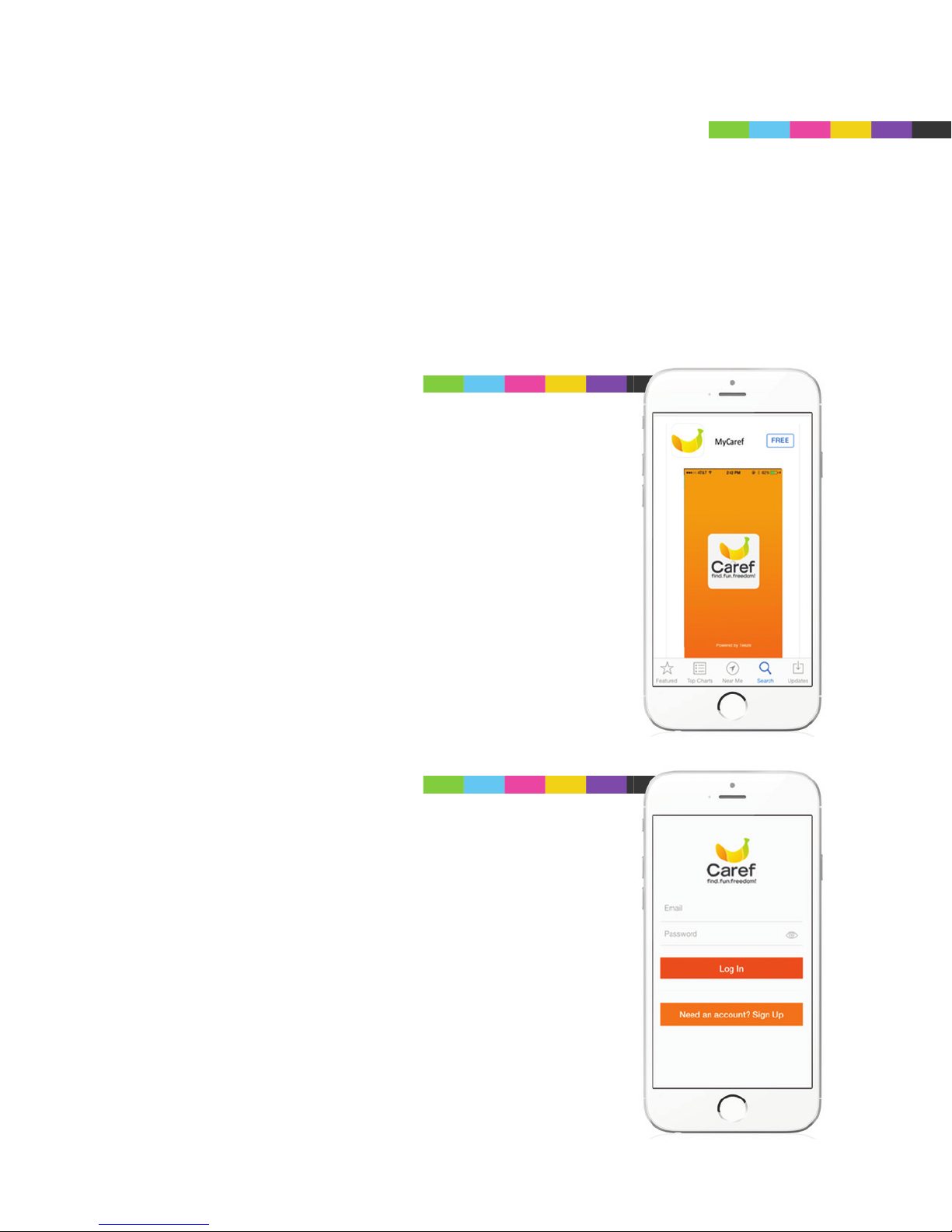
It’s now time to download the MyCaref Mobile App from either Google
Play™ or the Apple™ App Store. Account activation can also be set up
on your computer but it is easier to do it right through the mobile app:
SEARCH: MyCaref
Go to the App Store (iPhone) or Google Play
(Android) and search CAREF. Then download the
FREE App.
To create a NEW ACCOUNT, touch Need an
Account? Sign Up.
If you set up an account through the Web, simply
Log In with the user name and password that you
created.

ACCOUNT REGISTRATION
TERMS OF SERVICE
Input the information into the app to create your
account.
Please read the terms of service.

ACCOUNT VERIFICATION
If you agree with the Terms of Service, Click:
I Agree.
We will send you a veri cation code (to keep
your account secure). Select email for SMS (text
message). Then click Proceed.

ACCOUNT VERIFICATION
ACCOUNT VERIFICATION
You must then check your email or SMS account.
Be sure to write down your special code and
enter it into the app.
Congratulations, your account is now activated.
Click on +Activate New Watch.
Tabla de contenidos


