PP3DP UP! mini Manual de usuario

www.pp3dp.com
PP3DP-2013-V1

UP! mini 3D Printer User Manual
Legal Notice
The information in this document is subject to change without notice.
Beijing Tiertime Technology Co. Ltd. (Tiertime) MAKES NO WARRANTY OF
ANY KIND WITH REGARD TO THIS MATERIAL, INCLUDING, BUT NOT
LIMITED TO, THE IMPLIED WARRANTIES OF MERCHANTABILITY AND
FITNESS FOR A PARTICULAR PURPOSE. Beijing Tiertime Technology Co.
Ltd. shall not be liable for errors contained herein or for incidental or
consequential damages in connection with the furnishing, performance, or use
of this Material. Changes or modifications to the system not expressly
approved by Beijing Tiertime Technology Co. Ltd., the party responsible for
compliance, could void the user’s authority for use. This document is protected
by copyright. All rights reserved. Its use, disclosure, and possession are
restricted by an agreement with Beijing Tiertime Technology Co. Ltd. per
software copyright. No part of this document may be photocopied, reproduced
or translated into another language without the prior written consent of
Tiertime.
Delta Micro Corp. is wholly owned subsidiary of Beijing Tiertime Technology Co. Ltd.
PP3DP is a registered trademark of Tiertime.
© Copyright 2013 Beijing Tiertime Technology Co. Ltd. All rights reserved.

1. Introduction
UP! mini 3D Printer User Manual 2
1. INTRODUCTION................................................................................................................... 3
1.1 HOW TO USE THIS MANUAL.................................................................................................. 3
1.2PRECAUTIONS..................................................................................................................... 3
1.2.1 Safety........................................................................................................................ 3
1.2.2 Protection.................................................................................................................. 4
2. OVERVIEW ........................................................................................................................... 5
2.1APPEARANCE..................................................................................................................... 5
2.2 SPECIFICATIONS................................................................................................................. 8
2.2.1 Printer Physical Characteristics................................................................................ 8
2.2.2 Specifications............................................................................................................ 8
2.2.3 Environmental specifications .................................................................................... 9
3. OPERATION........................................................................................................................ 10
3.1 PREPARATION .................................................................................................................. 10
3.1.1Installation the printer............................................................................................... 10
3.1.2 Installing the software ............................................................................................. 13
3.1.3 Installing drivers...................................................................................................... 14
3.2 USING THE BASIC FUNCTIONS............................................................................................ 16
3.2.1 Start the program.................................................................................................... 16
3.2.2 Loading a 3D model................................................................................................ 16
3.2.3View Options............................................................................................................ 19
3.2.4 Model transformations ............................................................................................ 20
3.2.5 Placing models onto the build platform................................................................... 22
3.3 GETTING READY TO PRINT................................................................................................ 23
3.3.1 Initializing the Printer............................................................................................... 23
3.3.2 Calibrating the Nozzle Height ................................................................................. 24
3.3.3
3.3.4 Other Maintenance Options.................................................................................... 28
3.3.5 Preparing the Platform..................................................................
错误
!
未定义书签。
4. PRINTING............................................................................................................................ 39
5. MODEL REMOVAL............................................................................................................. 43
6. MAINTENANCE .................................................................................................................. 47
6.1 CHANGING THE MATERIAL................................................................................................. 47
6.2 VERTICAL CALIBRATION .................................................................................................... 48
6.3 CLEANING THE NOZZLE ..................................................................................................... 50
6.4 REMOVING /CHANGING THE NOZZLE .................................................................................. 51
6.5 LUBRICATION OF BEARINGS.....................................................................错误!未定义书签。
6.6 SPARE PARTS................................................................................................................... 51
7. TIPS & TRICKS................................................................................................................... 52
8. TROUBLESHOOTING........................................................................................................ 53
SOLUTION FOR "WINUSB.DLL NOT FOUND"PROBLEM................................................................ 53

1. Introduction
UP! mini 3D Printer User Manual 3
1. Introduction
1.1 How to use this manual
This User Manual is divided into four sections which cover Introduction,
Overview, Operation, and Troubleshooting, respectively. Please read this
manual carefully before install and operate this machine. Keep this manual
handy and refer to it when it is needed.
1.2 Precautions
Please read the following precautions carefully before operating the printer.
1.2.1 Safety
UP! printer can only be used with the power adapters supplied by Tiertime.
Other adapters could damage the printer with risk of fire.
During the period that printer is printing, and just after printer is done
printing, print platform, nozzle and printed model are still hot. In order to
avoid being burnt or cause deformation of model, do not touch model,
nozzle, or print platform by hand without any protection.
Protective glasses should always be worn when removing support
structure, especially when printing material is PLA.
The melting point of the brown sections of protection gloves supplied with
the printer is about 200°C . Please do not hold the nozzle with the gloves
when nozzle is heated.
Slight smell will be generated from printing material when printer is
extruding filament. A well ventilated room is highly recommended.
The following icons are used in this manual:
CAUTION: Indicating potential hazardous situation in which, if not
avoided, may cause minor or moderate injury.
WARNING: Indicating potential hazardous situation in which, if not
avoided, may cause serious injury.

1. Introduction
UP! mini 3D Printer User Manual 4
Gloves: When performing a certain maintenance work, machine
may be hot and protective gloves are required to avoid being burnt.
Safety Glasses: Wear safety glasses to avoid injury to the eyes.
1.2.2 Protection
UP! printer must not be exposed to water or rain, otherwise may cause
damage.
Do not shut down UP! Printer or pull the USB cable during the process of
loading a digital model to Printer, otherwise the model data may not be
transmitted successfully.
When using the “Extrude” function, keep at least 50mm gap between the
nozzle and the print platform. If the gap is too small, nozzle may not
extrude filament easily, which could cause nozzle clog.
UP! printer is designed to function properly at temperature between 15°C
and 30°C and humidity between 20% and 50%; Operating outside these
limits may cause low print quality.

2. Overview
UP! mini 3D Printer User Manual 5
2. Overview
UP! mini is designed with ultimate portability and simplicity in mind. The
machine and software allow you to print great models with only a few
keystrokes, even you are a first time user of 3D printer. UP! mini uses a nozzle
to deposit molten plastic, and the printed parts are strong and durable with high
accuracy.
2.1 Appearance
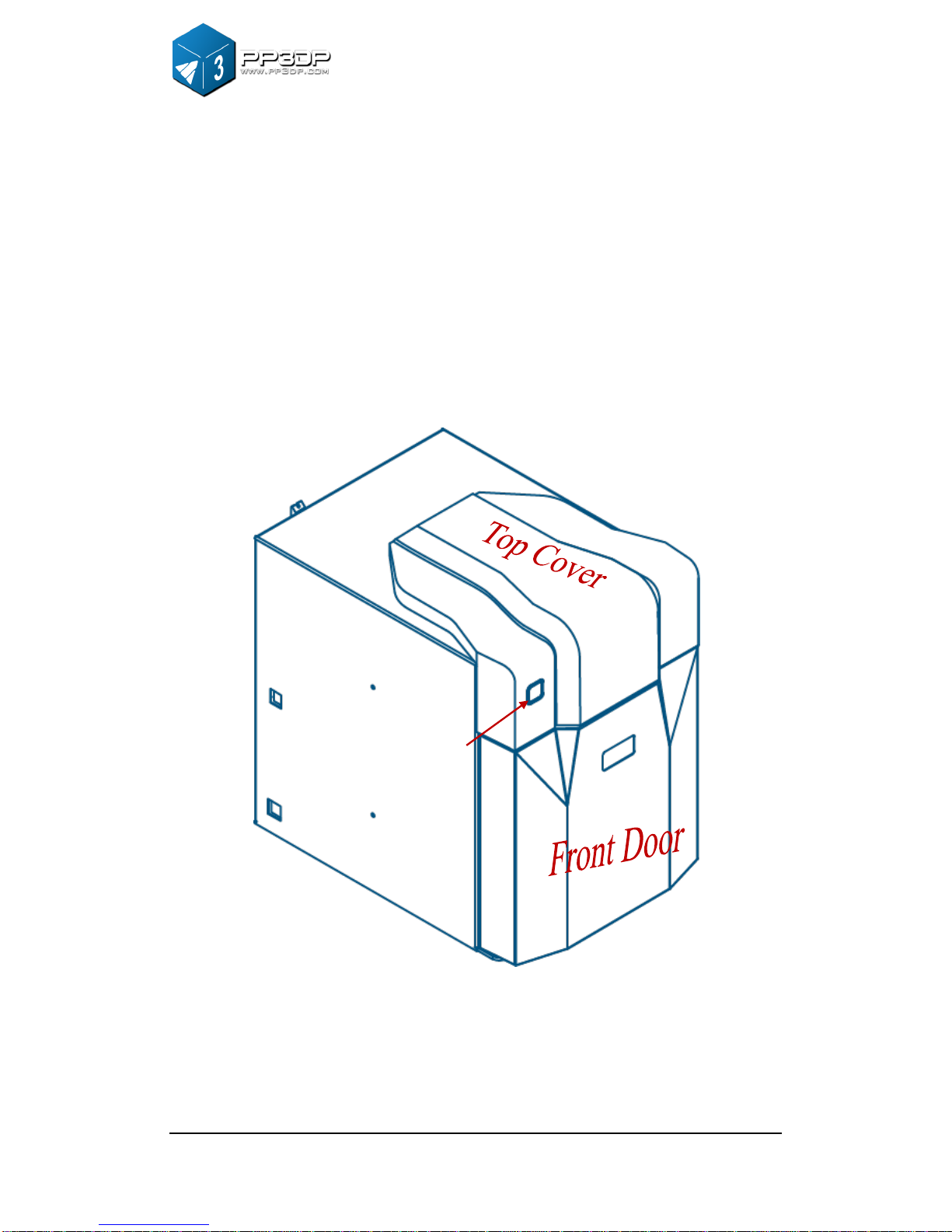
Figure 2-1 Front view of UP! mini
Init. Button

2. Overview
UP! mini 3D Printer User Manual 6
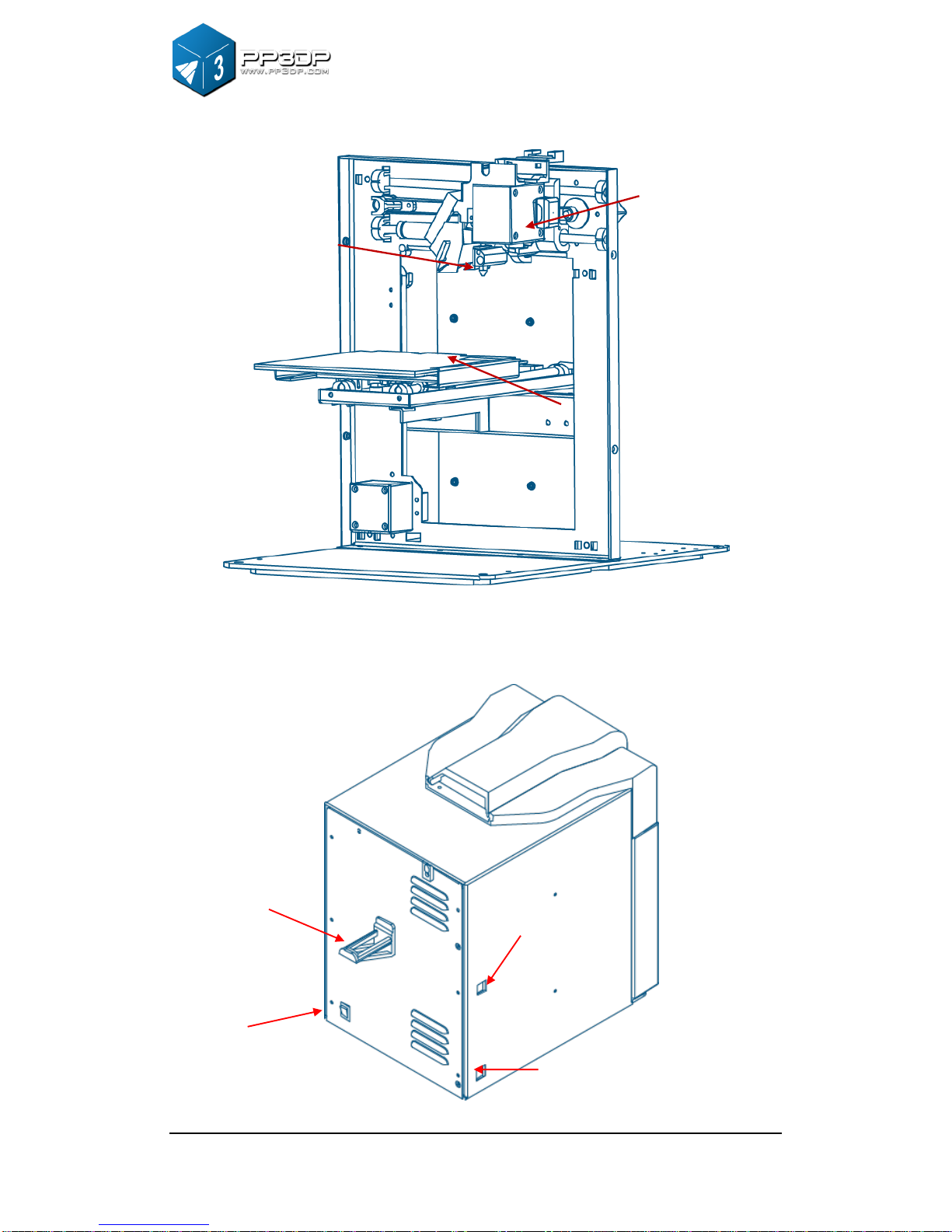
Figure 2-2 Inside View of UP! mini
Figure 2-3 Back view of UP! mini
Platform
Extrusion head
Nozzle
USB Interface
Power Interface
Roller Shaft
Power On/off

2. Overview
UP! mini 3D Printer User Manual 7
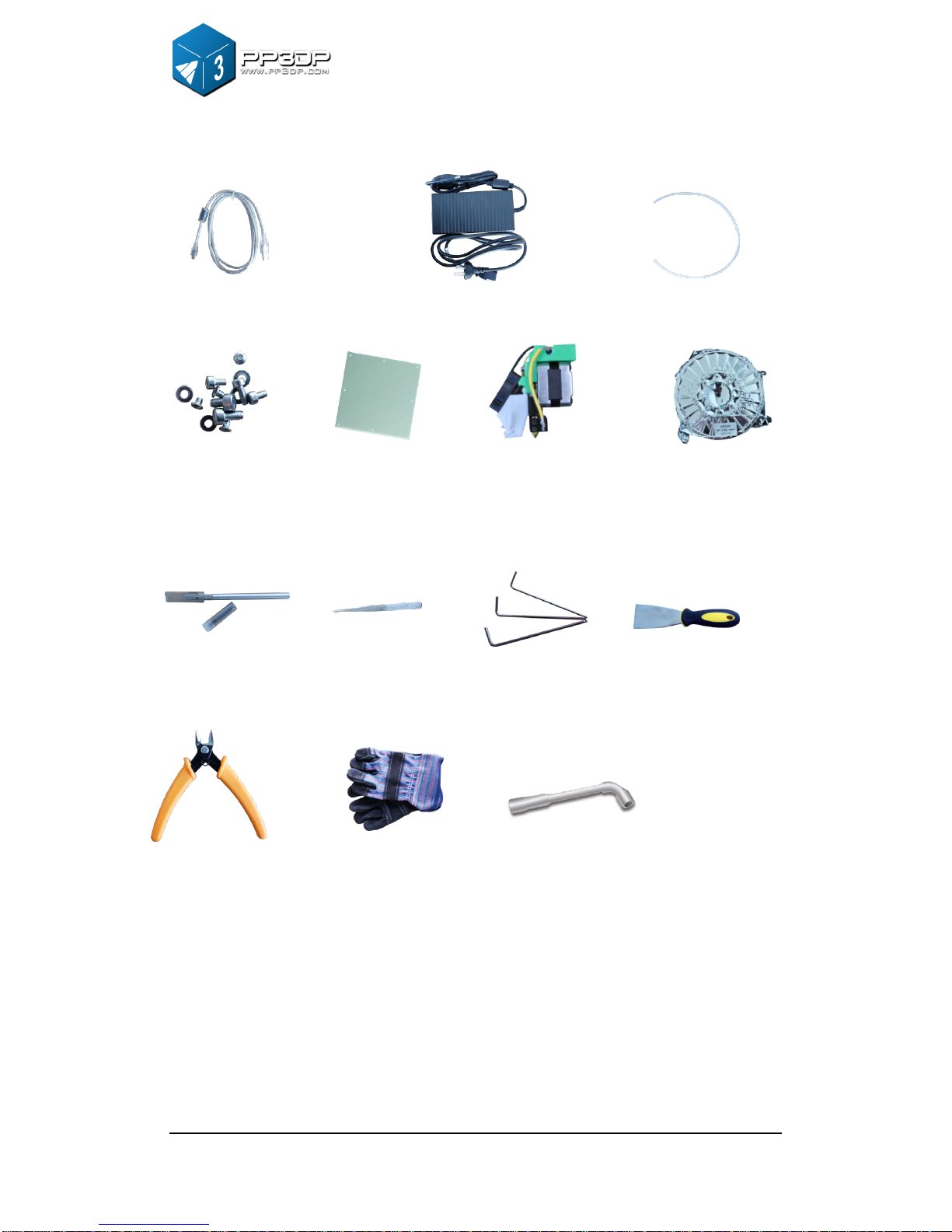
①USB cable ②Power adapter (20 V) ③Filament tube
④Screws ⑤Cell board ⑥Extrusion head ⑦ABS spool
Figure 2-4 Accessories
①Pen Knives ②Tweezers ③Hex wrench ④Shovel
⑤Pliers ⑥Gloves ⑦Nozzle wrench
Figure 2-5 Tool kit
⑤

2. Overview
UP! mini 3D Printer User Manual 8
Figure 2-6 Axis
2.2 Specifications
2.2.1 Physical Specifications
Printing Material
ABS or PLA
Material Color
White/Black/Red/Yellow/Blue/Green
Layer Thickness
0.2-0.35 mm
Print Speed
10-100 cm3/h
Print Size
120×120×120 mm
Printer Weight
5 KG (11 lb)
Printer Size
240 × 350 ×350 mm
2.2.2 Other Specifications
Power Requirements
100-240VAC, 50-60Hz,200W
Model Support
Auto-generated support
Y axis
Z axis
X axis

2. Overview
UP! mini 3D Printer User Manual 9
Input Format
STL
OS compatibility
Windows XP/Vista/7/8; Mac
2.2.3 Environmental specifications
Ambient Temperature
15°C ~30°C
Relative humidity
20%~50%
Otros manuales para UP! mini
1
Tabla de contenidos
Otros manuales de Impresora de PP3DP