
PowerCache 39602 Manual de usuario

HD Lithium Jump Starter Power Bank
P/N 39602
User's Manual

2
SAFETY WARNINGS AND GUIDELINES
Please read this entire manual before using this device, paying extra
attention to these safety warnings and guidelines. Please keep this manual in
a safe place for future reference.
•Do not leave the power bank unattended while charging.
•Do not use the power bank while it is being charged.
•Allow the power bank to cool for at least 15 minutes between each
jump start.
•Do not use the power bank with damaged clamps or a defective
power plug.
•Do not allow children under 18 years of age to use the power bank
without adult supervision.
•After performing a jump start, wait at least 30 minutes before
attempting to charge the power bank.
•Always use the cables included with the power bank or certified
replacement cables.
•Do not overcharge the internal battery.
•Do not smoke, strike a match, or cause a spark in the vicinity of the
power bank.
•Only charge in a well ventilated area.
•This power bank is not intended for use in a commercial repair
facility.
•Store the power bank indoors in a cool, dry place when not in use.

3
•This power bank is intended for temporary use outdoors.
Reasonable care should be taken when using the power bank in wet
conditions.
•This device contains a Lithium-ion battery. Dispose of this device
only in accordance with local, state, or federal regulations for
electronic waste.
•Clean using a soft, dry cloth only. Do not use chemical cleaners,
solvents, or detergents. For stubborn deposits, moisten the cloth
with warm water.
•This device has no user serviceable parts. Do not attempt to open,
service, or modify this device.
INTRODUCTION
This PowerCache™ HD Lithium Jump Starter Power Bank is rated to deliver
up to 1,200-amps and features a 16,000mAh/59.2Wh lithium-ion battery. It
has a USB Type-C™ input/output and is charged using a USB-C™ wall charger
or other power source. It includes a set of PowerCache Smart Battery Clamps
with built-in safety features, which are used to jump start a vehicle with a
dead battery. It also features two USB Type-A outputs for use in charging or
powering USB devices, such as tablets, phones, etc. and an LED lamp for
illumination. When used properly, this PowerCache HD Lithium Jump Starter
Power Bank has been tested and certified for safety and performance by an
accredited third-party laboratory to conform to UL® Standard 2743.

4
CUSTOMER SERVICE
The Monoprice Customer Service department is dedicated to ensuring that
your ordering, purchasing, and delivery experience is second to none. If you
have any problem with your order, please give us an opportunity to make it
right. You can contact a Monoprice Customer Service representative through
the Live Chat link on our website www.monoprice.com or via email at
[email protected]. Check the website for support times and links.
PACKAGE CONTENTS
Please take an inventory of the package contents to ensure you have all the
items listed below. If anything is missing or damaged, please contact
Monoprice Customer Service for a replacement.
1x PowerCache™ HD Lithium Jump Starter Power Bank
1x PowerCache Smart Battery Clamp Cable
1x USB Type-C™ Charging Cable
1x Carry Case
1x User's Manual

5
PRODUCT OVERVIEW
1. Power Button
2. Power/Battery Level Indicators
3. Battery Clamp Cable Connector
4. USB Type-A Output 2 Port
5. USB Type-A Output 1 Port
6. LED Lamp
7. USB Type-C™ Input/Output Port
8. DC Output

6
CHARGING
Perform the following steps to charge the power bank. It should be charged
for at least 3 hours before first use and at least once every 3 months to
ensure the battery is fresh and capable of holding a full charge.
1. Plug one end of the included USB Type-C™ Cable into the USB
Type-C Input/Output Port on the power bank.
2. Plug the other end into a USB power source, such as a wall charger
(not included). The Power/Battery Level Indicator will flash,
indicating that charging is in progress.
7
OPERATION
Jump Starting
This jump starter is only compatible with 12V engines up to 7.0L Gas/6.7L
Diesel in displacement. Using this product with larger displacement engines
or voltages other than 12V can cause serious personal injury, as well as
damage the device.
1. Ensure the power bank has at least 25% charge remaining. If less
than 25% changed, it may not be able to start the engine. We
recommend fully charging the power bank before performing a
jump start.
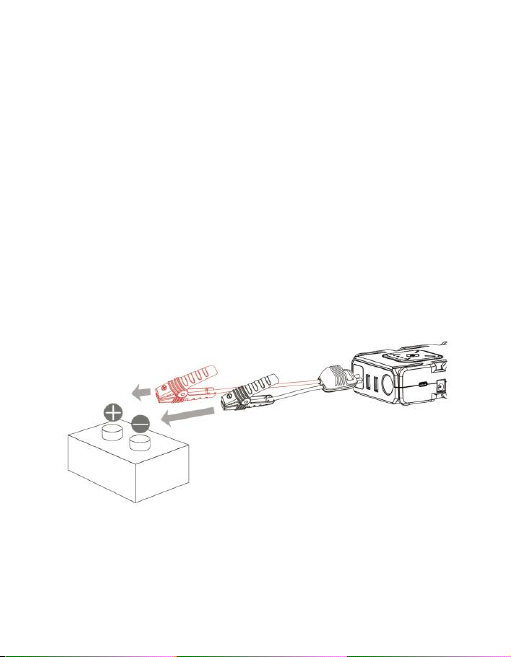
2. Attach the black clamp of the Battery Clamp Cable to the negative
lead on the battery, then attach the red clamp to the positive lead.

8
3. Plug the other end of the Battery Clamp Cable into the Battery
Clamp Cable Connector on the power bank. The LED on the cable
shows circling clockwise.
4. Use your vehicle's starter to start the engine. The
LED on the cable should show the power bank's
current voltage. Note that the power bank will
stop power output after 20 seconds and the LED on the cable will
flash .

9
5. Unplug the Battery Clamp Cable from the power bank within 30
seconds.
6. Remove the red clamp from the battery's positive lead, then
remove the black clamp from the battery's negative lead.
Notes:
•Never allow the red and black clamps to come into contact with
each other.

10
•After successfully starting your vehicle, the power bank will
automatically reset.
•Do not crank the engine more than 3 times in succession.
•If your vehicle fails to start, unplug the Battery Clamp Cable from
the power bank, wait for 15 minutes, then reconnect the cable and
try again to start the engine again.
Charging USB Devices
Perform the following steps to charge a USB device, such as a tablet, phone,
etc.
1. Plug one end of your device's charging cable into one of the USB
Type-A Output Ports or into the USB Type-C™ Input/Output Portfor
a USB-C™ device, then plug the other end into your device's
charging port.
2. Momentarily press the Power Button on the power bank to start
charging.
Using the LED Lamp
1. Press and hold the Power Button for about 3 seconds to turn the
LED Lamp on.
2. Momentarily press the Power Button to cycle through the Full On,
Flashing, and SOS light modes.
3. Press and hold the Power Button for about 3 seconds to turn the
LED Lamp off.
Tabla de contenidos


