
PlaneWave CDK700 Manual de usuario

1
CDK70O

2
Contents
Introduction .............................................................................................................................................................................................................. 3
CDK700 Overview...................................................................................................................................................................................................... 3
Unpacking ................................................................................................................................................................................................................. 3
Unpacking the Mount..................................................................................................................................................................................... 4
Installation ................................................................................................................................................................................................................ 6
Electronic Panel Housing Dimensions ....................................................................................................................................................................... 9
Software Installation ............................................................................................................................................................................................... 10
Connecting the Mount to the Control Panel Box..................................................................................................................................................... 11
Connecting the Computer to the Control Panel Box and to the on-board Accessories ........................................................................................... 12
Connecting the CDK700 to PWI............................................................................................................................................................................... 13
Software Overview.................................................................................................................................................................................................. 14
Creating a Mount Model ......................................................................................................................................................................................... 18
Observing Session with Existing Mount Model ....................................................................................................................................................... 18
Collimation .............................................................................................................................................................................................................. 18
Focusing .................................................................................................................................................................................................................. 19
Rotating Tertiary (Optional Accessory).................................................................................................................................................................... 19
Using Two Focusers................................................................................................................................................................................................. 19
Back Focus according to REV F, 3/17/11 ................................................................................................................................................................. 19
VISUAL ADAPTER, 700399 (7003991 AND 7003992).......................................................................................................................................... 20
2” Feather Touch Adapters for CDK700 ............................................................................................................................................................. 20
APOGEE IMAGE TRAIN with Alta Body, AFW50 Filter Wheel, and Monster MOAG...................................................................................... 21
APOGEE IMAGE TRAIN with Alta D9 Body and AFW50 Filter Wheel............................................................................................................. 21
APOGEE IMAGE TRAIN with Alta D9 Body .................................................................................................................................................... 21
SBIG STL IMAGE TRAIN WITH INTERNAL FILTER WHEEL ............................................................................................................................... 21
FLI ProLine Body and CFW3(.848) or CFW5 (.848) and MMOAG .................................................................................................................. 22
FLI ProLine Body and CFW3(.848) or CFW5 (.848) and MMOAG .................................................................................................................. 22
SBIG STL IMAGE TRAIN with MOAG.............................................................................................................................................................. 22
Specifications .......................................................................................................................................................................................................... 22
Wiring Diagrams ................................................................................................................................................................................................ 22

3
Introduction
Thank you for your purchase of the CDK700.
CDK700 Overview
Unpacking
The CDK700 comes in 3 to 4 crates. The mount and
optics come in the first crate. The upper cage and the
secondary mirror come in the second crate and the
control box electronics comes in the third crate. In most
cases there are also accessories that are ordered with
the telescope and many times may warrant a 4th crate as
shown in the picture to the right. Crates 1, 2 and 3 are
also shown below opened to show how the telescope is
packed inside.
Crate 1 –Fork and Base –54x50x73 inches
Crate 2 –Upper Cage –43x43x25 inches
Crate 3 –Electronics –45x41x25 inches
Crate 4 –Accessories - 28x34x31 inches
Total Weight –2750 lbs

4
To open crate 1, one of the sides needs to be removed. To do this, you will need an electric Phillips
screw driver. Remove one of the side panels as shown in the picture above. To choose the correct side
look at the bottom of the crate. It has a palletized bottom, meaning you can put a pallet jack or fork lift
under the crate. Remove one of the sides that has the opening for the fork lift underneath.
To remove the side panel, you will need to wood screws along the perimeter of the side panel. Once the
panel is removed it will look like the left hand image above.
Now you will want to remove the remaining sides and top. This you can do all at once. Just remove the
screws at the bottom of the three remaining sides, than you and another person will be able to slide the
remaining panels off together as one unit.
When the side and top panels have been removed from crate 1, it will
look something like the picture to the right.
The telescope mount is actually supported by the wooden side structure.
It is slightly lifted off of its base. This way the bearing is protected from
the mass of the telescope during shipping.
Unpacking the Mount
Step 1:
Attach the tandem lift bar to your crane of lifting device and attach
the tandem bar to the side lift plates on the inside of the forks as
shown in the picture to the right. At this point, put some tension of
5
the lift bar as to take some of the weight off of the side plates holding the weight of the telescope.
Step 2:
Adjust the feet at the bottom of the base plate such that they touch
the floor of the wooden crate. We will soon transfer the weight of
the telescope to the feet. There are three feet clocked 120 degrees
apart.
Step 4:
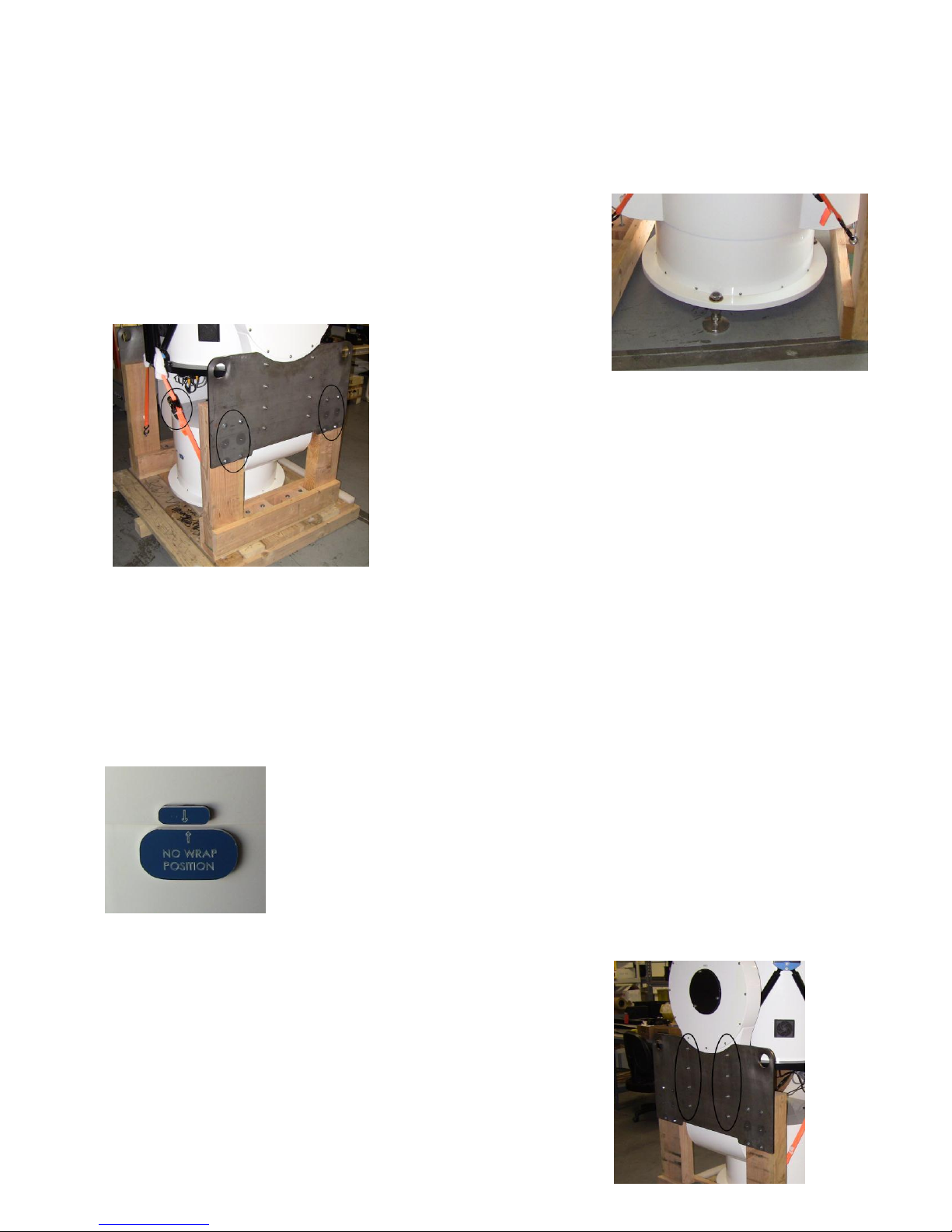
Loosen and remove the two
orange cargo straps. Then
remove the eight wood screws on each side of the mount circled
in the picture to the left.
NOTE: Please make sure you have the tandem bar lifting just
slightly and the feel lowered to the pallet floor so the telescope
does not fall when the screws are removed.
Step 5:
Slowly lift the telescope of the wood support structure with your crane/lifting equipment. And set it
down on its feet, or remove the feet to set it on its observatory pier or foundation.
NOTE: There is a correct orientation for how to set the mount down. There is a
label on the non-rotating pier base of the mount which says “NO WRAP”. If you
are setting up the Northern Hemisphere then the NO WRAP label should be
pointed approximately South. If you are in the Southern Hemisphere, then the
NO WRAP label should be pointed approximately North.
Step 6:
Remove the side steel side plates on each side of the fork arm by
removing the eight socket head cap screws.

6
NOTE: This side plate is heavy, so be prepared when the screws are removed that you are holding it. It
could fall and damage the telescope or worse damage you.
Step 7:
The telescope is shipped with a locking clamp on the azimuth bearing engaged. This is for shipping
safety. If you plan on lifting the telescope off of the bearing, it is a
good idea to engage the locking clamp.
To disengage the clamp, use the long Allen wrench provided with the
telescope as seen in the picture on the right. Turn the T handle
counter clockwise to loosen. All you have to do is turn it about 1 to
1.5 turns to fully disengage the clamp. This is done in four places at
the holes near the base of the fork arm. When you are done, the
telescope should move freely in azimuth.
For crate 2, you will just need to remove one of the side panels to remove the upper cage. Pick a side
panel whose base is accessible to a forklift like you did for crate 1. There are two bracing 2x4’s that will
also need to be removed in order to remove the upper cage.
For crate 3, you need to remove the top cover by removing the wood screws along the perimeter of the
cover and then remove the 2x4 braces.
Telescope Installation
The CDK700 as two major components that need installation. The first is the telescope and the second
is the Telescope Control Box. And there are several issues to think about prior to installing the
telescope. One is a cabling plan, another is the pier or mounting surface for the telescope and another
is the mounting wall for the Control Box. Other things to consider are the height of the telescope in the
observatory. If you are in a dome and the dome has high walls you may need to raise the telescope up
on a pier so the walls are not blocking too much of your sky. And you will need to prepare either bolts
with the correct orientation to North in the pier or mounting surface for the telescope.
Mounting Bolt Pattern
There are a couple ways of physically attaching to its pier or mounting floor. One is to have bolts come
out of the surface of the pier and then to put nuts and washers above and below the telescope base as
show in the picture below. In Appendix A we have a template for putting the bolt pattern in concrete.

7

8
Cabling Overview
There are several cables for various uses. There are 7 control cables that go between the Control Box
and the Telescope, there is an Ethernet cable that goes between the computer and the Control Box, and
there is a USB cable that goes between the telescope and the computer.
110VAC or
240VAC
Computer
Control Box
CDK700
7 control cables
Ethernet
USB for
controlling all
accessories
110VAC or 240VAC for
powering accessories
like camera’s
Cables come out the
bottom of the telescope
Observatory Floor

9
Electronic Panel Housing Dimensions
The control panel is normally mounted on the wall of the observatory. The cables connect to the
bottom of the box and should be routed down the wall, under the observatory floor over to the
telescope and back up through the floor
Telescope control Box Input
Input Voltage:
o90-264V AC for the single phase
o340-550V AC for the three phase
Input Frequency: 47-63 Hz
Input Current: 0.6 A to 8A
Inrush Current: cold start 60 A max
Power Factor: All units are
EN61000-3-2 compliant
There are three power supplies in the Telescope Control Box. There is a 12V, 24V and two 48V power
supplies. The 12V is to provide power to the telescope for standard 12V accessories and for the EFA kit

10
and the fans. The 24V power supply is for control circuit and the two 48V power supplies supply the 96V
line voltage for the direct drive motors.
Here are the power supplies:
1x of 12V Power Supply: PS-C12012 /501-1230, Manufacturer: Allied
1x of 24V Power Supply: PSP-24024 / 501-0190, Manufacturer: Allied
2x of 48V Power Supplies: PSP-480S48/501-0195, Manufacturer: Allied
Software Installation
Tabla de contenidos
Otros manuales de Telescopio de PlaneWave


