
Planar ContentSmart MP70 OPS Manual de usuario

Planar ContentSmart Media Player
MP70 OPS User Manual

Contents
1
Overview ............................................................................................................................................................ 3
1.1 Feature Highlights ....................................................................................................... 3
1.2 Package Contents ........................................................................................................ 4
1.3 Installation ...................................................................................................................... 4
1.3.1
Mounting .............................................................................................................................. 4
1.4 Physical View ................................................................................................................. 5
1.4.1
Physical features ................................................................................................................ 5
2
Configuring the Player ..................................................................................................................................
2.1 System Connections ...................................................................................................
2.2 Basic Settings ................................................................................................................ 7
2.3 Connect the Player to Your Network .................................................................... 8
2.3.1
Wireless connection ......................................................................................................... 8
2.3.2
Static IP – manually assign network IP address ..................................................... 9
2.3.3
Wired connection ............................................................................................................ 10
2.3.4
Proxy settings ................................................................................................................... 11
2.3.5
Show IP settings .............................................................................................................. 13
2.4 Time Zone Settings .................................................................................................. 14
2.5 Content Settings ....................................................................................................... 14
2.6 Player Information .................................................................................................... 17
2.7 Content Configuration – AppStart ..................................................................... 18
2.8 Content Configuration – FailSafe ........................................................................ 19
2.9 Content Configuration – EasyPlay ...................................................................... 20
2.10 Display Settings ...................................................................................................... 24
2.11 Sound Settings ........................................................................................................ 27
2.12 System Configuration – Player Name ............................................................. 28
2.13 System Configuration – Security ...................................................................... 29

Planar ContentSmart MP70 OPS User Manual 2
2.14 System Configuration – Time Server .............................................................. 30
2.15 System Configuration – Scheduled Reboot ................................................. 30
2.16 System Configuration - Firmware Update .................................................... 31
2.17 System Configuration – Expansion Storage ................................................. 32
2.17.1
Manual Expansion ..................................................................................................... 33
2.17.2
Auto Expansion .......................................................................................................... 34
2.18 System Configuration - Factory Reset ............................................................ 35
2.18.1
Using the reset button ............................................................................................ 35
2.18.2
Using a USB mouse ................................................................................................... 35
2.19 System Configuration – Power Save ............................................................... 3
3
Content Management ................................................................................................................................ 37
4
Authoring in HTML5 .................................................................................................................................... 37
5
Working with SMIL ....................................................................................................................................... 37
5.1 Introduction ................................................................................................................ 37
5.2 www.a-smil.org for Developers ........................................................................... 38
6
MP70 OPS Specifications ........................................................................................................................... 38
7
Technical Support......................................................................................................................................... 39
7.1 FAQ ................................................................................................................................ 39
7.2 Planar Support ........................................................................................................... 42
7.2.1
Cables and Accessories ................................................................................................. 42
7.2.2
Contact Planar .................................................................................................................. 42

Planar ContentSmart MP70 OPS User Manual 3
1
Overview
This document describes the hardware operation of the Planar® ContentSmart™ Media Player
MP70 OPS, system set-up and frequently asked questions.
1.1
Feature Highlights
The Planar ContentSmart MP70 OPS is a UHD (3840 x 21 0) high definition digital signage media
player featuring industrial-grade OPS format mechanical design and versatile open-standard
HTML5 and SMIL programmability.
•Power / Status LED indicator
•3.5mm composite Audio output
•Ethernet port for network content update
•Wireless antenna post
•JAE Connector for display mountingAV in for custom live content display
•Hardware decoding of MPEG1/2/4, H.2 4, H.2 5, and VC-1 media formats
•8GB on-board flash local storage with Micro SD expansion slot with SD card cover
•2 USB ports for USB content update and configuration
•S/W Reset button to perform factory reset
•Built-in wireless b/g/n network
•Support for HTML5 widgets for dynamic content (W3C Widgets standard)
•Industry leading W3C SMIL support for developers
•Supports full POPAI Screen Media Formats Standards profiles S1 to S12, and E1 to E8

Planar ContentSmart MP70 OPS User Manual 4
1.2
Package Contents
NOT INCLUDED: A USB mouse is required for system setup
1.3
Installation
1.3.1
Mounting
ATTACH the wireless antenna as shown in figure below. Screw antenna clockwise onto the post.
PLUG the player into the OPS slot of the monitor and push until it is securely plugged in the
display.
Media Player Unit
Wi
-
Fi Antenna
Micro
SD
card

Planar ContentSmart MP70 OPS User Manual 5
1.4
Physical iew
1.4.1
Physical features
•Power/Status LED indicator
•3.5mm composite Audio output
•Ethernet port for network content update
•Wireless antenna post
•Micro SD card slot with SD card cover
•USB ports for USB content update and configuration
•S/W Reset button to perform factory reset
•JAE Connector for display mounting

Planar ContentSmart MP70 OPS User Manual
2
Configuring the Player
2.1
System Connections
Connect to a monitor via an OPS slot.
Attach the AC power adapter to power on the unit. After approximately 15 seconds, the booting
animation will be displayed on screen as shown below:
The boot-up process takes approximately 40 seconds to complete.
After boot-up completes, player will stay in Basic settings menu if no content service has been
configured (i.e. first boot-up for brand new unit or after a factory reset).
Figure 2.1.1
Figure 1.1.2

Planar ContentSmart MP70 OPS User Manual 7
Note: If you have already sent content to the player, content will play back
automatically 15 seconds after boot-up.
2.2
Basic Settings
A USB mouse must be attached to the player to configure settings. If the display has a HID-
compliant touch screen, a USB mouse is not required and all the click action can be replaced by
tap actions.
Figure 2.2.1
Basic Settings:
Network
Time zone
Content
Each time the Basic settings menu is entered, playback will automatically begin after 15 seconds
if content services have been previously set. Auto playback can be canceled by clicking on the
button before the countdown ends.
User is able to enter Advanced Settings by clicking the Advanced button.
To enter the menu system at any time during playbac , plug in a USB mouse and
hold the left mouse key in the corner area as shown below for 10 seconds. If the
player has touch screen, tapping and holding in the corner areas for 10 seconds
will also bring you to the menu.
Note: Player will ask for password if password has been configured.
Figure 2.2.2

Planar ContentSmart MP70 OPS User Manual 8
2.3
Connect the Player to Your Network
2.3.1
Wireless connection
Click the Wireless LAN setting to launch the wireless configuration UI.
Figure 2.3.1
Click the ON/OFF button as indicated below to turn ON Wireless interface (network).
Figure 2.3.2
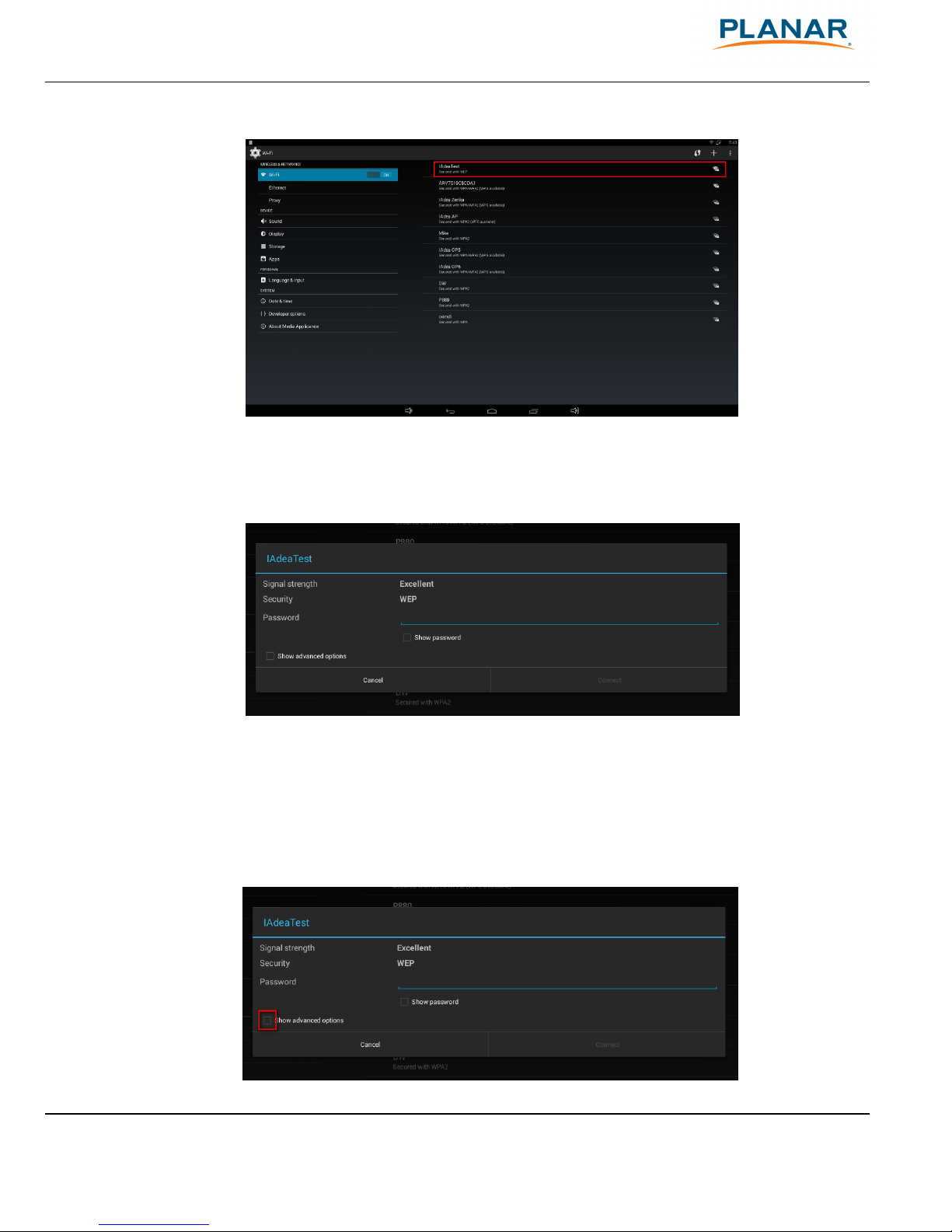
The player will scan for wireless signals nearby and available access points will be listed.
Planar ContentSmart MP70 OPS User Manual 9
Figure 2.3.3
Click on the network ID to connect. If the network requires authentication, you will be asked to
provide a password.
Figure 2.3.4
2.3.2
Static IP – manually assign network IP
address
1
Check the box that says "Show advanced options"
Tabla de contenidos
Otros manuales de Reproductor multimedia de Planar


