
Pixapro Core2400 Pro Manual de usuario

705-P24000-03
Power Pack
I
A
R
Unit 5 Sterling Park, Pedmore Road, Brierley Hill, West Midlands DY5 1TB
Tel: +44 (0)121 552 3113 [email protected]
ss
al
k

Conventions used in this Manual
This manual is based on the assumption that both the camera, power
pack and camera flash’s power switches are powered on.
The following alert symbols are used in this manual:
The Caution symbol indicates a warning to prevent shooting problem.
The Note symbol gives supplemental information.
•
•
Foreword
Warning
Name of Parts
Power Pack
Display
Included Accessories
Optional Accessories
Power Supply
Operation
Power On
Light Selection
Modeling Lamp
Wireless Mode Selection
2.4G Wireless Mode
433MHz Wireless Mode
Flash Mode— M Manual Flash
Display Flash Duration
Stable Color Temperature Function
Flash Mode—Multi: Stroboscopic Flash
Calculating the Shutter Speed
Number of Flashes / Flash Frequency = Shutter Speed
Maximum Stroboscopic Flashes:
Optic S1 Secondary Unit Setting
Optic S2 Secondary Unit Setting
Setting Custom Functions
03
04
05
05
06
06
07
07
08
08
08
08
10
11
13
13
14
14
15
15
15
16
16
17
18
Sync Triggering
Protection Function
Technical Data
Firmware Upgrade
Maintenance
20
20
21
22
22
Contents

Always keep this product dry. Do not use in rain or in damp
conditions.
Do not disassemble. Should repairs become necessary, this
product must be sent to an authorized maintenance center.
Keep out of reach of children.
Do not use the product in the presence of flammable gases,
chemicals and other similar materials. In certain circumstance,
these materials may be sensitive to the strong light emitting
from this product and fire or electromagnetic interference may
result.
Do not leave or store the flash unit if the ambient temperature
reads over 50℃. Otherwise the electronic parts may be
damaged.
As this product do not have waterproof function, please take
measures of waterproof in rainy or damp environment.
Turn off the power pack immediately in the event of malfunction.
Before using this product
Please read this manual carefully to make sure the correct operation and
exert the optimum function. And well keep it for future reference.
Thank you for purchasing !
PIXAPRO CORE2400 is a Power Pack with 2400Ws strong power,
stable output, constant color temperature, and built-in PIXAPRO 2.4G
and 433M wire-less system. Collocate with a CORE2400P Flash
Head(optional), the ultra-bright LED Modeling light, and with
CORE2400 built-in 2.4G wireless ONE system and 433MHz wireless,
it is compatible with PIXAPRO triggers like ST-IV, ST-III and ST-III+
and PRO AC 433MHz.
The CORE2400 offers:
•
•
•
•
•
•
•
•
•
•
•
S1/S2 Secondary Unit Setting and Secondary Unit Setting with
anti-preflash
Delay Flash:
0.01 to 30s, can be served as second-curtain sync.
With Mask Feature:
Greatly saving your post-production time and money.
3.5 Inch Colors Display:
Intuitive display and precious control.
Stable Color Temperature Mode:
color temperature changes within ±75K over the whole power
range(stable color temperature mode).
LED Modeling Lamp:
60W LED modeling lamp and light brightness can be freely adjusted..
Wireless Compatibility:
With built-in PIXAPRO 2.4G wireless system and 433MHz
wireless system, it is wirelessly compatible with ST-IV, ST-III, ST-III+
series and PRO AC 433MHz, and is equipped with 2 pieces 3.5mm
sync jacks, which can realize a variety of synchronous triggering
methods.
Flash Duration:
The flash duration (t0.1) max. can up to 1/17800s.
2 Kinds of Flash Modes:
Supports manual flash and Multi flash.
Precise Power Control:
Precisely control the power settings in 0.1 stop increment from 1.0 to
10, and 91 stops in total.
2 Power Sockets:
Double power sockets for using one or two flash heads.
Optical Triggering: 03 04
Forward
Warning

Power Pack:
01. Power Pack Body
02. Handle
03. Protect Cover
04. Fan Inlet
05. Fan Outlet
06. Optical Light Cover
07. Control Panel
08. Power Socket 1 for Flash
Head’s Power Cord
09. Power Socket 2 for Flash
Head’s Power Cord
10. Power Switch
11. Type-C Firmware Upgrade Port
1. STD Recycle
2. Radio Transmission Wireless Shooting
3. Channel (CH)
4. FREEZE Stable Color Temperature
5. Beeper
6. Group (GR)
7. Modeling Lamp
8. Power Level
9. Flash Duration
10.MASK
Power Pack × 1 Power Cord × 1 Instruction Manual
(Including Warranty) × 1
12. 3.5mm Sync Cord Jack
13. Adjustment Button for No. 1 Light
14. Adjustment Button for No. 2 Light
15. All Adjustment Button for Both Lights
16. < > Menu Button
17. < > Modeling Button
18. < > Modeling Button
19. < > Test Button/ Flash Ready Indicator
20. < > Beep Button
21. Select Dial
22. Power Socket
05 06
Name of Parts Display
Included Accessories
04
03
02
01
05
10 12 1122 21
14
18
20
19
15
06
16
13 070908 17
OFFOFF
CH FREEZEMASK
18
t0.11/8920 92Ws
BA
STD
5.3
5.3
06
02 05
09
07
0108 0403 10

CORE2400 power pack can be used in combination with the following
option-al accessories so as to achieve best photography effects:
CORE2400 Flash head, ST-IV, ST-III and ST-III+ flash trigger, PRO
AC 2.4G Transmitter, softbox, beauty dish, umbrella, snoot, light
stand, EC2400 5m Extension Cord, EC2400L10m Extension Cord,
etc.
AC Power Supply: insert the output end of
power cord into the power socket of power
pack to gain power source.
07 08
Optional Accessories
Power Supply
Power On/Off
Slide power switch to "-" to power on;
Slide power switch to "o" to power off.
Note: Unplug the power cord when
the power pack is not being used.
Operation
There are three modes: OFF, Percentage(1%-100%) and PROP. Short
press the Modeling Lamp Button, and the three modes will be displayed
on the LCD panel in sequence.
1.OFF: the modeling lamp is off.
Modeling Lamp
CORE2400 Power pack is
equipped with a 60W LED
modeling lamp which has two
continuous light-ing modes:
Percentage and PROP.
When connecting the flash head
(optional) into the power socket 1 or 2,
short press the corresponding adjust-
ment button 1 or 2 to set parameters.
Short press ALL button to adjust the
two lights simultaneously.
Flash Light Adjustment
OFFOFF
CH 13
AA
STD
1/8
7.0
MULTI 3 - 50 HZ
Note: When 1200Ws flash head and 2400Ws flash head are plugged into
this power pack at same time, the corresponding display screen of the
1200Ws flash head shows "Not Compatible". In this state, the 1200Ws
lamp holder cannot work, and the 2400Ws flash head works normally.
2.4GHz
POWER
CHANNEL
ON
[ ]
SET BUZZ L AMP
TEST
--
-
*
0
8
F
7
E
6
D
5
C
4
B
3
A
2
9
1

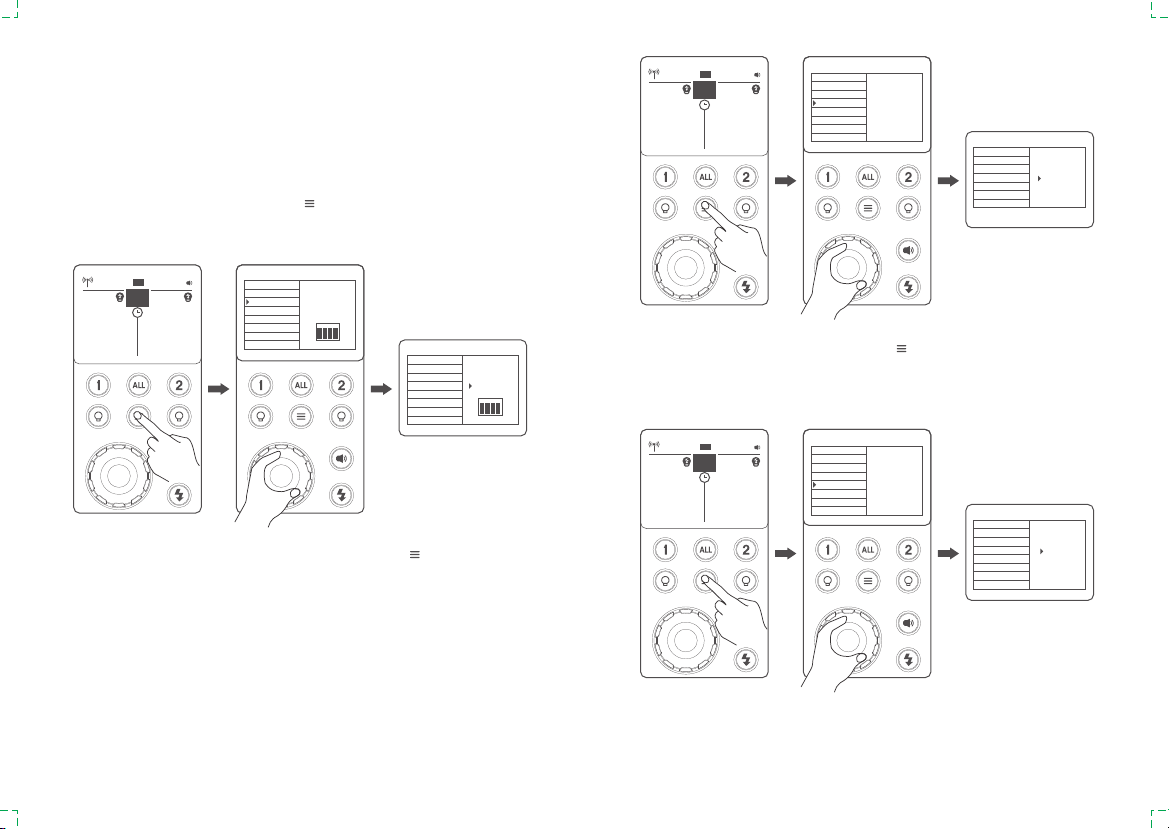
4. Modeling light has continuous and intermittent lighting functions. Short
press< >to enter the main menu, and turn the select dial to select the
modeling light, then short press the select dial once and rotate the select
dial to select "CONT" or "INTER". Press < > menu button again to
return to the main interface.
5. Long press the modeling lamp and choose the percentage. Then, turn
the select dial to adjust brightness from 1% to 100%.
MENU
COLOR
WIRELESS
CHANNEL
ID
SOCKET 1 GROUP
SOCKET 2 GROUP
RECEIVER
MODEL
OFF
2.4G
433M
VER 0.7
2.Percentage: 1%~100%(to prevent overheat, <45℃ the fan rotates in
low speed while >45℃ in high speed).
3.PROP: The modeling lamp's power changes with the flash's power.
The bigger power the flash has, the brighter the modeling lamp is(to
prevent overheat, <45℃ the fan rotates in low speed while >45℃ in
high speed).
With built-in 2.4G and 433MHz wireless, CORE2400 power pack can
be set as a receiver end. Enter the menu to choose wireless on, off,
2.4G or 433MHz wireless mode.
Press the < > button to enter the main menu. Turn the select dial to
choose wireless. Then, short press the select dial once and turn it to
choose 2.4G or 433MHz mode. Press the < > button to back to the
main interface and < > will be displayed onto the left upper corner of
the screen.
Wireless Flash Mode
MENU
COLOR
WIRELESS
CHANNEL
ID
SOCKET 1 GROUP
SOCKET 2 GROUP
RECEIVER
MODEL
CONT
INTER
VER 0.7
15%
+0.9
15%
CH 13
8A
STD
1/21/128
3.7
FREEZE
20%20%
CH 13
8A
STD
1/128
3.7
FREEZE
+0.9
1/2
20%
+0.9
20%
CH 13
8A
STD
1/21/128
3.7
FREEZE
20%20%
CH 13
AA
STD
1/8
7.0
MULTI 3 - 50 HZ
RPOPRPOP
CH 13
AA
STD
1/8
7.0
MULTI 3 - 50 HZ
09 10
MENU
COLOR
WIRELESS
CHANNEL
ID
SOCKET 1 GROUP
SOCKET 2 GROUP
RECEIVER
MODEL
32
NO
VER 0.7
MENU
COLOR
WIRELESS
CHANNEL
ID
SOCKET 1 GROUP
SOCKET 2 GROUP
RECEIVER
MODEL
32
VER 0.7
MENU
COLOR
WIRELESS
ID
SOCKET 1 GROUP
SOCKET 2 GROUP
RECEIVER
MODEL
32
VER 0.7
MENU
COLOR
WIRELESS
CHANNEL
ID
SOCKET 1 GROUP
SOCKET 2 GROUP
RECEIVER
MODEL
F
VER 0.7
MENU
COLOR
WIRELESS
CHANNEL
ID
SOCKET 1 GROUP
SOCKET 2 GROUP
RECEIVER
MODEL
F
VER 0.7
2.4G Wireless Mode
When choosing 2.4G wireless transmission, purchase ST-IV, ST-III or
ST-III+ series flash triggers (optional) is needed. If there are other
wireless flash systems nearby, you can change the channel (CH),
identification number (ID) and group (GR) to prevent signal
interference. The channels (CH), identification numbers (ID) and
groups (GR) of the transmitter unit and the receiver unit must be set to
the same.
1.Channel (CH) setting: press the< >button to enter menu. Turn the
select dial to choose channel. Then, short press the select dial once and
turn it to choose channel from 1 to 32.
2.Identification number (ID) setting: short press the< >button to enter
menu, turn the select dial to choose ID. Then, short press the select dial
once and turn it to choose ID from OFF and 01 to 99.
3. Group (GR) setting: short press the< >button to enter menu,in the
menu, turn the select dial to choose the corresponding group of socket 1
or socket 2. Then, short press the select dial once and turn it to choose
group from 0 to 9 and A to F.
11 12
off
+0.9
off
CH 13
8A
STD
1/128
3.7
FREEZE
MENU
COLOR
WIRELESS
CHANNEL
ID
SOCKET 1 GROUP
SOCKET 2 GROUP
RECEIVER
MODEL
32
VER 0.7
NO
offoff
CH 13
8A
STD
1/128
3.7
FREEZE
offoff
CH 13
8A
STD
1/128
3.7
FREEZE

When use this function, the color temperature changes within ±75K over
the entire power range.
Press the< >button to enter the main menu and turn the select dial to
choose color mode. Short press the select dial once and turn it to choose
OFF, STD or OPT(STD means regular state, and OPT means optimum
state), and Flash Ready Indicator< >will blink (the beeper will alarm).
Now press the Test Button to discharge, and the flash can be used as
normal.
433MHz Wireless Mode
When choosing 433MHz wireless
transmission, purchase PRO AC
433MHz remote control (optional) is
needed. Please set the channels
and groups of remote control to
the same with the power pack’s.
To get more using details of remote
control, please refer to PRO AC
433MHz instruc-tion manual.
Display Flash Duration
Flash duration refers to the length of
time that from flash’ s firing to reach the
half peak at maximum. The half peak at
maximum is usually expressed as
t=0.5. In order to provide the photogra-
pher with more concrete data, this
product adopts t=0.1. The difference
between t=0.5 and t=0.1 is shown in
the following picture.
A
t
50%
t=0.5
t=0.1
10%
MENU
ON
2.4G
433M
VER 0.7
COLOR
WIRELESS
CHANNEL
ID
SOCKET 1 GROUP
SOCKET 2 GROUP
RECEIVER
MODEL
MENU
BACKLIGHT
DELAY
UNITES
1-ALT
2-ALT
VER 0.7
STEP
MULTI
RECYCLE
OFF
ON
MENU
BACKLIGHT
DELAY
UNITES
1-ALT
2-ALT
STEP
MULTI
RECYCLE
VER 0.7
OFF
ON
MENU
COLOR
WIRELESS
CHANNEL
ID
SOCKET 1 GROUP
SOCKET 2 GROUP
RECEIVER
MODEL
OFF
STD
OPT
VER 0.7
MENU
COLOR
WIRELESS
CHANNEL
ID
SOCKET 1 GROUP
SOCKET 2 GROUP
RECEIVER
MODEL
OFF
STD
OPT
VER 0.7
13 14
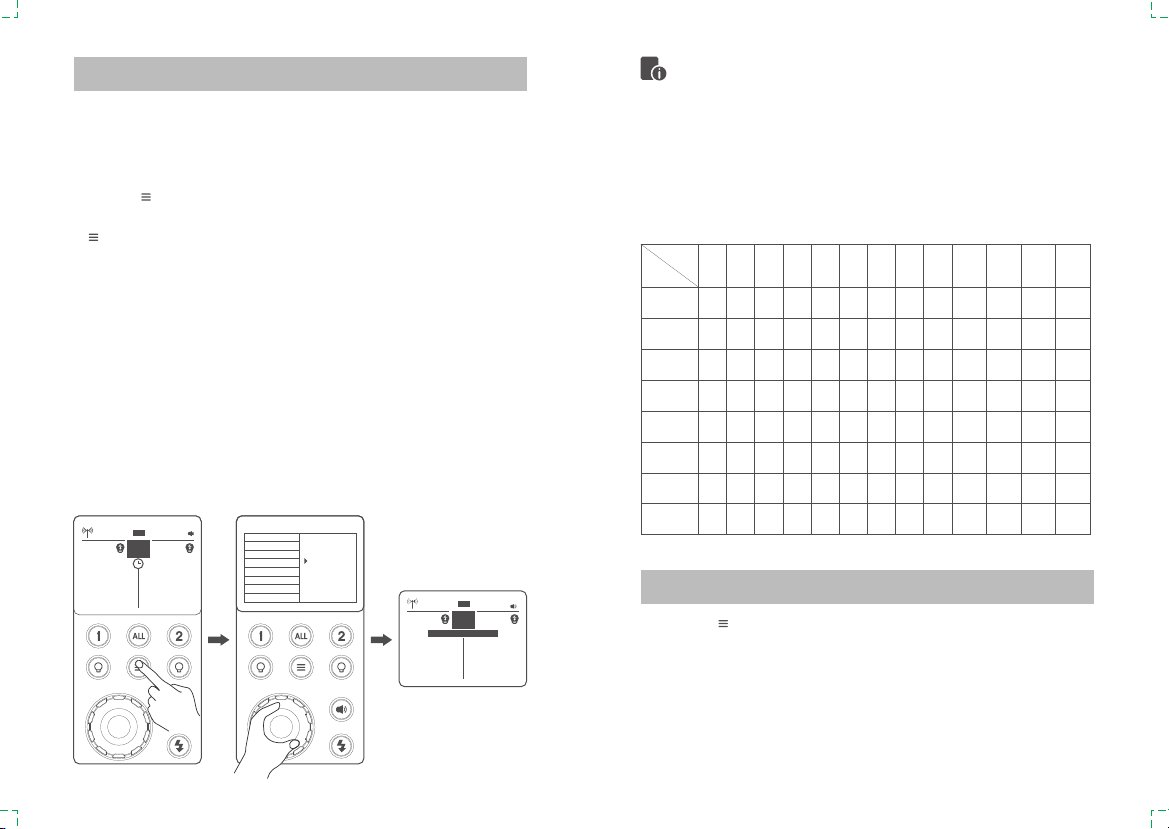
The flash output is adjustable from 1.0 power to 10 power in 0.1 step
increments. To obtain a correct flash exposure, use a hand-held flash
meter to determine the required flash output.
1. Press< >button to enter the menu. Turn the select dial to choose
multi flash. Then, short press the select dial and turn it to choose “OFF”.
Press the< >button to back to the main interface.
2. Turn the select dial to set the flash output.
Flash Mode-----M: Manual Flash
Stable Color Temperature Function
offoff
CH 13
8A
STD
1/128
3.7
FREEZE
offoff
CH 13
8A
STD
1/128
3.7
FREEZE
MENU
BACKLIGHT
DELAY
UNITES
1-ALT
2-ALT
STEP
MULTI
RECYCLE
VER 0.7
OFF
ON
15 16
With stroboscopic flash, a rapid series of flashes is fired. It can be used
to capture multiple images of a moving subject in a single photograph.
You can set the firing frequency (number of flashes per sec. expressed
as Hz), the number of flashes, and the flash output.
1. Press< >to enter the menu and turn the select dial to choose multi
flash. Then, short press the select dial and turn it to choose on. Press the
< >button to back to the main interface.
2. Set the flash frequency and flash times.
● Press the select dial to choose flash times. Turn the Select Dial to set
the number.
● Press the select dial to choose flash frequency. Turn the Select Dial to
set the number.
● After you finish the setting, press the select dial to confirm.
Calculating the Shutter Speed
During stroboscopic flash, the shutter remains open until the firing stops.
Use the formula below to calculate the shutter speed and set it with the
camera.
Number of Flashes / Flash Frequency = Shutter Speed
For example, if the number of flashes is 10 and the firing frequency is 5
Hz, the shutter speed should be at least 2 seconds.
Flash Mode-Multi: Stroboscopic Flash
Stroboscopic flash is most effective with a highly reflective subject
against a dark background.
Using a tripod and a remote control is recommended(Optional).
Stroboscopic flash can be used with“buLb”.
The number of flashes will be limited as shown by the following table.
•
•
•
•
Maximum Stroboscopic Flashes:
Press the< >button to enter menu and turn the select dial to choose
receiver. Then, short press the select dial and choose S1 function, so
that this flash can function as an optic S1 secondary flash with optic
sensor. With this function, the flash will fire synchronously when the main
flash fires, the same effect as that by the use of radio triggers. This helps
create multiple lighting effects.
Flash
Output
1 2 3 4 5 6-7 8-9 10 11 12-14 15-19 20-50 60-99
1/4 7 6 5 4 3 3 3 2 2 2 2 2 2
1/8 20 15 12 10 8 6 5 4 4 4 4 4 4
1/16 30 30 30 20 20 20 10 8 8 8 8 8 8
1/32 60 60 60 50 50 40 30 20 20 20 18 16 12
1/64 90 90 90 80 80 70 60 50 40 40 35 30 20
1/128 100 100 100 100 100 90 80 70 70 60 50 40 40
1/256 100 100 100 100 100 90 80 70 70 60 50 40 40
1/512 100 100 100 100 100 90 80 70 70 60 50 40 40
Hz
Optic S1 Secondary Unit Setting
offoff
CH 13
8A
STD
1/8
7.0
FREEZE
OFFOFF
CH 13
AA
STD
1/8
7.0
MULTI 3 - 50 HZ

ID OFF Off
Choose any figure from 01 to 99
01-99
Wireless mode
MENU
COLOR
WIRELESS
CHANNEL
ID
SOCKET 1 GROUP
SOCKET 2 GROUP
RECEIVER
MODEL
OFF
S1
S2
VER 0.7 MENU
COLOR
WIRELESS
CHANNEL
ID
SOCKET 1 GROUP
SOCKET 2 GROUP
RECEIVER
MODEL
OFF
S1
S2
VER 0.7
MENU
COLOR
WIRELESS
CHANNEL
ID
SOCKET 1 GROUP
SOCKET 2 GROUP
RECEIVER
MODEL
OFF
S1
S2
VER 0.7
MENU
COLOR
WIRELESS
CHANNEL
ID
SOCKET 1 GROUP
SOCKET 2 GROUP
RECEIVER
MODEL
OFF
S1
S2
VER 0.7 MENU
COLOR
WIRELESS
CHANNEL
ID
SOCKET 1 GROUP
SOCKET 2 GROUP
RECEIVER
MODEL
OFF
S1
S2
VER 0.7
MENU
COLOR
WIRELESS
CHANNEL
ID
SOCKET 1 GROUP
SOCKET 2 GROUP
RECEIVER
MODEL
OFF
S1
S2
VER 0.7
Optic S2 Secondary Unit Setting
Press the< >button to enter menu and turn the select dial to choose
receiver. Then, short press the select dial and choose S2 function, so
that this flash can also function as an optic S2 secondary flash with optic
sensor. This is useful when cameras have pre-flash function. With this
function, the flash will ignore a single “preflash” from the main flash and
will only fire in response to the second, actual flash from the main unit.
RECEIVER OFF
S1
S2
Off
S1 Mode
S2 Mode
MENU Custom Function Settings
Custom Functions Settings Settings & Descriptions
COLOR OFF
STD
WIRELESS OFF
2.4G
433MHz
1~32CHANNEL
SOCKET 1 GROUP
SOCKET 2 GROUP
0~9/A,B,C,D,E,F
Off
On
OPT
Off
2.4G Wireless
433MHz Wireless
Choose any figure from 1 to 32
Choose one from
0~9/A,B,C,D,E,F
Restrictions
Choose group
of socket 1
Choose group
of socket 2
Stable color
temperature mode,
changes within ±75K
BACKLIGHT -3~0~3 7 levels
MODEL CONT
INTER
Always lighting
Off after finishing the
flash recycle
Setting Custom Functions
Press the< >button to enter menu. Turn the select dial to choose
custom functions.
Short press the select dial and turn it to choose the corresponding
functions.
Short press the select dial again or short press the< >button to
back to the main interface.
1.
2.
3.
17 18
offoff
CH 13
8A
STD
1/128
3.7
FREEZE
offoff
CH 13
8A
STD
1/128
3.7
FREEZE
Tabla de contenidos


