
Pitney Bowes FeedMAX Manual de usuario

&
Operator’s Manual
-1-

-2-
The FeedMAX and the FeedMAX – S are designed to feed a verity of materials at a high capacity. Both models
of the FeedMAX can be set up and operated in either, straight in-line or right angle configurations. Sure-Feed
Engineering Inc. also offers a “Left 90 degree Angle” configuration FeedMAX and FeedMAX-S as a special
order item Depending on the specific model, the FeedMAX can be interfaced with several different types of ink
jets, folders, tabers and inserters as well as stand alone applications. Both FeedMAX models come with and
adjustable six (6) foot in-feed conveyor that will accommodate a variety of different size stock.
Safety Statement and Recommendations
The following recommendations for safe operation and maintenance of the FeedMAX and the FeedMAX-S
are as follows:
Any persons designated to operate, work on or near the FeedMAX or FeedMAX-S should be fully
trained by a factory-authorized representative.
Do not operate or perform any type of maintenance on the FeedMAX or FeedMAX-S while under the
influence of drugs or alcohol.
Do not operate or perform any type of maintenance on the FeedMAX or FeedMAX-S in or around
freestanding water.
Do not wear loose or baggie fitting shirts, shirts with bellowing sleeves, bracelets, rings, necklaces,
neckties or other loose apparel that may come into close proximity with moving parts of the FeedMAX or
FeedMAX-S.
Do not attempt to increase the operating height of the FeedMAX or FeedMAX-S by putting wood 2X4’s,
wood blocks, bricks, stacks of cardboard, stacks of paper, postal trays or any other objects or devices
not known to the manufacture, under the FeedMAX or FeedMAX-S. (The FeedMAX and FeedMAX-S
are manufactured with adjustable leveler pads designed to provide an adjustable operating height range
of plus five and one quarter inches [+ 5-1/4”]. Increasing the operating height of the FeedMAX or
FeedMAX-S beyond these specifications is not recommended by the manufacture and other companies
connected with the promotion and sale of the FeedMAX and FeedMAX-S. The manufacture and other
companies connected with the promotion and sale of the FeedMAX and FeedMAX-S do not assume
any responsibility for any damage to the FeedMAX or the FeedMAX-S or product and shall be held
harmless for any damages and / or injuries resulting from this practice.)
Wear protective safety eyeglasses or goggles and use a particle mask or similar device when cleaning
off the FeedMAX or FeedMAX-S with compressed air. Alert all other persons in the area to stand a
minimum of thirty (30) feet from the area where compressed air is put to such use.
All persons having hair greater than shoulder length who operate, work on or near the FeedMAX or
FeedMAX-S should keep their hair pulled back in ponytail fashion then pinned up or otherwise
contained to the top of their head or confined under the back of their shirt.
Turn off the main power to the FeedMAX or FeedMAX-S before performing any maintenance.
Any persons working near any of the electrical motors of the FeedMAX or FeedMAX-S should use
caution. Electrical motors give off heat; contact with or exposure to bare skin may result in burns.
The FeedMAX and the FeedMAX-S was designed to feed, transport and convey paper or paper
products. Do not attempt to feed and / or run materials made of or containing glass, metal, wood,
plastics, liquids, foods, powders, gasses, explosives or toxic and hazardous chemicals on the FeedMAX
or the FeedMAX-S. (Note: The manufacture recognizes and acknowledges that the FeedMAX and the
FeedMAX-S are capable of successfully running and / or feeding compact disk and audio cassettes,
however the manufacture and other companies connected with the promotion and sale of the FeedMAX
and the FeedMAX-S do not assume any responsibility for any damage to the FeedMAX and / or the
FeedMAX-S or product and shall be held harmless for any damages and / or injuries resulting from this
practice.)
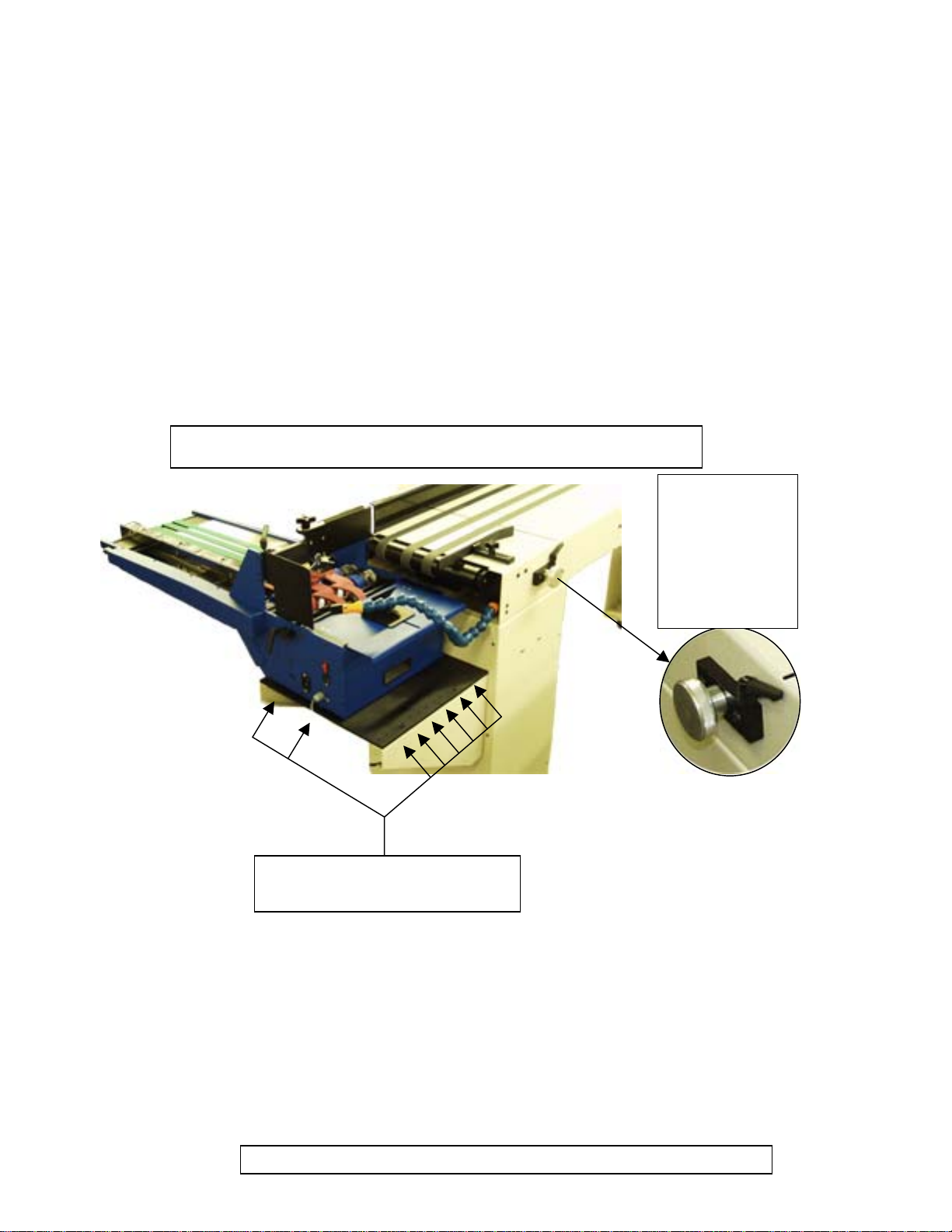
Set Up and Operation of the FeedMAX
Set the feeder to the conveyor for either right angle or in line configuration by performing the following:
1. Turn the power off to the FeedMAX and / or FeedMAX-S.
2. Loosen the ratchet lock handle located to the right of the roller extension knob by turning it in a counter
clock-wise direction, see figure .
3. Retract the front conveyor rollers by turning the adjustment knob in a clock-wise direction until the front
rollers are completely retracted, see figure .
Shown below is the FeedMAX – S model with the long transport belt
Adjustable Lock
Handle and
knob to extend /
retract the front
rollers of the
conveyor
Position of feeder assembly
alignment holes in support deck
(Fig. 1)
4. Using a philps head screwdriver, remove the paper guide located on the exit end of the in-feed
conveyor, see figure . (Note: The paper guide is only used when running the Feed Max in a right angle
configuration and must be removed before lifting the feeder up to re-position for straight in-line
operation.) (Warning: Lifting the feeder with out removing the paper guide may result in damage
to the machine as well as possible personal injury.)
-3-
Remove these two
(
2
)
Phili
p
s head screws and remove the
p
a
p
er
g
uide.
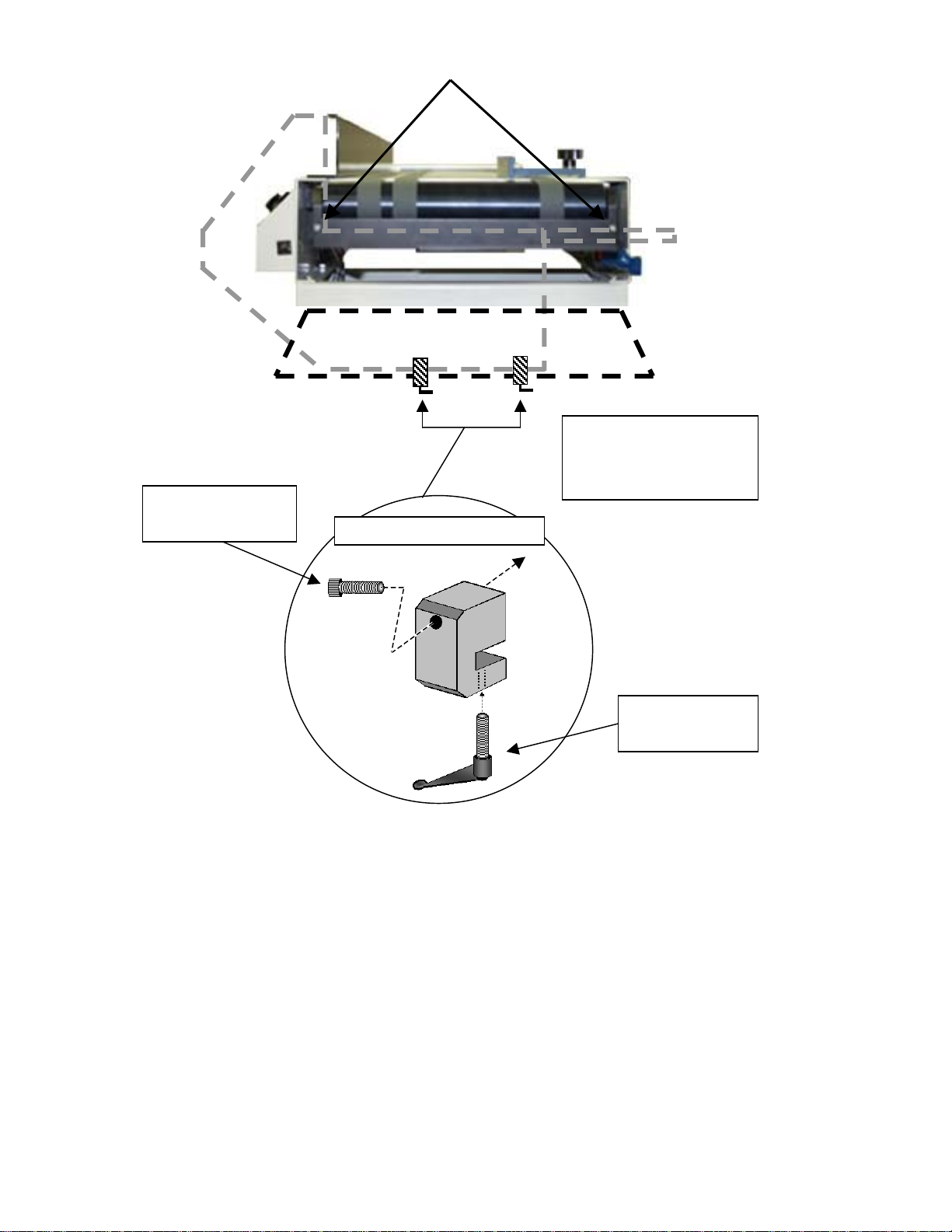
-4-
(Fig. 2)
Remove socket
head allen screw
Loosen ratchet
lock handle
Feeder Retainin
g
Clam
p
Special Note:
These retaining clamps
are only found on
FeedMAX-S models
5. FeedMAX-S (Only) remove the two (2) feeder retaining clamps located at the bottom of the feeder, see
figure . to remove the two (2) retaining clamps, perform the following:
a. Loosen the ratchet lock handle locate at the bottom of each retaining clamp.
b. Using a 5/32 allen wrench, remove the socket head allen screw located on the side of the
retaining clamp.
(Note:These retaining clamps are designed to prevent the feeder from tipping in the event the
long transport is not properly supported.)
6. Lift the feeder assembly straight up until the alignment pins are free of the feeder support deck.
(Warning: The FeedMAX feeder assembly weighs 39 pounds, the FeedMAX –S feeder assembly
weighs 58 pounds, practice safe lifting techniques while performing this step or request
assistance for lifting the feeder assembly.)

7. Set the feeder assembly alignment pins in selected holes of the feeder support deck that best
accommodates the configuration, (Straight or right angle) for the stock size you wish to run. (Note: Make
sure all alignment pins are seated in holes, do not let the feeder assembly over hang the support deck.
When performing this step with the FeedMAX – S model, make sure the long transport belt assembly is
supported at all times. Failure to support the long belt transport may result in damage to the machine.)
-5-
Set up the feeder section by performing the following:
1. Turn the power on to the feed max base and the ink jet base.
2. Select the side guide / guides, center guide and back wedge that best fit the material and configuration
of the set up you are preparing to run.
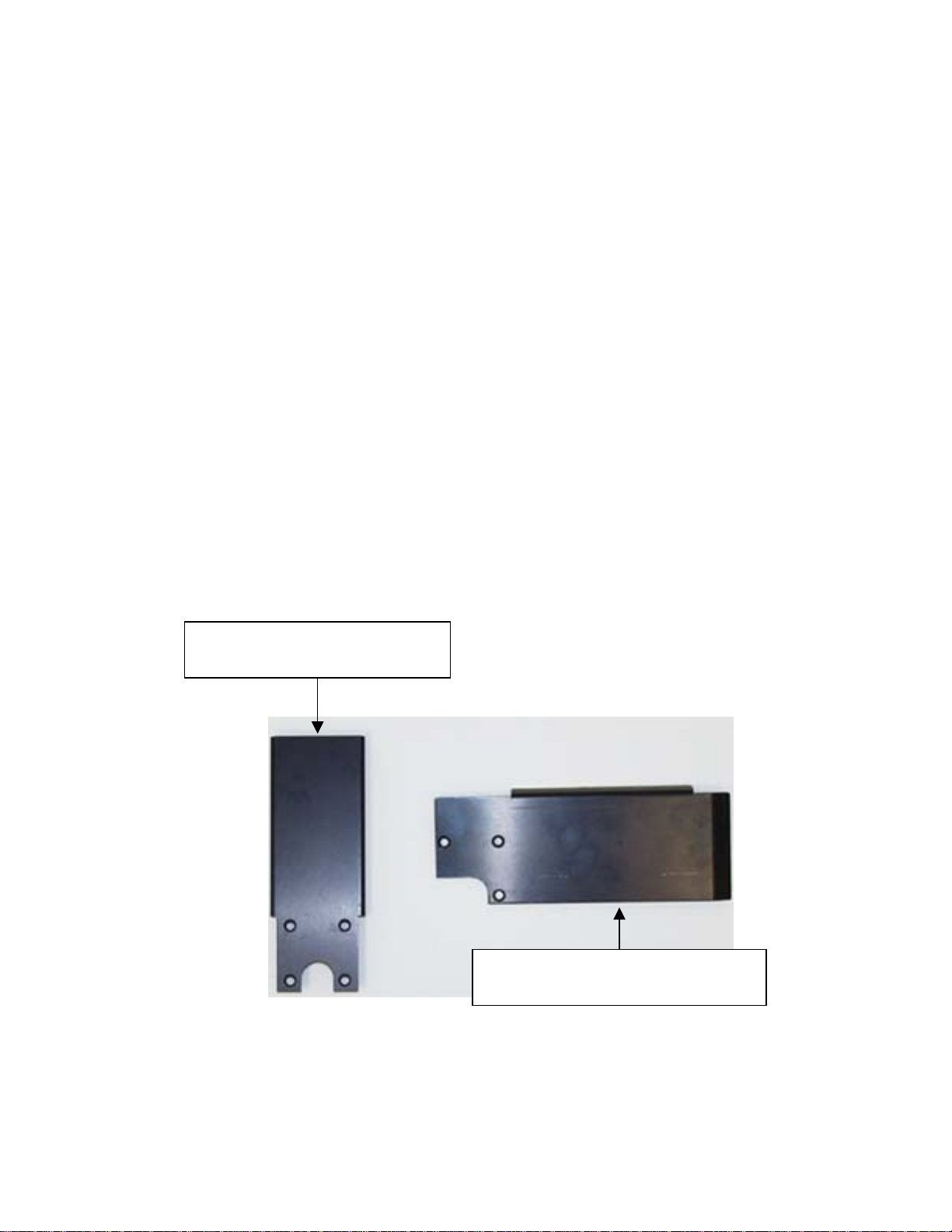
To change the center guide, perform the following:
a. Remove the 3 or 4 philps head screws located at the bottom of the center guide. (Note: The
center guide used for right angle operation has 3 philips head screws, the center guide used for
straight in line operation has 4 philips head screws)
b. Align the holes in the newly selected center guide to the center holes in the bridge tram bar of
the feeder and secure it using the screws that were removed in step [a]. (Note: To avoid
stripping out the threads in the bridge tram bar, do not over tighten the philips head screws.)
Direction In-Line Feed
Direction of Ri
g
ht An
g
le Feed
Conve
y
or
Alignment holes for
“Right Angle” configuration
Alignment holes for
“Straight In-Line”
configuration
To change the side guide / guides, perform the following:
a. Remove the 2 philips head screws located on the current side guide / guides near the bridge
tram bar. (Note: Do not loosen the front thumb lock or adjustable lock handle on the current side
guide at this time, use care to prevent dropping the side guide or screws) Once the existing side
guide has been removed the side clamp should still be secured to the bridge tram bar.
b. Mount the newly selected side guide / guides to the side guide clamp using the Philips head
screws removed in step [a]. (Note: To avoid stripping out the threads in the side guide clamp,
do not over tighten the Philips head screws.)
To change the back wedge, perform the following:
c. Remove the thumb lock screw that secures the current back wedge to the agitator plate by
turning it in a counter clock-wise direction, then lift up on the current back wedge until it is cleaer
of the roll pin, see figure .
d. Place the newly selected back wedge (slotted side down), onto the roll pin in the agitator feed
plate and secure it with the thumb lock screw removed in step [c]. (Note: To avoid stripping out
the threads in the mount block, located under the agitator feed plate, do not over tighten the
thumb lock screw.)
Special Note: The FeedMAX comes with a variety of back wedge guides, side guides and
center guides. These are designed to accommodate most standard size stocks
for either straight in-line or right angle configuration, see figures through .
-6-
Center Guide to run in line with the
In-feed conveyor
Center Guide to run at 90-degree right
angle with the in-feed conveyor
(Fig. 2)
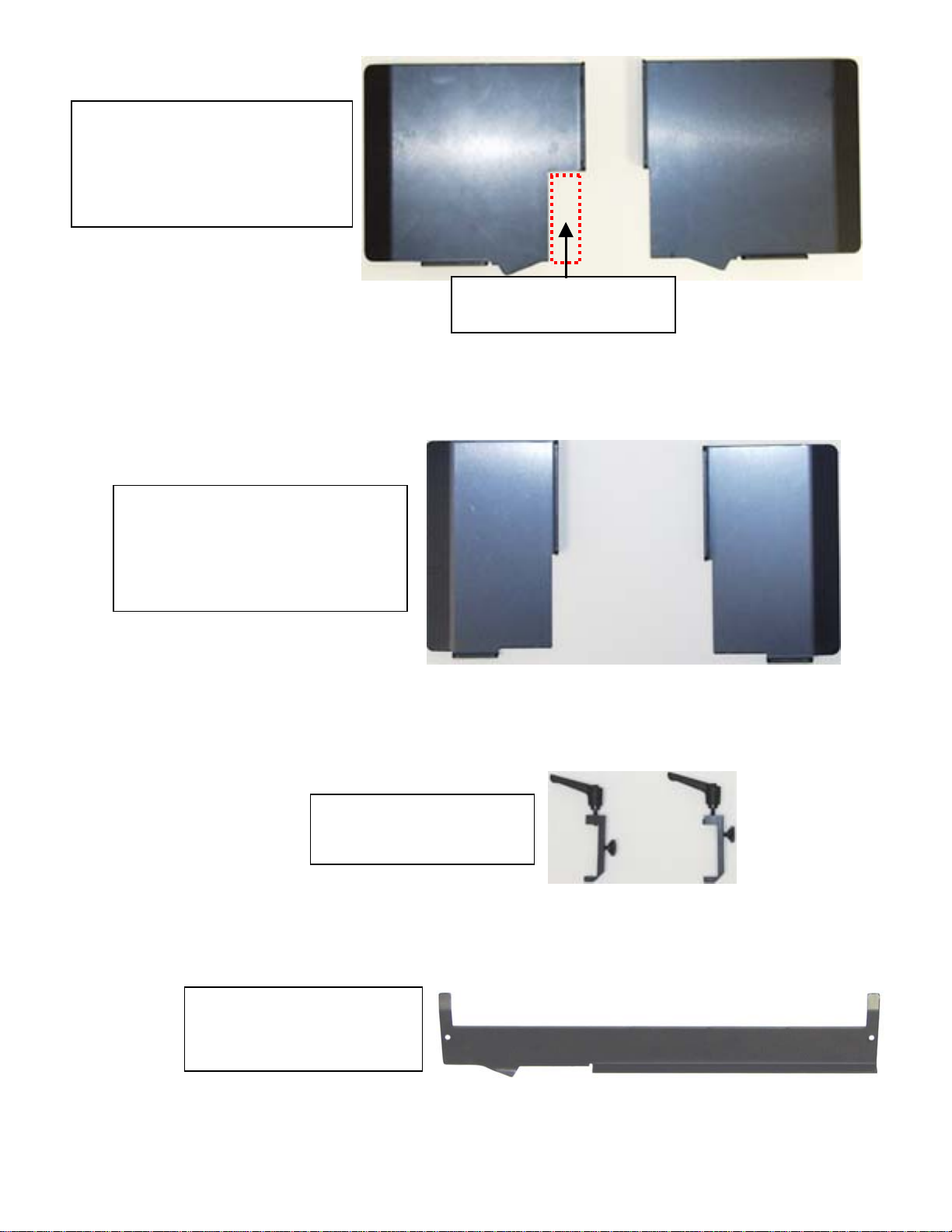
Large product side guides for
“catalog” size material.
(Use both for running in-line with the
in-feed conveyor, use the one shown
on the left to run at a 90-degree right
angle with the in-feed conveyor)
Cut for height sensor eye
when running straight in-line
Standard product side guides
for “letter” size material.
(Use both for running in-line with the
in-feed conveyor, use the one shown
on the left to run at a 90-degree right
angle with the in-feed conveyor)
Side guide Clamps
Shown with thumb lock and
adjustable ratchet handle.
(Fig. 3)
(Fig. 4)
In-feed conveyor paper guide
Used only when running in
right angle configuration
(Fig. 5)
-7-
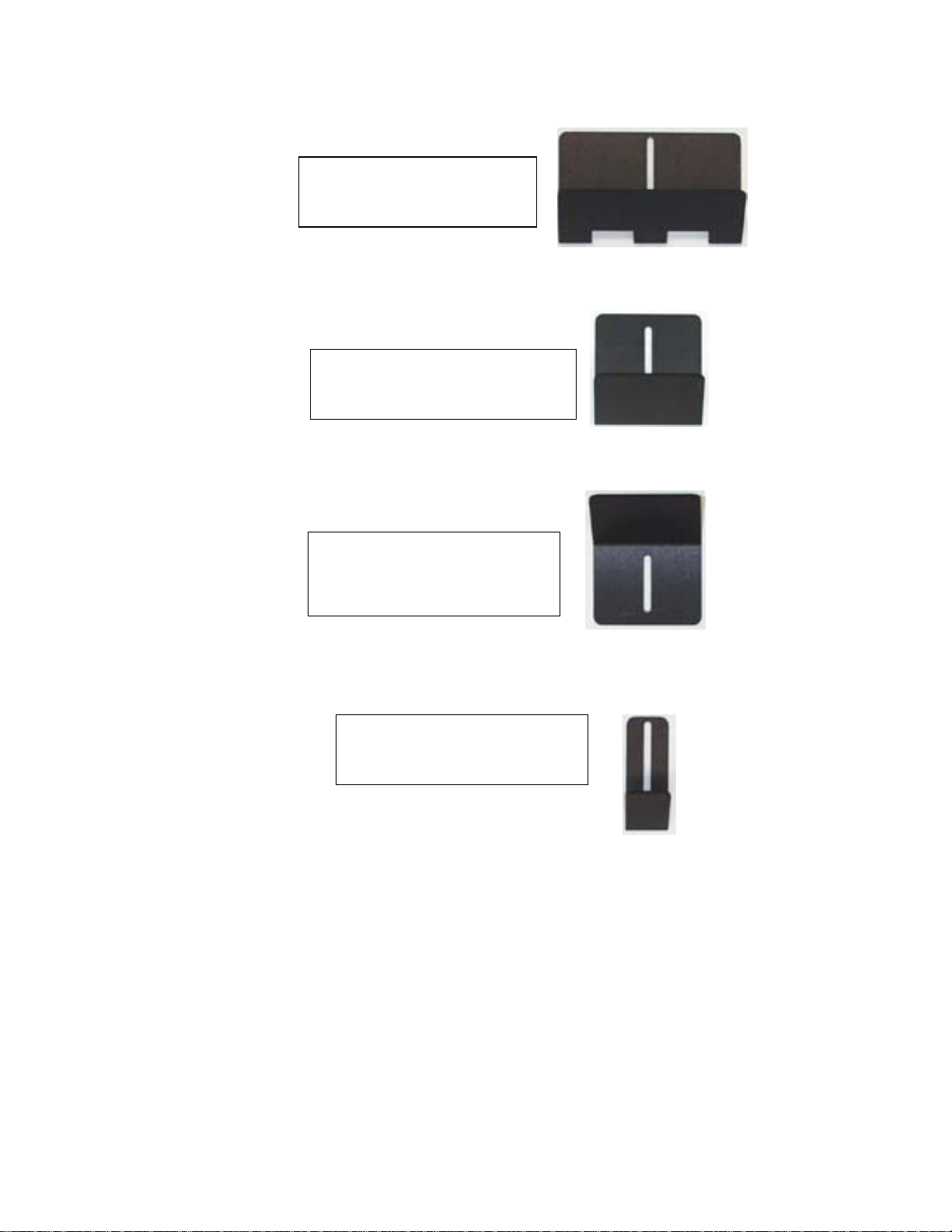
Wide feeder back wedge
Typically used for “catalog”
size material
(Fig. 6)
Standard feeder back wedge
Typically used for “letter” size
material
-8-
Forward tilt back wedge
Typically used to run flat sheets
(8-1/2 X 11) with feeder set to
run in an in-line configuration
Small feeder back wedge
Typically used for “business
card” or similar size material
(Fig.7)
(Fig.8)
(Fig.9)
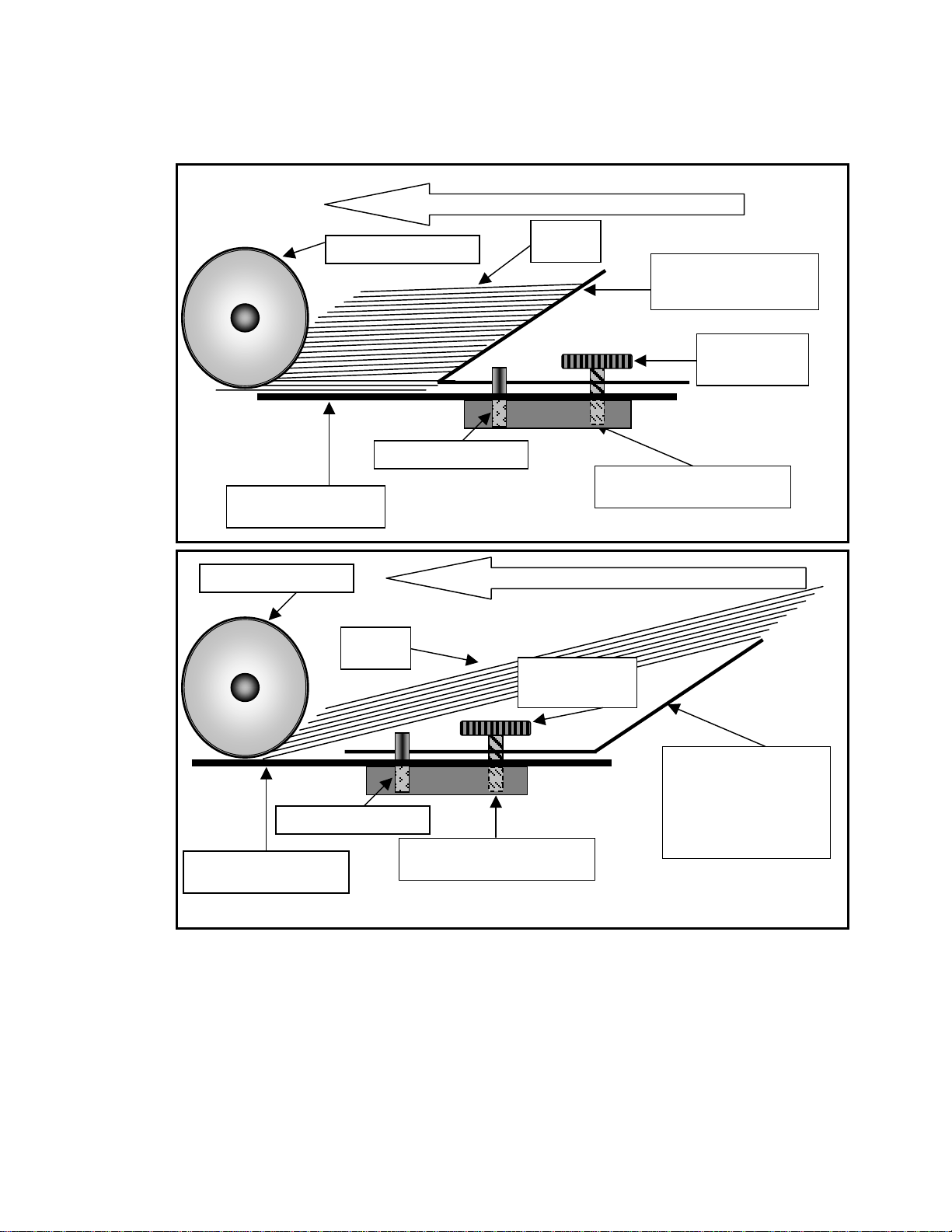
(Note: For back wedge installation orientation, see figure and , page , also see Back Wedge
adjustment for set-up, page .
-9-
Running direction of material
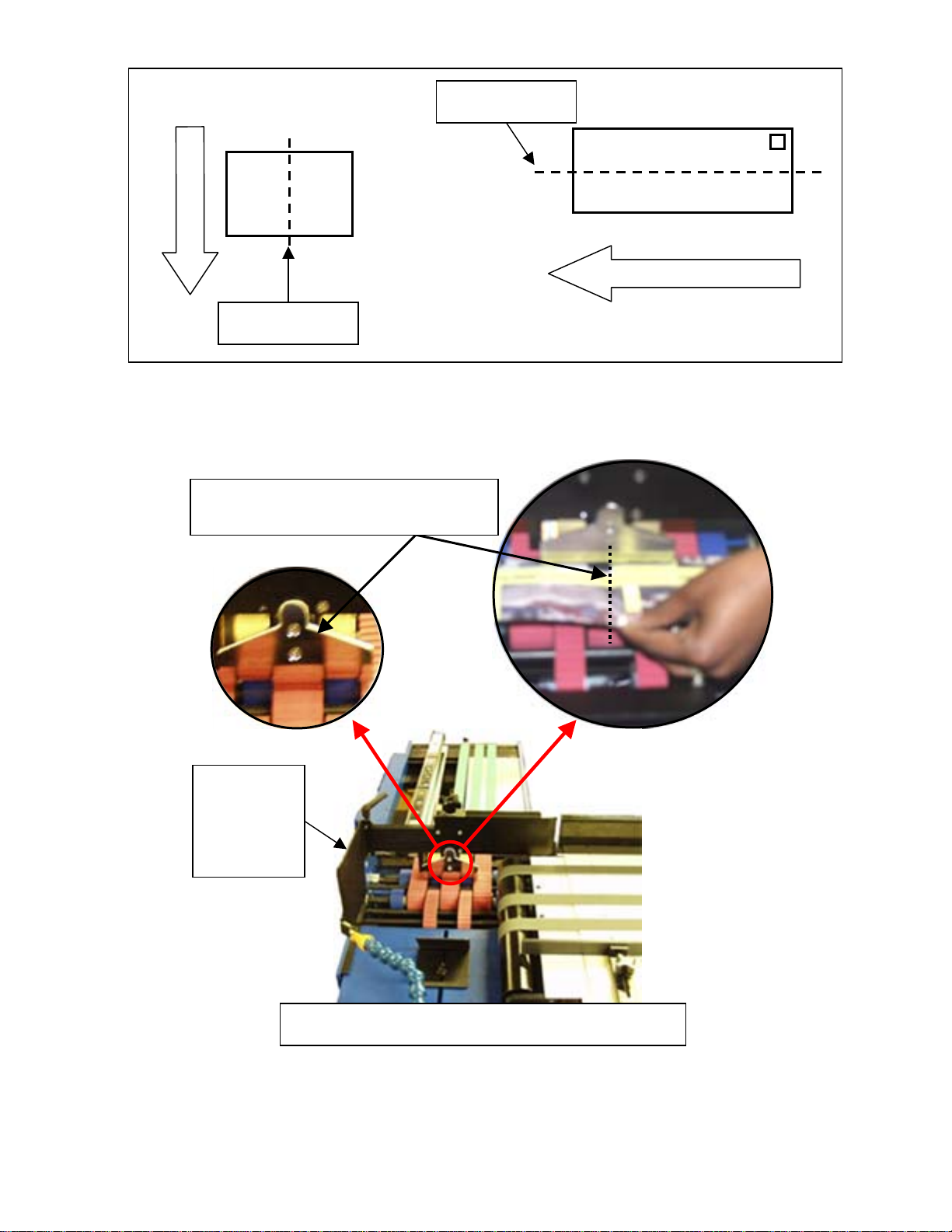
3. Fold one sample piece of the material your going to run in half from leading edge to trailing edge, forming a
center crease.
Agitator Feed plate Back wedge slide block
Running direction of material
Front Tilt back
angle, back wedge
(Runs 8-1/2X11, in-
line only feeding
paper long-wise)
Agitator Feed plate
Thumb Lock
Screw
Back wedge slide block
(Fig. 10)
(Fig. 11)
Paper
S
p
earator Wheels Standard back
angle, back wedge
Thumb Lock
Screw
A
li
g
nment Roll Pin
S
p
earator Wheels
Paper
A
li
g
nment Roll Pin
-10-
Center Crease
Run Direction
4. Set the creased sample in the feeder and align the crease with the philps head screws in the center of the
stainless steel shroud of the separator wheels, see figure .
5. Loosen the front thumb lock and the adjustable ratchet handle on the side guide / guides. When running in a
right angle configuration, slid the side guide over until it just touches the material, then tighten the front
Post Card
To
John Q. Public
Run Direction
Center Crease (Fig. 12)
$
Letter
To
John Q. Public
Move the
side guide to
with in a 1/8”
from the
material
Align the center crease in the sample, to
the center screws on the feeder shroud
Feed Max-S shown set up in right angle configuration
(Fig. 13)
Este manual sirve para los siguientes modelos
1
Otros manuales de Equipos industriales de Pitney Bowes


