
Pine Technology TL-BX31 Manual de usuario

INTEL PII
User’s Guide
TABLE OF CONTENTS
1. INTRODUCTION …………………………………………………………… 1
1.1 Key Features………………………………………………………… 1
1.2 Checkl st…………..………………………………………………… 3
1.3 Stat c Electr c ty Precaut ons……………………………………….. 3
2. HARDWARE CONFIGURATION…………………………………………. 4
2.1 Ma nboard Layout………………………………………………….. 4
2.2 Install ng CPU……………………………………………………… 12
2.3 How to Set Jumper…………………………………………………. 13
2.4 Jumpers & Connectors……………………………………………… 13
2.4.1 ATX Ma nboard………………………………………….. 15
2.4.2 Baby AT Ma nbard……………………………………….. 19
2.5 Memory Conf gurat on……………………………………………… 23
3. AWARD BIOS SETUP……………………………………………………… 24
3.1 Standard CMOS Setup……………………………………………… 25
3.2 BIOS Features Setup……………………………………………….. 27
3.3 Ch pset Features Setup…………………………………………….. 30
3.4 Power Management Setup…………………………………………. 32
3.5 PNP/PCI Slot Conf gurat on……………………………………….. 34
3.6 Load Setup Defaults……………………………………………….. 36
3.7 Integrated Per pherals Setup……………………………………….. 36
3.8 User Password Setup………………………………………………. 38
3.9 IDE HDD Auto Detect on………………………………………….. 39
3.10 CPU Speed Setup…………………………………………………. 40
3.11 Save and Ex t Setup……………………………………………….. 41
3.12 Ex t w thout Sav ng………………………………………………… 41
4. DRIVER INSTALLATION…………………………………………………. 42
Append x I………………………………………………………………………. 45

INTEL PII
User’s Guide
1. INTRODUCTION
YEAR2000 COMPLIANCE
This Intel chipset mainboard is Hardware Year2000 Compliance and supports the latest Pentium
III Processor. It achieves the highest performance which based on the advanced Pentium II
Microprocessor and featuring PCI ocal Bus and Accelerated Graphics Port feature. This
mainboard offers a high degree of flexibility in configuration and is fully IBM PC/AT
compatible.
1.1 KEY FEATURES
This manual applies to different models of Intel chipset mainboard. Please refer to appropriate
section and mainboard layout according to the model no.
Model No. T -BX31 T -ZX31 T -BX21 T -ZX21
Chipset i440BX i440ZX i440BX i440ZX
Socket Slot 1
Front-Side Bus 66 / 100 MHz
Processor INTE Pentium III 450 MHz or above Processor (Please download the updated
BIOS from our website)
INTE Pentium II 233 – 450 MHz Processor
INTE Celeron / Celeron A 266 MHz or above Processor
CPU Speed Jumperless setting
oltage Regulator Built in switching voltage regulator to support 1.5V to 3.5V
Cache Built in evel 2 cache: 512KB (PII and PIII), 128KB (Celeron A)
SDRAM Support 66MHz and 100MHz (PC100) SDRAM module. Also SPD or Non SPD.
Each DIMM slot supports up to 256 MB.
168 pin DIMM
Slot
3 2 3 2
Max. System
Memory
768 MB 512 MB 768 MB 512 MB
Expansion Slots 1 x AGP 1.0 slot (1X/2X mode)
4 x PCI slots
3 x ISA slots
1 x AGP 1.0 slot (1X/2X mode)
3 x PCI slots
2 x ISA slots
On-borad I/O 2 x Ultra DMA/33 Bus Master IDE Ports (support up to 4 IDE devices and PIO
Mode 3 & 4, DMA 2 & Ultra DMA 33)
Support HD greater than 8.4GB
1 x Floppy port (up to 2.88 MB floppy)
1 x Serial ports (16550 Fast UART)
1 x Parallet port (ECP/EPP)
2 x USB ports
1 x PS/2 mouse port
1 x Infra-red port
System BIOS Award 1M or 2M Flash BIOS
Support ACPI, DMI, PnP, Green, Wake on Modem (external) features
Wake on LAN Yes -- --
Power Connector ATX ATX and AT
Sound on Board -- -- Crystal Sound (4235)
1

INTEL PII
User’s Guide
Form Factor ATX Baby AT
Model No. T -IBX3-13 T -IZX3-13 T -IBX2-13 T -IZX2-13
Chipset i440BX i440ZX I440BX i440ZX
Socket Socket 370
Front-Side Bus 66 / 100 MHz
Processor INTE Socket 370 Celeron A 300 MHz or abover Processor
CPU Speed Jumperless setting
oltage Regulator Built in switching voltage regulator to support 1.5V to 3.5V
Cache Built in evel 2 cache: 128 KB
SDRAM Support 66MHz and 100MHz (PC100) SDRAM module. Also SPD or Non SPD.
Each DIMM slot supports up to 256 MB.
168 pin DIMM
Slot
3 2 3 2
Max. System
Memory
768 MB 512 MB 768 MB 512 MB
Expansion Slots 1 x AGP 1.0 slot (1X/2X mode)
4 x PCI slots
3 x ISA slots
1 x AGP 1.0 slot (1X/2X mode)
3 x PCI slots
2 x ISA slots
On-borad I/O 2 x Ultra DMA/33 Bus Master IDE Ports (support up to 4 IDE devices and PIO
Mode 3 & 4, DMA 2 & Ultra DMA 33)
Support HD greater than 8.4GB
1 x Floppy port (up to 2.88 MB floppy)
1 x Serial ports (16550 Fast UART)
1 x Parallet port (ECP/EPP)
2 x USB ports
1 x PS/2 mouse port
1 x Infra-red port
System BIOS Award 1M or 2M Flash BIOS
Support ACPI, DMI, PnP, Green, Wake on Modem (external) features
Wake on LAN Yes -- --
Power Connector ATX ATX and AT
Sound on Board -- -- Crystal Sound (4235)
Form Factor ATX Baby AT
Crystal (4235) Sound on Board
-Compatible with Sound Blaster, Sound Blaster Pro and Windows Sound System
-Advanced MPC3-compliant input and output mixer
-Enhanced stereo full duplex operation
-Dual Type-F DMA support
-Integrated CrystalClear 3D stereo enhancement
-Industry leading Delta-sigma data converters (90 dB DAC)
-Internal default PnP resources
-CS9236 wavetable interface
-CS4610 audio accelerator interface
2

INTEL PII
User’s Guide
Yamaha 128 oice SoftSynth Software
The Yamaha Software Synthesizer S-YXG50 makes it possible for computers with MMX
technology to playback MIDI data with higher sound quality than ever. Even to CD quality level
without using hardware. As it also supports DirectSound as well, you can also enjoy the sound
effects from the latest DirectSound multimedia games.
Yamaha XG Studio Mixer
This versatile playback software allows you to play MIDI files in tandem with animation, video
and still images to create a wonderful multimedia effect. In addition, it allows you to change all
aspects of the MIDI files from its tempo, volume, source, special effects, voice and individual
instruments; so that you are in complete control of the sound effects.
1.2 CHECKLIST
Mainboard x 1
User’s Guide x 1
CD Driver x 1
FDD & HDD Cable Pack (Sound connector card & ATX form card for Baby AT mainboard
only)
1.3 STATIC ELECTRICITY PRECAUTIONS
Static electricity can easily damage your mainboard. Following procedures can help you to
protect your mainboard from electrostatic discharge :
- Keep the mainboard and other system components in their anti-static packaging until you are
ready to install them.
- Ground yourself before removing any system component from its protective anti-static
packaging. A grounded surface within easy reach is the expansion slot covers at the rear of the
system case or any other unpainted portion of the system chassis.
- Frequently ground yourself to discharge any static electric charge that may build up in your
body while working on installation and/or configuration.
- Handle the mainboard by its edges or by the mounting bracket to avoid touching its
components.
3

INTEL PII
User’s Guide
2. HARDWARE CONFIGURATION
Before you install the mainboard into the system chassis, you may find it convenient to
first configure the mainboard’s hardware. This chapter describes how to set jumpers and
install memory modules, and where to attach components.
**You can find the Model No. label on the mainboard.**
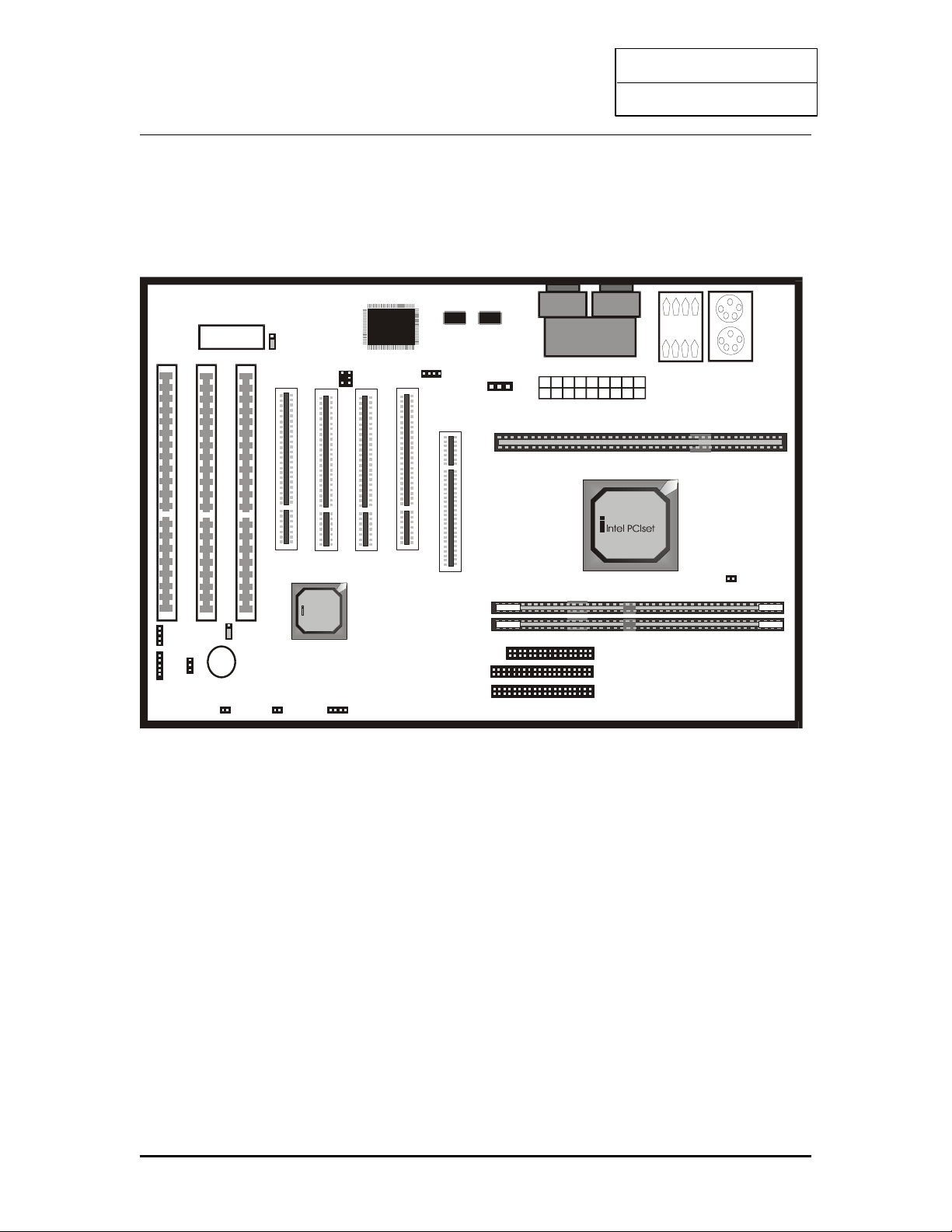
2.1 MAINBOARD LAYOUT
Model No: T -BX31
USB 0 /1
C O M1 C O M2
LPT1
Inte l PCIset
RTC
1
Speaker
1
PWR+
KEY OCK
P1
J23
P6
RESET Power Button
P2
HD- ED
P5
JP11
“Normal”
DIMM0
DIMM1
J26 ATX POWER CONNECTOR
A G P S L O T
SLO T 1
LO WER:
PS2
KEYBO ARD
UPPER:
PS2 MO USE
J7
J8
IDE1
IDE2
1
1
Floppy J1
1
P9
BIOS J25
1
1 2
J27
J21
P4
+
1
P11
DIMM2
AT On board Connector Description
PS/2 Mouse USB Port 1 Printer Port
4

INTEL PII
User’s Guide
PS/2 Keyboard USB Port 2 Serial Port 1 / 2
5
INTEL PII
User’s Guide
Model No: T -ZX31
USB 0/1
C O M1 C O M2
LPT1
Inte l PC Iset
RTC
1
Speaker
1
PWR+
KEY OCK
P1
J23
P6
RESET Power Button
P2
HD- ED
P5
JP11
“Normal”
DIMM0
DIMM1
J26 ATX POWER CONNECTOR
A G P S L O T
SLO T 1
LO WER:
PS2
KEYBO ARD
UPPER:
PS2 MO USE
J7
J8
IDE1
IDE2
1
1
Floppy J1
1
P9
BIOS J 25
1
1 2
J27
J21
P4
+
1
P11
6

INTEL PII
User’s Guide
Model No.: T -BX21
Inte l PC Ise t
RTC
1
Speaker
1
P1
J23
P6
P2
HD- ED
P5 JP11
“Normal”
AGP SLOT
SLOT 1
1
BIOS
J25
1
2 1
J27
P4
+
J32
J31
IDE1IDE2
1 1
J30
Jp13
Floppy
1
AT -From card
J28
P11
+ +
7

INTEL PII
User’s Guide
Model No.: T -ZX21
Inte l PC Ise t
RTC
1
Speaker
1
P1
J23
P6
P2
HD- ED
P5 JP11
“Normal”
AGP SLOT
SLOT 1
1
BIOS
J25
1
2 1
J27
P4
+
J32
J31
IDE1IDE2
1 1
J30
Jp13
Floppy
1
AT -From card
J28
P11
+ +
8

INTEL PII
User’s Guide
Model No.: T -IBX3-13
USB 0/1
C O M1 C O M 2
LPT1
Intel PC Iset
RTC
1
Speaker
1
PWR+
KEY OCK
P1
J23
P6
RESET Power Button
P2
HD- ED
P5
JP11
“Normal”
DIMM0
DIMM1
J26 ATX POWER CONNECTOR
AG P SLO T
LOWER:
PS2
KEYBO ARD
UPPER:
PS2 M O USE
J7
J8
IDE1
IDE2
1
1
Floppy J1
1
P9
BIOS J25
1
1 2
J27
J21
P4
+
1
SLO T 1
1
DIMM2
P11
9
Este manual sirve para los siguientes modelos
3
Tabla de contenidos
Otros manuales de Placa madre de Pine Technology


Manuales populares de Placa madre de otras marcas


Telit Wireless Solutions
Telit Wireless Solutions SL869-3DR Manual de usuario

Gigabyte
Gigabyte GA-9IVDT Manual de usuario

Texas Instruments
Texas Instruments ADS8372EVM Manual de usuario

Commell
Commell MS-C73 Manual de usuario

IBT Technologies
IBT Technologies MB860 Manual de usuario

Nvidia
Nvidia TEGRA DG-04927-001_V01 Manual de usuario


