Piega PS 1 Manual de usuario

PIEGA User Manual
PIEGA PS 1 / PS 2
Active-Subwoofer

«Music.That‘s really the only important issue
when it comes to loudspeakers...»
In our view, the superior loudspeaker is the one that does not interfere. One that
adds no sound of its own.That accurately and naturally conveys what was played
in the concert or recording studio. Since 1986 we have been working to perfect
this ideal – with a pioneering spirit, inventiveness and exacting craftsmanship. You
will now be able to hear for yourself how far we have succeeded.
By purchasing a loudspeaker from PIEGA you have expressed your trust in our
company, for which we thank you very much. At the same time we assure you
that you have purchased a product that is based on twenty years of R & D, and
which in terms of its design represents the state of the art. We are sure that you
will gain much listening enjoyment from your new Piega loudspeaker products.
Although using the loudspeakers is very straightforward, we recommend that
you read the contents of this user manual carefully. It will explain how to properly
connect up your new PIEGA loudspeaker products and install them for optimum
results. It also provides you with some useful information that will increase your
understanding of loudspeakers. But don’t worry. Even apparently complicated
details are explained very simply. On the last page of these instructions you will
find our warranty conditions. Please also read these carefully just in case.
We wish you an enjoyable read and above all much listening enjoyment with your
new PIEGA loudspeakers...!
PIEGA PS 1 / PS 2
2User Manual

Contents
This user manual describes how to connect the PIEGA active subwoofer to different loudspeaker con-
figurations and the appropriate setting options for optimum operation in stereo and home cinema mode. It
also contains instructions for unpacking and setting up the subwoofer.
Precautions 4
Unpacking 5
Positioning 6
Terminal Area 7
Setup Procedure 8
Setting the Sound Characteristics 11
Daily Use 12
Warranty 13
User Manual PIEGA PS 1 / PS 2 3

Precautions
Please read this user manual carefully and pay special attention to the following precautions and warnings. In
your own interest, we advise you to strictly observe the following procedure when installing your new PIEGA
subwoofer.
Safety Precautions / Warnings:
The PIEGA subwoofers have been designed for use
with PIEGA loudspeaker products. Nevertheless, the
subwoofer can also be operated with the loud-
speakers of other suppliers.
Ensure particularly that the subwoofer is installed
and connected in accordance with the instructions of
this user manual.
The PS 1 / PS 2 was only designed for use in dry
residential environments within a temperature range
of 10...40°C
To reduce the risk of electronic shock, do not remove
cover (or back). No user-serviceable parts inside.
Refer servicing to qualified service personnel.
To completely disconnect this product from the
mains, disconnect the plug from the wall socket
outlet. When setting up this product, make sure that
the AC outlet you are using is easily accessible.
A note about Recycling:
This product packaging materials are recyclable and
can be reused. Please dispose of any materials in
accordance with the local recycling regulations.
When discarding the unit, comply with local rules or
regulations.
4PIEGA PS 1 / PS 2 User Manual

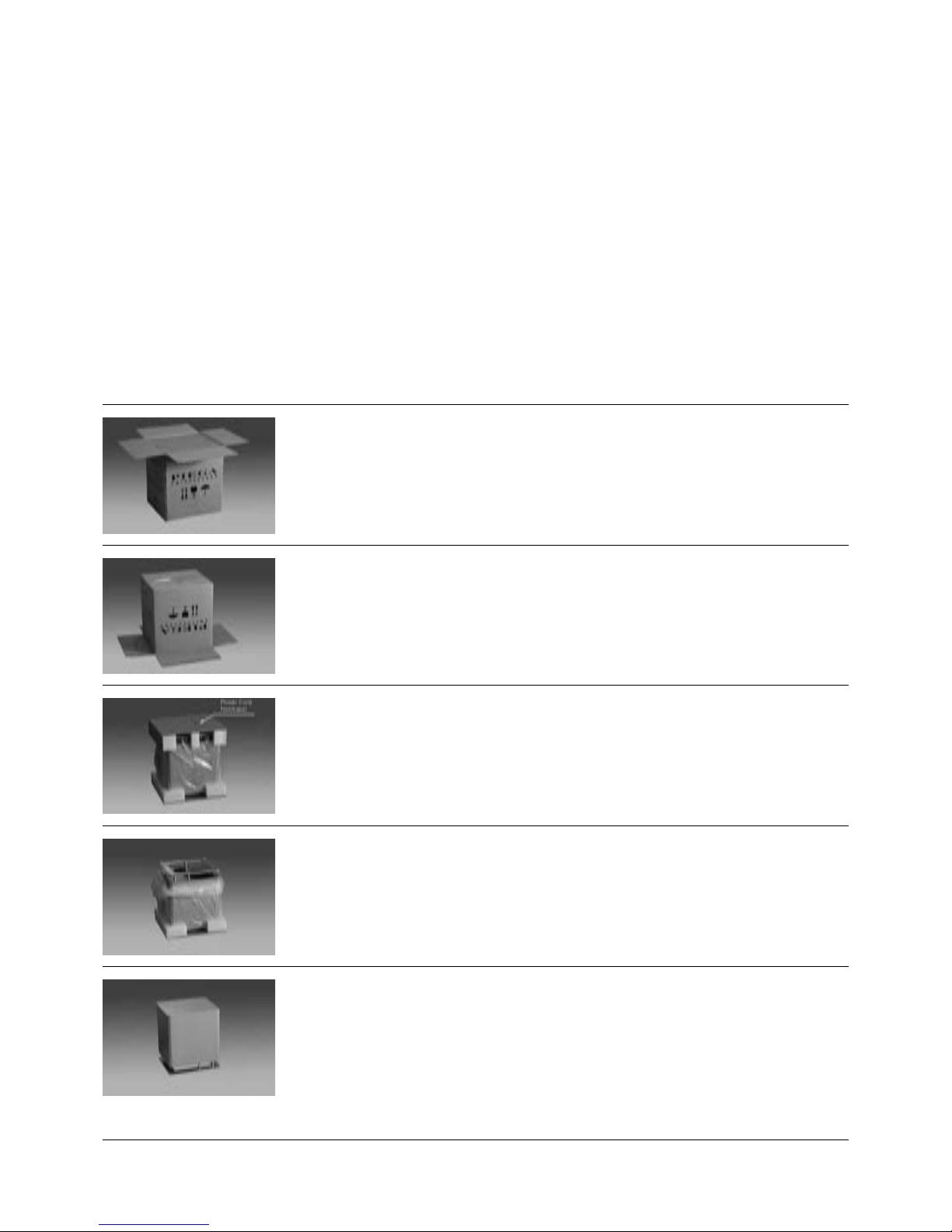
Special care was taken in the packaging of your subwoofer in order to ensure that this new PIEGA quality
product reaches your living room safely and undamaged. In order to avoid any damage when unpacking the
loudspeaker, follow closely the instructions below.
Procedure:
Before unpacking, remove any jewelry such as
watches, rings, bracelets etc. in order to avoid
scratching the aluminum
1 Open the carton as shown in the figure, leave the
protective cushion
2 Carefully invert the subwoofer 180° with the carton
open and stand it on the protective cushion so that
the carton can be lifted up and off the loudspeaker
3 Remove the upper protective cushion and the cable
which is packed in the protective cushion
4 Remove the protective foil and check that the
subwoofer has not been damaged in transit
5 Then place the subwoofer in the required position
Unpacking
User Manual PIEGA PS 1 / PS 2 5

Positioning
The subwoofer can be installed flexibly and easily. Due to its relatively small size, it can be integrated in any
unit and can be positioned as required virtually anywhere in the room. However, to ensure the most natural
sound, the subwoofer should be placed on the floor near the two front loudspeakers.
Ideal setup
For both surround and stereo mode, position the
subwoofer as close to the two front loudspeakers as
possible.
The connecting terminal of the PS 1 / PS 2 should
face the wall.
Do not in any way prevent the free movement of the
subwoofers.
To avoid any possible accident, do not place any ob-
jects such as vases etc. on your PS 1 / PS 2.
PIEGA PS 1 / PS 2
6User Manual

Its large range of connection options offers the subwoofer a wide number of configurations both for stereo
and for surround mode. Refer to the appropriate user manual supplied for specific information on the
loudspeakers used and components of your stereo or surround system.
Terminal area
Note:
The connection terminal of the subwoofer allows a
wide number of possible configuration options for
stereo and surround mode
Depending on the equipment in use, select the
appropriate configuration (see the following pages)
The LFE/IN, INPUT, OUTPUT terminals for connect-
ing to the AV receiver or the stereo amplifier require
connection cables with cinch plugs
The HIGH LEVEL INPUT terminals for connecting
amplified music signals can be connected to loud-
speaker cables with or without banana plugs
Connecting the supply cable:
Check whether the default switch position (240/
120 V) of your subwoofer corresponds to the
standard supply voltage in your country
Plug the supply cable provided with the PS 1 / PS 2
into the appropriate socket
Do not switch on the subwoofer (POWER ON) until
all cable connections have been made
240V
240V ~ 50 Hz
Fuse type:T 1AL/250V
120V ~ 50Hz
Fuse type:T 2AL/250V
MAX 180WATTS
POWERED SUBWOOFER
WARNING: SHOCK HAZARD DO NOT OPEN
AVIS: RISQUE DE CHOC ELECTRIQUE NE PAS OUVRIR
HI LEVEL IN
120V
ON
OFF
R
ON AUTOMATIC
POWER
L R
L R
LFE LINE IN LINE OUT
L
7
PIEGA PS 1 / PS 2User Manual

Setup Procedure
This connection configuration for 5.1 surround applications uses an AV receiver with a separate subwoofer
output. Since the AV receiver handles the bass management in this configuration, the settings for each loud-
speaker can be adjusted individually via the menu. Note: in this case, the LOW PASS setting of the subwoofer
has no effect. Refer to the user manual of your AV receiver for information on the individual setup controls.
Dolby Digital System – Surround-System with AV-Receiver
Connection:
Connect the subwoofer cable to the terminal marked
SUBWOOFER (or similar) on the AV receiver
Connect the subwoofer cable to the terminal on the
subwoofer marked LFE
Please use a suitable connection cable with cinch
plugs (not supplied with the PS 1 / PS 2)
Connect the front, rear and center loudspeakers us-
ing the loudspeaker terminals provided on your AV
receiver
Subwoofer
L
R
Front R Rear R Center Rear L Front L
Amplifier
Front
Speaker R Front
Speaker L
Center
Speaker
Rear
Speaker R Rear
Speaker L
L R
L R
LFE LINE IN LINE OUT
8PIEGA PS 1 / PS 2 User Manual

Setup Procedure
The power amplifiers of some manufacturers feature separate MAIN IN and PRE OUT terminals, allowing the
preamplified signal to reach the subwoofer and to be looped back again filtered. In this way the loudspeakers
are relieved in the deep range, thus gaining in precision and sound characteristics. Refer to the appropriate
manual for information about operation and connection options for your power amplifier.
Stereo System and power amplifier with separate pre- and power sections
Connection:
Connect the subwoofer cable on the amplifier at the
PRE OUT (or similar) terminal and at the LINE IN
Connect the PS 1 / PS 2 on the amplifier at the MAIN
IN (or similar) terminal and at the LINE OUT terminal
on the subwoofer
For this setup, use two connection cables with cinch
plugs (not supplied)
MAIN IN PRE OUT
L
R
Front R Front L
Amplifier
Front
Speaker R Front
Speaker L
L R
L R
LINE IN LINE OUT
User Manual PIEGA PS 1 / PS 2 9

Commonly used configuration in stereo mode, loudspeakers to be connected parallel to the subwoofer (not
recommended for Surround mode because of overcharge of small satellite speakers). In this configuration the
PS 1 / PS 2 will be connected to the amplifier. Refer to the appropriate manual for information about operation
and connection options for your stereo amplifier.
Stereo System with power amplifier
Connection:
Connect the subwoofer on the amplifier at the
SPEAKER (or similar) terminal
Connect the loudspeakers (parallel) to the SPEAKER
(or similar) terminal
For this use equivalent loudspeaker cables (not sup-
plied)
Subwoofer
L
R
Amplifier
HIGH LEVEL INPUT
R
R
L
L
Front
Speaker R Front
Speaker L
Front R Rear R Center Rear L Front L
Setup Procedure
10 PIEGA PS 1 / PS 2 User Manual
Otros manuales para PS 1
1
Este manual sirve para los siguientes modelos
1
Tabla de contenidos
Otros manuales de Subwoofer de Piega