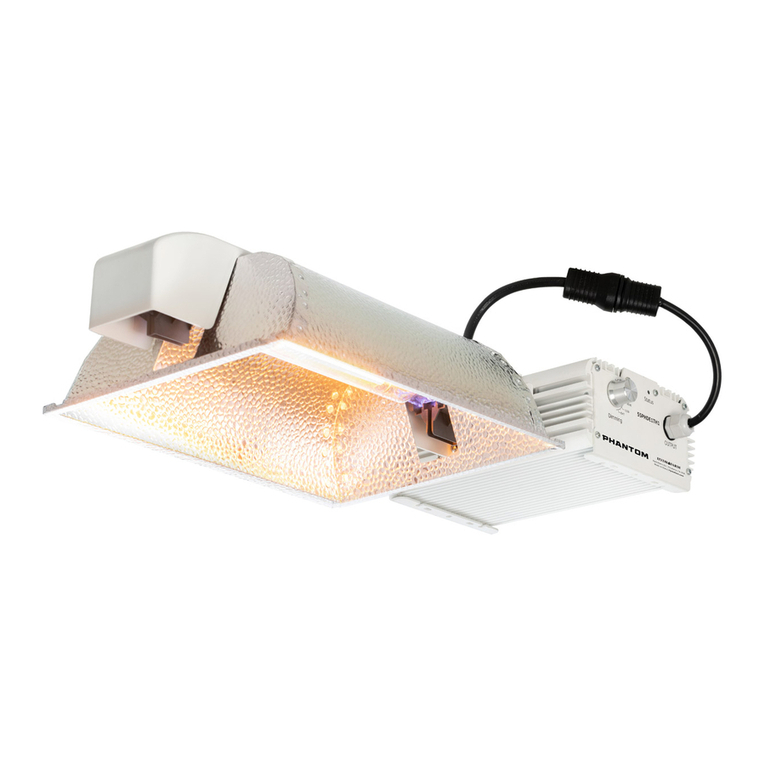
Phantom 60 Series Manual de usuario

ENCLOSED SYSTEM
USER MANUAL
60 SERIES DOUBLE ENDED LIGHTING SYSTEMS ALL MODELS
OPEN SYSTEM
INSTRUCTIONS EN FRANÇAIS ...............12–21
INSTRUCCIONES EN ESPAÑOL...............22–31

We recommend wearing clean gloves to prevent geng the lamp dirty before use. Carefully remove from
packaging and follow the guidelines below.
PLEASE NOTE: Do not force the lamp holders closed. This could cause damage to both the lamp and lamp
holders. Do not handle lamp with bare hands. Always wear surgical or cloth gloves whenever possible
when handling lamp to minimize ngerprints and oils le on the lamp. If the lamp needs cleaning aer
installaon, use a so dry coon cloth to wipe o ngerprints/skin oils.
1. Open both lamp holders by sliding them outwards and away from the center of the xture, as shown
in PHOTO A.
Do not apply excessive force when installing lamp.
IMPORTANT: The lamp must be oriented so that the high voltage wire end/lead (the end near the
geer, which is the small square tab aached to the wire loop) is installed in the socket end closest
to the ballast as seen in DIAGRAM A.
NOTE: Lamp shown below is for general reference only; actual lamp (if included) may vary.
Anode
(closest to ballast - High Voltage)
Getter
(absorbs lamp impurities)
Burner Filament
(always position up)
Triple Capacitor
Cathode
(Neutral)
Arc Tube Quartz Outer Jacket
DIAGRAM A (side view)
2. Also be sure that the lamp is oriented so that the burner lament (the long wire that runs along
the full length of the arc tube) is posioned upward, facing the top inside surface of the reector.
OVERVIEW
Thank you for purchasing the Phantom Double-Ended Lighng System. Setup is the same for each
system: Open and Enclosed.
INITIAL SETUP AND INSTALLATION CONSIDERATIONS
These systems based on the 60 Series ballasts are hard-wired, all-in-one systems. Carefully remove
packaging material and locate power cord and other components. The xture is designed to hang
from eyebolts. One is pre-installed on armature and the other (in a component bag) is designed to be
screwed into threaded hole as shown.
INSTALLING THE LAMP (IF INCLUDED)
1. Make sure your unit is
unplugged.
2. Locate eye bolt in
component bag and screw
securely into threaded hole
on top of ballast enclosure.
Hole
2

3. Ensure that the wire ends/leads are not
bent or frayed, as this will prevent proper
installaon. Begin by installing the double-
ended lamp within the lamp holders shown
in PHOTO A.
4. The wire ends/leads must be fully seated
as shown (PHOTO B) before sliding each
socket end closed.
5. Aer sliding the socket ends closed, be
certain that there is no gap between the
edge of the sliding secon and the part it
meets at the end of the slide path. Once
lamp is posioned correctly, slide the lamp
holder inward toward the center of the
lamp to secure and lock the lamp in place
as shown in PHOTO C.
INSTALLING THE LAMP
, continued
WARNING – POSSIBLE RISK OF INJURY TO EYES AND SKIN
• Hazardous opcal radiaon may be emied from the light source. Do not stare at operang
lamp. May be harmful to the eyes.
• UV may be emied from the light source. Eye or skin irritaon may result from exposure.
Use appropriate shielding.
• IR may be emied from the light source. Do not stare at operang lamp.
WARNING – WHEN USING METAL HALIDE DOUBLE ENDED LAMPS, 1000W
(100%) OPERATION ONLY. DO NOT DIM/BOOST! USE ONLY OPEN RATED LAMPS
WITH DOUBLE JACKET.
WARNING: FAILURE TO FOLLOW GUIDELINES COULD RESULT IN ELECTRICAL SHOCK.
Do not touch, move, spray, or clean your light xture when it is plugged in. Allow it to cool down before
handling. Recommended mounng clearance for your xture is 8"–12" on all sides. Do not mount
directly to any surface. Make sure to disconnect the power when changing the lamp.
PHOTO B
PHOTO A
PHOTO C
3

All 60 Series Phantom Ballasts come standard with two RJ control ports on the back enclosure surface
which facilitate communicaon between your Autopilot PX lighng controller or other commercial
greenhouse environmental control system. Use with the PX is oponal—the 60 Series ballasts also
operates with manual control knob when not connected to a PX.
BALLAST OVERVIEW
Two RJ Ports to
integrate with PX
Lighng Controller
Manual control
knob allows for
use without a
lighng controller
HANGING THE FIXTURE
1. Idenfy a suitable locaon for the ballast with sucient cooling and away from any heat source.
2. Plug the power cord into the ballast but DO NOT PLUG SYSTEM IN YET.
3. Determine whether you will be using RJ control method or on board control. If RJ control, proceed
to Ballast overview and Notes on Variable Control and refer to Controller instrucons before
hanging and energizing.
4. Plug the power cord into the power source (electrical outlet).
5. Once the lamp has red, set your desired waage output level. Please note that the ballast
decreases or increases output gradually to protect the lamp, so you might not see an instant
increase upon changing your output percentage.
6. For proper lamp break-in, we recommend that you run the ballast and new lamp at 100% power
for at least 12 straight hours aer inial startup. This will improve lamp life and performance.
LED Status
indicator
4

WARNINGS
• Do not connect any other device to the Control Port. Any attempt to connect it to an unrelated
device or control it with an incompatible controller may result in damage to the ballast and will
void the warranty. Contact Hydrofarm or PARsource for integration with commercial greenhouse
environmental control systems.
• Use this ballast in greenhouses or indoor applications only. Position it in an area away from
excessive heat or contact with liquids.
• This ballast does not rely on the luminaire enclosure for protection against accidental contact
with live parts.
• Disconnect the ballast from the power supply before performing any maintenance, lamp changes,
or other modifications.
• Contact the place of purchase for service if the ballast does not work after confirming the power
connection, output connection, and lamp operation.
• Opening the ballast will void the warranty.
• This product may cause interference to radio equipment and should not be installed near
maritime safety communications equipment or other critical navigation or communication
equipment operating between 0.45–30 MHz.
• If using with a generator, line conditioning equipment must be used to control input voltage in
order to avoid damage to the ballasts. Contact us for more information.
BALLAST OVERVIEW
5

NOTES ON VARIABLE OUTPUT CONTROL
• When RJ cables are connected to the ballast’s control ports, turn the knob to “PX”. To disconnect
the ballast from the controller, the knob should be returned to the variable output button before
removing the RJ cables from the ballast, otherwise, the ballast will be shut off.
• This ballast has built-in hot-restrike programming to protect the lamp and ballast in the event of
the ballast turning off unexpectedly. The ballast will not attempt to restart a hot lamp for at least
15 minutes. If your lamp fails to start immediately, DO NOT cycle the power on and off. This can
damage the lamp and ballast. If after 30 minutes your lamp is still not lit, shut off power to the
ballast, and reconnect. This will begin the startup sequence again
DEFINITION OF TERMS
Main Voltage – Rated input voltage range for the ballast.
Operang Voltage Range – The acceptable operang range for input voltage to the ballast. Deviaons
from the rated numbers may result in decreased ballast performance and addional case generated
heat.
Max Input Power – Maximum possible waage draw of the ballast.
Amperage – Input current or draw.
Power Factor – A measurement of how eecvely the ballast converts electrical current to useful
power output, in this case, output to the lamp. Power factor is measured between 0-1; the closer you
get to 1, the more eecve the circuit is said to be. The ballast’s power factor is greater than .99.
Ignitor Voltage – Ballast output during ignion sequence.
THD (Total Harmonic Distoron) – A measurement of all harmonics present in a circuit. The higher
the number, the more stress is applied to internal parts, the lamp, and the power grid. Generally, a
number below 10% is considered desirable in an electronic ballast applicaon.
CF (Crest Factor) – A measurement of how “clean” the ballast power output wave is. A perfectly clean
output sine wave would have a CF of 1.414. Given that some harmonics must exist in an electrical
system, the crest factor must always be higher than 1.414. Therefore, the closer the ballast is to a CF of
1.414, the easier it is on the lamp.
ta (Ambient Temperature) – Maximum rated ambient temperature for the ballast area. Excessive
ambient temperature can result in ballast failure, safety shutdown, or lamp failure.
tc (Case Temperature) – Maximum temperature that the case of the ballast should reach. If the case
temperature exceeds this number, the ballast may be malfunconing or the ambient temperature may
exceed the rang.
INSTRUCTIONS
6

PHANTOM 60 SERIES BALLAST ELECTRICAL SPECIFICATIONS
Model Watts Main
Voltage
Operating
Voltage
Range
Max
Input
Power
Output Power Settings Power
Factor
Ignitor
Voltage THD CF ta tc
PHB6015 1000W 208–240V 185–265V 1236W 600W-660W-750W-825W-
1000W-1150W > 0.97 3–5 kV < 8% 1.414–1.6 40°C/104°F 80°C/176°F
PHB6024 1000W 277–400V 249-440V 1236W 600W-660W-750W-825W-
1000W-1150W > 0.97 3–5 kV < 8% 1.414–1.6 40°C/104°F 80°C/176°F
PHB6030 1000W 480V 432-528V 1226W 600W-660W-750W-825W-
1000W-1150W > 0.97 3–5 kV < 8% 1.414–1.6 40°C/104°F 80°C/176°F
ELECTRICAL SPECIFICATIONS
Model
BALLAST INPUT AMPERAGE REFERENCE
PHB6015
Irated 208/240V 1150W 208/240V 1000W 208/240V 825W 208/240V 750W 208/240V 660W 208/240V 600W 208/240V
6.1A/5.3A 6.1A/5.3A 5.4A/4.7A 4.5A/3.9A 4.1A/3.6A 3.7A/3.2A 3.3A/2.9A
PHB6024
Irated 277/400V 1150W 277/400V 1000W 277/400V 825W 277/400V 750W 277/400V 660W 277/400V 600W 277/400V
4.8A/3.3A 4.8A/3.3A 4.1A/2.8A 3.4A/2.4A 3.1A/2.2A 2.8A/2.0A 2.5A/1.8A
PHB6030
Irated 480V 1150W 480V 1000W 480V 825W 480V 750W 480V 660W 480V 600W 480V
2.8A 2.8A 2.4A 2.0A 1.8A 1.6A 1.5A
• Microprocessor Control
• LED Status Indicator
• Open Circuit Protection
• Open Circuit Indicator
• Short Circuit Protection
• Short Circuit Indicator
• Overtemperature Protection
• Overtemperature Indicator
• End-of-Lamp-Life Sensor
• End-of-Lamp-Life Indicator
• Over/Undervoltage Protection
• Over/Undervoltage Indicator
• Patented Ignition Control
• RJ12 Port to Integrate with PX Lighting
Controller
• Auto-restrike Protection
• Internal EMI Suppression
• 18/3 AWG Power Cord
• Vent Plug
PHANTOM 60 SERIES BALLAST FEATURES
7

1. Environmental Controllers
• When setting restrike delays with your environmental controller, it is best to set a restrike delay
at 20 minutes or longer to prevent constant restrikes throughout the day.
• When installing your controller, it is best to program the controller for a staggered start with 40
luminaires or fewer on each start.
• It is best to use special HID relays and high inrush circuit breakers to ensure proper performance.
• Lighting sub-panels should have a fan installed to prevent high heat of the sub-panel and
optimum performance.
2. Autopilot PX Lighng Controller
The Autopilot PX Lighng Controller is designed to work with the Phantom Commercial DE Electronic
Ballast. Follow the PX Controller instrucons for proper operaon and to avoid ballast damage. Typical
setup for the PX Controller is shown below.
WORKING WITH OTHER EQUIPMENT
Controls
up to
500 Ballasts
per Zone
4-100
104-200
204-300
304-400404-500
504-600
604-700
704-800
804-900904-1000
8

PROPER OPERATING ENVIRONMENT
• Always provide a well-ventilated environment where ambient temperatures do not exceed
40°C (104°F) regardless of whether the ballasts are in operation or off. Excessive temperatures
can inhibit performance and may cause damage or shorten the life of the ballasts and void the
warranty.
• Do not run or store lights in the greenhouse unless proper environmental cooling systems are in
operation. Greenhouses that are “shut down” can record excessively high temperatures resulting
in premature equipment failure.
• When calculating cooling needs for your greenhouse, take into consideration the excessive heat
that can be shed by HID lighting.
• This ballast is intended for indoor or greenhouse use only. Do not run lights where water will
come in direct contact with the ballast or lamp.
Replacing Lamps
It is recommended to replace a nonworking lamp immediately. Failure to do so could damage the
ballast or components over me.
Never remove a lamp when a ballast is receiving power. Never have a powered ballast without a lamp
inserted in the socket. This can be both dangerous and harmful to the ballast. Electronic ballasts may
shut o if this occurs.
Lamp Replacement Steps
• Disconnect power to the ballast.
• Make sure that the lamp is cool to prevent burns.
• Remove and replace the suspected bad lamp with a known working lamp.
• Make sure the lamp is securely installed into the lamp holders to ensure proper performance.
Failure to properly install the lamp can reduce performance and can cause lamp and ballast
failures.
• Power the ballast. The lamp should immediately start. If it does not, allow 3 minutes for the
ballast to attempt to re-strike the lamp. Some lamps may require a burn-in period of 12 hours to
ensure proper performance and consistent starting.
• If the lamp does not ignite, check the troubleshooting section or consult a PARsource/Hydrofarm
representative.
Tracking Performance
It is best to map out the lights by locaon to track any maintenance or replacement data. Consult
PARsource/Hydrofarm for examples of product mapping.
TIPS
• The lamp may require 10–30 minutes cooling time before restarting.
• After you plug the reflector in, the lamp may require several minutes to reach its full brightness. In the
event of a momentary power interruption, the lamp will not restart immediately.
• Some variation in the color of light emitted by the lamp is not unusual, especially in the first 100 hours
of operation.
• Never pull the cord to unplug the reflector, pull the plug only.
• Avoid scratching the lamp, subjecting it to undue pressure, or getting it wet when it is hot; these
actions may cause the lamp to break.
• In the event of lamp breakage, immediately unplug the reflector to prevent exposure to ultraviolet
energy, which may be harmful to eyes and skin.
• Keep room temperature below 95°F, with adequate air circulation by fan in the growing area.
• The DE lamp produces very high-intensity light and was originally designed for commercial
growing operations. Please take care to consider proximity to plants when installing your fixture.
GENERAL CARE & MAINTENANCE
9

TROUBLESHOOTING
General Informaon
DO NOT open the ballast’s chamber. Should a failure occur, please contact your distributor or
PARsource/Hydrofarm for a replacement or repair on any products with an acve warranty.
LED Indicators
This ballast comes with smart LED indicators on the ballast that can help you with diagnosis. The
ballast must be powered for the indicators to work.
Electronic ballasts come with safety shut-os. A non-working ballast may be in the shut-o mode. To
reset the shut-o, turn o the power to the ballast for a minimum of 15 minutes. Restart the ballast.
If the ballast does not start, review the basic diagnosis steps or consult with a PARSource/Hydrofarm
representave.
BASIC DIAGNOSIS STEPS
Follow these steps to idenfy whether the issue is with the lamp or the ballast.
• Turn on the lights.
• Idenfy which lights are not on (the locaons should be mapped).
• Make sure there is power to the ballast (you can check this with a mulmeter at the receptacle).
• Is the circuit live?
• Is the ballast plugged in or properly wired?
• Make sure ballast and reector cords are securely connected.
• Make sure lamps are securely installed into the lamp holders.
• Cut power to the ballast.
• Remove lamp and replace with a known working lamp.
• Repower the ballast.
If lamp ignites, then the original lamp is bad. If the lamp does not work, then replace the ballast.
NOTE: When you repower the ballasts, they may not restrike immediately. Wait up to 15 minutes
to make sure the lamps have had enought me to restrike.
For technical support, please contact Support@Hydrofarm.com.
10
Tabla de contenidos
Idiomas:
Otros manuales de Equipo de iluminación de Phantom
Manuales populares de Equipo de iluminación de otras marcas

Qazqa
Qazqa Suplux SL 3 Black 103062 Manual de usuario

Commercial Electric
Commercial Electric 54568141 Manual de usuario

CREE LIGHTING
CREE LIGHTING 304 Series Manual de usuario

Goobay
Goobay 49867 Manual de usuario

ECOMAN ITALIA
ECOMAN ITALIA LED T8 Manual de usuario

Alkalite
Alkalite Krypton KT-81 Manual de usuario


