Perfect Aire RG51F/EU1 Manual de usuario

Portable Air Conditioner
REMOTE CONTROL
OWNER’S MANUAL

IMPORTANT:
Thank you for your purchase. Please read this manual carefully before operating.
Make sure to save this manual for future reference.

Remote Control Specications ......................................................................................................
Handling the Remote Control ........................................................................................................
Remote Functions .........................................................................................................................
Remote Screen Icons ..................................................................................................................
Operating Functions ..................................................................................................................
3
4
6
7
8
TABLE OF CONTENTS
FOR PORTABLE AIR CONDITIONER MODELS
2PORT9000A
2PORT10000A
2PORT12000
2PORT14000

REMOTE CONTROL SPECIFICATIONS
Model RG51F(2)/EU1
Rated Voltage 3.0V( Dry batteries R03/LR03×2)
Signal Range 26 Ft. (8 Metres)
Remote Operating Temperature 23°F~140°F (-5°C~60°C)
Quick Start Guide
PLACE BATTERIES
PRESS POWER BUTTON
SELECT MODE
POINT REMOTE TOWARD UNIT
SELECT TEMPERATURE
SELECT FAN SPEED
1
6
2
5
3
4
Note
• Button designs on your unit may differ slightly from the example shown.
• If the indoor unit does not have a particular function, pressing that function’s
button on the remote control will have no effect.
AUTO
COOL
DRY
HEAT
FAN
AUTO
LOW
MED
HIGH
Refer to Operating Functions section of this manual for a detailed description of each setting.
ATTENTION
3

HANDLING THE REMOTE CONTROL
1. To insert batteries, slide down back cover of the remote controller to expose battery compartment.
2. Insert batteries accordingly matching the (-) and (+) terminals of the battery
3. Slide cover in the upward position to close battery compartment
Inserting and Replacing Batteries
• 2 AAA batteries are included.
• Remove batteries from packaging and place batteries into the remote.
ATTENTION
For optimum product performance:
• Do not mix old and new batteries, or batteries of different types.
• Do not leave batteries in the remote control if you don’t plan on using the device for more than 2 months.
Note
4

Battery Disposal
Tips
• The remote control must be within 26 ft (8m) of the unit.
• The unit will beep when remote signal is received.
• Curtains, direct sunlight, amongst other objects may interfere with the IR signal receiver, assure there are no
objects between remote and unit.
• Remove batteries if the remote will not be used more than 2 months.
Do not dispose of batteries as unsorted municipal waste. Refer to local laws for proper disposal of batteries.
The device should comply with the local national regulations.
• In Canada, it should comply with CAN ICES-3(B) NMB-3(B).
• In USA, this device complies with part 15 of the FCC Rules. Operation is subject to the following
two conditions:
1. This device may not cause harmful interference, and
2. This device may receive unwanted interference that may affect operation.
This equipment has been tested and found to comply with the limits for a Class B digital device, pursuant
to part 15 of the FCC Rules. These limits are designed to provide reasonable protection against harmful
interference in a residential installation. This equipment generates, uses and can radiate radio frequency
energy and, if not installed and used in accordance with the instructions, may cause harmful interference
to radio communications. However, there is no guarantee that interference will not occur in a particular
installation. If this equipment does cause harmful interference to radio or television reception, which can be
determined by turning the equipment off and on, the user is encouraged to try to correct the interference by
one or more of the following measures:
• Reorient or relocate the receiving antenna. Increase the separation between the equipment and receiver.
• Connect the equipment into an outlet on a circuit different from that to which the receiver is connected.
• Consult the dealer or an experienced radio/TV technician for help.
• Changes or modications not approved by the party responsible for compliance could void user’s authority
to operate the equipment.
CAUTION
HANDLING THE REMOTE CONTROL
5
CONTINUED

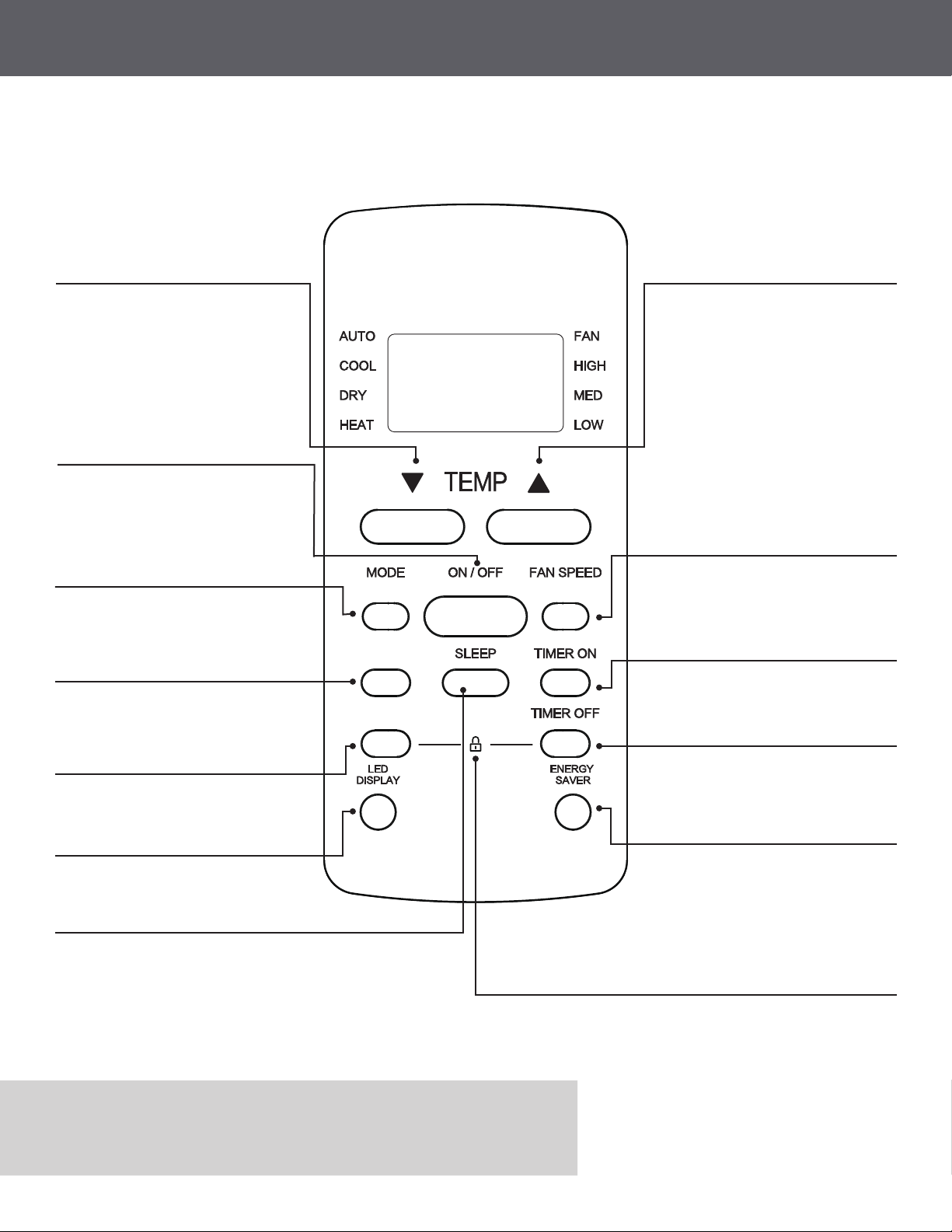
TEMP
ON/OFF
AUTO MODE
SWING
FOLLOW ME
LED DISPLAY
TIMER OFF
TIMER ON
FAN SPEED
TEMP
ENERGY SAVER
LOCK
SLEEP
Decreases temperature in 1°F (1°C) increments.
Minimum temperature is 62°F (17°C).
Powers the unit ON/OFF.
Scrolls automatically through modes based on
indoor and set temperature.
NOTE: Some models may not be supported by
HEAT mode.
Louver will automatically move side to side to direct
air ow.
Will allow the remote to be used as a thermostat.
The display screen will display the room
temperature.
Use this function to turn off and on display of the
unit
Will allow you to set the unit to a desired ON
time (See Operating Instructions for detailed
instructions)
Selects fan speeds in the following order:
AUTO -> LOW -> MED -> HIGH
Increases temperature in 1°F (1°C) increments.
Maximum temperature is 86°F (30°C).
Will allow you to set the unit to desired OFF
time (See Operating Instructions for detailed
instructions)
Fan will run for 3 minutes after compressor shuts
off, Fan will then cycle ON/OFF every 2 and 10
minutes until the room temp is above the set
temp. Once room temp rises, the compressor
will resume to cool. Available in COOL, DRY,
and AUTO mode.
1. Press the °C/°F & TIMER OFF button
together for 5 seconds to lock remote.
No buttons or features will be accessible.
2. Repeat procedure to Unlock.
Unit will increase the temperature by 2F (2C) every 30 min for the rst hour. Will
maintain the same temperature for the next 6 hours and then restore to the original
setting.
In Heat mode, unit will decrease the temperature 2F(2C) every 30 min for the rst
hour and maintain the same temp for 6 hours. (Only for COOL & HEAT mode)
Note
• To lock and unlock the remote, press both the FOLLOW ME &
TIMER OFF button together for 5 seconds.
Model: RG51F(2)/EU1
REMOTE FUNCTIONS
Before you begin using your new air conditioner, make sure to familiarize yourself with its remote control.
The following is a brief introduction to the remote control itself. For instructions on how to operate your air
conditioner, refer to the Operating Functions section of this manual.
FOLLOW ME
6
CONTINUED
SWING
FOLLOW ME

REMOTE SCREEN ICONS
AUTO
COOL
DRY
HEAT
FAN
Displayed when signal is being transmitted
Displayed when unit is turned ON
Displayed when TIMER ON time is set
Displayed when TIMER OFF time is set
Will show set temp, room temp, and desired timer increments
The lock will appear when remote buttons are locked and cannot be used
Displayed when FOLLOW ME feature is active
Displayed when SLEEP feature is activated
HIGH - High speed
MED - Medium speed
LOW - Low speed
NO Arrow
Displayed Auto fan speed
The following icons will appear upon powering the remote.
AUTO
COOL
DRY
HEAT
FAN
HIGH
MED
LOW
Mode Display
Fan Speed Indication
Note
• All icons shown in the gure above are for visualization purposes only. During operation, only the
selected icons will be displayed.
7
CONTINUED

Select AUTO mode MODE.
Select DRY mode.
Set your desired temperature.
Turn on the air conditioner.
Turn on the air conditioner
AUTO Mode
DRY Mode
OPERATING FUNCTIONS
MODE
ON / OFF
8
Before powering on, assure the unit is plugged in the correct outlet conguration.
ATTENTION
Note
Note
• In auto mode will, unit will automatically cycle through modes based on indoor and set temperature. Fan
speed cannot be changed.
• Dry mode will work as a dehumidier in continuous run mode and the fan speed cannot be changed.
MODE
ON / OFF

TIMER Mode (Example)
Keep in mind that the time periods you set for both functions refer to hours after the current time.
Ex. If current time is 1:00 PM and the TIMER ON is set to 2.5Hr, and TIMER OFF at 5.0Hrs, the unit will turn
on at 3:30 PM and off at 6:00 PM.
TIMER ON
TIMER OFF
xn xnxn
TIMER MODE
9
Press TIMER ON button to initiate
the ON time sequence.
Press TIMER OFF button to
initiate the OFF time sequence.
Using the temp up or down arrow
button, select desired time to turn the
unit ON.
Using the temp up or down arrow
buttons, select desired time to turn
the unit OFF
Point remote to unit and wait 1sec, the
TIMER ON will be activated.
Point remote to unit and wait 1sec, the
TIMER OFF will be activated.
TIMER ON setting
TIMER OFF setting
TIMER ON
TIMER ON
x5
Set the desirable time in which the unit will automatically turn ON or OFF.
Note
• When setting TIMER ON or TIMER OFF, increments of 30 min can be selected up to 10hours. After 10
hours, hourly increments can be made up to 24 hrs.
xn×
10
Este manual sirve para los siguientes modelos
1
Tabla de contenidos
Otros manuales de Mando a distancia de Perfect Aire

Perfect Aire
Perfect Aire 3PAMSDH09 Manual de usuario

Perfect Aire
Perfect Aire 1PAMSHH series Manual de usuario

Perfect Aire
Perfect Aire 3PAMSH09A-SZW Manual de usuario

Perfect Aire
Perfect Aire 1PACU8000 Manual de usuario

Perfect Aire
Perfect Aire PORT8000 Manual de usuario

Perfect Aire
Perfect Aire RG10A/BGEFU1 Manual de usuario

Perfect Aire
Perfect Aire 3PAMSH36B-SZW Manual de usuario

Perfect Aire
Perfect Aire 3PAMSHQCW09-U230 Manual de usuario