
PEHA Easyclick 450 FU-HS128 Manual de usuario

1
2
3
4
5
6
7
8
l
Elektro GmbH & Co. KG
Easyclick
450 FU-HS128
GB450 FU-HS128 (126497-01)

GB - 2
APPLICATION..........................................4
SAFETY & TECHNICAL SPECIFICATIONS..5
RANGE.....................................................6
COMMISSIONING ....................................7
Batteries ........................................................... 7
Basic settings..................................................... 7
Assign switching functions/channels...................... 7
DESCRIPTION..........................................8
START SCREEN ........................................9
LIST WITH SWITCHING COMMANDS .......10
Move switching function/channel .......................... 11
SETTINGS................................................12
New list............................................................. 13
Edit list name..................................................... 14
Templates (List) ................................................. 15
Delete list.......................................................... 16
Timers .............................................................. 17
Set Timers (Timers)............................................ 18
Set special functions (Timers) .............................. 19
Switching times for switching functions (Timers)..... 20
Switching times for special functions (Timers) ........ 21
Days of the week (Timers)................................... 22
Time and date.................................................... 23
Shortcuts .......................................................... 24
Conguration (Shortcuts) .................................... 25
Display.............................................................. 26
PIN code and login.............................................. 27
Language .......................................................... 28
Temperature measurement .................................. 29
Heating Control .................................................. 30
EnOcean EEPs (Heating Control)........................... 31
EnOcean Service Monitor ..................................... 32
EnOcean Service Repeater ................................... 33
EnOcean Service RadioLinkTest............................. 34
Factory settings.................................................. 36
SET THE HEATING ...................................38
CONTENTS

GB
GB - 3
CONTENTS
SWITCHING LIST.....................................39
New item .......................................................... 40
Templates (Switching list).................................... 41
Name................................................................ 42
Icon.................................................................. 43
Channel number................................................. 44
Delete............................................................... 45
SWITCHING FUNCTION ...........................46
Icons for switching functions ................................ 47
BATTERIES ..............................................48
Inserting the batteries ........................................ 48
Charging the batteries ........................................ 49
Replacing the batteries ....................................... 50
Correct battery disposal ...................................... 50
TROUBLESHOOTING ................................51
New system or existing system ............................ 51
Receiver self-switching function ........................... 51
Range restrictions............................................... 51
Contact ............................................................. 51
GENERAL INFORMATION .........................52
Disposal of the device ......................................... 52
Warranty conditions ............................................ 52
Conformity declaration ........................................ 52

GB - 4
The hand-held transmitter is part of the Easyclick radio system developed by PEHA. The system is based on radio transmit-
ters and receivers which operate at 868.3 MHz frequency, allowing consumers to be wirelessly controlled by radio telegram.
Pressing a button on the hand-held transmitter (radio transmitter) can, for example, activate lighting systems or drive mo-
tors (shutters, blinds). The consumers must be equipped with suitable radio receivers.
• 512 radio channels for controlling radio receivers.
• 32 congurable lists.
• 32 programmable timers
• 8 congurable shortcut buttons.
• Voltage supplied by 3 rechargeable batteries (AAA / NiMH)
• Settings protected by PIN code
Notes
– Read through the operating instructions carefully before putting the device into service!
– The switching functions (channels) on the hand-held transmitter must be assigned to a radio receiver prior to use!
– The hand-held transmitter can control an unlimited number of radio receivers.
– The operating instructions for the radio receivers must be observed!
APPLICATION

GB
GB - 5
This device is only intended to be used for its stated application. Unauthorised conversions, modications or changes are
not permissible! This device may not be used in conjunction with other devices whose operation could present a hazard to
people, animals or property.
The following must be observed:
• The device’s operating instructions.
• Operating instructions can only cite general stipulations.
These are to be viewed in the context of a specic system.
Technical specifications
Power supply 3x batteries 1.2 V (AAA/NiMH)
Transmission frequency 868,3 MHz
Standby Up to 1000 hours
Max. operating time (normal operation) Up to 1200 min.
Max. operating time (Enocean Service) Up to 600 min.
Channels 512
Display 40 mm x 40 mm (black / white)
Operating temperature 0 to + 40°C
Dimensions 165 mm x 57 mm x 21 mm
SAFETY & TECHNICAL SPECIFICATIONS

GB - 6
Radio signals are electromagnetic waves. The farther away the transmitter is, the weaker is the eld strength surrounding
the receiver. As such, the range is limited. Different materials or interference sources in the direction of the signals can
further reduce the range. The range can be increased by the use of Easyclick Repeaters (radio ampliers).
Material Reduction
Wood, plaster, non-coated glass 0 - 10%
Masonry, wood/plaster walls 5 - 35%
Reinforced concrete 10 - 90%
Range Conditions
> 30 m Under good conditions (large, clear space without obstructions).
> 20 m
Through up to 5 plasterboard/partition walls or 2 brick/porous concrete walls (furniture and people in the
room): For transmitter and receiver with good aerial positioning/layout.
> 10 m
Through up to 5 plasterboard/partition walls or 2 brick/porous concrete walls (furniture and people in the
room): For receivers installed in walls or corners of rooms, receivers with internal aerial or narrow corridors.
Through 1-2
ceilings/walls
Depending on ceiling/wall armouring and type of aerial in the receiver.
Note: Go to www.peha.de for further information on “Range”.
RANGE

GB
GB - 7
COMMISSIONING
Batteries
The supplied AAA / NiMH batteries must be inserted in the battery compartment of the hand-held transmitter. Make sure the
battery poles are correct. The batteries are supplied charged. They may need charging if they have been in storage for a
longer period. First connect the USB cable to the hand-held transmitter. To charge the batteries, connect the cable to a USB
interface (e.g. PC) or to a socket using the enclosed adapter.
Basic settings
• Select language Page 28
• Set date and time Page 23
• Programme lists and switching functions Page 13 and 40
Assign switching functions/channels
Radio Receiver Assign switching functions/channels on the hand-held transmitter
Activate receiver learn mode. If necessary,
set the functions and parameters for the ra-
dio receiver (see receiver instructions).
Select a switching function (channel) from a list of switching commands
and activate by pressing l. hen perform the switching function 1x by press-
ing or .
Caution! Pressing the button more than once assigns and deletes the
switching function alternately.

GB - 8
DESCRIPTION
Operation Function
Menu buttons Activate menu items and functions
Control buttons/
Enter button Cursor control, settings and switching functions
Shortcuts 1-8 Assign switching functions, channels and user functions
(must be congured)
Displays
!User function is active
! Time is not set
Programming via PC or USB cable
Note: Switching functions on the hand-held transmitter must be assigned
to a radio receiver before they can be executed. If necessary, the func-
tion and parameters must be set accordingly on the radio receiver (see
receiver instructions).
1
2
3
4
5
6
7
8
l
12:29
Mo 25.10.2010
23.5°C
Date
Shortcuts 1 -8
Control buttons/Enter
button
Menu buttons
Time
Battery charge status
Temperature
Icon displays
(menu buttons)
USB cable connection: For charging the batteries or programming the hand-held transmitter using the "Conguration tool" PC software.
The software is available on the internet, together with instructions for use, at the following address: www.peha.de

GB
GB - 9
START SCREEN
The backlight goes off after 15-60s if no buttons are pressed.
The device switches to energy-saving mode after 30s if the USB cable is not connected.
If lists and switching functions have not yet been programmed, the following information
is displayed:
Back (Start screen):.................
Settings Page 12: .................
No pro-
grammed
function!
12:29
Mo 25.10.2010
23.5°C
l
Switch to energy-saving mode
lTurn on device
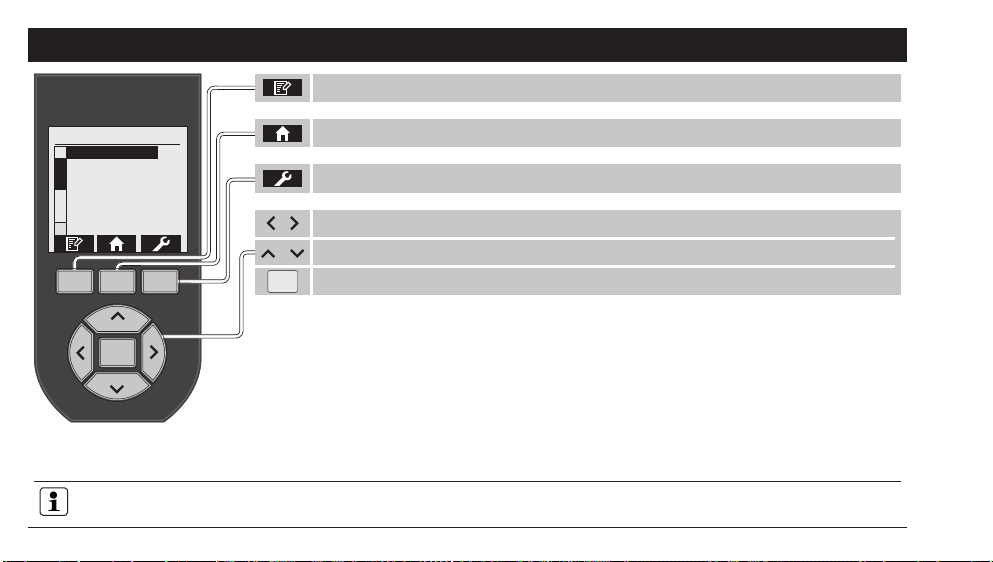
Call up the list with switching commands Page 10
Settings (Heating OFF) Page 12
Call up the list with switching commands Page 10
Press button briey: Set the heating Page 38
Press button for a long time: Settings Page 12
GB - 10
SWITCHING LIST
The backlight goes off after 15-60s if no buttons are pressed.
The device switches to energy-saving mode after 30s if the USB cable is not connected.
l
List 01 - 32
Channel 001
Channel 002
Channel 003
Channel 031
Channel 032
Edit switching list Page 39
Back (Start Screen) Page 9
, Select list (32 lists)
, Assign switching function/channel (32 per list)
lActivate switching function/channel Page 46
Settings Page 12
Tabla de contenidos
Otros manuales de Mando a distancia de PEHA


